
1. Inngangur
This manual provides instructions for the setup, operation, and maintenance of your Bose MediaMate Computer Speakers. These speakers are designed to enhance the audio experience for your computer, whether for music, movies, or gaming. The compact design and upward-angled sound projection optimize audio delivery for desktop use, occupying minimal desk space.
2. Öryggisupplýsingar
Please read and follow all safety instructions before using this product to prevent electric shock, fire, or injury. Keep this manual for future reference.
- Ekki láta hátalarana verða fyrir vatni eða raka.
- Ekki setja hátalarana nálægt hitagjöfum eins og ofnum, hitaspjöldum, eldavélum eða öðrum tækjum (þ.m.t. amplyftara) sem framleiða hita.
- Notaðu aðeins viðhengi/aukahluti sem framleiðandi tilgreinir.
- Taktu þetta tæki úr sambandi í eldingum eða þegar það er ónotað í langan tíma.
- Látið alla þjónustu til hæfs þjónustufólks. Þjónusta er nauðsynleg þegar tækið hefur skemmst á einhvern hátt, svo sem að rafmagnssnúra eða kló er skemmd, vökvi hefur hellst niður eða hlutir hafa fallið inn í tækið, tækið hefur orðið fyrir rigningu eða raka, virkar ekki eðlilega , eða hefur verið fellt niður.
3. Innihald pakka
Gakktu úr skugga um að allir hlutir séu til staðar í pakkanum þínum:
- Bose MediaMate Computer Speakers (2 units)
- Rafmagns millistykki
- Audio Cable (3.5mm stereo jack)
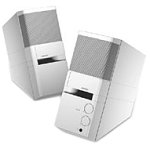
Image: The Bose MediaMate Computer Speakers in Gray. The image shows two compact speakers, one with visible volume and mix controls, and a headphone jack.
4. Uppsetning
Follow these steps to set up your Bose MediaMate Computer Speakers:
- Staðsetning: Place the speakers on a flat, stable surface on either side of your computer monitor. Ensure they are angled slightly upward towards your listening position for optimal sound.
- Tengdu hljóðsnúruna: Connect the 3.5mm audio cable from the back of the primary speaker (the one with controls) to the audio output jack on your computer.
- Tengdu rafmagn: Plug the power adapter into the power input on the primary speaker, then plug the adapter into a wall outlet.
- Kveikt á: Turn on the speakers using the volume knob. The power indicator light should illuminate.
5. Notkunarleiðbeiningar
Once set up, operating your MediaMate speakers is straightforward:
- Hljóðstyrkur: Use the large knob labeled "VOLUME" on the front of the primary speaker to adjust the overall sound level.
- Mix Control: The "MIX" knob allows you to blend audio from two different sources if you have a second device connected to the auxiliary input.
- Heyrnartól tjakkur: For private listening, plug your headphones into the headphone jack located on the front of the primary speaker. This will mute the speakers.
- Tvöfalt inntak: The speakers feature dual inputs, allowing you to connect and mix two audio sources simultaneously. For example, you can connect your computer and a portable music player.
6. Viðhald
Til að tryggja endingu og hámarksnýtingu hátalaranna:
- Þrif: Use a soft, dry cloth to clean the exterior surfaces of the speakers. Do not use liquid cleaners or aerosols.
- Ryk: Regularly dust the speaker grilles to prevent accumulation that could affect sound quality.
- Geymsla: Ef hátalararnir eru geymdir í langan tíma skal aftengja þá frá rafmagni og geyma þá á köldum, þurrum stað.
7. Bilanagreining
If you encounter issues with your Bose MediaMate speakers, refer to the following common problems and solutions:
| Vandamál | Möguleg orsök | Lausn |
|---|---|---|
| Ekkert hljóð |
|
|
| Bjagað hljóð |
|
|
| Aðeins einn hátalari virkar |
|
|
8. Tæknilýsing
- Vörumerki: Bose
- Gerð: MediaMate
- Tengingar: 3.5mm Audio Input, AC Power
- Hljóðúttak: Stereo
- Gerð hátalara: Margmiðlun
- Efni: Málmur
- Hátalarastærð: 6 Centimeters (Audio Driver)
- Þyngd hlutar: 3 pund
- Litur: Grátt
9. Ábyrgð og stuðningur
Bose MediaMate Computer Speakers come with a limited warranty. For specific warranty details and duration, please refer to the warranty card included with your product or visit the official Bose websíða.
For technical support, product registration, or service inquiries, please contact Bose customer service:
- Sími: 800-444-2673
- Websíða: www.bose.com
Please have your product model number (MediaMate) and purchase date available when contacting support.