
Fujifilm Fujifilm FinePix 3800
Fujifilm FinePix 3800 Digital Camera User Manual
Model: FinePix 3800 (V-4401)
Inngangur
This manual provides comprehensive instructions for the operation, maintenance, and troubleshooting of your Fujifilm FinePix 3800 Digital Camera. Designed for both novice and experienced photographers, the FinePix 3800 offers a 3.0-megapixel sensor, 6x optical zoom, and various features to capture high-quality images and videos.
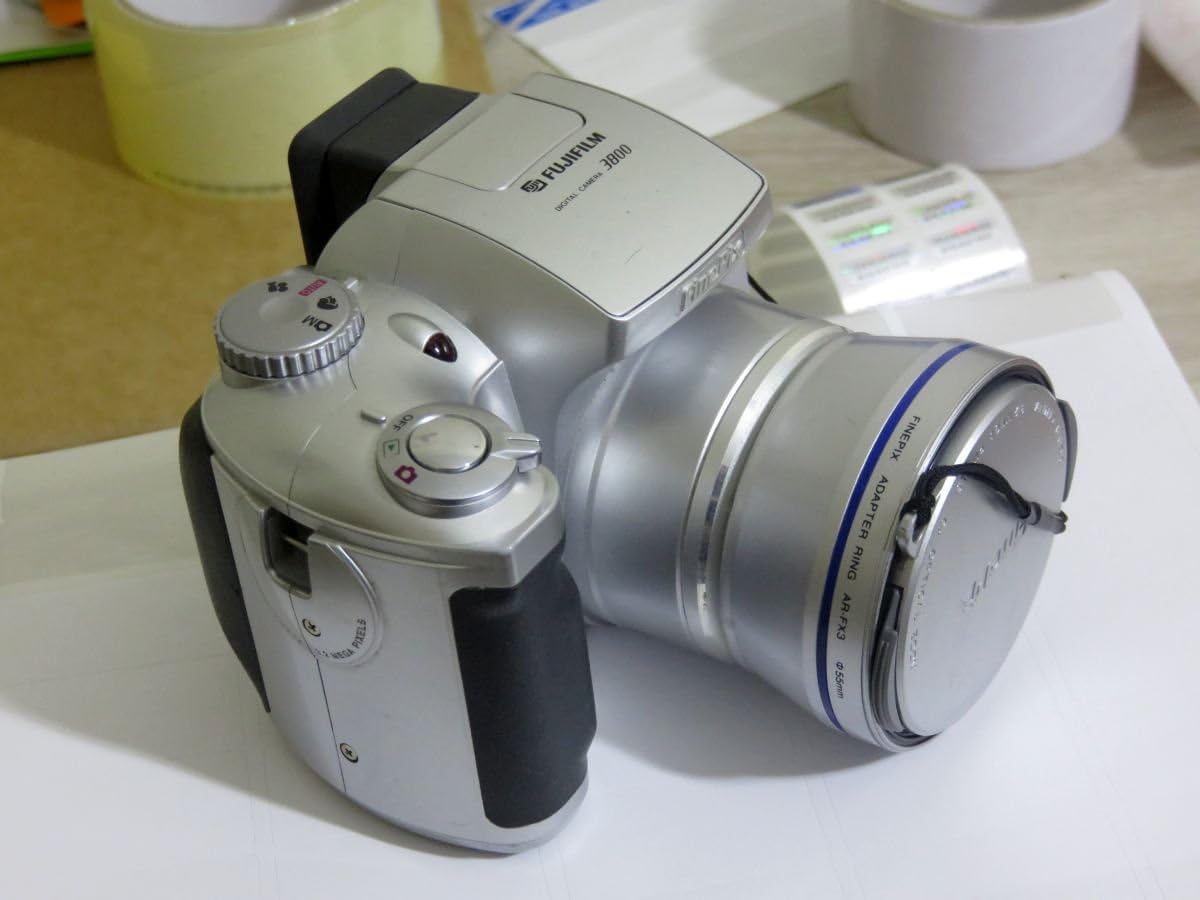
Mynd 1: Framan view of the Fujifilm FinePix 3800 Digital Camera with the lens cap attached, showcasing its silver body and ergonomic grip.
Uppsetning
1. Uppsetning rafhlöðu
The FinePix 3800 operates on four (4) AA batteries. For optimal performance and extended usage, it is highly recommended to use rechargeable Nickel Metal Hydride (NiMH) batteries. Alkaline batteries are suitable for temporary use but will deplete quickly.
- Locate the battery compartment cover on the bottom or side of the camera.
- Renndu eða lyftu lokinu til að opna hólfið.
- Settu fjórar AA rafhlöður í og gætið þess að pólunin (+/-) sé rétt eins og gefið er til kynna inni í hólfinu.
- Lokaðu rafhlöðuhólfinu vel þar til það smellpassar.
2. Uppsetning minniskorts
The camera uses xD-Picture Card memory. A 16 MB xD card is typically included, capable of storing approximately 12 images in fine mode or 26 images in normal mode.
- Finndu minniskortaraufina, venjulega nálægt rafhlöðuhólfinu.
- Opnaðu hlífina yfir minniskortaraufinni.
- Insert the xD-Picture Card with the metal contacts facing the correct direction (refer to the diagram inside the slot). Push gently until it clicks into place.
- Lokaðu hlíf minniskortaraufarinnar vel.
3. Upphafleg kveiking og stilling dagsetningar/tíma
After installing batteries and the memory card, power on the camera for the first time.
- Turn the power dial or press the power button to switch on the camera.
- The LCD monitor will display the initial setup screen, prompting you to set the date and time.
- Use the camera's navigation buttons to adjust the year, month, day, hour, and minute.
- Confirm the settings to proceed. Correct date and time settings are crucial for proper image file stjórnun.
Notkunarleiðbeiningar
1. Grunnstillingar ljósmyndunar
The FinePix 3800 offers various shooting modes to suit different conditions and user preferences.
- Sjálfvirk stilling: For simple point-and-shoot operation. The camera automatically adjusts aperture, shutter speed, and white balance.
- Handvirk stilling: Provides control over settings such as aperture, exposure compensation, and white balance for advanced users.
- Scene Position: Optimize settings for specific scenes like landscape or portrait.

Figure 2: The Fujifilm FinePix 3800 with its lens extended and the pop-up flash activated, ready for capturing images.
2. Aðdráttaraðgerð
The camera features a 6x optical zoom Fujinon lens (equivalent to 38-228mm on a 35mm camera) and a variable digital zoom.
- Use the zoom lever (typically located near the shutter button) to zoom in (telephoto) or zoom out (wide-angle).
- Optical zoom provides higher quality images. Digital zoom can be used to extend magnification further (up to 3.25x in 640x480 pixel mode), but may result in reduced image quality.
3. Flassstillingar
The built-in pop-up flash offers several modes:
- Sjálfvirkt flass: Myndavélin ákvarðar sjálfkrafa hvort flass sé nauðsynlegt.
- Rauð augu minnkun: Gefur frá sér forblikk til að draga úr rauðum augum.
- Forced Flash: Flash fires regardless of ambient light.
- Suppressed Flash: Flassið er óvirkt.
- Hæg samstilling: Sameinar flass með hægum lokarahraða til að ná jafnvægi í lýsingu myndefnis og bakgrunns í lítilli birtu.
4. White Balance and Exposure
- Hvítjöfnun: In manual mode, select from 6 preset positions (e.g., Daylight, Cloudy, Fluorescent) or use automatic white balance for accurate color reproduction.
- Lokarahraði: The camera supports shutter speeds from 3 to 1/1,500 second. In manual mode, you can adjust this setting to control motion blur or freeze action.
5. LCD Monitor and Electronic Viewfinnandi (EVF)
The FinePix 3800 features a 1.8-inch LCD monitor and an electronic viewfinder for composing shots and reviewí myndir.

Mynd 3: Aftan view of the Fujifilm FinePix 3800, highlighting the 1.8-inch LCD monitor, electronic viewleitarvél og stjórnhnappar.
- Use the LCD for a larger preview og valmyndaleiðsögn.
- The EVF is useful in bright sunlight or to conserve battery power during image playback.
- A dedicated button (e.g., "EVF/LCD") allows switching between the two displays.
6. Movie and Voice Memo Capabilities
- Kvikmyndaháttur: Record digital videos with sound in QVGA (320 x 240) format, up to approximately 60 seconds in length at 10 frames per second.
- Raddminning: Add up to 30 seconds of voice tags to your captured images for personal notes or descriptions.
7. Image Transfer to PC
Transferring images and videos to your computer is straightforward using the included USB cable and FinePixViewer hugbúnaður.
- Tengdu annan endann á USB snúrunni við USB tengi myndavélarinnar og hinn endann við tölvuna þína.
- Ensure the camera is powered on. Your computer should automatically recognize the camera as a removable storage device.
- Use the FinePixViewer software (included on CD-ROM) or your computer's file explorer to browse and transfer files.
Viðhald
1. Þrif á myndavélinni
- Linsa: Use a soft, lint-free cloth specifically designed for optical lenses. Gently wipe in a circular motion. Avoid using harsh chemicals.
- Líkami: Þurrkið myndavélarhúsið með mjúkum, þurrum klút. Fyrir þrjósk óhreinindi, þurrkið örlítið.ampÞvoið klútinn með vatni og þurrkið síðan. Notið ekki leysiefni.
- LCD skjár: Use a soft, dry cloth. For smudges, a screen cleaner designed for electronics can be used sparingly.
2. Umhirða rafhlöðu
- Fjarlægið rafhlöðurnar ef myndavélin verður ekki notuð í langan tíma til að koma í veg fyrir leka.
- Geymið rafhlöður á köldum, þurrum stað.
- If using rechargeable batteries, follow the charger manufacturer's instructions for charging and maintenance.
3. Memory Card Handling
- Forsníðið alltaf ný minniskort í myndavélinni fyrir fyrstu notkun.
- Avoid removing the memory card while the camera is writing data (e.g., after taking a photo) to prevent data corruption.
- Keep memory cards away from strong magnetic fields and extreme temperatures.
Úrræðaleit
This section addresses common issues you might encounter with your FinePix 3800.
Myndavélin kveikir ekki á sér
- Gakktu úr skugga um að rafhlöður séu rétt settar í með réttri pólun.
- Check battery charge level. Replace with fresh alkaline batteries or fully charged NiMH batteries.
- Verify the battery compartment cover is securely closed.
Léleg myndgæði
- óskýrar myndir: Ensure the lens is clean. Check if the camera is in focus. Use a tripod in low light or for slow shutter speeds.
- Rangir litir: Adjust white balance settings to match the lighting conditions.
- Dark/Overexposed Images: Check flash settings. Adjust exposure compensation if available in manual mode.
Memory Card Errors
- Gakktu úr skugga um að minniskortið sé rétt og að fullu sett í.
- Try formatting the memory card (Note: This will erase all data on the card. Back up important files fyrst.).
- If errors persist, the memory card may be faulty and require replacement.
Computer Does Not Recognize Camera
- Gakktu úr skugga um að USB-snúran sé vel tengd bæði við myndavélina og tölvuna.
- Verify the camera is powered on and in the correct connection mode (if applicable).
- Install or reinstall the FinePixViewer software and USB drivers from the included CD-ROM.
- Prófaðu annað USB tengi á tölvunni þinni.
Tæknilýsing
Key technical specifications for the Fujifilm FinePix 3800 Digital Camera:
| Eiginleiki | Forskrift |
|---|---|
| Nafn líkans | Fujifilm FinePix 3800 |
| Árangursrík kyrrupplausn | 3.0 megapixlar |
| Ljósmyndaskynjaratækni | CCD |
| Optískur aðdráttur | 6x |
| Stafræn aðdráttur | Up to 3.25x (in 640x480 mode) |
| Hámarks brennivídd | 228 millimetrar (jafngildir 35 mm) |
| Lágmarks brennivídd | 38 millimetrar (jafngildir 35 mm) |
| Hámarks ljósop | f/2.8 |
| Lokarahraði | 3 to 1/1,500 seconds |
| ISO næmi | ISO 100 equivalent (Expanded ISO Minimum: 100, Maximum: 1600) |
| LCD skjástærð | 1.8 tommur |
| Viewfinnandi | Rafræn |
| Tegund minni | xD-Picture Card (16 MB included) |
| Tengingar | USB |
| Aflgjafi | 4 x AA rafhlöður |
| Mál (H x B x D) | U.þ.b. 3.03 x 3.9 x 2.7 tommur |
| Þyngd | Approx. 0.88 Pounds (without batteries/card) |
| Myndbandsupplausn | QVGA (320x240) with audio, max 60 seconds |
Ábyrgð og stuðningur
Upplýsingar um ábyrgð
The Fujifilm FinePix 3800 Digital Camera comes with a 1 ára takmörkuð ábyrgð from the manufacturer. Please retain your proof of purchase for warranty claims. For detailed terms and conditions, refer to the warranty card included with your product or contact Fujifilm customer support.
Viðbótarauðlindir
- Opinber notendahandbók (PDF): For a more detailed guide, you can download the official PDF manual: Sækja PDF handbók
- Fujifilm Store: Explore other Fujifilm products and support resources: Visit Fujifilm Store
Ask a question about this manual
Ask about setup, troubleshooting, compatibility, parts, safety, or missing instructions. Manuals+ will review the question and use this page’s manual context to help answer it.