
Inngangur
The TC-Helicon VoiceLive 2 is an advanced vocal effects processor designed to provide vocalists with a comprehensive suite of studio-quality effects, rich harmonies, and intuitive control for live performances and studio recording. This manual provides detailed instructions for setting up, operating, and maintaining your VoiceLive 2 unit, ensuring you can fully utilize its extensive capabilities.
Helstu eiginleikar
- One-button access to global Tone, Pitch, and Guitar FX.
- Over 250 presets with step sequencer functionality.
- Up to 8 voices with MIDI keyboard control or 4 doubled harmonies.
- Global effects including Tone, pitch correction, and Guitar FX that can all be used simultaneously.
- Tone tailors adaptive EQ, compression, and de-essing to your voice.
Uppsetning
Proper setup is crucial for optimal performance of your VoiceLive 2. Follow these steps to connect your unit and prepare it for use.
Connecting Your VoiceLive 2
The VoiceLive 2 offers extensive connectivity options to integrate seamlessly into your audio setup:
- Hljóðnema-/línuinntak: Connect your microphone or line-level audio source using an XLR or 1/4" phone jack. The unit features digital controlled mic gain.
- Gítarinntak: Connect your guitar using a 1/4" phone jack. The VoiceLive 2 includes auto-mix and Guitar FX, with transparent pass-through.
- Aukainntak: Use the 1/8" stereo mini jack to connect an MP3 player or other auxiliary audio source for backing tracks or harmony control.
- Úttak: Stereo XLR, 1/4" phone jack, and Headphone outputs are available for connecting to mixers, amplifiers, or monitoring devices.
- MIDI: MIDI In, Out, and Thru ports allow for external control and synchronization with MIDI devices.
- Tjáningarpedalainntak: Connect an optional expression pedal for real-time control over various parameters.
- USB: A USB-B port is provided for firmware updates, data backups, and audio streaming.

Initial Power-up and Configuration
Upon powering on, the VoiceLive 2 automatically adjusts several settings for optimal performance:
- Auto Mic Gain: Set your microphone gain from a standing position by simply singing into the mic. This feature ensures appropriate input levels without manual knob adjustments.
- Adaptive Tone: A single press of the Tone button engages studio-quality Shape EQ, compression, and de-essing that adapts to your vocal style and range, providing polished dynamics.
- Sjálfvirk hlið: This feature helps reduce feedback and effects bleed-through when you are not singing, adjusting automatically to your input.
Operating the VoiceLive 2
The VoiceLive 2 is designed for intuitive operation, allowing vocalists to access and control a wide range of effects and harmonies with ease.
Notendaviðmót og stýringar
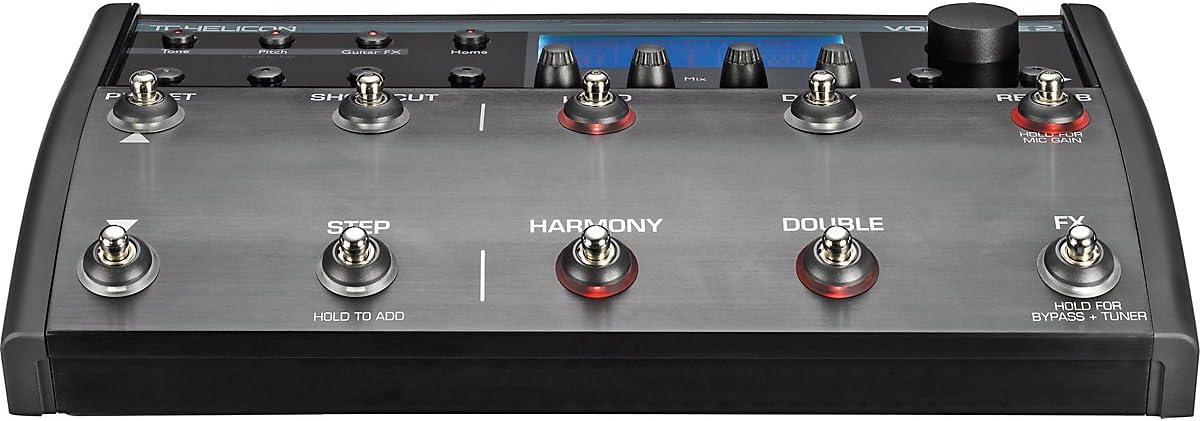
The unit features a redesigned user interface with a bright LCD and large lettering for clear visibility on stage. Key controls include:
- Wizard Button: Helps you quickly find suitable presets.
- Stompbox Access: Six dedicated footswitches provide direct access to individual effect blocks (µMod, Delay, Reverb, Harmony, Double, FX).
- Global Effects: One-button access to global Tone, Pitch, and Guitar FX.
- Easy Editing: All parameters are easily editable for fine-tuning your sound.
- Preset Chaining (Step Feature): Simple preset chaining allows for creative sound sequences for each song.

NaturalPlay Harmonies
The VoiceLive 2 features advanced NaturalPlay harmonies that respond intelligently to your musical input:
- Harmony Control: Harmonies can be controlled by a connected guitar, MIDI keyboard, or even an MP3 input.
- Voice Options: Generate up to 8 voices with MIDI keyboard control or 4 doubled harmonies.
- Advanced Algorithm: The new algorithm ensures smooth and natural harmonies, even for diverse vocal styles.
- Sjálfvirk skynjun: The unit automatically senses the harmony control instrument, simplifying setup.
Söngáhrif
The VoiceLive 2 provides a powerful array of effects that can be used simultaneously:
- Core Effects: Includes new reverb, tap delay, and µMod effects.
- FX Block: Dedicated FX block for unique sounds like T-Pain effect, megaphone, and distortion.
- Global Effects: Tone, pitch correction, and Guitar FX are applied globally.
- Samtímis notkun: All effects can be used concurrently, offering extensive sound design possibilities.
Adaptive Processing
The VoiceLive 2 acts like a professional audio engineer, adapting to your voice for a polished sound:
- Tónn: Automatically applies adaptive EQ, compression, and de-essing.
- Adaptive Gate: Reduces microphone input when you are not singing, minimizing noise and feedback.
- Reverb and Delay Ducking: Increases the sustaining tail of effects while ensuring vocal intelligibility by reducing effect levels during singing and subtly increasing them afterward.
Frammistöðustýringar
The floor-based design allows for hands-free control during live performances:
- Stompbox Footswitches: Individual footswitches for Harmony, Doubling, µMod, Reverb, Delay, and FX allow for flexible layering and simplification of effects.
- Shortcut Footswitch: Assignable to various functions such as tap tempo or harmony hold.
- Preset/Song Mode: Each preset can have up to 50 steps, allowing for complex sequences or simple modifications.
Viðhald
To ensure the longevity and optimal performance of your TC-Helicon VoiceLive 2, follow these maintenance guidelines:
- Þrif: Þurrkið tækið reglulega með mjúkum, þurrum klút. Forðist að nota slípiefni eða leysiefni.
- Umhverfisskilyrði: Operate and store the unit within the specified temperature range of 32°F to 122°F (0°C to 50°C) and avoid high humidity (max. 90% non-condensing).
- Geymsla: When not in use for extended periods, store the VoiceLive 2 in a dry, cool place, ideally in its original packaging or a protective case.
- Kapalstjórnun: Ensure all cables are connected securely and are not under undue stress to prevent damage to ports.
Úrræðaleit
If you encounter issues with your VoiceLive 2, consult the following common troubleshooting tips:
- Ekkert hljóð/óreglulegt hljóð: Check all cable connections (input, output, power). Ensure microphone gain is set correctly and effects are not bypassed.
- "Popping" Sound at Startup: Some users have reported a slight popping sound when first turning on the unit. This can often be mitigated by ensuring your PA system or amplifier is turned down during startup.
- Distorted Keyboard Sound (Higher Keys): If using a keyboard for MIDI control and experiencing distortion at higher notes, check the input levels and ensure they are not clipping. Adjust the keyboard's output or the VoiceLive 2's input sensitivity.
- Unwanted FX Switch Activation: If the FX switch is inadvertently activating or you wish to disable it globally, consult the detailed user manual (often available on the manufacturer's website) for global settings or preset editing options.
- Harmonies Out of Key/Scale: If harmonies are not tracking correctly, ensure the correct key and scale are set. For automatic detection, verify your guitar or MIDI input is properly connected and providing clear musical information. You can also manually set the key by holding the Harmony button and playing a chord on your keyboard.
- Eining svarar ekki: Try power cycling the unit. If issues persist, a factory reset may be necessary (refer to the full manual for instructions).
Tæknilýsing
| Flokkur | Forskrift |
|---|---|
| Þyngd hlutar | 5 pund (2.3 kg) |
| Vörumál | 13.8 x 8.5 x 3 tommur (350 x 216 x 76 mm) |
| ASIN | B00263JCE4 |
| Tegundarnúmer vöru | 996352005 |
| Litur Nafn | Svartur, Silfur |
| Tölvu pallur | Windows, Macs |
| Voltage | 100 to 240 VAC, 50 to 60 Hz (auto-select) |
| Orkunotkun | <14 W |
| Analog Inputs (Mic) | XLR, Impedance: 2.14/1.07 kOhm (Balanced/Unbalanced), Level @ 0 dBFS: -49dBu to +10dBu, SNR: >107 dB |
| Analog Inputs (Line) | 1/4" phone jack, Impedance: 13/6.5 kOhm, Level @ 0 dBFS: -37 dBu to +22 dBu |
| Analog Inputs (Guitar) | 1/4" phone jack, Impedance: 1 MOhm, Level @ 0 dBFS: 14 dBu to -4 dBu, SNR: >104dB |
| Analog Inputs (Aux) | 1/8" stereo mini jack, Level @ 0dBu: +2dBu |
| A / D-umbreytingu | 24 bita, 128 x oversampling bitstream, 110dB SNR A-weighted |
| D/A umbreyting | 24 bita, 128 x oversampling bitstream, 115dB SNR A-weighted |
| Analog úttak | XLR and 1/4" phone jack, Impedance: 100/50 Ohm (Balanced/Unbalanced), Output Range: 16 dBu / 0dBu (Line/Mic Level), Dynamic Range: >109 dB, 20 Hz to 20 kHz |
| Tíðni svörun | +0/-0.3 dB, 20 Hz til 20 kHz |
| Heyrnartól út | 1/8" Mini stereo jack, 32 Ohm, +16dBu max (180mW max) |
| Stafræn inntak og úttak | RCA Phono (S/PDIF), Formats: S/PDIF (24 bit), EIAJ CP-340, IEC 958 |
| Sample Verð | 44.1 kHz, 48 kHz, 88.2kHz, 96kHz |
| EMC samræmi | EN 55103-1 and EN 55103-2, FCC part 15, Class B, CISPR 22, Class B |
| Öryggisvottun | IEC 65, EN 60065, UL6500 and CSA |
| Rekstrarhitastig | 32°F til 122°F (0°C til 50°C) |
| Geymsluhitastig | -22°F til 167°F (-30°C til 70°C) |
| Raki | Hámark 90% þéttir ekki |
| Stýriviðmót | USB-B, MIDI In/Out/Thru (5 Pin DIN), Pedal (1/4" TRS phone jack) |
| Skjár | 192 x 64 Blue STN LCD, White Backlight |


Ábyrgð
The TC-Helicon VoiceLive 2 comes with a 1 árs ábyrgð covering parts and labor from the date of purchase. Please retain your proof of purchase for warranty claims. For detailed terms and conditions, refer to the official TC-Helicon warranty policy.
Stuðningur
For further assistance, technical support, or to access additional resources such as detailed manuals, firmware updates, and FAQs, please visit the official TC-Helicon website. You may also find helpful community forums and video tutorials online.