
1. Inngangur
This manual provides detailed instructions for setting up, operating, maintaining, and troubleshooting your Dell UltraSharp U2312HM 23-inch IPS LED LCD Monitor. Please read this manual thoroughly to ensure proper use and to maximize the performance and lifespan of your monitor.
The Dell UltraSharp U2312HM monitor features a 23-inch IPS panel with LED backlighting, offering a Full HD 1920x1080 resolution, wide viewing angles, and excellent color consistency. It includes a highly adjustable stand and multiple connectivity options to enhance your viewreynslu og framleiðni.
2. Öryggisupplýsingar
Observe the following safety precautions when using your monitor:
- Aflgjafi: Use only the power cord and adapter provided with your monitor. Ensure the power outlet is properly grounded.
- Loftræsting: Do not block ventilation openings on the monitor. Allow adequate space around the monitor for proper airflow.
- Staðsetning: Place the monitor on a stable, flat surface. Avoid placing it in direct sunlight, near heat sources, or in environments with excessive dust or humidity.
- Þrif: Aftengdu rafmagnssnúruna áður en þú þrífur. Notið mjúkan, þurran klút.amp cloth for cleaning the screen and casing. Forðist að nota slípiefni eða leysiefni.
- Meðhöndlun: Handle the monitor with care. Avoid applying pressure to the screen.
- Þjónusta: Reynið ekki að gera við skjáinn sjálfur. Látið hæft þjónustufólk sjá um alla þjónustu.
3. Innihald pakka
Gakktu úr skugga um að allir íhlutir séu til staðar í pakkanum þínum:
- Dell UltraSharp U2312HM Monitor Panel
- Skjástandur (grunnur og upphækkun)
- Rafmagnssnúra
- DVI snúru
- VGA snúru
- USB uppstraumssnúra
- Documentation (this user manual, safety information)
4. Uppsetning
4.1 Samsetning skjástandsins
- Leggið skjáborðið með framhliðina niður á mjúkan, hreinan klút til að koma í veg fyrir rispur.
- Attach the riser to the monitor panel by aligning the tabs and pushing until it clicks into place.
- Attach the stand base to the riser. Tighten the captive screw on the bottom of the base to secure it.

4.2 Skjárinn tengdur
Tengdu nauðsynlegar snúrur við skjáinn og tölvuna þína:
- Rafmagnssnúra: Connect the power cable to the monitor's power port and then to a grounded electrical outlet.
- Vídeó kapall: Connect one end of the DVI, DisplayPort, or VGA cable to the corresponding port on the monitor and the other end to your computer's graphics card. Use only one video connection at a time.
- USB uppstreymissnúra: To enable the monitor's USB ports, connect the square end of the USB upstream cable to the monitor's upstream USB port and the rectangular end to an available USB port on your computer.

4.3 Byrjunarkveikt
- Gakktu úr skugga um að allar snúrur séu tryggilega tengdar.
- Ýttu á rofann á tölvunni þinni.
- Ýttu á rofann á framhlið skjásins. Rafmagnsvísirinn mun kvikna.
- The monitor should automatically detect the active input. If not, you may need to manually select the input source using the OSD menu.
5. Notkun skjásins
5.1 Stjórnborð á framhlið
The monitor features several buttons on the front bezel for accessing and navigating the On-Screen Display (OSD) menu.
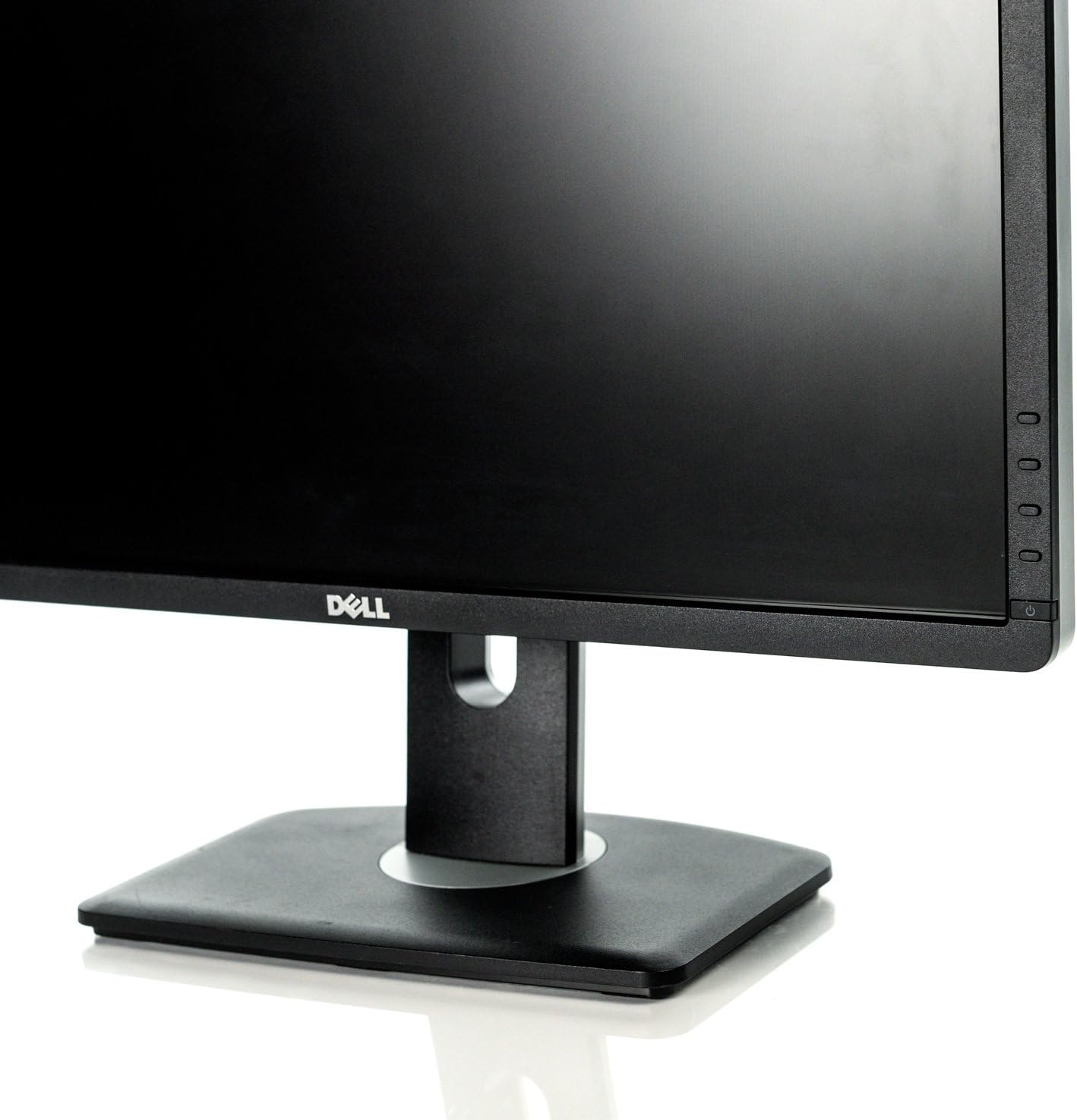
- Aflhnappur: Kveikir eða slekkur á skjánum.
- Valmyndarhnappar: Notað til að fá aðgang að skjávalmyndinni og fletta í gegnum valkosti.
- Inntaksval: Allows manual selection of the video input source.
5.2 Skjávalmynd (OSD)
The OSD menu allows you to adjust various monitor settings:
- Press any of the menu buttons to activate the OSD.
- Notaðu flakkhnappana til að fletta í gegnum valmyndarvalkosti.
- Ýttu á valhnappinn til að fara í undirvalmynd eða staðfesta val.
- Algengar stillingar eru meðal annars:
- Birtustig / birtuskil: Adjusts the display's luminance and contrast levels.
- Inntaksheimild: Manually switch between DVI, DisplayPort, or VGA inputs.
- Litastillingar: Adjust color temperature, gamma, and preset modes.
- Rafmagnsstjórnun: Configure PowerNap and dynamic dimming features.
- Ýttu á hætta-hnappinn til að loka skjávalmyndinni.
5.3 Að stilla skjástöðu
The Dell U2312HM monitor offers ergonomic adjustments for optimal viewþægindi:
- Hæðarstilling: Gently push or pull the monitor panel up or down along the stand riser. The height adjustment range is 130mm (5.12 inches).
- Stilla halla: Tilt the monitor panel forward (up to 4°) or backward (up to 21°) to find your preferred viewing horn.
- Snúningsstilling: Snúðu skjáborðinu til vinstri eða hægri á botninum.
- Snúningsfall: Rotate the monitor panel 90 degrees to switch between landscape and portrait orientation. Ensure sufficient clearance before pivoting.

5.4 Using the USB Hub
The monitor includes a built-in USB 2.0 hub with four downstream ports for connecting peripherals.

- Gakktu úr skugga um að USB-snúran sé tengd milli skjásins og tölvunnar.
- Connect your USB devices (e.g., keyboard, mouse, flash drive) to the USB downstream ports on the monitor. There are two ports on the side and two on the rear.
6. Viðhald
6.1 Þrif á skjánum
- Slökktu á skjánum og taktu rafmagnssnúruna úr sambandi.
- Notaðu létt mjúkan, lólausan klút dampened with water or a non-abrasive screen cleaner to wipe the screen surface.
- Fyrir skjáinn casing, use a soft, dry cloth. Avoid spraying liquids directly onto the monitor.
6.2 Almenn umönnun
- Forðastu að útsetja skjáinn fyrir miklum hita eða raka.
- Ekki setja þunga hluti ofan á skjáinn eða snúrur hans.
- If storing the monitor, use its original packaging or a protective cover.
7. Bilanagreining
Ef þú lendir í vandræðum með skjáinn þinn skaltu skoða eftirfarandi algengar lausnir:
| Vandamál | Möguleg orsök | Lausn |
|---|---|---|
| Enginn kraftur | Rafmagnssnúra aftengd; vandamál með rafmagnsinnstungu | Ensure power cable is securely connected to monitor and outlet. Check if the outlet is functional. |
| Engin mynd á skjánum | Video cable disconnected; incorrect input selected; computer not powered on | Check video cable connections. Use the OSD menu to select the correct input source. Ensure computer is powered on and not in sleep mode. |
| Myndin er óskýr eða bjöguð | Incorrect resolution; video cable issue | Set display resolution to 1920x1080. Check video cable for damage or loose connections. |
| Litir eru rangir | Litastillingar rangstilltar | Adjust color settings in the OSD menu. Reset to factory defaults if necessary. |
| USB tengi virka ekki | USB upstream cable disconnected | Gakktu úr skugga um að USB-snúran sé tengd milli skjásins og tölvunnar. |
If the problem persists after attempting these solutions, please contact Dell technical support.
8. Tæknilýsing
Key technical specifications for the Dell UltraSharp U2312HM monitor:
| Eiginleiki | Forskrift |
|---|---|
| Gerðarnúmer | U2312HM |
| Skjástærð | 23 tommur (58.42 cm) |
| Tegund pallborðs | IPS (In-plane Switching), anti-glare |
| Upplausn | Full HD 1920 x 1080 at 60Hz |
| Hlutfall | 16:9 (breiðskjár) |
| Hámark Viewí horn | 178° lóðrétt, 178° lárétt |
| Birtustig | 300 cd/m² (venjulegt) |
| Litasvið | 82% (CIE 1976) |
| Andstæðuhlutfall | 1000:1 (typical), 2 Million:1 (max, dynamic) |
| Svartími | 8ms (gray to gray) with overdrive |
| Myndbandstengi | DVI-D (HDCP), DisplayPort (DP), VGA |
| USB tengi | 5 USB (1 upstream, 4 downstream) |
| Þyngd hlutar | 14.3 pund |
| Vörumál | 8.78 x 16.54 x 25 tommur (LxBxH) |
9. Ábyrgð og stuðningur
Your Dell UltraSharp U2312HM monitor is covered by a limited hardware warranty provided by Dell. For specific warranty terms and conditions, please refer to the documentation included with your purchase or visit the official Dell support websíða.
For technical assistance, troubleshooting, or warranty claims, please contact Dell Technical Support. You will typically need your monitor's service tag or serial number when contacting support.
Locating the Serial Number: The serial number is usually found on a label on the back of the monitor. An example serial number format is CN-0T9MJ3-74445-27U-BABL.

For the most up-to-date support resources, drivers, and contact information, please visit the official Dell Support websíða: www.dell.com/support