
Inngangur
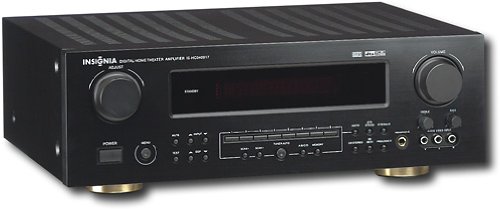
This manual provides essential instructions for the setup, operation, maintenance, and troubleshooting of your Insignia 6.1-Channel 600W Digital Home Theater Receiver, model IS-HC040917. Please read this manual thoroughly before using the receiver to ensure proper and safe operation.
Mikilvægar öryggisleiðbeiningar
- Ekki loka neinum loftræstiopum. Setjið upp í samræmi við leiðbeiningar framleiðanda.
- Ekki setja upp nálægt neinum hitagjöfum eins og ofnum, hitatöflum, ofnum eða öðrum tækjum (þ. amplyftara) sem framleiða hita.
- Verndaðu rafmagnssnúruna gegn því að ganga á hana eða klemma hana, sérstaklega við innstungur, innstungur og staðinn þar sem þau fara út úr tækinu.
- Notaðu aðeins viðhengi/aukahluti sem framleiðandi tilgreinir.
- Taktu þetta tæki úr sambandi í eldingum eða þegar það er ónotað í langan tíma.
- Vísaðu allri þjónustu til viðurkennds þjónustufólks. Þjónusta er nauðsynleg þegar tækið hefur skemmst á einhvern hátt.
Uppsetningarleiðbeiningar
1. Upptaka
Carefully remove the receiver and all accessories from the packaging. Ensure all components are present:
- Insignia IS-HC040917 Receiver
- Fjarstýring
- AM hringloftnet
- FM vír loftnet
- Notendahandbók (þetta skjal)
2. Tenging hátalara
The IS-HC040917 receiver supports a 6.1-channel speaker configuration. Connect your speakers to the corresponding terminals on the rear panel. Ensure correct polarity (+ to + and - to -) for each speaker.
- Front Left/Right: For main stereo sound.
- Miðja: For dialogue.
- Surround Left/Right: For ambient sound effects.
- Surround Back: For additional rear channel effects in 6.1 setups.
- Subwoofer (Pre-out): Connect to a powered subwoofer's LFE input.
Note: The receiver is designed for speakers with an impedance of 8 ohms.
3. Tenging hljóð-/myndgjafa
Connect your external devices (e.g., DVD player, Blu-ray player, game console, cable box) to the appropriate input jacks on the receiver.
- HDMI: Use HDMI cables for high-definition audio and video signals. The receiver has 3 HDMI input ports.
- Stafrænt hljóð (sjónrænt/koaxial): For digital audio from devices like CD players or set-top boxes.
- Analog hljóð (RCA): For standard stereo audio connections from devices like VCRs or older CD players.
- S-myndband: For video signals from compatible devices.
4. Loftnetstenging
Connect the supplied AM loop antenna and FM wire antenna to their respective terminals on the rear panel for radio reception.
5. Rafmagnstenging
Once all audio/video and speaker connections are made, plug the receiver's power cord into a standard AC wall outlet.
Mynd: Rear panel of the Insignia IS-HC040917 receiver, showing various input and output connections for speakers, audio/video sources (HDMI, RCA, S-Video, Digital), and antenna terminals. This diagram is crucial for correctly wiring the home theater system.
Notkunarleiðbeiningar
1. Kveikt/slökkt
Ýttu á KRAFTUR hnappinn á framhliðinni eða fjarstýringunni til að kveikja eða slökkva á móttakaranum.
2. Val á innslætti
Notaðu INPUT VELJA knob/buttons on the front panel or the remote control to choose the desired audio/video source (e.g., HDMI 1, DVD, CD, Tuner).
3. Hljóðstyrkur
Stilltu aðalhljóðstyrkinn með stóra takkanum RÁÐMÁL hnappinn á framhliðinni eða Bindi +/- takkana á fjarstýringunni.
4. Hljóðstillingar
The receiver supports various audio modes, including 6.1-channel surround sound. Use the MODE or DSP buttons on the remote to cycle through available sound modes (e.g., Stereo, Dolby Digital, DTS, Pro Logic).
5. Tuner Operation (AM/FM Radio)
Select the "Tuner" input. Use the HLJÓMSVEIT button to switch between AM and FM. Use the TUNE +/- buttons to manually tune to stations or FORSTILLING +/- to select stored stations. Refer to the remote control for specific tuner functions.
Viðhald
1. Þrif
Wipe the exterior of the receiver with a soft, dry cloth. Do not use liquid cleaners or aerosol sprays, as they may damage the finish or internal components. Ensure the unit is unplugged before cleaning.
2. Loftræsting
Ensure that the ventilation openings on the top and sides of the receiver are not blocked. Proper airflow is essential to prevent overheating and ensure long-term performance.
3. Kapalstjórnun
Periodically check all cable connections to ensure they are secure. Loose connections can lead to poor audio or video quality.
Úrræðaleit
| Vandamál | Möguleg orsök | Lausn |
|---|---|---|
| Enginn kraftur | Rafmagnssnúra úr sambandi; rafmagnsinnstungan er ekki virk. | Athugaðu tengingu rafmagnssnúrunnar; prófaðu aðra innstungu. |
| Ekkert hljóð | Rangt inntak valið; hátalaravírar lausir; hljóðstyrkur of lágur; hljóðnemi virkur. | Veldu rétt inntak; athugaðu tengingar hátalara; hækkaðu hljóðstyrkinn; slökktu á hljóðnema. |
| Ekkert myndband | Incorrect input selected; video cables loose or incorrect. | Select correct input; check video cable connections (HDMI, S-Video, RCA). |
| Fjarstýring virkar ekki | Rafhlöður tæmdar; hindrun á milli fjarstýringar og móttakara; rangur fjarstýringarstilling. | Replace batteries; remove obstructions; ensure remote is in the correct operating mode. |
Tæknilýsing
- Gerð: IS-HC040917
- Vörumerki: INSIGNIA
- Úttaksstyrkur: 600 Watt
- Fjöldi rása: 6.1 rásir
- Hljóðútgangsstilling: Umhverfi
- Samtals HDMI tengi: 3
- Tengigerðir: 3.5mm Jack, HDMI, RCA, USB
- Samhæf tæki: Ræðumaður
- Stjórnunaraðferð: Fjarstýring
- Litur: Svartur
- UPC: 799530659962
- ASIN: B0075C3DN2
Ábyrgð og stuðningur
Fyrir upplýsingar um ábyrgð og þjónustu við viðskiptavini, vinsamlegast skoðið ábyrgðarkortið sem fylgir vörunni eða heimsækið opinberu Insignia síðuna. websíða. Geymdu kaupkvittun þína fyrir ábyrgðarkröfur.
For further assistance, you may contact Insignia customer service. Contact details are typically available on the manufacturer's websíðuna eða í vöruumbúðunum.