
1. Vöru lokiðview
The Grandstream GXP1630 is a powerful Gigabit IP phone designed for small businesses. This Linux-based, 3-line IP Phone model includes 8 BLF keys and 4-way conferencing. It features a 132x64 backlit LCD screen for clear display, dual HD audio, multi-language support, integrated Power over Ethernet (PoE), and 3 XML programmable soft keys. The GXP1630 incorporates state-of-the-art security encryption technology (SRTP and TLS) and supports various automated provisioning options for easy mass deployment.
Helstu eiginleikar:
- 3 SIP accounts, 3 line keys, 4-way conferencing
- 3 XML programmable context-sensitive soft keys
- HD hljóð í hátalara og handtæki
- Allt að 1000 tengiliðir, símtalaskrá allt að 200 færslur
- Tvöföld Gigabit tengi, samþætt PoE
- 8 tvílitir BLF/hraðvalslyklar
- EHS-stuðningur fyrir Plantronics heyrnartól
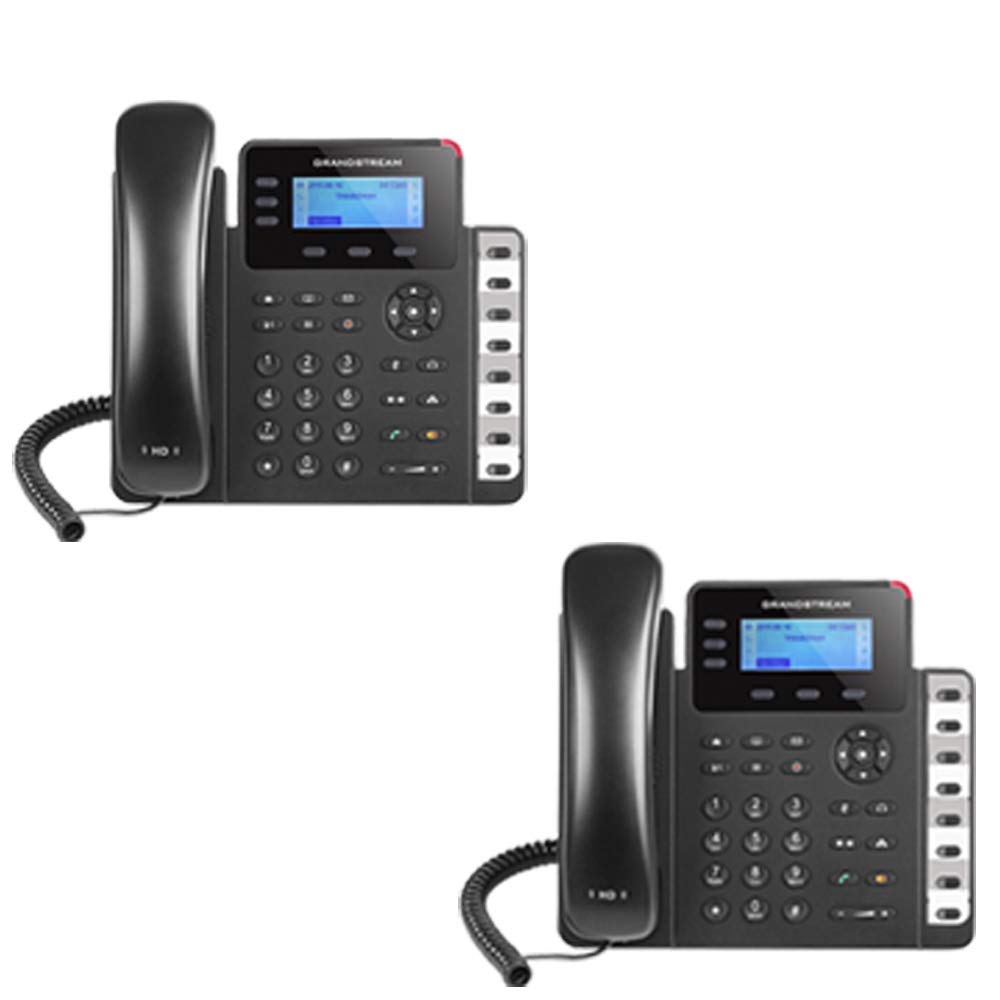
Figure 1: Grandstream GXP1630 Gigabit IP Phone
2. Uppsetning og uppsetning
2.1 Innihald pakka
Gakktu úr skugga um að allir íhlutir séu til staðar:
- Grandstream GXP1630 IP símaeining
- Handtól og snúra
- Ethernet snúru
- Rafmagns millistykki (ef PoE er ekki notað)
- Símastandur
2.2 Tenging símans
- Connect the coiled cord to the handset and the handset port on the phone base.
- Connect the Ethernet cable from your network switch (with PoE) or router to the LAN port on the phone. If not using PoE, connect the power adapter to the phone and a power outlet.
- Optionally, connect a headset to the headset port.
- Attach the phone stand to the base unit.
2.3 Initial Power-Up and Provisioning
Once connected, the phone will power on and begin the boot-up sequence. The LCD screen will display status information. The GXP1630 supports automated provisioning options, including zero-configuration with Grandstream’s UCM series IP PBXs, encrypted XML files, and TR-069, to facilitate easy mass deployment and configuration.
3. Notkun símans
3.1 Using the Headset or Speaker
- To turn the speaker on or off during a call, press the Ræðumaður hnappinn.
- Til að nota tengt heyrnartól skaltu ýta á Heyrnartól hnappinn.
Myndband 1: Yfirview of using headset and speaker functions on Grandstream GXP1600 series IP phones.
3.2 Hringing
Það eru þrjár helstu leiðir til að hefja símtal:
- Sími/heyrnartól: Lyftu símtólinu eða ýttu á Heyrnartól hnappinn.
- Hátalari: Ýttu á Ræðumaður hnappinn.
- Val á línulykli: Press an available line key.
Once you hear a dial tone (the corresponding line key will turn green), enter the phone number using the keypad. Then, press the Senda hnappinn eða # key to place the call. To use a different SIP account, simply press a different line key before dialing.
3.3 Endurval á númeri
Til að endurhringja síðasta númerið sem hringt var í:
- Lyftu símtólinu eða ýttu á Ræðumaður hnappinn.
- Ýttu á Senda hnappinn eða Endurvalið soft key displayed on the phone screen.
The phone will redial using the same SIP account as the previous call.
3.4 Að svara símtali
Þegar símtal hringir:
- Einstakt símtal: Lyftu tólinu, ýttu á Ræðumaður button, or press the corresponding flashing line key.
- Margar innhringingar (símtal í bið): If you are on an active call and another call comes in, you will hear a call waiting tone. The new incoming call's line key will flash red. Press the flashing red line key to answer the new call. Your current call will be placed on hold. You can toggle between calls by pressing the line key corresponding to each call.
3.5 Símtali lokið
Til að ljúka virku símtali:
- Leggðu á símtólið.
- Ýttu á Ljúka símtali soft key on the phone screen.
3.6 Hold and Resume a Call
- Ýttu á til að setja virkt símtal í bið Haltu button. The line key will typically flash.
- Til að halda áfram símtali sem var sett í bið skaltu ýta á samsvarandi blikkandi línutakka.
3.7 Volume Adjustment and Mute
- Þegar síminn er í óvirkri notkun skaltu nota Bindi hnappinn til að stilla hljóðstyrk hringsins.
- Meðan á símtali stendur er stutt á Bindi button to adjust the call volume for the handset, headset, or speaker.
- To mute or unmute your microphone during a call, press the Þagga hnappinn.
4. Viðhald
To ensure optimal performance and longevity of your Grandstream GXP1630 IP Phone, consider the following maintenance tips:
- Þrif: Notið mjúkan, þurran klút til að þrífa yfirborð símans. Forðist slípiefni eða leysiefni.
- Uppfærsla vélbúnaðar: Regularly check for and apply firmware updates provided by Grandstream. Keeping the firmware up to date can improve performance, add new features, and address security vulnerabilities.
- Umhverfisskilyrði: Operate the phone within recommended temperature and humidity ranges to prevent damage.
5. Bilanagreining
If you encounter issues with your GXP1630 IP Phone, try the following basic troubleshooting steps:
- Enginn hringitónn/Ekki hægt að hringja: Check all cable connections (Ethernet, handset, power). Ensure the phone is properly registered with your SIP server.
- Enginn kraftur: Verify the power adapter is securely connected to both the phone and a working power outlet, or that your network switch is providing Power over Ethernet (PoE).
- Léleg hljóðgæði: Check network connectivity. Ensure the handset/headset cord is properly connected. Adjust the call volume using the volume buttons.
- Phone Unresponsive: As with any electronic device, occasional reboots can resolve minor issues. Disconnect the power for a few seconds and then reconnect it.
- Sýnamál: If the screen is blank or frozen, try rebooting the phone.
For more advanced issues, consult your IT administrator or Grandstream's official support resources.
6. Tæknilýsing
| Eiginleiki | Lýsing |
|---|---|
| SIP reikningar | 3 |
| Línulyklar | 3 |
| Ráðstefna | 4-átta |
| BLF/hraðvalslyklar | 8 tvílitir |
| Hljóð | HD hljóð í hátalara og handtæki |
| Netviðmót | Tvöföld Gigabit tengi |
| PoE | Integrated Power over Ethernet |
| Skjár | 132x64 baklýstur LCD skjár |
| Mál | 8 x 12 x 6 tommur |
| Þyngd | 6 pund |
| Litur | Svartur |
| Efni | Plast |
| Samhæf tæki | Grandstream IP phones, Plantronics headsets with EHS feature, devices supporting TR-069 and XML config files |
7. Ábyrgð og stuðningur
7.1 Ábyrgð framleiðanda
The Grandstream GXP1630 IP Phone comes with a 1ja ára framleiðandaábyrgðVinsamlegast geymið kaupkvittunina vegna ábyrgðarkröfu.
7.2 Tæknileg aðstoð
For technical assistance, product registration, or to access additional resources, please visit the official Grandstream website or contact your product vendor. Support resources often include FAQs, knowledge bases, and community forums.