
1. Inngangur
This manual provides detailed instructions for the installation, operation, and maintenance of your Thomson SB260IBT 2.1 Channel Soundbar. Please read this manual thoroughly before using the product and retain it for future reference.
1.1 Öryggisupplýsingar
- Gakktu úr skugga um að aflgjafinn voltage uppfyllir kröfurnar sem tilgreindar eru á vörumiðanum.
- Ekki láta hljóðstöngina eða bassahátalarann verða fyrir rigningu, raka eða miklum hita.
- Forðist að setja tækið nálægt hitagjöfum eða í beinu sólarljósi.
- Gakktu úr skugga um rétta loftræstingu í kringum eininguna til að koma í veg fyrir ofhitnun.
- Ekki opna casing; vísið öllum viðhaldi til hæfs starfsfólks.
- Hreinsaðu tækið aðeins með mjúkum, þurrum klút.
2. Innihald pakka
Gakktu úr skugga um að allir hlutir séu til staðar í pakkanum:
- Thomson SB260IBT Soundbar
- Subwoofer
- Fjarstýring
- Rafmagnssnúra
- Audio Cables (e.g., Optical, AUX - may vary by region)
- Notendahandbók
3. Vöru lokiðview
3.1 Hljóðstika og bassabox

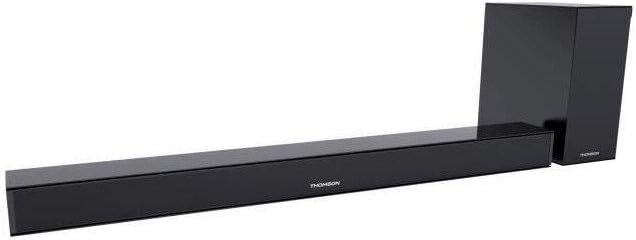
This image displays the Thomson SB260IBT soundbar unit alongside its accompanying subwoofer. The soundbar is a long, slender black unit, and the subwoofer is a compact black cube, both designed to complement modern home entertainment systems.
3.2 Stjórnborð og tengi
This image shows a close-up of the soundbar's side panel, revealing various control buttons and input/output ports. These include buttons for power, mode selection, volume control, and ports such as USB, SD card slot, and auxiliary input.
3.2.1 Framhlið
- LED vísir: Sýnir núverandi stillingu eða stöðu.
- IR móttakari: Fyrir fjarstýringarmerki.
3.2.2 Bakhlið
- Rafmagnsinntak: Tengist við riðstraumssnúru.
- OPTICAL Input: For digital audio connection from a TV or other device.
- AUX inntak: For analog audio connection using a 3.5mm cable.
3.2.3 Hliðarhlið
- USB tengi: Til að spila hljóð files frá USB drifi.
- SD kortarauf: Til að spila hljóð files frá SD korti.
- Stjórnhnappar: Power, Mode, Volume Up/Down.
3.2.4 Fjarstýring
The remote control provides full functionality for power, input selection, volume adjustment, and playback controls.
4. Uppsetning
4.1 Staðsetning
Place the soundbar on a stable, flat surface directly in front of your television. Position the subwoofer on the floor near the soundbar for optimal bass response. Ensure adequate ventilation around both units.
4.2 Tenging við rafmagn
- Tengdu rafmagnssnúruna við aflgjafainntak hljóðstikunnar.
- Stingdu hinum enda rafmagnssnúrunnar í vegginnstungu.
- Connect the subwoofer to its power source (if separate).
4.3 Hljóðtengingar
4.3.1 Ljóstenging
For high-quality digital audio, connect an optical cable from your TV's optical output to the soundbar's OPTICAL input. Select 'Optical' mode on the soundbar.
4.3.2 AUX tenging
Use a 3.5mm audio cable to connect your device's audio output (e.g., smartphone, MP3 player) to the soundbar's AUX input. Select 'AUX' mode on the soundbar.
4.3.3 Bluetooth-tenging
For wireless audio, select 'Bluetooth' mode on the soundbar. Refer to section 5.4 for detailed pairing instructions.
5. Notkunarleiðbeiningar
5.1 Kveikt/slökkt
Ýttu á Kraftur hnappinn á hljóðstikunni eða fjarstýringunni til að kveikja eða slökkva á tækinu.
5.2 Inntaksval
Ýttu á Mode button on the soundbar or remote control to cycle through available input sources: Bluetooth, Optical, AUX, USB, SD Card. The LED indicator will show the selected mode.
5.3 Hljóðstyrkur
Notaðu Bindi + og Bindi - hnappana á hljóðstikunni eða fjarstýringunni til að stilla aðalhljóðstyrkinn.
5.4 Bluetooth pörun
- Kveiktu á hljóðstikunni og ýttu á Mode button to select Bluetooth mode. The LED indicator will flash, indicating it is in pairing mode.
- Virkjið Bluetooth á Bluetooth-tækinu ykkar (t.d. snjallsíma, spjaldtölvu) og leitið að tiltækum tækjum.
- Select "SB260IBT" from the list of found devices to pair.
- Once successfully paired, the soundbar's LED indicator will stop flashing and remain solid. You can now play audio from your device through the soundbar.
5.5 USB/SD kort spilun
Insert a USB drive or SD card (containing compatible audio files) into the corresponding port on the soundbar's side panel. The soundbar will automatically switch to USB/SD mode and begin playback. Use the remote control for playback functions such as Play/Pause, Next Track, and Previous Track.
6. Viðhald
6.1 Þrif
Disconnect the soundbar from the power supply before cleaning. Use a soft, dry cloth to gently wipe the surfaces. Do not use liquid cleaners, abrasive materials, or chemical solvents, as these may damage the finish.
6.2 Geymsla
If storing the unit for an extended period, disconnect it from power and store it in a cool, dry place, away from direct sunlight and extreme temperatures. It is recommended to keep the original packaging for storage.
7. Bilanagreining
| Vandamál | Lausn |
|---|---|
| Enginn kraftur | Check if the power cable is securely connected to the soundbar and the wall outlet. Ensure the wall outlet is functional. |
| Ekkert hljóð | Ensure the correct input source (e.g., Optical, AUX, Bluetooth) is selected. Check all audio cable connections. Increase the volume on both the soundbar and the connected device. |
| Bluetooth Disconnection or Failure to Pair | Ensure the device is within the Bluetooth operating range (approximately 10 meters). Turn off and on Bluetooth on your device, then try re-pairing. Ensure no other devices are actively connected to the soundbar. |
| Fjarstýring virkar ekki | Check the battery in the remote control and replace if necessary. Ensure there are no obstacles between the remote control and the soundbar's IR receiver. |
8. Tæknilýsing
- Fyrirmyndarheiti: SB260IBT
- Vörumerki: Thomson
- Rásarstillingar: 2.1 Rás
- Hámarks úttaksstyrkur: 200 Watt
- Tengingartækni: Bluetooth, Wired/Wireless
- Inntakstegund: Multiple (Optical, AUX, USB, SD Card)
- Aflgjafi: Rafmagn með snúru
- Stjórnunaraðferð: Via App, Remote Control, On-unit Buttons
- Sérstakir eiginleikar: Bluetooth
- Mælt er með notkun: For Computers, Gaming Consoles, Music Players, Smartphones or Tablets, Televisions
- Vörumál: 100 x 15 x 7 cm (hljóðstika)
- Vöruþyngd: Approximately 3 kg (Soundbar and Subwoofer combined)
- Fjöldi eininga: 2 (Hljóðstöng og bassahátalari)
- Vatnsheldur: Nei
- Gerð festingar: Borðplata
9. Ábyrgð og stuðningur
9.1 Upplýsingar um ábyrgð
This product comes with a limited warranty. Please refer to the warranty card included in your package for specific terms and conditions, including the warranty period and coverage details. Retain your proof of purchase for warranty claims.
9.2 Þjónustuver
For technical assistance, troubleshooting, or service inquiries, please contact Thomson customer support. Contact details can typically be found on the manufacturer's official website or in your product documentation. Please have your model number (SB260IBT) and purchase information ready when contacting support.