
Inngangur
Thank you for choosing the Awei B923BL Wireless Magnetic Sports Bluetooth Earphones. This manual provides essential information for setting up, operating, maintaining, and troubleshooting your new earphones. Please read it carefully before use to ensure optimal performance and longevity of your device.
Innihald pakka
Vinsamlegast athugið hvort eftirfarandi atriði séu í pakkanum:
- Awei B923BL Wireless Magnetic Sports Bluetooth Earphones
- USB hleðslusnúra
- Margar stærðir af eyrnatöppum
- Notendahandbók
Vara lokiðview
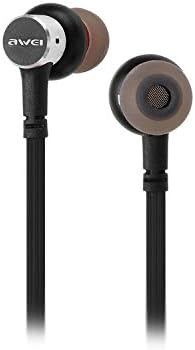
The Awei B923BL earphones are designed for active lifestyles, featuring a wireless Bluetooth connection and a magnetic design for convenient storage around your neck when not in use. They include an integrated microphone for hands-free calling.

Uppsetning
1. Hleðsla heyrnartólanna
Before first use, fully charge your earphones. Connect the provided USB charging cable to the charging port on the earphones and the other end to a USB power source (e.g., computer USB port, wall adapter). The indicator light will show charging status and turn off or change color when fully charged.
2. Pörun Bluetooth
- Gakktu úr skugga um að heyrnartólin séu slökkt.
- Press and hold the multi-function button (usually the power button) until the indicator light flashes red and blue alternately, indicating pairing mode.
- Í farsímanum þínum eða Bluetooth-tæki skaltu fara í Bluetooth-stillingarnar og virkja Bluetooth.
- Leitaðu að available devices. You should see "Awei B923BL" or a similar name in the list.
- Select "Awei B923BL" to connect. Once connected, the indicator light will usually flash blue slowly or turn off, and you may hear a confirmation tone.
- Ef beðið er um lykilorð, sláðu inn „0000“.
Once paired, the earphones will automatically connect to the last paired device when turned on, if the device's Bluetooth is active and within range.
Notkunarleiðbeiningar
Kveikt/slökkt
- Kveikt á: Press and hold the multi-function button for approximately 3 seconds until the blue indicator light flashes.
- Slökkva á: Press and hold the multi-function button for approximately 5 seconds until the red indicator light flashes and then turns off.
Spilun tónlistar
- Spila / gera hlé: Ýttu einu sinni á fjölvirka hnappinn.
- Næsta lag: Ýttu á og haltu inni Hljóðstyrk + hnappinum.
- Fyrra lag: Ýttu á og haltu inni Hljóðstyrkshnappinum.
Hringistjórnun
- Svara/slíta símtali: Ýttu einu sinni á fjölvirka hnappinn.
- Hafna símtali: Ýttu á fjölnotahnappinn og haltu honum inni í um það bil 2 sekúndur.
- Endurval síðasta númer: Ýttu tvisvar á fjölnotahnappinn.
Hljóðstyrkstýring
- Auka hljóðstyrk: Ýttu á hljóðstyrk + hnappinn.
- Minnka hljóðstyrk: Ýttu á Hljóðstyrkshnappinn -.
Viðhald
- Clean the earphones regularly with a soft, dry cloth. Do not use harsh chemicals or abrasive materials.
- Fjarlægið eyrnatappana og þrífið þá með mildri sápu og vatni ef þörf krefur, og gætið þess að þeir séu alveg þurrir áður en þeir eru settir aftur á.
- Geymið heyrnartólin á köldum, þurrum stað fjarri beinu sólarljósi og miklum hita.
- Forðist að láta heyrnartólin verða fyrir vatni eða miklum raka.
- Ekki reyna að taka í sundur eða breyta heyrnartólunum, þar sem það ógildir ábyrgðina.
Úrræðaleit
- Heyrnartólin kveikjast ekki: Gakktu úr skugga um að heyrnartólin séu fullhlaðin.
- Ekki er hægt að para við tækið:
- Make sure the earphones are in pairing mode (flashing red and blue).
- Gakktu úr skugga um að kveikt sé á Bluetooth í tækinu þínu.
- Færðu heyrnartólin nær tækinu þínu.
- Reyndu að endurræsa bæði heyrnartólin og tækið.
- Clear previous Bluetooth connections on your device if you have too many.
- Ekkert hljóð eða lágt hljóðstyrkur:
- Athugaðu hljóðstyrkinn bæði í heyrnartólunum og tengda tækinu.
- Gakktu úr skugga um að heyrnartólin séu rétt tengd við tækið þitt.
- Prófaðu að spila mismunandi hljóðgjafa.
- Vandamál með símtalsgæði:
- Gakktu úr skugga um að hljóðneminn sé ekki hindraður.
- Farðu á svæði með minni truflunum.
Tæknilýsing
| Eiginleiki | Smáatriði |
|---|---|
| Vörumerki | Awei |
| Gerðarnúmer | B923BL |
| Litur | Svartur |
| Formþáttur heyrnartóla | In Ear |
| Tengitækni | Þráðlaust |
| Þráðlaus samskiptatækni | Þráðlaust |
| Lýsing á aldursbili | Fullorðinn |
| Efni | Gúmmí |
| Samhæf tæki | Farsímar |
| Kapaleiginleiki | Án kapals |
| Eftirlitsaðferð | Snerta |
| Fjöldi hluta | 1 |
| Framleiðandi | Awei |
| Sérstakir eiginleikar | Microphone Included (Note: This model does not feature active noise cancellation as per product description.) |
Ábyrgð og stuðningur
Upplýsingar um ábyrgð
This product comes with a 1-year manufacturer's warranty from the date of purchase. For warranty claims or service, please contact the manufacturer or their authorized service agent. For further details, you may also contact the retailer where the product was purchased.
Þjónustudeild
If you encounter any issues not covered in this manual or require further assistance, please refer to the contact information provided with your product packaging or visit the official Awei websíða fyrir stuðningsúrræði.