1. Inngangur
Thank you for choosing the ASAKUKI Smart Wi-Fi Essential Oil Diffuser. This device combines aromatherapy with smart technology, allowing you to control it via a mobile application or voice commands. It is designed to humidify and purify the air, creating a relaxing atmosphere in your home or office.
This manual provides detailed instructions for the safe and efficient use of your diffuser. Please read it thoroughly before operation and retain it for future reference.

Image: The ASAKUKI Smart Wi-Fi Essential Oil Diffuser is versatile for various environments, including nurseries, family rooms, bedrooms, yoga studios, and workspaces.
2. Öryggisráðstafanir
Til að tryggja örugga notkun og koma í veg fyrir skemmdir skal fylgja eftirfarandi:
- Always place the diffuser on a flat, stable surface.
- Do not exceed the maximum water fill line (500ml).
- Use only clean tap water or distilled water. Avoid using hot water.
- Add essential oils carefully to avoid spilling on the exterior of the unit.
- Geymið dreifarann þar sem börn og gæludýr ná ekki til.
- Do not cover the mist outlet during operation.
- Takið tækið úr sambandi við rafmagn áður en það er þrifið eða fyllt á.
- Ekki sökkva einingunni niður í vatn eða annan vökva.
- If the unit is damaged, do not attempt to repair it yourself. Contact customer support.
- The diffuser features an automatic shut-off when water runs out, but it is recommended to monitor water levels.
3. Innihald pakka
Gakktu úr skugga um að allir hlutir séu til staðar í pakkanum þínum:
- ASAKUKI Smart Wi-Fi Essential Oil Diffuser (Model DF010)
- Rafmagns millistykki
- Notendahandbók
- Mælibolli (má fylgja með)
4. Vöru lokiðview
Familiarize yourself with the main components of your diffuser:

Image: The ASAKUKI Smart Wi-Fi Essential Oil Diffuser, showing its sleek design and the accompanying mobile app for control.
- Lok: Top cover of the diffuser.
- Mist Outlet: Þar sem þokan losnar.
- Vatnsgeymir: Tekur allt að 500 ml af vatni.
- Max Water Line: Indicates the maximum fill level.
- Ómskoðunarplata: Located at the bottom of the water tank, responsible for mist generation.
- Loftúttak: Located on the base.
- Drain Side: Indicated for proper water drainage.
- Ljóshnappur: Controls the LED light functions.
- Mist/Wi-Fi Button: Controls mist output and initiates Wi-Fi pairing.
- Power Jack: Til að tengja straumbreytinn.
5. Uppsetningarleiðbeiningar
Fylgdu þessum skrefum fyrir fyrstu uppsetningu:
- Setjið dreifarann: Setjið dreifarann á slétt, stöðugt og vatnshelt yfirborð.
- Fjarlægðu lokið: Gently lift the top lid off the diffuser.
- Bæta við vatni: Using a measuring cup, fill the water tank with clean tap water or distilled water up to the maximum water line (500ml). Do not overfill.
- Bæta við ilmkjarnaolíum: Bætið 3-5 dropum af ilmkjarnaolíunni sem þið kjósið beint út í vatnstankinn. Stillið magnið eftir smekk og stærð herbergisins.
- Skiptu um lokið: Securely place the lid back onto the diffuser.
- Tengdu rafmagn: Plug the power adapter into the power jack at the base of the diffuser, then plug the adapter into a wall outlet.
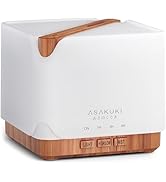
Image: Simple setup guide illustrating connecting power, app pairing, and wireless control.
6. Notkunarleiðbeiningar
6.1 Handstýring
- Miststýring: Ýttu á Mist/Wi-Fi button once for continuous mist. Press again for intermittent mist (30 seconds on, 30 seconds off). Press a third time to turn off the mist.
- Ljósastýring: Ýttu á Ljós button once to turn on the LED light with automatic color cycling. Press again to fix the light to a specific color. Continue pressing to cycle through colors. Press and hold the Light button to turn off the light.
6.2 Smart Wi-Fi and App Control
The diffuser can be controlled remotely using the TuyaSmart app.
- Sækja appið: Leitaðu að "TuyaSmart" in your smartphone's app store (iOS or Android) and download it.
- Skráning/Innskráning: Opnaðu appið og stofnaðu nýjan aðgang eða skráðu þig inn ef þú ert nú þegar með einn.
- Farðu í pörunarham: With the diffuser plugged in, press and hold the Mist/Wi-Fi button for 5 seconds until the indicator light flashes rapidly. This indicates the diffuser is in pairing mode.
- Bæta við tæki: In the TuyaSmart app, tap "Add Device" or the "+" icon. Select "Small Home Appliance" > "Diffuser" (Wi-Fi).
- Tengjast Wi-Fi: Follow the in-app instructions to connect the diffuser to your 2.4GHz Wi-Fi network. Ensure your phone is also connected to the same 2.4GHz network during setup.
- Stjórna: Once successfully paired, you can control the mist, light, set timers, and create schedules directly from the TuyaSmart app.

Image: The mobile app allows for convenient control of the diffuser's functions.
6.3 Raddstýring með Alexa
The diffuser is compatible with Amazon Alexa for voice control.
- Virkja færni: In the Alexa app, search for and enable the "TuyaSmart" skill.
- Tengja reikning: Link your TuyaSmart account to your Alexa account.
- Uppgötvaðu tæki: Ask Alexa to "Discover devices" or manually discover them in the Alexa app.
- Raddskipanir: Once discovered, you can use commands such as:
- "Alexa, turn on the diffuser."
- "Alexa, turn off the diffuser."
- "Alexa, set the diffuser to red."
- "Alexa, set diffuser brightness to 50%."

Image: Voice control with Alexa allows hands-free operation of the diffuser.
7. Viðhald
Regluleg þrif hjálpa til við að viðhalda bestu mögulegu virkni og lengir líftíma dreifarans.
7.1 Þrif
Hreinsið ilmkjarnaolíudreifarann eftir 5-6 notkunar eða á 3-5 daga fresti, sérstaklega þegar skipt er um ilmkjarnaolíur.
- Taktu úr sambandi: Disconnect the diffuser from the power outlet.
- Tómt vatn: Remove the lid and carefully pour out any remaining water from the drain side of the water tank.
- Þurrkaðu: Use a soft cloth or cotton swab with a small amount of mild dish soap to gently wipe the inside of the water tank and the ultrasonic plate.
- Skol: Rinse the water tank with clean water, being careful not to get water into the air outlet.
- Þurrt: Wipe all parts dry with a clean, soft cloth.
- Deep Clean (Optional): For stubborn residue, add a small amount of white vinegar to the water tank and let it sit for 10-15 minutes before wiping and rinsing.
7.2 Geymsla
When not in use for an extended period, ensure the diffuser is clean and completely dry. Store it in a cool, dry place away from direct sunlight.
8. Bilanagreining
Ef þú lendir í vandræðum skaltu vísa til eftirfarandi algengra vandamála og lausna:
| Vandamál | Möguleg orsök | Lausn |
|---|---|---|
| Enginn eða lítill úðaframleiðsla |
|
|
| Diffuser does not power on |
|
|
| Get ekki tengst við Wi-Fi/forrit |
|
|
| Vatnsleki |
|
|
9. Tæknilýsing
| Eiginleiki | Smáatriði |
|---|---|
| Vörumerki | ASAKUKI |
| Gerðarnúmer | DF010 |
| Getu | 500 millilítrar |
| Mál | 6" L x 6" B x 7" H |
| Efni | Akrýlnítríl bútadíen stýren (ABS), pólýprópýlen (PP) |
| Aflgjafi | Rafmagn með snúru |
| Hvaðtage | 10 vött |
| Umfangssvæði | Allt að 323 fermetrar |
| Sérstakir eiginleikar | App Control, Automatic Shut-Off, Multiple Light Settings, Multiple Mist Settings, Voice Control (Alexa) |
| Hávaðastig | Lower than 35 dB |
| Runtime (Full Capacity) | Up to 16 hours (on weak mist setting) |
10. Ábyrgð og stuðningur
The ASAKUKI Smart Wi-Fi Essential Oil Diffuser comes with a 1 ára ábyrgð á tæknilegri aðstoðÞessi ábyrgð nær yfir framleiðslugalla og vandamál sem kunna að koma upp við eðlilega notkun.
For technical assistance, troubleshooting, or warranty claims, please contact ASAKUKI customer support through the retailer where you purchased the product or visit the official ASAKUKI websíða fyrir upplýsingar um tengiliði.
Please have your model number (DF010) and proof of purchase ready when contacting support.