
1. Inngangur
This manual provides instructions for the installation, operation, and maintenance of the Cisco CP-68KEM-3PCC Expansion Module. This module is designed to enhance the functionality of your Cisco IP Phone 6851 by providing additional programmable keys.
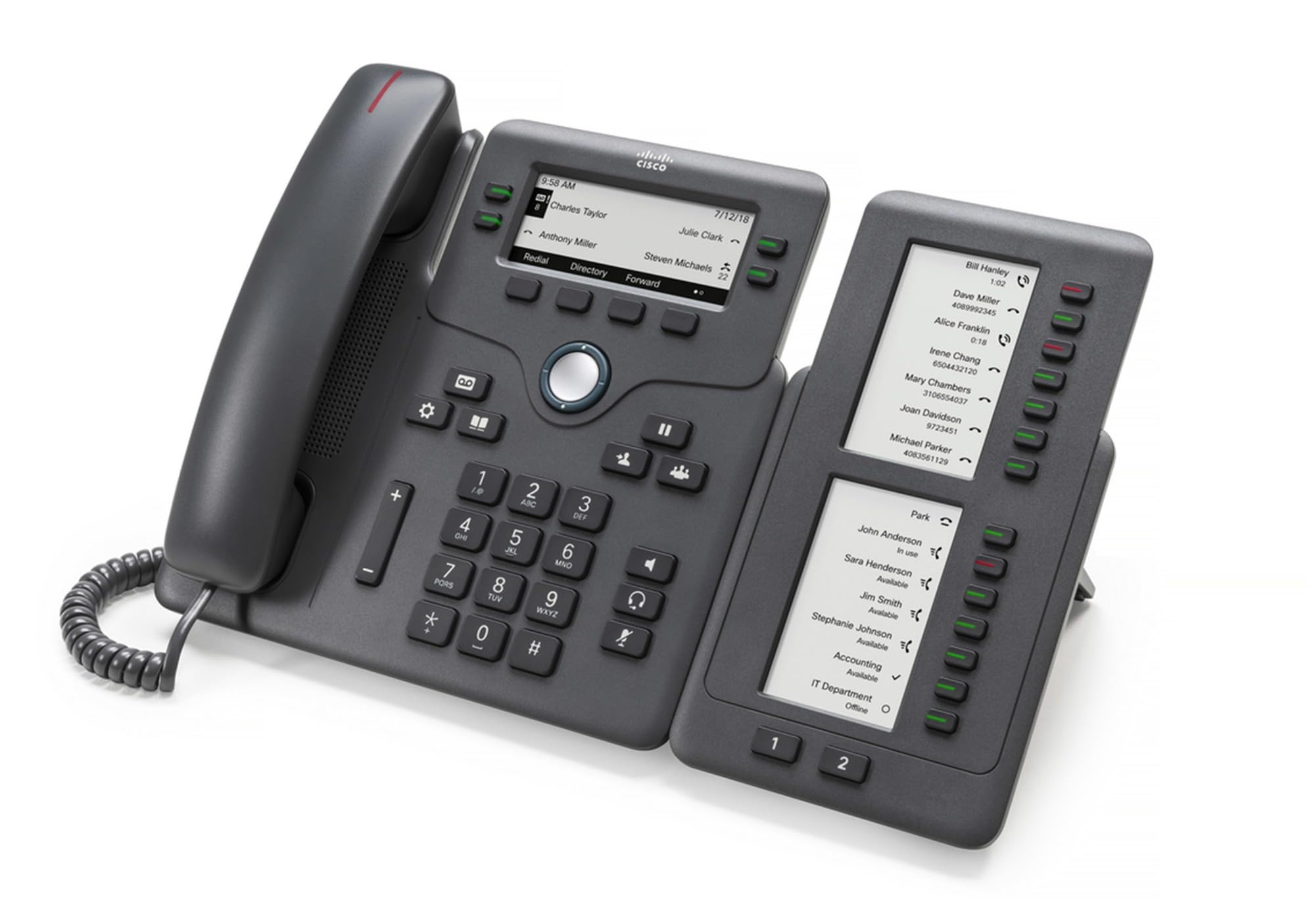
Figure 1: Cisco CP-68KEM-3PCC Expansion Module. This image shows the front view of the expansion module with its grayscale LCD screen and programmable keys.
The Cisco CP-68KEM-3PCC Expansion Module adds 14-line keys and 2-page keys, totaling 28 additional keys, with an easy-to-read grayscale LCD screen. It is ideal for monitoring and managing call status, directory numbers, and speed dial functions.
2. Hvað er í kassanum
Takið kassann vandlega úr og gangið úr skugga um að allir hlutir séu til staðar:
- Cisco CP-68KEM-3PCC Phone Expansion Module
- Connecting Cable (typically included for linking to the phone)
- Documentation (this user manual, safety information)
If any items are missing or damaged, please contact your vendor or Cisco support immediately.
3. Uppsetningarleiðbeiningar
Follow these steps to connect your Cisco CP-68KEM-3PCC Expansion Module to your Cisco IP Phone 6851.
- Prepare the IP Phone: Ensure your Cisco IP Phone 6851 is powered off and disconnected from the network.
- Connect the Expansion Module: Locate the expansion port on the back or side of your Cisco IP Phone 6851. Connect the provided connecting cable from the expansion module to this port.
- Tryggið tenginguna: Gakktu úr skugga um að snúran sé vel fest til að koma í veg fyrir að hún rofni óvart.
- Kveikt á: Reconnect your Cisco IP Phone 6851 to the network and power it on. The expansion module should be detected automatically.
- Staðfestu virkni: Once the phone has booted, check the expansion module's display and keys to ensure they are responsive.
For detailed visual instructions, refer to the official Cisco documentation or support websíða.
4. Operating the Expansion Module
The expansion module provides additional keys for various functions, enhancing your call management capabilities.
4.1 forritanlegir takkar
The 28 programmable keys (14 keys across 2 pages) can be configured for:
- Directory Numbers (DNs): Assign specific phone lines or extensions.
- Hraðval: Program frequently called numbers for quick access.
- Eiginleikalyklar: Assign functions like call transfer, conference, or call park.
- Call Status Monitoring: Monitor the status of other lines (e.g., busy, ringing).
4.2 Page Navigation
Use the dedicated page keys (usually located near the display) to switch between the two pages of programmable keys. The grayscale LCD screen will update to show the labels for the currently active page.
4.3 Stillingar
Configuration of the programmable keys is typically managed through your organization's phone system administrator or via the web interface of the Cisco IP Phone 6851. Consult your IT department for specific configuration instructions.
5. Viðhald
To ensure the longevity and optimal performance of your Cisco CP-68KEM-3PCC Expansion Module, follow these maintenance guidelines:
- Þrif: Notið mjúkan, þurran og lólausan klút til að þrífa ytra byrði. Fyrir þrjósk bletti, þurrkið örlítiðampen the cloth with water. Avoid using harsh chemicals, abrasive cleaners, or solvents, as these can damage the finish and electronic components.
- Umhverfi: Geymið eininguna á hreinum, þurrum stað, fjarri beinu sólarljósi, miklum hita og raka.
- Meðhöndlun: Farðu varlega með eininguna. Forðastu að missa hana eða verða fyrir hörðum höggum.
- Kapalstjórnun: Ensure connecting cables are not kinked, pinched, or under strain.
There are no user-serviceable parts inside the expansion module. Do not attempt to open or repair the device yourself.
6. Bilanagreining
If you encounter issues with your expansion module, try the following troubleshooting steps:
| Vandamál | Möguleg orsök | Lausn |
|---|---|---|
| Síminn þekkir ekki eininguna | Loose cable connection, phone not restarted, incompatible phone model. |
|
| Lyklar svara ekki | Software glitch, configuration issue. |
|
| Skjárinn er tómur eða blikkar | Rafmagnsvandamál, innri bilun. |
|
If these steps do not resolve the issue, please contact Cisco technical support or your authorized reseller.
7. Tæknilýsing
| Eiginleiki | Smáatriði |
|---|---|
| Gerðarnúmer | CP-68KEM-3PCC |
| Vörumerki | Cisco |
| Samhæf tæki | Cisco IP sími 6851 |
| Litur | Svartur |
| Efni | Málmur |
| Stærðir hlutar (LxBxH) | 5.1 x 10.2 x 20.3 cm |
| Aflgjafi | Corded (powered via host IP Phone) |
| Fjöldi lykla | 28 (14 keys across 2 pages) |
| Skjár | Grayscale LCD |
| GTIN/UPC | 889728068383 |
8. Upplýsingar um ábyrgð
The Cisco CP-68KEM-3PCC Expansion Module comes with a 2 ára vöruábyrgð frá kaupdegi. Þessi ábyrgð nær til galla í efni og framleiðslu við eðlilega notkun. Hún nær ekki til tjóns sem orsakast af misnotkun, slysum, óheimilum breytingum eða utanaðkomandi orsökum.
For warranty claims or detailed terms and conditions, please refer to the official Cisco warranty policy available on their websíðuna eða hafið samband við söluaðila.
9. Stuðningur
For technical assistance, product information, or to report issues, please contact Cisco support:
- Cisco stuðningur Websíða: Heimsæktu embættismanninn Cisco stuðningur websíða for documentation, downloads, and contact options.
- Authorized Reseller: Contact the reseller from whom you purchased the product.
When contacting support, please have your product model (CP-68KEM-3PCC) and serial number ready.