
Inngangur
This manual provides essential instructions for the setup, operation, and maintenance of your Hamzer 61-Key Electronic Keyboard Piano. Please read this manual thoroughly before using the product to ensure proper function and longevity. This set is designed for beginner to intermediate-level users, offering a comprehensive learning experience with lighted keys and various sound options.
Mikilvægar öryggisupplýsingar
- Ensure the power adapter is correctly connected to a suitable power outlet.
- Ekki láta lyklaborðið verða fyrir vatni eða miklum raka.
- Haltu vörunni frá beinu sólarljósi og hitagjöfum.
- Use only the provided accessories (power adapter, microphone, headphones) or approved replacements.
- Hafið eftirlit með börnum meðan á notkun stendur til að koma í veg fyrir slys.
- Disconnect power during thunderstorms or when not in use for extended periods.
Innihald pakka
Gakktu úr skugga um að allir hlutir séu til staðar í pakkanum þínum:
- Hamzer 61-Key Electronic Keyboard Piano
- Adjustable H-Style Keyboard Stand
- Padded Piano Bench
- Hljóðnemi með 4' snúru
- Heyrnartól
- Keynote Stickers (for white and black keys)
- DC 9V straumbreytir
- Eigandahandbók

Image: Hamzer 61-Key Electronic Keyboard Piano with all included accessories.
Uppsetningarleiðbeiningar
1. Samsetning hljómborðsstandsins
The H-style stand is designed for stability and adjustability. Assemble the stand according to the diagrams in the separate stand assembly guide. Ensure all screws are tightened securely. The stand offers three height settings: 22", 24.5", and 27". Adjust to your preferred height before placing the keyboard.

Image: Adjustable H-Style Keyboard Stand with height options.
2. Assembling the Piano Bench
The padded piano bench provides comfortable seating. Assemble the bench by unfolding its legs and ensuring it is stable. It supports up to 220 lbs. The bench is also adjustable to 19", 20.5", or 21.5".

Image: Padded Piano Bench with adjustable height options.
3. Að setja lyklaborðið
Carefully place the 61-key electronic keyboard onto the assembled stand. Ensure it is centered and stable before proceeding.
4. Kveikja á lyklaborðinu
Hægt er að knýja lyklaborðið á tvo vegu:
- DC 9V millistykki: Plug the included DC 9V adapter into the power input jack on the back of the keyboard and then into a wall outlet.
- Rafhlöður: For portable use, insert 6 AA batteries (not included) into the battery compartment located on the underside of the keyboard.
5. Tengingar á fylgihlutum
- Hljóðnemi: Plug the microphone's 3.5mm jack into the microphone input port.
- Heyrnartól: Plug the headphones' 3.5mm jack into the headphone output port for private practice.
- Lykiltóna límmiðar: For visual learning, apply the transparent keynote stickers to the white and black keys as indicated on the sticker sheets. These stickers help identify notes and simplify learning.

Image: Included microphone and headphones.

Image: Optional keynote stickers for learning.
Notkunarleiðbeiningar
1. Kveikt/slökkt
Ýttu á KRAFTUR button to turn the keyboard on or off. The digital display will illuminate.
2. Stilling hljóðstyrks
Notaðu MEISTARABÓL controls to adjust the overall volume of the keyboard.
3. Val á tóntegundum (hljóðum)
The keyboard features 255 Timbres. Use the number pad or the dedicated timbre selection buttons to choose different instrument sounds (e.g., Acoustic Grand Piano, Electric Guitar, Violin).
4. Að velja takta
Choose from 255 rhythms to accompany your playing. Use the number pad or rhythm selection buttons to select a rhythm (e.g., Pop Rock, Jazz, Disco).
5. Demonstration Songs
The keyboard includes 24 demonstration songs. Press the DEMÓ SÖNG button to cycle through and play these pre-recorded melodies.
6. Lighted Keys Learning System
Taktu þátt í Lykillýsing feature to activate the lighted keys. When playing a demonstration song or using the FYLGJA mode, the keys will light up to guide you on which notes to press. This feature is particularly useful for beginners.
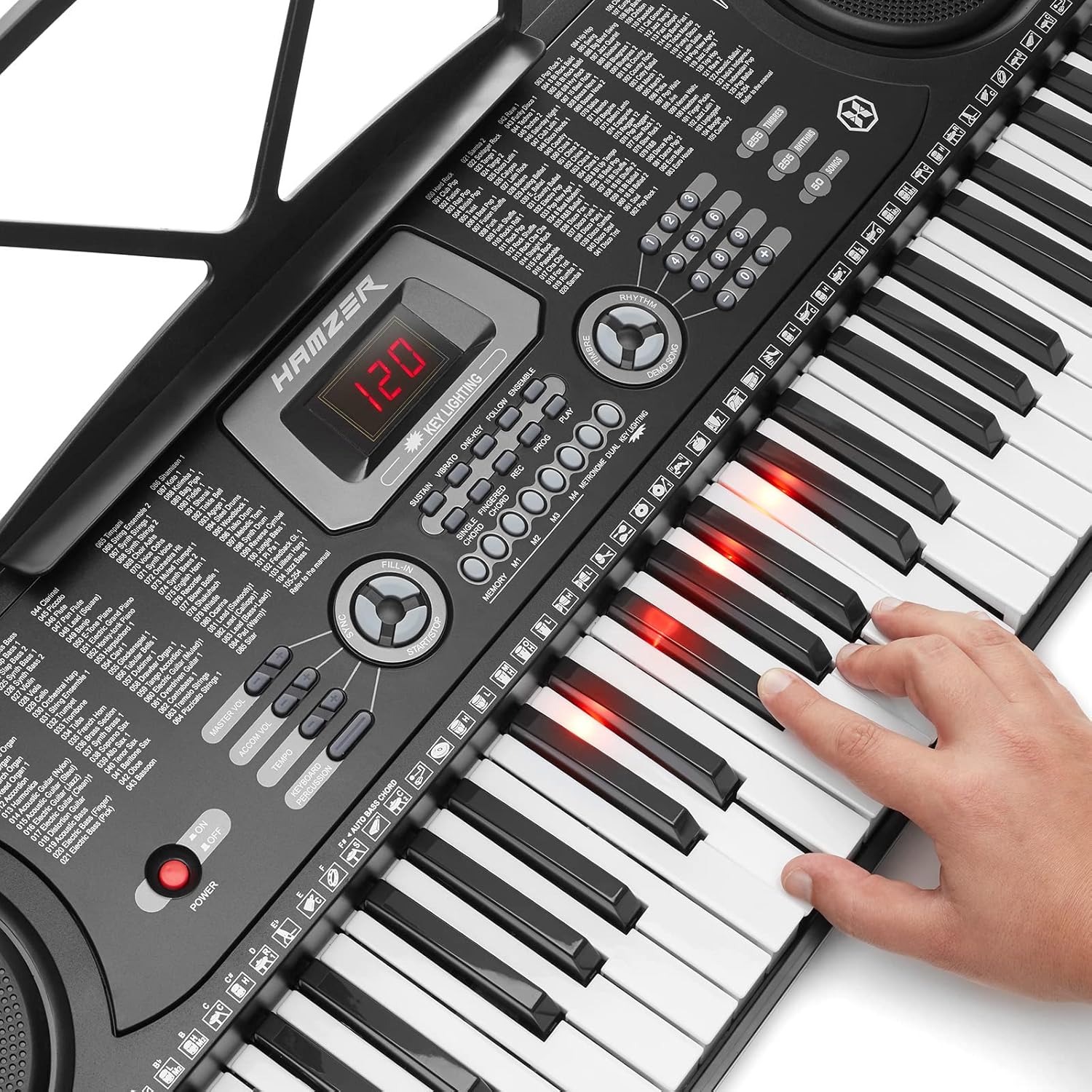
Image: Lighted keys feature in action.
7. Upptaka og spilun
Notaðu REC button to record your playing. Press SPILA to listen to your recorded performance. This function is useful for self-assessment and improvement.
8. Sérstök áhrif
Enhance your music with built-in effects:
- Halda uppi: Holds notes longer.
- Titringur: Adds a pulsating effect to notes.
- Saman: Creates a richer, fuller sound.
Vörusýningar
No official product videos from the seller are available for embedding based on the provided criteria.
Viðhald
- Þrif: Wipe the keyboard and accessories with a soft, dry cloth. Do not use abrasive cleaners or solvents.
- Geymsla: Þegar lyklaborðið er ekki í notkun skal geyma það á köldum, þurrum stað fjarri beinu sólarljósi og miklum hita.
- Skipt um rafhlöðu: If using batteries, replace all 6 AA batteries simultaneously when power diminishes.
Úrræðaleit
| Vandamál | Möguleg orsök | Lausn |
|---|---|---|
| Enginn kraftur | Power adapter not connected, batteries drained, or power outlet issue. | Check power adapter connection. Replace batteries if using battery power. Test power outlet with another device. |
| Ekkert hljóð | Hljóðstyrkurinn er of lágur, heyrnartól tengd eða vandamál með hátalarann. | Increase master volume. Disconnect headphones if sound is desired from speakers. |
| Lyklar loga ekki | Key lighting feature is off or not in a learning mode. | Tryggja Lykillýsing is enabled and a demonstration song or FYLGJA stillingin er virk. |
| Microphone/Headphones not working | Incorrectly plugged in or faulty accessory. | Ensure accessories are fully plugged into the correct 3.5mm jacks. Test with another compatible accessory if available. |
Tæknilýsing
- Gerð: KEY-UNIT-411HSL-BLK
- Lyklar: 61 (Lighted)
- Timbre: 255
- Taktar: 255
- Keyboard Percussions: 61
- Sýnikennslulög: 24
- Áhrif: Vibrato, Sustain, Ensemble
- Hljómar: Single-fingered, Fingered Auto-bass
- Tengingar: 3.5mm Jack (Microphone In, Headphone Out, Audio Input)
- Aflgjafi: DC 9V Adapter (included) or 6 AA Batteries (not included)
- Stærðir lyklaborðs: 33.5" D x 13" B x 4" H
- Þyngd lyklaborðs: 11 pund
- Stand Height Settings: 22", 24.5", 27"
- Bench Height Settings: 19", 20.5", 21.5"
- Þyngdargeta bekkjar: Allt að 220 pund
Ábyrgð og stuðningur
For warranty information, product support, or to purchase replacement parts, please refer to the contact information provided with your purchase documentation or visit the official Hamzer webGeymið kaupkvittunina sem sönnun fyrir kaup vegna ábyrgðarkröfu.
Hægt er að kaupa viðbótarverndaráætlanir. Vinsamlegast hafið samband við söluaðila til að fá nánari upplýsingar.