
1. Inngangur
This manual provides essential information for the safe and effective operation of your Retevis RT55 Marine Radio. Please read this manual thoroughly before using the device to ensure proper functionality and to prevent damage. The Retevis RT55 is a portable VHF marine transceiver designed for maritime communication, featuring IP67 waterproofing, floating capability, and vibration drainage.

Image 1.1: Retevis RT55 Marine Radio demonstrating its floating capability.
2. Innihald pakka
Gakktu úr skugga um að allir hlutir sem taldir eru upp hér að neðan séu í pakkanum þínum. Ef einhverjir hlutir vantar eða eru skemmdir skaltu hafa samband við söluaðila.
- 1 x Retevis RT55 Marine Radio
- 1 x Loftnet
- 1 x 1200mAh Lithium-ion rafhlaða
- 1 x straumbreytir
- 1 x hleðsluvagga
- 1 x beltaklemmur
- 1 x Snúra
- 4 x skrúfur
- 1 x Notendahandbók (þetta skjal)

Mynd 2.1: Allir íhlutir fylgja Retevis RT55 pakkanum.
3. Vöru lokiðview
Kynntu þér íhluti og stjórntæki útvarpsins.
3.1. Útvarpsíhlutir

Image 3.1: Front panel of the Retevis RT55 Marine Radio with key controls labeled.
- Loftnet: Til að senda og taka á móti merkjum.
- LCD skjár: Shows channel number, battery status, and other operational indicators.
- CH 16 Button: Quickly switches to Channel 16 (emergency channel).
- CH hnappur: Notað til að velja rás.
- TAG/FAV Button: Skiptir á milli tagged/favorite channels.
- MUTE/VOL Button: Adjusts volume or mutes audio.
- MONI/SQL Button: Activates monitor function or adjusts squelch level.
- DUAL/SCAN Button: Activates dual watch or scan function.
- LOCK/H/L Button: Locks the keypad or switches between high/low power output.
- Upp/niður örvar: Fletta í valmyndum og skipta um rásir.
- PTT (Push-to-talk) hnappur: Staðsett á hliðinni, notað til að senda.
4. Uppsetning
4.1. Uppsetning rafhlöðu
- Gakktu úr skugga um að útvarpið sé slökkt.
- Stilltu rafhlöðupakkann saman við rafhlöðuhólfið aftan á útvarpinu.
- Ýttu rafhlöðunni varlega á sinn stað þar til hún smellur örugglega.

Image 4.1: The 1200mAh Lithium-ion battery pack for the RT55.
4.2. Loftnetsfesting
- Skrúfið loftnetið réttsælis á tengið efst á útvarpinu þar til það er fingraföst. Ekki herða of mikið.
4.3. Hleðsla rafhlöðunnar
Hleðdu rafhlöðuna að fullu fyrir fyrstu notkun. Full hleðsla tekur venjulega nokkrar klukkustundir.
- Tengdu straumbreytinn við hleðsluvögguna.
- Stingdu rafmagnsmillistykkinu í venjulegan rafmagnsinnstungu.
- Place the radio (with battery installed) into the charging cradle. Ensure proper contact between the radio and the cradle's charging terminals.
- The charging indicator on the cradle will illuminate (e.g., red for charging, green for fully charged).
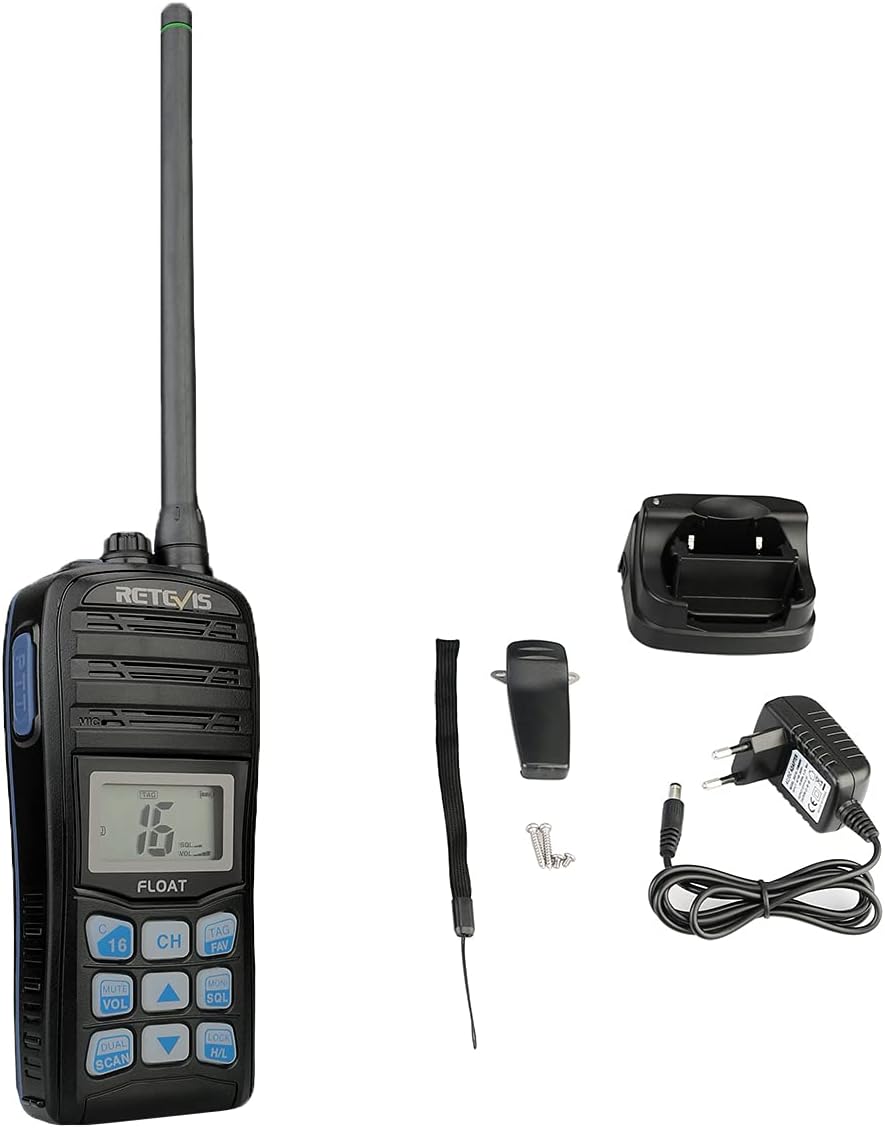
Image 4.2: The Retevis RT55 radio placed in its charging cradle.
5. Notkunarleiðbeiningar
5.1. Kveikt/slökkt
- Til að kveikja á, haltu inni KRAFTUR button (often integrated with the LOCK/H/L button or a dedicated button) until the display illuminates.
- Haltu inni til að slökkva á KRAFTUR hnappinn aftur þar til skjárinn slokknar.
5.2. Hljóðstyrksstilling
- Ýttu á MUTE/VOL hnappinn.
- Notaðu Upp / niður ör hnappa til að hækka eða lækka hljóðstyrkinn.
- Ýttu á MUTE/VOL again to confirm or wait for the setting to auto-save.
5.3. Rásarval
The RT55 supports 88 international marine channels.
- Ýttu á CH hnappinn.
- Notaðu Upp / niður ör hnappana til að velja rásina sem þú vilt.
- Ýttu á CH again to confirm or wait for the setting to auto-save.
- To quickly access the emergency channel, press the dedicated 16 CH hnappinn.
5.4. Þöggunarvirkni
Squelch eliminates background noise when no signal is being received.
- Ýttu á MONI/SQL hnappinn.
- Notaðu Upp / niður ör buttons to adjust the squelch level (typically 0-9, where 0 is open squelch and 9 is maximum squelch).
- Ýttu á MONI/SQL aftur til staðfestingar.
5.5. Dual Watch / Tri-Watch
This feature allows monitoring multiple channels simultaneously.
- Tvöföld úra: Monitors the current working channel and Channel 16.
- Þríþátta úrklippa: Monitors the current working channel, Channel 16, and a designated call channel (e.g., Channel 9).
- Ýttu á DUAL/SCAN button to activate or cycle through these modes.

Image 5.1: Visual representation of Dual-Watch and Tri-Watch channel monitoring.
5.6. Weather Channels
The RT55 can receive weather alerts on dedicated weather channels.
- Consult your local regulations for available weather channels.
- Access weather channels via the TAG/FAV button or a dedicated menu option.

Image 5.2: The radio displaying weather alert functionality.
5.7. Floating and Vibration Drainage
The RT55 is designed to float if dropped in water and features a vibration drainage function to clear water from the speaker.
- If the radio falls into water, it will float to the surface.
- To activate vibration drainage, typically press and hold a specific button (e.g., MONI/SQL or a dedicated drainage button) for a few seconds. The radio will emit a vibrating sound to expel water.

Image 5.3: The RT55 radio floating in water, highlighting its IP67 waterproof rating.

Image 5.4: The radio demonstrating its vibration drainage feature.
Video 5.1: Demonstration of the Retevis RT55's waterproofing, floating, and vibration drainage functions.
6. Viðhald
- Þrif: Þrífið ytra byrði útvarpsins með mjúkum klút.amp klút. Ekki nota sterk efni eða slípiefni.
- Geymsla: Geymið útvarpið á köldum og þurrum stað þegar það er ekki í notkun. Fjarlægið rafhlöðuna ef það er geymt í langan tíma.
- Umhirða rafhlöðu: Avoid fully discharging the battery frequently. Recharge before the battery is completely depleted to prolong its lifespan.
7. Bilanagreining
| Vandamál | Möguleg orsök | Lausn |
|---|---|---|
| Útvarpið kveikir ekki á sér | Rafhlaðan er lág eða ekki rétt sett í. | Hlaðið rafhlöðuna eða setjið hana rétt aftur í. |
| No reception or poor audio quality | Antenna loose or damaged; Squelch level too high; Out of range. | Check antenna connection; Adjust squelch level; Move closer to other radios or a repeater. |
| Get ekki sent | Battery low; Incorrect channel selected; Keypad locked. | Charge battery; Select appropriate channel; Unlock keypad. |
| Water in speaker after submersion | Normal after water exposure. | Activate the vibration drainage function. |
8. Tæknilýsing
| Eiginleiki | Smáatriði |
|---|---|
| Vörumerki | Retevis |
| Gerðarnúmer | RT55 |
| Litur | Svartur (Noir) |
| Fjöldi rása | 88 |
| Tíðnisvið | VHF |
| Hámarkssvið | 4 kílómetrar |
| Vatnsþolsstig | IP67 (vatnsheldur) |
| Sérstakir eiginleikar | Float, Monitor Function, IP67 Waterproof, Call Channel Programming, Automatic Backlight, Vibration Drainage |
| Tegund rafhlöðu | 1 x 1200mAh Lithium-ion (included) |
| Voltage | 7.4 volt |
| Vörumál (D x B x H) | 4.1P x 6.5L x 14H sentímetrar |
| Þyngd hlutar | 288 grömm |
| Hávaðastig | 40 desibel |
| Samhæf tæki | Other two-way radios with the same band or channel, compatible accessories (headsets, earphones, external antennas) |
| Hitastig | -20℃ ~ +55℃ |
| Upprunaland | Kína |
9. Ábyrgð og stuðningur
Retevis offers the following warranty and support for the RT55 Marine Radio:
- Ábyrgðartímabil: 2 years for the radio body, 1 year for accessories.
- Skilareglur: 30 days for no-reason returns.
- Þjónusta eftir ábyrgð: Maintenance service is available beyond the warranty period. Buyers are responsible for associated costs.
For further assistance or technical support, please refer to the official Retevis websíðuna eða hafðu samband við söluaðila á staðnum.