
Awei A780BL
Awei A780BL Bluetooth 5.0 Over-Ear Headphones User Manual
Gerð: A780BL | Vörumerki: Awei
Inngangur
This manual provides comprehensive instructions for the Awei A780BL Bluetooth 5.0 Over-Ear Headphones. Please read this manual carefully before using the product to ensure proper operation and to maximize your listening experience. These headphones offer high-quality audio, a built-in microphone, and a comfortable over-ear design, suitable for various uses including gaming, music, and calls.
Innihald pakka
Gakktu úr skugga um að allir hlutir séu til staðar í pakkanum:
- 1 x Awei A780BL Bluetooth Headset
- 1 x USB hleðslusnúra
- 1 x Notendahandbók (þetta skjal)

Image: The Awei A780BL headphones shown alongside their retail packaging, highlighting the included components.
Vara lokiðview

Mynd: Framan view of the Awei A780BL Over-Ear Headphones in black, showcasinhönnun þeirra.
The Awei A780BL headphones are designed for comfort and superior sound quality. They feature a foldable design for portability and intuitive controls for ease of use.
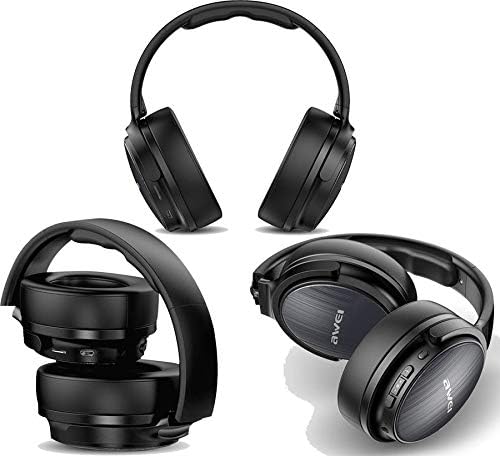
Mynd: Margfeldi views of the Awei A780BL headphones, demonstrating their foldable earcups and compact storage capability.
Helstu eiginleikar:
- Bluetooth V5.0 for stable and efficient wireless connection.
- Dynamic 40mm drivers for powerful and clear audio.
- Built-in microphone for hands-free calls and gaming communication.
- IPX5 water and sweat resistance, suitable for sports and outdoor activities.
- Supports both wireless (Bluetooth) and wired (3.5mm AUX) connectivity.
- Long battery life: Up to 15 hours of music/talk time.
- Þægileg hönnun yfir eyrað með mjúkum eyrnapúðum.

Image: A graphic highlighting the "All-Around Stereo Sound" feature of the Awei A780BL headphones, noting the 40mm driver, 32 Ohm impedance, and 122dB sensitivity.
Uppsetning
Hleðsla heyrnartólanna:
- Finndu USB hleðslutengið á heyrnartólunum.
- Connect one end of the provided USB charging cable to the headphone's charging port.
- Tengdu hinn enda USB-snúrunnar við samhæfan USB-aflgjafa (t.d. USB-tengi tölvu, USB-millistykki).
- The indicator light will illuminate during charging and turn off or change color once fully charged.
- Full hleðsla tekur um það bil 2 klukkustundir.
Kveikt/slökkt:
- Til að kveikja á: Press and hold the Power button (usually the Multi-function button) for a few seconds until the indicator light flashes and you hear a power-on prompt.
- Til að slökkva á: Press and hold the Power button for a few seconds until the indicator light turns off and you hear a power-off prompt.
Notkunarleiðbeiningar
Bluetooth-parun:
- Gakktu úr skugga um að heyrnartólin séu fullhlaðin og slökkt.
- Ýttu á aflrofann og haltu honum inni í um það bil 5-7 sekúndur þar til vísirljósið blikkar til skiptis rautt og blátt, sem gefur til kynna pörunarstillingu.
- Virkjaðu Bluetooth í tækinu þínu (snjallsíma, spjaldtölvu, tölvu) og leitaðu að tiltækum tækjum.
- Veldu „AWEI A780BL“ af listanum yfir fundin tæki.
- Once paired, the indicator light will typically turn solid blue or flash slowly, and you will hear a connection confirmation.
- Ef beðið er um lykilorð, sláðu inn „0000“.
Tenging með snúru (AUX-stilling):
The headphones can also be used with a 3.5mm audio cable (not included) when the battery is low or for devices without Bluetooth.
- Connect one end of a 3.5mm audio cable to the AUX port on the headphones.
- Tengdu hinn endann við 3.5 mm hljóðtengið á tækinu þínu.
- In wired mode, the headphone's battery is not consumed, and the power button is not required for operation.
Grunnstýringar:
| Virka | Aðgerð |
|---|---|
| Spila / gera hlé á tónlist | Ýttu einu sinni á fjölvirka hnappinn. |
| Næsta lag | Ýttu lengi á hljóðstyrkshnappinn (+). |
| Fyrra lag | Ýttu lengi á hljóðstyrkslækkunarhnappinn (-). |
| Hljóðstyrkur upp | Ýttu stutt á hljóðstyrkshnappinn (+). |
| Hljóðstyrkur niður | Ýttu stutt á hljóðstyrkslækkunarhnappinn (-). |
| Svara/slíta símtali | Ýttu einu sinni á fjölvirknihnappinn meðan á símtali stendur. |
| Hafna símtali | Long press the Multi-function button during an incoming call. |
| Endurvalið síðasta númer | Ýttu tvisvar á Multi-function hnappinn. |
| Virkjaðu raddaðstoðarmann | Triple-press the Multi-function button (if supported by your device). |
Viðhald
- Þrif: Notið mjúkan, þurran klút til að þrífa heyrnartólin. Notið ekki slípiefni eða leysiefni.
- Geymsla: Þegar heyrnartólin eru ekki í notkun skal geyma þau á köldum, þurrum stað, fjarri beinu sólarljósi og miklum hita. Samanbrjótanleg hönnun gerir kleift að geyma þau á lítinn hátt.
- Umhirða rafhlöðu: Til að lengja endingu rafhlöðunnar skaltu forðast að tæma heyrnartólin alveg oft. Hladdu þau reglulega, jafnvel þótt þau séu ekki í stöðugri notkun.
- Vatnsþol: The headphones are IPX5 water resistant, meaning they can withstand splashes and sweat. Do not submerge them in water or expose them to heavy rain.
Úrræðaleit
| Vandamál | Möguleg lausn |
|---|---|
| Heyrnartólin kveikjast ekki. | Gakktu úr skugga um að heyrnartólin séu fullhlaðin. Ýttu á og haltu inni aflrofanum í lengri tíma. |
| Ekki er hægt að para við tækið. |
|
| Ekkert hljóð eða lágt hljóðstyrkur. |
|
| Hljóðnemi virkar ekki. |
|
| Stuttur rafhlaðaending. |
|
Tæknilýsing
| Eiginleiki | Smáatriði |
|---|---|
| Nafn líkans | A780BL |
| Vörumerki | Awei |
| Tengitækni | Wireless (Bluetooth V5.0), Wired (3.5mm AUX) |
| Bluetooth samskiptareglur | HSP/A2DP/HFP/AVRCP |
| Rekstrarfjarlægð | Up to 10 meters (barrier-free space) |
| Formþáttur heyrnartóla | Yfir-eyra |
| Stærð bílstjóra | 40 mm |
| Viðnám | 32 Ohm |
| Næmi | 122 dB |
| Tíðnisvið | 2.402 GHz - 2.480 GHz |
| Hljóðnemi | Já |
| Hávaðastýring | None (No Active Noise Cancellation) |
| Einkunn fyrir vatnsþol | IPX5 (vatns- og svitaþolinn) |
| Tegund rafhlöðu | Lithium Polymer |
| Rafhlöðugeta | 250 mAh |
| Hleðslutími | Um það bil 2 klst |
| Spilunartími tónlistar | Allt að 15 klst |
| Talatími | Allt að 12 klst |
| Biðtími | Allt að 300 klst |
| Nettóþyngd | 270 grömm |
| Litur | Svartur |
| Vörumál | 4 x 10 x 16.5 cm |
Ábyrgð og stuðningur
Specific warranty information for the Awei A780BL headphones is not provided in this manual. Please refer to the product packaging or the retailer's website for details regarding warranty coverage and support options.
For technical assistance or customer service, please contact the vendor or manufacturer directly through their official channels.
Ask a question about this manual
Ask about setup, troubleshooting, compatibility, parts, safety, or missing instructions. Manuals+ will review the question and use this page’s manual context to help answer it.