
TCL 55P8
Notendahandbók fyrir TCL 55P8 55 tommu AI 4K UHD Android snjallsjónvarp með LED-skjái
Gerð: 55P8
1. Inngangur
This manual provides essential information for the safe and efficient operation of your TCL 55P8 55-inch AI 4K UHD Android Smart LED TV. Please read it thoroughly before using the product and retain it for future reference. This television combines advanced display technology with smart features for an enhanced viewupplifun.

Mynd 1.1: Framan view of the TCL 55P8 TV displaying a vibrant image.
2. Öryggisupplýsingar
Til að tryggja örugga notkun og koma í veg fyrir skemmdir skal fylgja eftirfarandi varúðarráðstöfunum:
- Aflgjafi: Tengdu sjónvarpið aðeins við riðstraumsgjafa innan tilgreinds rúmmáls.tagGætið þess að rafmagnssnúran sé ekki skemmd eða klemmd.
- Loftræsting: Ekki loka loftræstiopum. Hafðu nægilegt pláss í kringum sjónvarpið til að tryggja góða loftflæði til að koma í veg fyrir ofhitnun.
- Vatn og raki: Ekki láta sjónvarpið verða fyrir rigningu eða raka og ekki setja hluti sem eru fylltir með vökva á eða nálægt sjónvarpinu.
- Þrif: Aftengdu sjónvarpið áður en þú þrífur það. Notið mjúkan, þurran klút. Notið ekki fljótandi hreinsiefni eða úðabrúsa.
- Staðsetning: Setjið sjónvarpið á stöðugt, slétt yfirborð eða festið það örugglega á vegg. Forðist að setja það í beinu sólarljósi eða nálægt hitagjöfum.
- Þjónusta: Reynið ekki að gera við sjónvarpið sjálfur. Látið hæft starfsfólk sjá um alla þjónustu.
3. Hvað er í kassanum
Upon unpacking your TCL 55P8 TV, verify that all the following components are included:
- 1 x TCL 55P8 LED TV
- 1 x Table Top Stand (set)
- 1 x Wall Mount Bracket (Note: Wall mount is provided, but installation service is separate for TVs above 55 inches.)
- 1 x Notendahandbók
- 1 x ábyrgðarkort
- 1 x fjarstýring
- 2 x AAA rafhlöður (fyrir fjarstýringu)
- 1 x AV-RCA Adapter
4. Uppsetning
4.1 Líkamleg uppsetning
You can install your TV using the included tabletop stand or a wall mount bracket.
Tabletop Stand Installation:
- Leggið sjónvarpið varlega með framhliðina niður á mjúkan, sléttan flöt til að koma í veg fyrir að skjárinn skemmist.
- Attach the stand bases to the designated slots at the bottom of the TV.
- Festið stöndurnar með meðfylgjandi skrúfum.
- Settu sjónvarpið upprétt á stöðugu, sléttu yfirborði.

Image 4.1: The TCL 55P8 TV securely placed on its tabletop stand.
Uppsetning veggfestingar:
If you choose to wall mount the TV, use the provided wall mount bracket. For TVs above 55 inches, professional installation is recommended. Ensure the wall can support the TV's weight (approximately 12 kg). Refer to the wall mount bracket's specific instructions for detailed steps.
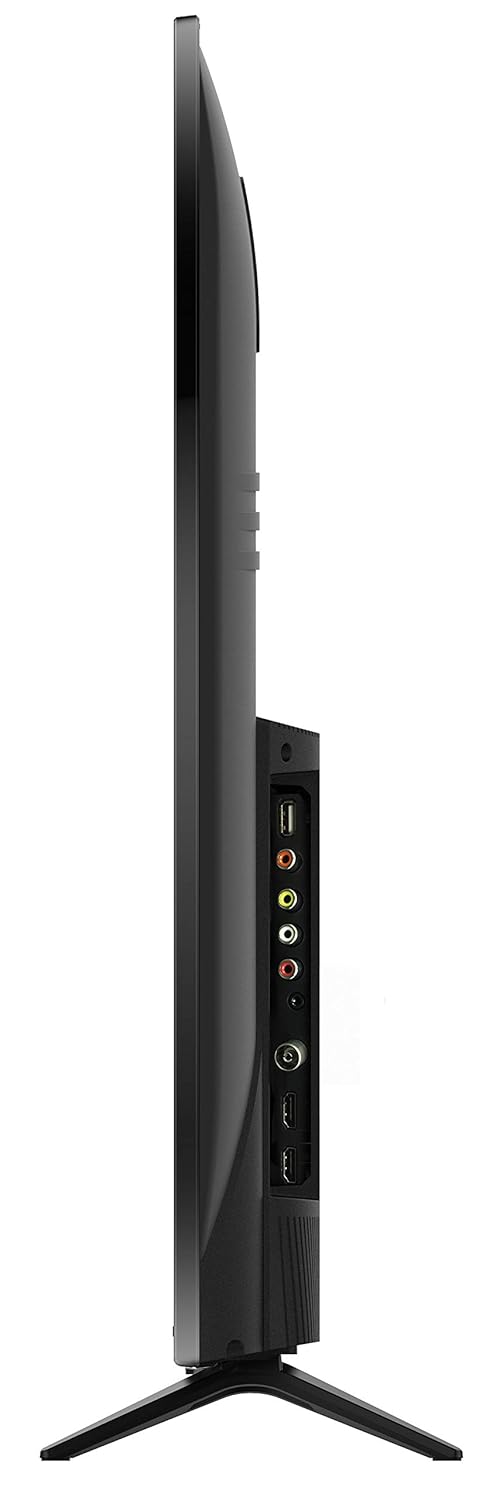
Mynd 4.2: Aftan view of the TCL 55P8 TV, indicating VESA mounting points for wall installation.
4.2 Tenging við utanaðkomandi tæki
Your TCL 55P8 TV offers various ports for connecting external devices:
- HDMI tengi (x3): Tengdu sjónvarpsbox, Blu-ray spilara, leikjatölvur eða önnur HDMI-tengd tæki.
- USB tengi (x2): Tengdu USB-lykil eða ytri harða diska til að spila margmiðlunarefni.
- LAN tengi: Tengdu Ethernet-snúru fyrir snúrubundna internettengingu.
- AV inntak: Use the provided AV-RCA adapter to connect older devices with composite video and stereo audio outputs.
- Heyrnartól tjakkur: Tengdu heyrnartól til að hlusta á einkaaðila.
- Stafræn hljóðútgangur: Tengdu við hljóðstiku eða heimabíókerfi fyrir betri hljóðupplifun.

Image 4.3: Diagram illustrating the various connectivity ports available on the TCL 55P8 TV.
5. Notkunarleiðbeiningar
5.1 Kveikt/slökkt
Press the power button on the remote control or on the TV to turn it on or off. The TV may take a few moments to boot up due to its Android operating system.
5.2 Fjarstýring
The included remote control allows you to navigate the TV's features. It supports both IR and Bluetooth technology. Insert the two AAA batteries into the remote control, ensuring correct polarity.
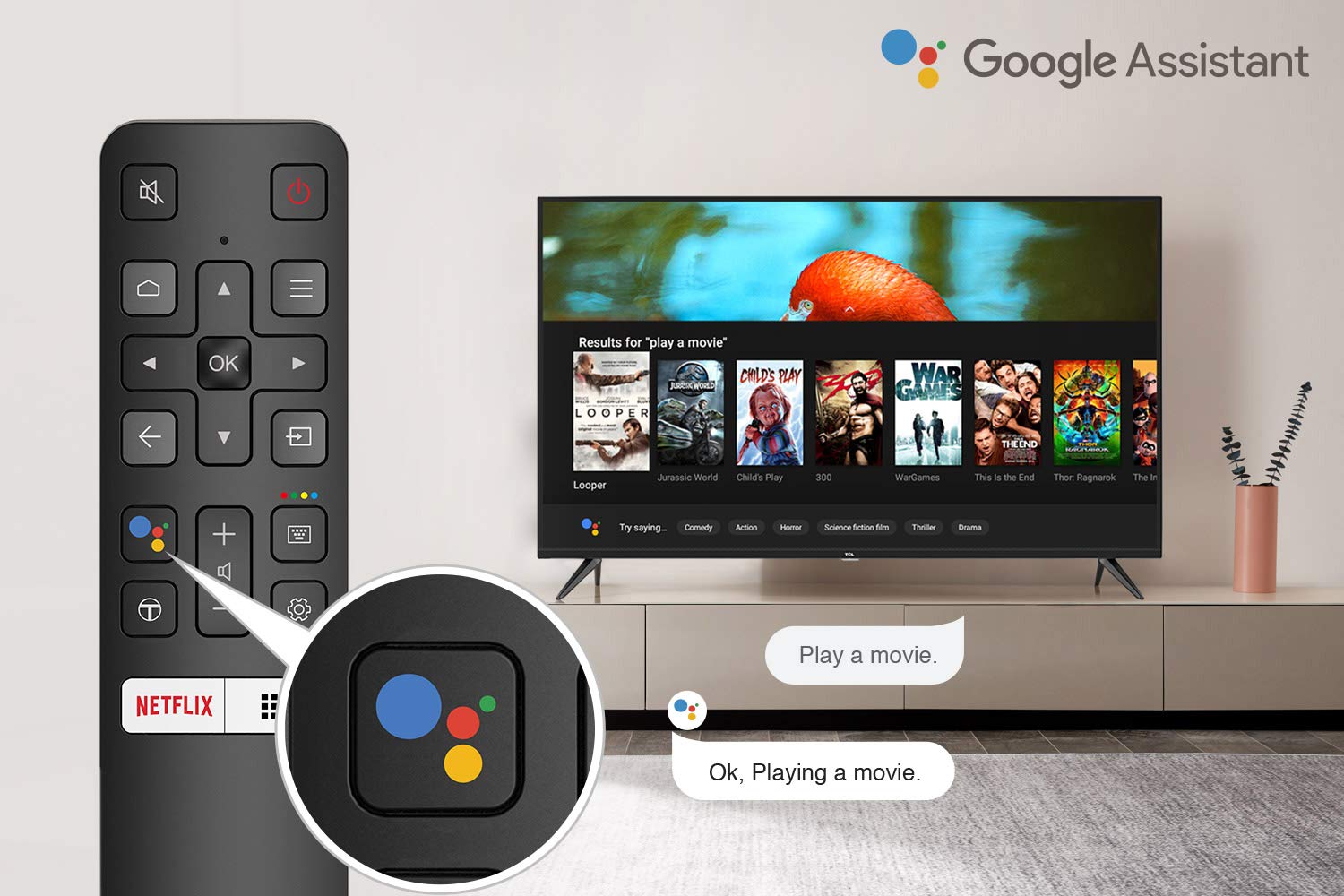
Image 5.1: The remote control for the TCL 55P8 TV, highlighting the Google Assistant button for voice commands.
5.3 Eiginleikar snjallsjónvarps (Android TV 9.0)
Your TCL 55P8 TV runs on Android TV 9.0, offering a wide range of smart functionalities:
- AI-Google Assistant: Notaðu raddskipanir í gegnum fjarstýringuna til að leita að efni, stjórna snjalltækjum heimilisins og fá upplýsingar.
- Google Cast (Chromecast built-in): Cast content from your compatible smartphone, tablet, or computer directly to the TV screen.
- T-cast: Utilize the T-cast app for additional smart features and screen mirroring.
- Bluetooth: Connect Bluetooth-enabled devices such as headphones or game controllers.
- Aðgangur að forriti: Download and install various applications from the Google Play Store, including streaming services like Netflix, Amazon Prime Video, YouTube, Hotstar, Sony Liv, and Zee5.
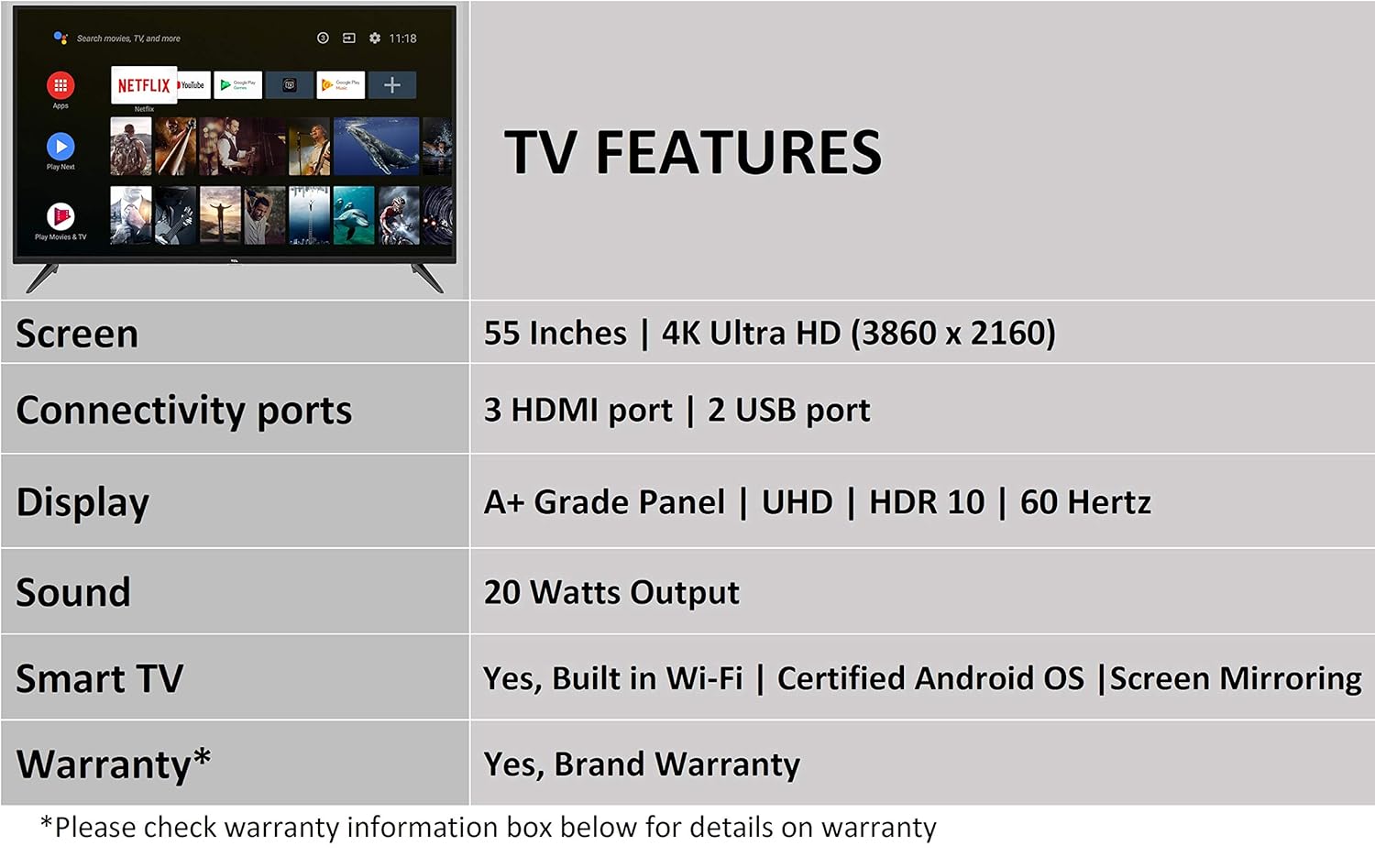
Image 5.2: The Android TV home screen on the TCL 55P8, displaying icons for popular streaming applications.
5.4 Mynd- og hljóðstillingar
- Mynd: Navigate to the picture settings menu to adjust brightness, contrast, color, and sharpness. The TV supports 4K Ultra HD resolution, HDR10, and features Micro Dimming for enhanced contrast.
- Hljóð: Access sound settings to adjust volume, equalizer, and select audio output modes. The TV provides 20 Watts of audio output and supports Dolby Audio.
6. Viðhald
6.1 Þrif á sjónvarpinu
- Skjár: Gently wipe the screen with a soft, lint-free, dry cloth. For stubborn marks, slightly dampÞvoið klútinn með vatni (ekki úða beint á skjáinn).
- Líkami: Þurrkið sjónvarpsrammann og standinn með mjúkum, þurrum klút.
- Varúð: Ekki nota slípiefni, alkóhól, bensen eða þynningarefni, þar sem þau geta skemmt yfirborð sjónvarpsins.
6.2 Hugbúnaðaruppfærslur
Your Android TV may receive periodic software updates. Ensure your TV is connected to the internet to receive these updates, which can improve performance and add new features. You can usually check for updates in the TV's settings menu.
7. Bilanagreining
Ef þú lendir í vandræðum með sjónvarpið þitt skaltu skoða eftirfarandi algengar lausnir:
| Vandamál | Möguleg lausn |
|---|---|
| Enginn kraftur | Gakktu úr skugga um að rafmagnssnúran sé vel tengd við sjónvarpið og innstunguna. Gakktu úr skugga um að innstungan virki. |
| Engin mynd, en hljóð er til staðar | Verify the correct input source is selected. Check HDMI/AV cable connections. Try restarting the TV. |
| Ekkert hljóð, en mynd er til staðar | Check the volume level and ensure the TV is not muted. Verify audio cable connections if using external speakers. Check audio output settings. |
| Fjarstýring virkar ekki | Replace batteries. Ensure there are no obstructions between the remote and the TV's IR sensor. Re-pair the Bluetooth remote if necessary. |
| Vandamál með nettengingu | Check Wi-Fi password. Restart your router. Ensure the TV is within range of the Wi-Fi signal or the Ethernet cable is properly connected. |
| Hæg afköst / Forrit hrynja | Close unused applications. Clear cache for problematic apps. Restart the TV. Consider a factory reset if issues persist (note: this will erase all data). |
If the problem persists after attempting these solutions, please contact TCL customer support.
8. Tæknilýsing
Detailed technical specifications for the TCL 55P8 55-inch AI 4K UHD Android Smart LED TV:
| Eiginleiki | Forskrift |
|---|---|
| Fyrirmynd | 55P8 |
| Skjástærð | 55 tommur (138.78 cm) |
| Upplausn | 4K Ultra HD (3840 x 2160 pixlar) |
| Endurnýjunartíðni | 60 Hz |
| Viewí horn | 178 gráður |
| Skjár Tegund | LED, A+ stigs skjár |
| HDR stuðningur | HDR 10 |
| Stýrikerfi | Android 9.0 |
| Örgjörvi | Quad-core A55 (1.1GHz) |
| Grafískur hjálpargjörvi | Mali470x3 (600MHz-800MHz) |
| vinnsluminni | 2 GB |
| Innri geymsla | 16 GB |
| Hljóðúttak | 20 Watt |
| Hljóðtækni | AI Sound Engine, Dolby Audio |
| HDMI tengi | 3 (HDMI 2.0, HDCP2.2, ARC on Port 1) |
| USB tengi | 2 (USB 2.0) |
| Tengingar | Wi-Fi (2x2 b/g/n 2.4GHz), Ethernet, Bluetooth 5.0 |
| Sérstakir eiginleikar | AI-Google Assistant, Google Cast, T-cast, Micro Dimming |
| Vörumál (LxBxH) | 124.4 x 23.9 x 77.5 cm (með standi) |
| Þyngd hlutar | 12 kg |

Image 8.1: Dimensional diagram of the TCL 55P8 TV, showing height, width, and depth measurements.
9. Ábyrgð og stuðningur
9.1 Upplýsingar um ábyrgð
Your TCL 55P8 TV comes with an 18 mánaða ábyrgð provided by TCL from the date of purchase. Please retain your purchase receipt and warranty card for any warranty claims.
9.2 Installation and Customer Support
For requesting installation, wall mounting, or a product demonstration after delivery, please contact TCL customer service:
- Ókeypis símanúmer: 18004190622 eða 18001020622
For any other technical assistance or support, please refer to the contact information provided on your warranty card or the official TCL websíða.
9.3 Skilareglur
This product is eligible for replacement or refund within 10 days of delivery in case of any product defects, damage, or features not matching the description provided. Please refer to the retailer's return policy for detailed terms and conditions.