
1. Vöru lokiðview
The Obuby Kids Walkie Talkies are designed for children aged 3-12, offering a fun and reliable way to communicate. This set includes two 2-way radios with 22 channels and a range of up to 3 kilometers, making them ideal for both indoor and outdoor adventures. Key features include a backlit LCD, a built-in flashlight, and clear sound quality with anti-interference capabilities.

Image: The Obuby Kids Walkie Talkies set, featuring two units and their packaging.
2. Uppsetningarleiðbeiningar
2.1 Uppsetning rafhlöðu
Each walkie talkie requires 4 AAA batteries (not included). Ensure batteries are inserted with correct polarity.
- Finndu rafhlöðuhólfið aftan á talstöðinni.
- Gently slide the battery cover latch to open the compartment.
- Settu í tvær AAA rafhlöður og láttu plús (+) og neikvæðu (-) tengipunktana passa saman eins og sýnt er inni í hólfinu.
- Lokaðu rafhlöðulokinu vel þar til það smellpassar.

Image: Visual guide for battery installation.
2.2 Kveikt/slökkt
Til að kveikja á talstöðinni skaltu halda inni Aflhnappur ( ) located on the top right side of the device until the LCD screen illuminates. To power off, press and hold the same button until the screen turns off.
3. Notkunarleiðbeiningar
Familiarize yourself with the buttons and functions for optimal use.

Image: Close-up of the walkie talkie's features and buttons.
3.1 Rásarval
The walkie talkies feature 22 available channels. To change the channel:
- Ýttu á MENU button once. The channel number on the LCD will flash.
- Notaðu Up (
 ) eða Niður (
 ) arrow buttons to select your desired channel (1-22).
 - Ýttu á TALA button to confirm your selection and exit the menu, or wait a few seconds for it to auto-confirm.
For communication, both walkie talkies must be set to the same channel.
3.2 Sending og móttaka
- To Transmit (Talk): Ýttu á og haltu inni stóra TALA button located on the front of the device. Speak clearly into the microphone. Release the button when you are finished speaking.
- Til að taka við: Simply ensure the walkie talkie is powered on and on the same channel as the transmitting unit. No button press is required to receive.
3.3 Eftirlitsvirkni (MON)
The MÁN button allows you to temporarily disable the squelch function, enabling you to hear weaker signals or monitor a channel for activity without interference. Press and hold the MÁN button to activate, release to deactivate.
3.4 Notkun vasaljóss
The built-in LED flashlight is located at the top of the walkie talkie. Press the LAMP hnappur (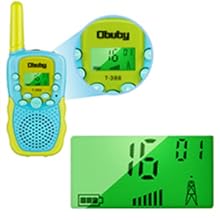 ) to turn the flashlight on or off. This feature is useful in low-light conditions.

Image: Walkie talkie flashlight in use during an outdoor adventure.
3.5 Hljóðstyrksstilling
Notaðu Up () og Niður () arrow buttons to adjust the speaker volume. The volume level is displayed on the LCD screen.
3.6 Keypad Lock Function
Til að koma í veg fyrir að stillingum verði breytt fyrir slysni er hægt að læsa takkaborðinu. Haltu inni takkanum MENU button until a key icon ( ) appears on the LCD. To unlock, press and hold the MENU button again until the key icon disappears.
3.7 VOX (raddstýrð skiptistöð)
The VOX function allows for hands-free operation. When activated, the walkie talkie will automatically transmit when it detects your voice, without needing to press the TALK button. To activate/deactivate VOX:
- Ýttu á MENU button multiple times until "VOX" appears on the LCD.
- Notaðu Up or Niður arrow buttons to select the VOX sensitivity level (e.g., 1-3, with 3 being most sensitive) or "OFF" to disable.
- Ýttu á TALA hnappinn til að staðfesta.
3.8 hringitónar
The walkie talkies offer 10 customizable call tones. To select a call tone:
- Ýttu á MENU button multiple times until "CA" (Call Tone) appears on the LCD.
- Notaðu Up or Niður arrow buttons to cycle through the available tones.
- Ýttu á TALA hnappinn til að staðfesta.
To send a call tone to another unit, press the Musical Note button ( ) einu sinni.
3.9 Roger Beep
The Roger Beep is an audible tone transmitted at the end of your transmission to signal to other users that you have finished speaking. To enable/disable the Roger Beep:
- Ýttu á MENU button multiple times until "RO" (Roger Beep) appears on the LCD.
- Notaðu Up or Niður arrow buttons to select "ON" or "OFF".
- Ýttu á TALA hnappinn til að staðfesta.
4. Viðhald
- Þrif: Þurrkið talstöðvarnar með mjúkum klútamp klút. Ekki nota sterk efni eða slípiefni.
- Umhirða rafhlöðu: Remove batteries if the devices will not be used for an extended period to prevent leakage. Replace all batteries at the same time.
- Geymsla: Geymið talstöðvarnar á köldum, þurrum stað fjarri beinu sólarljósi og miklum hita.
- Vatnsþol: The walkie talkies have an IPX5 waterproof rating, meaning they are protected against low-pressure water jets from any direction. They are not designed to be submerged in water.
5. Bilanagreining
| Vandamál | Möguleg orsök | Lausn |
|---|---|---|
| No power or device not turning on. | Batteries are low, incorrectly installed, or missing. | Skiptið um nýjar AAA rafhlöður og gætið þess að þær séu rétt pólaðar. |
| Cannot communicate with another unit. | Units are on different channels, out of range, or batteries are low. | Ensure both units are on the same channel. Move closer to the other unit. Replace batteries. |
| Léleg hljóðgæði eða truflanir. | Interference from other electronic devices or obstacles. Unit is at the edge of range. | Move away from sources of interference. Adjust volume. Use the MON button to check for weak signals. |
| Channel changes accidentally. | Buttons are being pressed unintentionally. | Activate the Keypad Lock function by pressing and holding the MENU button. |
| Stuttur rafhlaðaending. | Frequent use of flashlight or continuous transmission. Low quality batteries. | Use high-quality alkaline or rechargeable AAA batteries. Limit continuous transmission and flashlight use. |
6. Tæknilýsing
- Vörumál: 5 x 2 x 1.5 tommur
- Þyngd hlutar: 6.7 aura
- Gerðarnúmer: WT1-1
- Rafhlöður: 4 AAA batteries required (per unit)
- Fjöldi rása: 22
- Tíðnisvið: UHF (around 400-470 MHz)
- Talsvið hámark: 3 kílómetrar
- Vatnsþol: IPX5 (vatnsheldur)
- Sérstakir eiginleikar: Adjustable Volume, Built-in Flashlight, Backlit LCD, Keypad Lock, VOX
7. Ábyrgð og stuðningur
For warranty information, please refer to the documentation included with your purchase or visit the official OBUBY website. If you encounter any issues or require technical assistance, please contact OBUBY customer support through their official channels.
You can visit the OBUBY Store for more information: OBUBY Store on Amazon.