
1. Inngangur
This manual provides detailed instructions for the installation, operation, and maintenance of your ANNKE 8-channel 3K Lite DVR security system. This system is designed to provide reliable surveillance with advanced features such as AI-powered person/vehicle detection, 1080P color night vision cameras, and continuous 24/7 recording to a pre-installed 1TB hard drive.
Please read this manual thoroughly before setting up and using your system to ensure proper functionality and safety.
2. Innihald pakka
Gakktu úr skugga um að allir hlutir sem taldir eru upp hér að neðan séu innifaldir í pakkanum þínum. Ef einhverjir hlutir vantar eða eru skemmdir skaltu hafa samband við þjónustuver ANNKE.
- 1x 3K Lite DVR with 1TB Hard Drive
- 4x 1080P TVI Bullet Cameras
- 4x BNC Cables (60 feet each)
- 1x Ethernet kapall
- 1x HDMI snúru
- 1x USB mús
- 2x 12V straumbreytir
- 1x 4-in-1 Power Splitter Cable
- 1x Notendahandbók
- 4x Mounting Screws and Wall Plugs
- 1x 24-Hour Video Surveillance Sticker
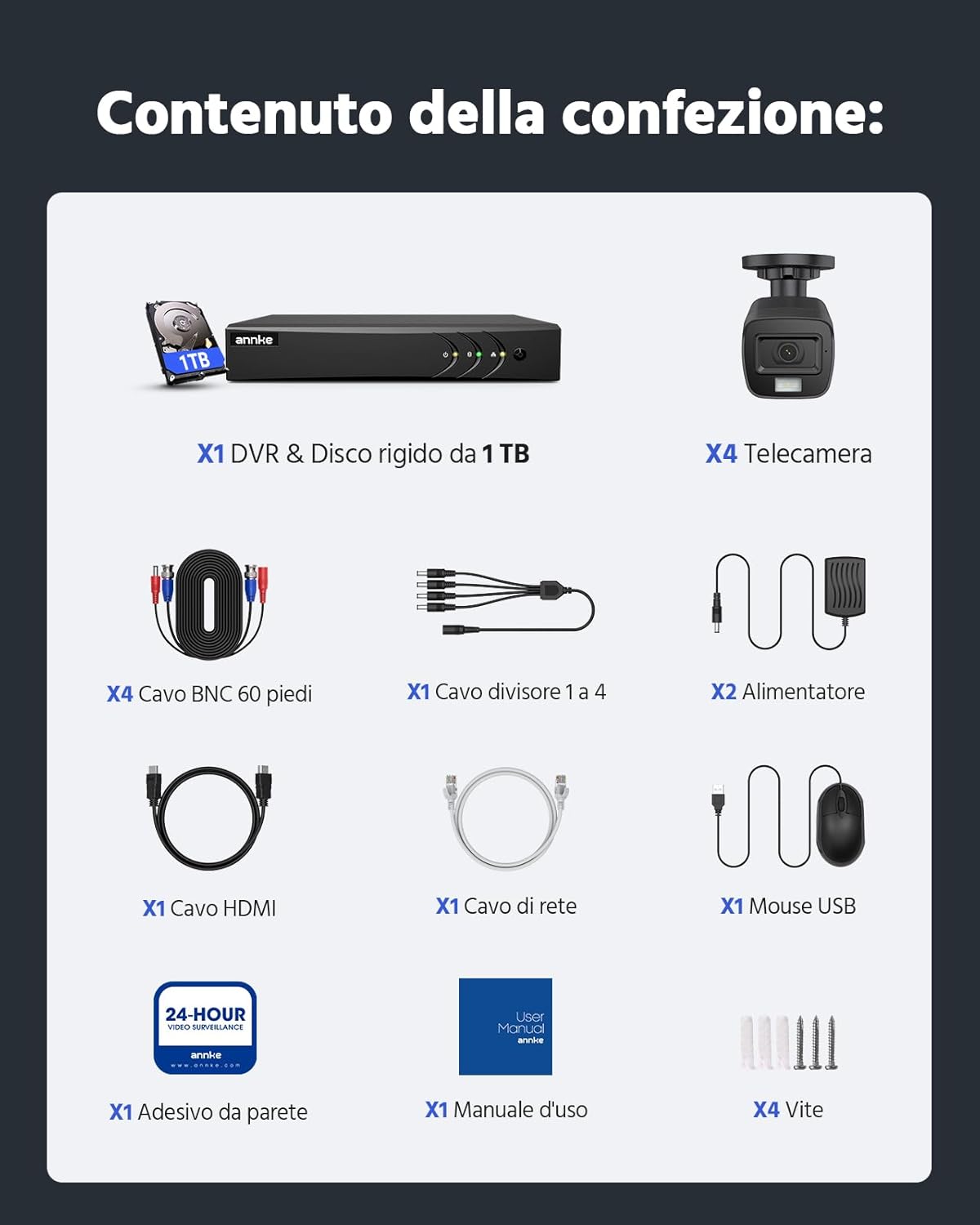
Mynd 2.1: All components included in the ANNKE 8CH 3K Lite DVR security system package.
3. Kerfi lokiðview
3.1 DVR Features
- 5-in-1 Hybrid DVR: Supports TVI, AHD, CVI, CVBS, and IP cameras, offering broad compatibility.
- Ítarleg myndþjöppun: H.265+ technology optimizes storage space and reduces bandwidth for longer recordings and smoother viewing.
- Fyrirfram uppsettur 1TB harður diskur: Ensures reliable 24/7 continuous recording, expandable up to 10TB.
- AI Event Analysis: Features intelligent motion detection, line crossing detection, and intrusion detection with person/vehicle filtering to minimize false alarms.

Mynd 3.1: The 5-in-1 hybrid DVR supports multiple camera technologies.

Mynd 3.2: H.265+ video compression significantly reduces storage requirements.
3.2 Myndavélareiginleikar
- 1080P High Definition: Veitir skýrt og ítarlegt myndbandtage.
- Smart Dual-Light Color Night Vision: Offers clear color night vision with flexible switching between IR (black and white) and color modes.
- IP67 Veðurþolið: Sterkt casing ensures excellent performance in extreme temperatures (-40°C to +60°C) and harsh weather conditions.

Mynd 3.3: Smart Dual-Light technology enables clear color night vision.

Mynd 3.4: IP67 weatherproof cameras are designed for outdoor use in various conditions.
4. Uppsetningarleiðbeiningar
4.1 Líkamleg uppsetning
- Tengja myndavélar við DVR: Use the provided BNC cables to connect each camera to the corresponding video input ports on the back of the DVR.
- Connect Power to Cameras: Use the 4-in-1 power splitter cable and a 12V power adapter to power the cameras. Ensure all cameras receive power.
- Tengja DVR við skjá: Use the HDMI cable to connect the DVR to a monitor or TV for initial setup and local viewing.
- Tengdu USB mús: Stingdu USB músinni í USB tengi á DVR til að leiðsögu.
- Tengjast neti (valfrjálst fyrir fjaraðgang): Connect the DVR to your router using the Ethernet cable if you plan to use remote viewing eiginleika.
- Kveikt á: Connect the remaining 12V power adapter to the DVR and plug it into a power outlet. The system will boot up.
4.2 Upphafleg stilling
Við fyrstu ræsingu mun upptökutækið leiða þig í gegnum uppsetningarhjálp. Fylgdu leiðbeiningunum á skjánum til að:
- Settu upp sterkt lykilorð fyrir stjórnandareikninginn.
- Stilltu dagsetningar- og tímastillingar.
- Adjust network settings (DHCP is recommended for most home users).
- Format the hard drive (if prompted, this is necessary for recording).
5. Notkunarleiðbeiningar
5.1 Í beinni View
Eftir upphaflega uppsetningu mun upptökutækið sýna beina útsendingu. view frá öllum tengdum myndavélum á skjánum þínum. Þú getur skipt á milli einnar myndavélar view, fjölmyndavél view, and customize display layouts using the mouse.
5.2 Upptaka
- Stöðug upptaka: The system is pre-configured for 24/7 continuous recording to the 1TB HDD.
- Hreyfiskveikt upptaka: Configure specific channels to record only when motion is detected. This can be set up in the DVR's recording schedule settings.
- AI Detection Recording: Enable person/vehicle detection for specific channels to trigger recording only when relevant events occur.

Mynd 5.1: The pre-installed 1TB HDD supports continuous 24/7 recording.
5.3 Spilun
Aðgangur skráð footage through the DVR's playback menu. You can search by date, time, and event type (e.g., motion, AI detection). Use the timeline to navigate through recordings.
5.4 Remote Access (ANNKE VISION App)
Til view myndavélarnar þínar fjarstýrt í snjallsíma eða spjaldtölvu:
- Sækja ANNKE VISION app úr Google Play Store eða Apple App Store.
- Skráðu reikning og skráðu þig inn.
- Add your DVR device by scanning the QR code found on the DVR or in its network settings.
- Follow the app's instructions to complete the device addition. You can now view Bein útsending og spilun upptöku hvaðan sem er með nettengingu.

Mynd 5.2: Fjarstýring viewing on multiple devices via the ANNKE VISION app.
5.5 AI Detection (Person/Vehicle)
The system's AI capabilities allow for precise detection of people and vehicles, reducing false alarms from animals or environmental factors. When enabled, you will receive push notifications and email alerts only for actual threats.
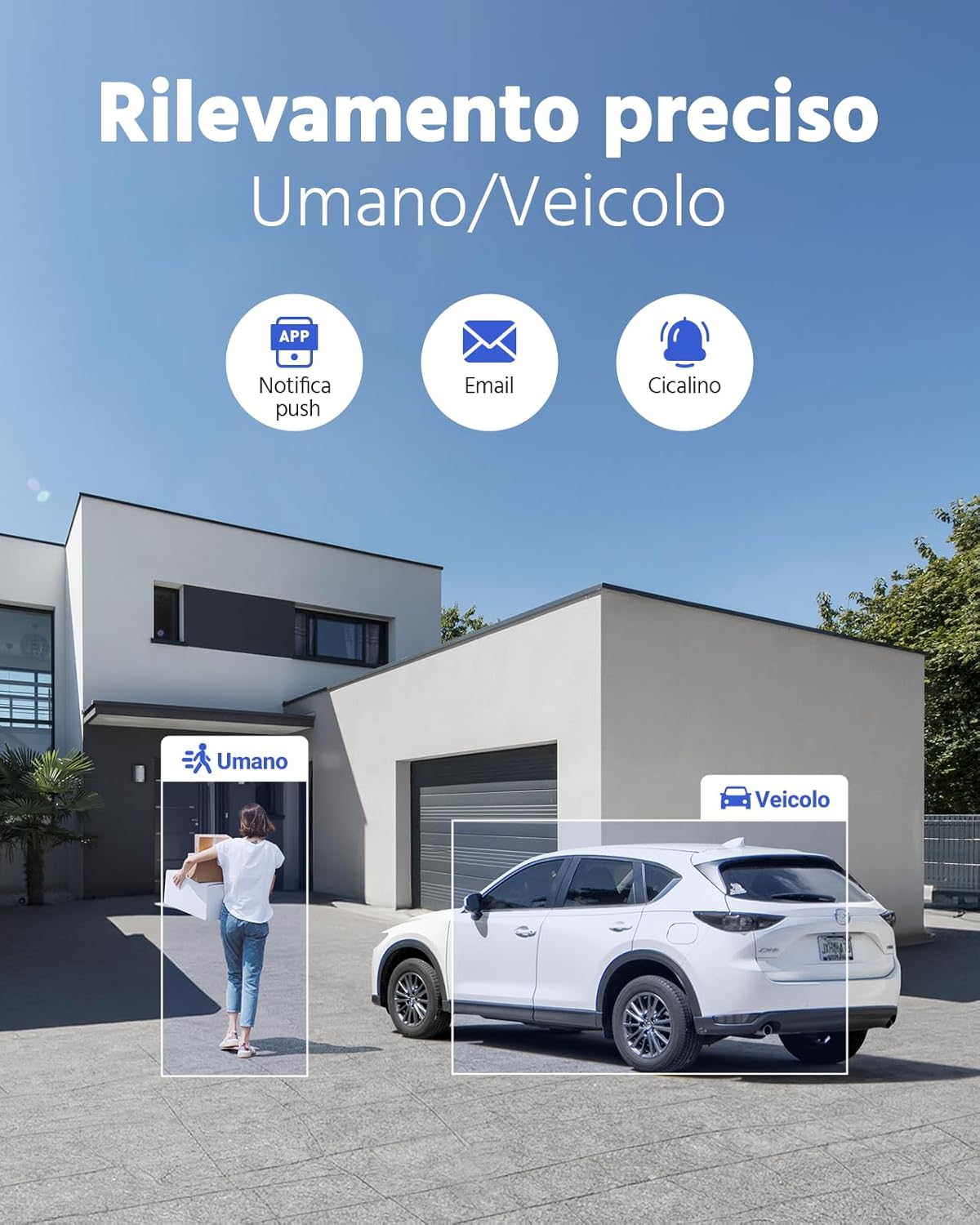
Mynd 5.3: AI-powered person and vehicle detection for accurate alerts.
5.6 Persónuverndargrímur
To protect privacy in sensitive areas, you can configure privacy masks within the DVR settings. This feature allows you to block out specific regions in the camera's view frá því að vera tekið upp eða birt.

Mynd 5.4: Privacy masking allows you to exclude specific areas from surveillance.
6. Viðhald
6.1 Stjórnun harðdisks
The DVR's hard drive will automatically overwrite the oldest footage when it becomes full. Regularly check the hard drive status in the DVR settings to ensure it is functioning correctly. You can also manually format the HDD if needed (this will erase all recordings).
6.2 vélbúnaðaruppfærslur
Athugaðu reglulega ANNKE website for firmware updates for your DVR. Keeping your firmware updated ensures optimal performance, security, and access to new features. Follow the instructions provided with the firmware update carefully.
6.3 Þrif
- Myndavélar: Gently clean camera lenses with a soft, damp cloth to remove dust or smudges that may affect image quality. Do not use harsh chemicals.
- DVR: Keep the DVR in a well-ventilated area. Clean the exterior with a dry cloth. Do not block ventilation openings.
7. Bilanagreining
This section addresses common issues you might encounter. For more complex problems, please refer to the ANNKE support websíðuna eða hafðu samband við þjónustuver.
- Engin myndbandsúttak:
- Check all cable connections (power, HDMI/VGA).
- Ensure the monitor is set to the correct input source.
- Verify that the DVR is powered on. - Engin upptaka:
- Check if the hard drive is installed and formatted correctly.
- Verify recording schedules and settings.
- Ensure cameras are properly connected and receiving power. - Fjaraðgangur virkar ekki:
- Ensure the DVR is connected to the internet via Ethernet cable.
- Check network settings on the DVR and your router.
- Verify that the ANNKE VISION app is correctly configured and the device is added. - Léleg myndgæði:
- Hreinsið myndavélarlinsur.
- Ensure camera resolution settings are optimal.
- Check cable integrity for any damage. - False Alarms from Motion Detection:
- Adjust motion detection sensitivity.
- Utilize AI person/vehicle filtering.
- Set up privacy masks for areas with frequent irrelevant motion.
8. Tæknilýsing
| Eiginleiki | Forskrift |
|---|---|
| Vörumerki | ANNKE |
| Gerðarnúmer | DW81KT1-54EP |
| DVR rásir | 8 rásir |
| DVR gerð | 3K Lite Hybrid (5-in-1) |
| Upplausn myndavélar | 1080p |
| Myndbandsþjöppun | H.265 + |
| Harður diskur | 1TB Pre-installed (Expandable up to 10TB) |
| Sérstakir eiginleikar | Remote Access, Smart Dual-Light, IP67 Weatherproof, Person/Vehicle Detection, Color Night Vision |
| Tengitækni | Þráðlaust |
| Power Tegund | Rafmagns |
| Voltage | 12 volt |
| Hvaðtage | 35 vött |
| Rekstrarhitastig | -40°C til +60°C (-40°F til 140°F) |
| Vörumál | 37 x 30 x 20 cm |
| Þyngd hlutar | 4.05 kíló |
9. Stuðningur
ANNKE is committed to providing excellent customer service and technical support. If you encounter any issues or have questions about your security system, please utilize the following resources:
- Stuðningur á netinu: Heimsæktu opinbera þjónustudeild ANNKE websíða fyrir algengar spurningar, leiðbeiningar um bilanaleit og niðurhal á vélbúnaði.
- Stuðningur við tölvupóst: Hafðu samband við þjónustudeild okkar í gegnum tölvupóst til að fá aðstoð.
- Tæknileg aðstoð ævilangt: ANNKE provides lifetime technical support for its products.

Mynd 9.1: ANNKE's commitment to customer support.
Athugasemd um myndbönd: Engin opinber vörumyndbönd frá seljanda voru tiltæk í þeim gögnum sem gefnar voru til innfellingar í þessa handbók.