
1. Inngangur
Thank you for choosing the Awei A831BL Bluetooth In-Ear Headset. This manual provides essential information for the safe and efficient use of your device. Please read it carefully before use and retain it for future reference.
The Awei A831BL is a wireless in-ear headset designed for mobile phone use, offering up to 8 hours of continuous talk and music playback. It features pure, high-quality bass sound and is suitable for various activities.
2. Innihald pakka
Vinsamlegast athugið hvort eftirfarandi atriði séu í pakkanum:
- Awei A831BL Bluetooth In-Ear Headset
- USB hleðslusnúra
- Eyrnabendingar (ýmsar stærðir)
- Notendahandbók
3. Vöru lokiðview
Familiarize yourself with the components of your Awei A831BL headset.
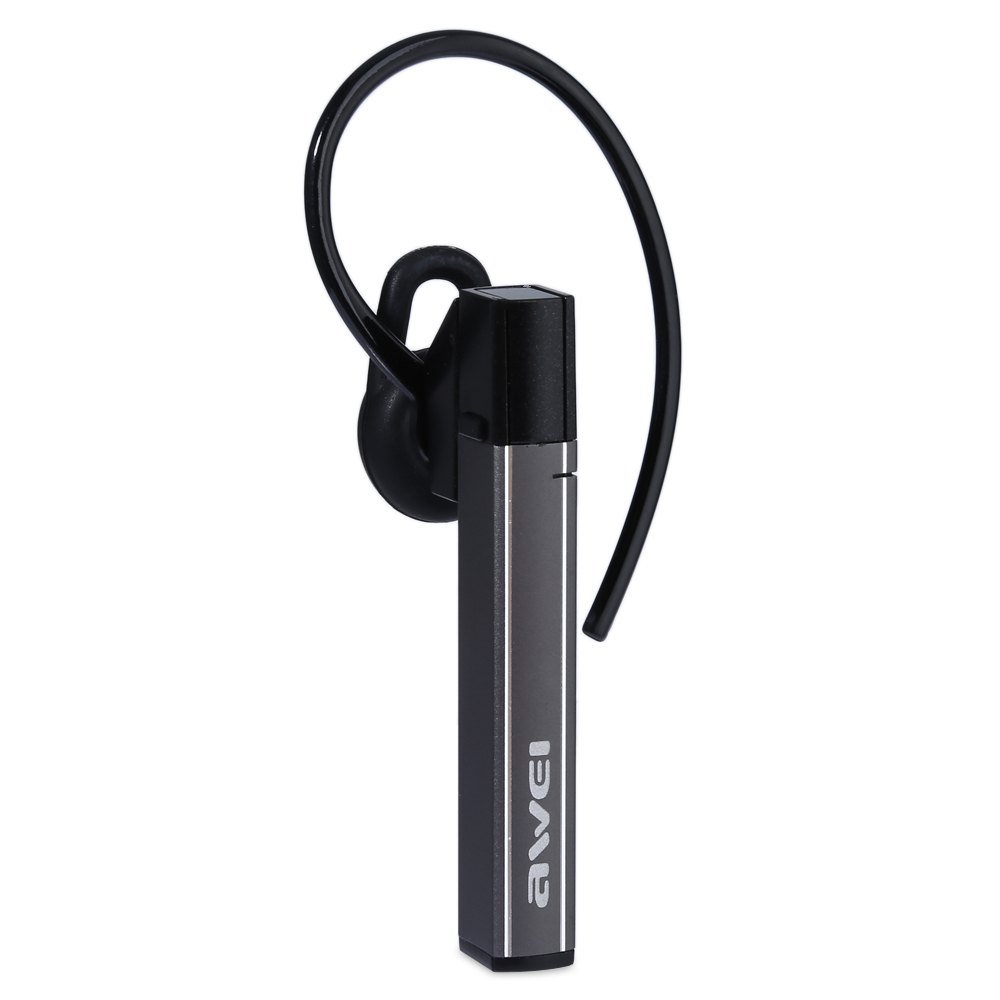
Image: The Awei A831BL Bluetooth In-Ear Headset in grey, showing the earbud design and inline controls.
The headset features an ergonomic in-ear design for comfortable wear, especially during activities. It includes an integrated microphone for hands-free calls and inline controls for managing audio and calls.
4. Uppsetning
4.1 Hleðsla heyrnartólanna
- Tengdu USB hleðslusnúruna við hleðslutengið á heyrnartólinu.
- Tengdu hinn endann á USB snúrunni við USB straumbreyti (fylgir ekki með) eða USB tengi tölvu.
- The indicator light will illuminate (e.g., red) during charging.
- Once fully charged, the indicator light will change (e.g., turn blue or turn off).
A full charge provides up to 8 hours of talk or music playback time.
4.2 Bluetooth pörun
- Gakktu úr skugga um að heyrnartólið sé fullhlaðið og slökkt.
- Press and hold the Multi-function button (usually the center button on the inline control) for approximately 5-7 seconds until the indicator light flashes red and blue alternately, indicating pairing mode.
- Í farsímanum þínum eða Bluetooth-tæki skaltu virkja Bluetooth og leita að tiltækum tækjum.
- Veldu „Awei A831BL“ af listanum yfir fundin tæki.
- Ef beðið er um lykilorð, sláðu inn „0000“ (fjór núll).
- Once successfully paired, the indicator light will flash blue slowly, and you may hear a confirmation tone.
Heyrnartólið mun sjálfkrafa reyna að tengjast við síðasta paraða tækið þegar það er kveikt á því.
5. Notkunarleiðbeiningar
5.1 Kveikt/slökkt
- Kveikt á: Press and hold the Multi-function button for about 3 seconds until the blue indicator light flashes.
- Slökkva á: Press and hold the Multi-function button for about 3-4 seconds until the red indicator light flashes briefly and then turns off.
5.2 Tónlist spilun
- Spila / gera hlé: Ýttu einu sinni á fjölvirka hnappinn.
- Hækka: Ýttu á '+' hnappinn.
- Hljóðstyrkur niður: Ýttu á '-' hnappinn.
- Næsta lag: Ýttu á og haltu inni '+' hnappinum.
- Fyrra lag: Ýttu á og haltu inni '-' hnappinum.
5.3 Símtalsstjórnun
- Svara símtali: Ýttu einu sinni á fjölnotahnappinn þegar símtal berst.
- Ljúka símtali: Ýttu einu sinni á fjölnotahnappinn meðan á símtali stendur.
- Hafna símtali: Ýttu á fjölnotahnappinn og haltu honum inni í um það bil 2 sekúndur þegar símtal berst.
- Endurval síðasta númer: Ýttu tvisvar á Multi-function hnappinn.
The integrated microphone allows for clear hands-free communication.
6. Viðhald
- Þrífið heyrnartólin reglulega með mjúkum, þurrum klút.
- Forðist að útsetja heyrnartólið fyrir miklum hita, raka eða ætandi efnum.
- Do not attempt to disassemble or modify the headset, as this will void the warranty and may cause damage.
- Geymið heyrnartólið á köldum og þurrum stað þegar það er ekki í notkun.
7. Bilanagreining
| Vandamál | Lausn |
|---|---|
| Heyrnartólið kviknar ekki á. | Gakktu úr skugga um að heyrnartólið sé fullhlaðið. Tengdu það við rafmagn og reyndu aftur. |
| Ekki er hægt að para við tæki. | Ensure the headset is in pairing mode (flashing red and blue). Turn off and on your device's Bluetooth. Move closer to the device. Clear previous Bluetooth connections on your device. |
| Ekkert hljóð eða lágt hljóðstyrkur. | Athugaðu hljóðstyrkinn bæði í heyrnartólunum og tengda tækinu. Gakktu úr skugga um að heyrnartólin séu rétt tengd. |
| Léleg símtalsgæði. | Ensure the microphone is not obstructed. Move to an area with less interference. Check your phone's signal strength. |
8. Tæknilýsing
| Eiginleiki | Smáatriði |
|---|---|
| Vörumerki | Awei |
| Gerðarnúmer | A831BL |
| Litur | Grátt |
| Tengitækni | Þráðlaust (Bluetooth) |
| Tegund heyrnartóls | In-Ear |
| Hljóðnemi | Já |
| Noise Cancellation | Nei |
| Rafhlöðuending | Up to 8 hours (talk/music) |
| Hljóðeiginleikar | Pure, high-quality bass sound |
| Efni | Plast |
| Samhæf tæki | Farsímar |
9. Ábyrgð og stuðningur
Awei products are designed and manufactured to the highest quality standards. For warranty information and customer support, please refer to the warranty card included in your package or contact your local retailer. Keep your purchase receipt as proof of purchase.
For further assistance, please visit the official Awei websíðuna eða hafðu samband við þjónustudeild þeirra.