
1. Inngangur
This manual provides detailed instructions for the safe and effective use of your Sndway SW-M40 Digital Laser Rangefinder. Please read this manual thoroughly before operating the device and retain it for future reference.
The Sndway SW-M40 is a compact and precise digital laser distance meter designed for various measurement tasks, including single distance, area, volume, and Pythagorean calculations. It features a measuring range of up to 40 meters.
2. Öryggisupplýsingar
VIÐVÖRUN: Leysigeislun
- Ekki stara inn í leysigeislann.
- Ekki beina leysigeislanum að fólki eða dýrum.
- Forðist beina útsetningu fyrir augum fyrir leysigeisla.
- This device emits Class 2 laser radiation.
- Geymið tækið þar sem börn ná ekki til.
- Ekki reyna að breyta eða taka tækið í sundur.
Always use the device in accordance with the instructions provided to prevent injury or damage.
3. Vöru lokiðview
The Sndway SW-M40 Digital Laser Rangefinder is equipped with a clear display and intuitive controls for efficient operation.

Mynd 3.1: Framan view of the Sndway SW-M40 Digital Laser Rangefinder displaying multiple measurement results.
3.1 Helstu eiginleikar
- Digital Laser Distance Measurement
- Area and Volume Calculation
- Pythagorean Measurement Function
- Addition and Subtraction of Measurements
- Reference Point Adjustment
- Unit Switching (meters, feet, inches)
- Gagnageymsluaðgerð
- Integrated Horizontal and Vertical Bubble Levels for alignment.

Figure 3.2: Sndway SW-M40 functions including Distance, Area, Volume, and Pythagorean measurement.
3.2 Hnappar aðgerðir

Figure 3.3: Control panel with button functions.
- READ Button: Powers on the device and initiates measurement.
- Area/Volume/Pythagorean Mode Button: Fer í gegnum mismunandi mælistillingar.
- Hnappar: Used for adding or subtracting measurements.
- Reference Point / Unit Switch Button: Changes the measurement reference point (front/rear of device) and switches measurement units.
- Vista hnappur: Stores current measurement data.
- OFF/CLEAR Button: Turns off the device or clears the current display.
4. Uppsetning
4.1 Uppsetning rafhlöðu
The Sndway SW-M40 requires two AAA batteries for operation. Ensure correct polarity when inserting the batteries.
- Finndu rafhlöðulokið aftan á tækinu.
- Opnaðu hlífina.
- Insert two AAA batteries, matching the '+' and '-' indicators inside the compartment.
- Lokaðu rafhlöðuhólfinu tryggilega.
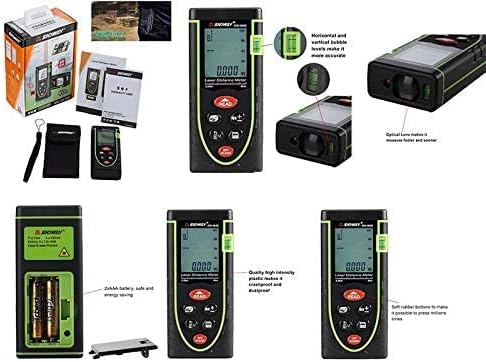
Figure 4.1: Battery compartment and other product details.
5. Notkunarleiðbeiningar
5.1 Kveikt/slökkt
- Til að kveikja á: Ýttu á LESIÐ hnappinn. Leysirinn mun virkjast.
- Til að slökkva á: Ýttu á og haltu inni SLÖKKT/HJÆRT button for a few seconds. The device will also automatically power off after a period of inactivity.
5.2 Mæling á einni fjarlægð
- Power on the device by pressing LESIÐ.
- Beindu leysigeislanum að markpunktinum.
- Ýttu á LESIÐ again to take the measurement. The distance will be displayed on the screen.
5.3 Svæðismæling
- Ýttu á Mode button (the button with the box icon) until the area icon (square) appears on the display.
- Take the first length measurement by pressing LESIÐ.
- Take the second width measurement by pressing LESIÐ.
- Tækið mun sjálfkrafa reikna út og birta flatarmálið.
5.4 Rúmmálsmæling
- Ýttu á Mode hnappinn þar til hljóðstyrkstáknið (teningur) birtist á skjánum.
- Take the length measurement by pressing LESIÐ.
- Take the width measurement by pressing LESIÐ.
- Take the height measurement by pressing LESIÐ.
- Tækið mun sjálfkrafa reikna út og birta rúmmálið.
5.5 Pýþagórasarmælingar
This mode is used to calculate indirect distances (e.g., height) using the Pythagorean theorem.
- Ýttu á Mode button until the Pythagorean icon (triangle) appears. There are typically two Pythagorean modes: two-point and three-point.
- Fylgdu leiðbeiningunum á skjánum til að mæla hliðar þríhyrningsins sem þarf (t.d. lághlið, grunnhlið).
- Tækið mun reikna út og birta óþekktu hliðina.
5.6 Unit Switching and Reference Point
- Einingarofi: Ýttu stuttlega á Viðmiðunarpunktur / einingarofi hnappinn til að fletta á milli mælieininga (metrar, fet, tommur).
- Viðmiðunarpunktur: Ýttu á og haltu inni Viðmiðunarpunktur / einingarofi button to change the measurement reference point between the front edge and the rear edge of the device. An icon on the display will indicate the active reference point.

Figure 5.1: Device held in hand, showing button layout.
5.7 Samlagning og frádráttur
Til að bæta við eða draga frá mælingar:
- Take the first measurement.
- Ýttu á '+' or '-' hnappinn.
- Take the second measurement.
- Niðurstaða samlagningar eða frádráttar verður birt.
5.8 Gagnageymsla
To save a measurement, press the Vista button after a measurement is displayed. The device can store multiple readings, which can be recalled later.
5.9 Clearing Measurements
To clear the current measurement from the display, briefly press the SLÖKKT/HJÆRT hnappinn.
6. Viðhald
- Þrif: Notaðu mjúkan, damp klút til að þrífa tækið. Notið ekki slípiefni eða leysiefni.
- Linsuumhirða: The optical lens is a sensitive component. Clean it gently with a soft cloth, similar to cleaning camera lenses.
- Geymsla: Geymið tækið á þurrum, köldum stað, fjarri beinu sólarljósi og miklum hita. Ef það er geymt í langan tíma skal fjarlægja rafhlöðurnar til að koma í veg fyrir leka.
- Skipt um rafhlöðu: Replace batteries when the low battery indicator appears on the display to ensure accurate operation.
7. Bilanagreining
| Vandamál | Möguleg orsök | Lausn |
|---|---|---|
| Ekki kveikir á tækinu | Lítil eða dauðar rafhlöður; Röng uppsetning rafhlöðu | Skiptu um rafhlöður; Athugaðu pólun rafhlöðunnar |
| Ónákvæmar mælingar | Unstable target surface; Obstruction in laser path; Dirty lens; Incorrect reference point | Ensure stable target; Clear laser path; Clean lens; Verify reference point setting |
| „Villa“ skilaboð á skjánum | Measurement out of range; Strong light interference; Laser blocked | Ensure target is within 0.05m-40m range; Measure in shaded areas; Ensure laser is not blocked |
| Laser ekki sýnilegur | Björt umhverfisljós; Leysirinn er ekki virkjaður | Measure in lower light conditions; Press READ button to activate laser |
8. Tæknilýsing
| Eiginleiki | Forskrift |
|---|---|
| Fyrirmynd | SW-M40 |
| Mælisvið | 0.05m - 40m |
| Mælieiningar | meters (m), feet (ft), inches (in) |
| Laser Class | 2. flokkur |
| Rafhlöður | 2 x AAA (innifalið) |
| Efni | Plast |
| Litur | Grænn |
| Þyngd hlutar | 0.17 kíló |
| Stærðir pakka | 17 x 8.8 x 5 cm |
9. Ábyrgð og stuðningur
9.1 Upplýsingar um ábyrgð
Vinsamlegast skoðið kaupskjölin ykkar eða upplýsingar frá söluaðilanum. website for specific warranty terms and conditions applicable to your Sndway SW-M40 Digital Laser Rangefinder.
9.2 Þjónustuver
For technical assistance, troubleshooting not covered in this manual, or service inquiries, please contact the retailer or the manufacturer directly. Contact information can typically be found on the product packaging or the seller's online store page.