Inngangur
Welcome to the user manual for your SNDWAY SW-T60 Digital Laser Rangefinder. This device is designed for precise and efficient measurement of distances, areas, and volumes. Please read this manual carefully before using the device to ensure safe and optimal operation and to understand all features.
Öryggisupplýsingar
Laser öryggi
The SNDWAY SW-T60 emits a Class II laser. Observe the following precautions:
- Ekki stara beint inn í leysigeislann.
- Ekki beina leysigeislanum að fólki eða dýrum.
- Forðist beina útsetningu fyrir augum.
- Ekki taka í sundur eða breyta tækinu.
Almennt öryggi
- Geymið tækið þar sem börn ná ekki til.
- Ekki nota tækið í sprengifimu umhverfi.
- Verjið tækið gegn raka og beinu sólarljósi.
- Use only specified batteries (2 x 1.5V AAA).
Vara lokiðview
Íhlutir tækis
The following image illustrates the main components of the SNDWAY SW-T60.

A framhlið view of the SNDWAY SW-T60 Digital Laser Rangefinder, showing the display screen, "READ" button, and other function buttons. A bubble level is visible on the right side.

Nærmynd view highlighting the integrated bubble level on the side of the SNDWAY SW-T60, used for ensuring horizontal alignment during measurements.
Sýna skipulag
The LCD provides various measurement readings and status indicators. Key elements include:
- Aflgjafavísir: Sýnir rafhlöðustig.
- Record/Memory Indicator: Indicates data storage status.
- Laser On Indicator: Confirms laser is active.
- Hámarks-/lágmarksgildisskjár: Shows highest and lowest values in continuous measurement.
- Length Measurement Display: For single distance measurements.
- Area, Volume, and Pythagorean Measurement Indicators: Icons for selected measurement modes.
- Continuous Measuring Indicator: Active during tracking mode.
- Major Display: The primary measurement result.
- Auxiliary Display: Secondary measurement results or previous values.
Lyklaborðsaðgerðir
The device features several buttons for different operations:
- LESA: Activates the laser, initiates a measurement, or confirms a selection.
- +: Used for adding measurements.
- -: Used for subtracting measurements.
- Area/Volume/Pythagorean: Cycles through Area, Volume, and various Pythagorean measurement modes.
- Save/Memory: Saves current measurement data or recalls stored data.
- Reference Point/Unit Switch: Toggles the measurement reference point (front/rear edge) or switches between measurement units (m/in/ft).
- SLÖKKT/HJÆRT: Turns off the device or clears the current measurement/selection.
Uppsetning
Uppsetning rafhlöðu
The SNDWAY SW-T60 requires two 1.5V AAA batteries for operation.
- Finndu rafhlöðulokið aftan á tækinu.
- Slide or open the cover to access the battery slots.
- Insert two AAA batteries, ensuring that the positive (+) and negative (-) terminals match the indicators inside the compartment.
- Lokaðu rafhlöðuhólfinu tryggilega.
Notkunarleiðbeiningar
Kveikt/slökkt
- Til að kveikja á tækinu skaltu ýta á LESIÐ hnappinn.
- Til að slökkva á, ýttu á og haltu inni SLÖKKT/HJÆRT button. The device will automatically shut off after 150 seconds of inactivity to conserve battery.
Basic Distance Measurement
- Ýttu á LESIÐ Ýttu einu sinni á hnappinn til að virkja leysigeislann.
- Beindu leysigeislapunktinum að markpunktinum.
- Ýttu á LESIÐ button again to take a measurement. The result will be displayed on the main screen.

The SNDWAY SW-T60 shown alongside a reflective plate. A reflective plate can be used to improve measurement accuracy and range, especially in bright conditions or on non-reflective surfaces.
Skipt um einingu
To switch between measurement units (meters, inches, feet), press the Viðmiðunarpunktur/einingarrofi hnappinn stuttlega.
Reference Point Setting
The device can measure from the front or rear edge. Press and hold the Viðmiðunarpunktur/einingarrofi button to toggle the reference point. An icon on the display will indicate the current reference point (e.g., an arrow pointing from the top or bottom of the device icon).
Stöðug mæling (mælingar)
This mode allows for dynamic measurement, displaying minimum and maximum distances as you move the device.
- Í biðstöðu, ýttu á og haltu inni LESIÐ hnappinn.
- The device will continuously measure and display the current, minimum, and maximum distances.
- Ýttu á LESIÐ aftur til að stöðva samfellda mælingu.
Svæðismæling
To measure the area of a rectangular space:

A close-up of the device's display showing the icon for area measurement, which is a square.
- Ýttu á Flatarmál/Rúmmál/Pýþagóreyjar button once until the area icon (square) appears on the display.
- Mælið fyrstu hliðina (lengdina) með því að ýta á LESIÐ.
- Mælið aðra hliðina (breiddina) með því að ýta á LESIÐ.
- Tækið mun sjálfkrafa reikna út og birta flatarmálið.
Rúmmálsmæling
Til að mæla rúmmál rýmis:

A close-up of the device's display showing the icon for volume measurement, which is a cube.
- Ýttu á Flatarmál/Rúmmál/Pýþagóreyjar button twice until the volume icon (cube) appears.
- Mælið lengdina með því að ýta á LESIÐ.
- Mælið breiddina með því að ýta á LESIÐ.
- Mælið hæðina með því að ýta á LESIÐ.
- Tækið mun sjálfkrafa reikna út og birta rúmmálið.
Pýþagórasmæling
The device supports various Pythagorean modes for indirect measurements, useful for calculating heights or distances that cannot be measured directly.
A close-up of the device's display showing the icon for Pythagorean measurement, which is a triangle.
- Ýttu á Flatarmál/Rúmmál/Pýþagóreyjar button repeatedly until the desired Pythagorean mode icon appears (e.g., single Pythagorean for height, double Pythagorean for partial height).
- Follow the on-screen prompts to measure the required sides (e.g., hypotenuse, base).
- Tækið mun reikna út og birta óþekktu hliðina.
Samlagning og frádráttur
Til að bæta við eða draga frá mælingar:
- Take the first measurement.
- Ýttu á + button for addition or the - hnappur fyrir frádrátt.
- Take the second measurement.
- The result will be displayed. You can continue adding or subtracting further measurements.
Gagnageymsla og innköllun
Tækið getur geymt allt að 30 mæligögn.
- Eftir mælingu, ýttu á hnappinn Save/Memory hnappinn til að vista niðurstöðuna.
- To recall stored data, press and hold the Save/Memory hnappinn. Notaðu + og - buttons to navigate through stored records.
Viðhald
- Hreinsaðu tækið með mjúku, damp klút. Ekki nota slípiefni eða leysiefni.
- Ensure the laser lens is clean for accurate measurements.
- Fjarlægðu rafhlöður ef tækið verður ekki notað í langan tíma.
- Store the device in a dry, dust-free environment.
- Tækið hefur IP54 rating, meaning it is protected against dust and splashing water, but it is not waterproof.
Úrræðaleit
| Vandamál | Möguleg orsök | Lausn |
|---|---|---|
| Ekki kveikir á tækinu | Low or dead batteries, incorrect battery polarity | Skiptu um rafhlöður, athugaðu pólun |
| Ónákvæmar mælingar | Dirty laser lens, unstable measuring surface, target too reflective/dark | Clean lens, ensure stable position, use a reflective plate for difficult targets |
| Laser ekki sýnilegur | Björt umhverfisljós | Use in lower light conditions, use a target plate |
| Villuboð á skjánum | Measurement out of range, internal error | Re-measure within range, restart device |
Ef vandamálin halda áfram, vinsamlegast hafið samband við þjónustuver viðskiptavina til að fá frekari aðstoð.
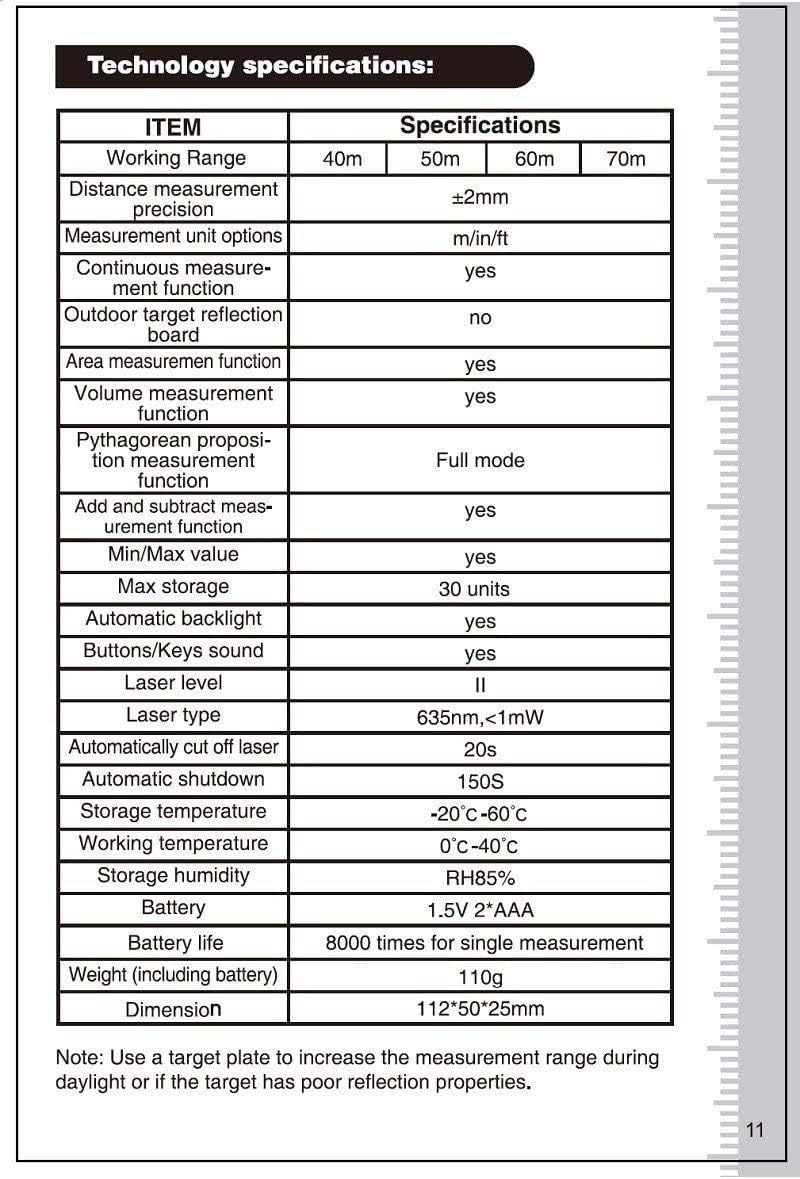
Tæknilýsing
| Atriði | Forskrift |
|---|---|
| Vinnusvið | 0.05 - 60m |
| Nákvæmni fjarlægðarmælinga | ±2 mm |
| Measurement Unit Options | m/in/ft |
| Continuous Measurement Function | Já |
| Outdoor Target Reflection Board | No (recommended for daylight/poor targets) |
| Area Measurement Function | Já |
| Volume Measurement Function | Já |
| Pythagorean Measurement Function | Full stilling |
| Add and Subtract Measurement Function | Já |
| Lágm/hámarksgildi | Já |
| Hámarks geymsla | 30 einingar |
| Sjálfvirk baklýsing | Já |
| Buttons/Keys Sound | Já |
| Laser stig | II |
| Laser gerð | 635nm, <1mW |
| Automatically Cut Off Laser | 20s |
| Sjálfvirk lokun | 150s |
| Geymsluhitastig | -20°C - 60°C |
| Vinnuhitastig | 0°C - 40°C |
| Geymsla Raki | RH85% |
| Rafhlaða | 1.5V * 2 AAA |
| Rafhlöðuending | 8000 sinnum fyrir staka mælingu |
| Þyngd (þar á meðal rafhlaða) | 110g |
| Stærð | 112 x 50 x 25 mm |
| International Protection Rating | IP54 |
Note: A target plate is recommended to increase the measurement range during daylight or if the target has poor reflection properties.
Ábyrgð og stuðningur
For warranty information and technical support, please refer to the documentation provided with your purchase or contact SNDWAY customer service. Keep your purchase receipt as proof of purchase for any warranty claims.