
1. Inngangur
Welcome to your new qunyiCO Y10 Android Tablet. This manual provides essential information for setting up, operating, and maintaining your device. Please read it thoroughly to ensure optimal performance and longevity.
Öryggisupplýsingar
- Do not expose the tablet to extreme temperatures or direct sunlight.
- Forðist að láta spjaldtölvuna detta eða verða fyrir hörðum höggum.
- Notaðu aðeins meðfylgjandi hleðslutæki og fylgihluti.
- Haldið töflunni frá vatni og öðrum vökvum.
- Ekki reyna að taka spjaldtölvuna í sundur eða gera við hana sjálfur.
2. Vöru lokiðview
Líkamlegir þættir
The qunyiCO Y10 tablet features a sleek design with essential ports and buttons for ease of use.
Framan View

This image shows the front of the qunyiCO Y10 tablet, highlighting its 10.1-inch IPS HD display.
Aftan View

This image displays the back of the qunyiCO Y10 tablet, featuring the rear camera and the qunyiCO logo.
Hnappar og tengi
Familiarize yourself with the location of key controls and connections.
An illustrative diagram highlighting key features such as Android 10.0, Quad-core CPU, 5000mAh battery, 10.1-inch display, 2.4GHz Wi-Fi, Dual Camera, 2GB RAM + 32GB ROM, and 1280x800 IPS HD.
- Power/Volume Buttons: Located on the side for power on/off and volume control.
- Heyrnartól tjakkur: Staðlað 3.5 mm hljóðúttak.
- SD kortarauf: Fyrir stækkanlegt geymslurými allt að 128GB.
- Hleðsluport: Micro USB tengi fyrir hleðslu.
- Myndavélar: 2MP front camera and 8MP rear camera.
3. Uppsetning
Upphafleg hleðsla
Before first use, fully charge your tablet using the provided power adapter.
Kveikt/slökkt
- Kveikt á: Press and hold the Power button until the qunyiCO logo appears.
- Slökkva á: Haltu inni aflrofann og veldu síðan „Slökkva“ úr valkostunum.
- Endurræsa: Haltu inni aflrofann og veldu síðan „Endurræsa“ úr valkostunum.
Fyrsta skipulag
Fylgdu leiðbeiningunum á skjánum til að ljúka upphafsuppsetningunni, þar á meðal vali á tungumáli, Wi-Fi tengingu og innskráningu á Google reikning.
4. Notkunarleiðbeiningar
Grunnleiðsögn
Your tablet runs on Android 11, offering an intuitive user interface.
- Snertibendingar: Ýttu til að velja, strjúktu til að fletta, klíptu til að stækka.
- Heimaskjár: Fáðu aðgang að forritunum þínum og búnaðinum.
- Tilkynningar: Swipe down from the top to view tilkynningar og flýtistillingar.
Wi-Fi tenging
Tengstu við Wi-Fi net til að fá aðgang að internetinu.
- Farðu til Stillingar > Net og internet > Wi-Fi.
- Kveikja á Wi-Fi On.
- Veldu netið sem þú vilt nota af listanum og sláðu inn lykilorðið ef þú ert beðinn um það.
Stjórnun forrita
Sækja og stjórna forritum úr Google Play Store.

This image illustrates the tablet's screen with various popular application icons, demonstrating its compatibility with a wide range of apps.
- Opnaðu Play Store app.
- Leitaðu að apps and games.
- Bankaðu á Settu upp til að sækja.
Notkun myndavélar
Capture photos and videos using the built-in cameras.

A visual comparison demonstrating the clarity and quality of images captured by the tablet's 2MP front and 8MP rear cameras.
- Opnaðu Myndavél app.
- Skiptu á milli fram- og aftari myndavéla eftir þörfum.
- Ýttu á lokarahnappinn til að taka mynd eða hefja/stöðva myndbandsupptöku.
5. Geymslustjórnun
Innri geymsla
The tablet comes with 32GB of internal storage for your apps and files.
Stækkanlegt geymsla
You can expand the storage up to 128GB using a microSD card.
This image visually represents the tablet's storage capabilities, indicating 32GB of internal ROM and the option to expand up to 128GB, suitable for storing various media and applications.
- Settu microSD-kortið í tilgreinda rauf.
- Follow on-screen prompts to format the card if necessary.
- Note: While expandable up to 128GB, 32GB is recommended for optimal performance. Larger cards may slow down the system.
6. Upplýsingar um rafhlöðu
Rafhlöðuending
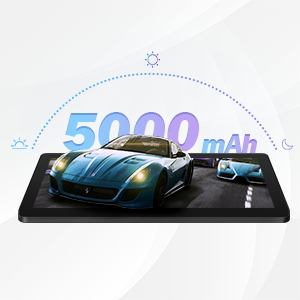
The qunyiCO Y10 is equipped with a 5000mAh battery, providing up to 8 hours of usage on a single charge, depending on usage patterns.

An image highlighting the 5000mAh battery, with icons indicating approximate usage times for video playback (6H), gaming (6H), and browsing (12H), showcasing its long-lasting capability.
Hleðsla
Use the provided charger to ensure proper charging and battery health.
- Connect the charger to the tablet's charging port and a power outlet.
- Rafhlöðutáknið á skjánum gefur til kynna hleðslustöðu.
7. Tengingar
Wi-Fi
Supports 2.4G Wi-Fi for stable internet connection.
Bluetooth
Connect to Bluetooth devices such as headphones or speakers.
- Farðu til Stillingar > Tengd tæki > Bluetooth.
- Kveiktu á Bluetooth On.
- Select the device you wish to pair with from the list.
8. Margmiðlun
Að njóta efnis
The 1280x800 IPS HD display provides clear visuals for various media.
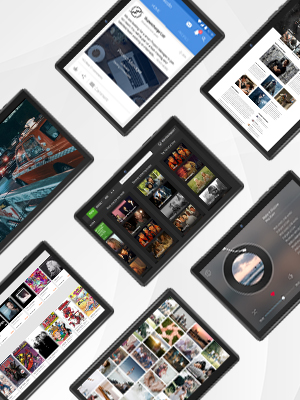
This image presents a collage of tablet screens, each showing different forms of digital content such as social media feeds, news articles, movie interfaces, and music players, emphasizing the tablet's versatility for media consumption.
You can enjoy movies, music, photos, and e-books.
Opinbert vörumyndband
Horfðu á þetta opinbera myndband til að fá yfirlitview of the qunyiCO Y10 Tablet's features and capabilities.
This video, titled "qunyiCO Y10 Tablet 10 inch Android 10.0", provides a comprehensive look at the tablet's design, performance, and user experience.
9. Bilanagreining
Algeng vandamál og lausnir
| Útgáfa | Hugsanleg orsök | Lausn |
|---|---|---|
| Tablet keeps shutting off / rebooting | Software glitch, low battery, faulty charger/port, overheating. | Ensure full charge. Perform a factory reset if software related. Check charger and port for damage. Avoid heavy usage in hot environments. |
| Snertiskjár svarar ekki | Software freeze, screen protector interference, physical damage. | Restart the tablet. Remove any screen protectors. If problem persists, contact support. |
| Won't charge | Damaged charging cable/adapter, dirty charging port, battery issue. | Try a different compatible charger. Clean the charging port gently. If still no charge, battery may need service. |
| Vandamál með Wi-Fi tengingu | Incorrect password, router issues, tablet software glitch. | Double-check password. Restart router and tablet. Forget and reconnect to the network. |
| Apps flip/rotate incorrectly | Auto-rotate setting, app compatibility, sensor issue. | Check auto-rotate settings in quick panel/settings. Some apps may not support all orientations. If persistent, sensor may be faulty. |
10. Tæknilýsing
Tæknilegar upplýsingar
| Eiginleiki | Smáatriði |
|---|---|
| Fyrirmynd | Y10 |
| Stýrikerfi | Android 11 |
| Örgjörvi | 1.6 GHz Quad-Core (Allwinner) |
| vinnsluminni | 2 GB DDR4 SDRAM |
| Innri geymsla | 32 GB |
| Stækkanlegt geymsla | Allt að 128 GB (MicroSD) |
| Skjástærð | 10.1 tommur |
| Skjáupplausn | 1280x800 IPS HD |
| Myndavél að aftan | 8 MP |
| Myndavél að framan | 2 MP |
| Rafhlaða | 5000mAh litíumjón |
| Tengingar | Wi-Fi (2.4G), Bluetooth |
| Mál (LxBxH) | 9.62 x 6.83 x 0.39 tommur |
| Þyngd hlutar | 1.08 pund |
11. Viðhald
Þrif og umhirða
- Notið mjúkan, lólausan klút til að þrífa skjáinn og spjaldtölvuna.
- Ekki nota slípiefni eða leysiefni.
- Keep the tablet in a protective case to prevent scratches and damage.
Hugbúnaðaruppfærslur
Regularly check for system updates to ensure optimal performance and security.
- Farðu til Stillingar > Kerfi > Kerfisuppfærsla.
- Fylgdu leiðbeiningunum á skjánum til að hlaða niður og setja upp allar tiltækar uppfærslur.
12. Ábyrgð og stuðningur
Upplýsingar um ábyrgð
Your qunyiCO Y10 tablet comes with a standard manufacturer's warranty. Please refer to the warranty card included in your product packaging for specific terms and conditions.
Þjónustudeild
For technical assistance, troubleshooting beyond this manual, or warranty claims, please contact qunyiCO customer support through their official webvefsíðu eða tengiliðaupplýsingar sem gefnar eru upp í vörugögnum þínum.
You can also visit the official qunyiCO store on Amazon for more information: qunyiCO Store.