
Inngangur
Þakka þér fyrir kaupinasing the Byron Statics Portable CD Boombox. This device offers versatile audio playback options, including a top-loading CD player, AM/FM radio, and an Aux-in port for external devices. Designed for portability and ease of use, this manual provides detailed instructions to help you operate and maintain your boombox effectively.
Öryggisupplýsingar
- Aflgjafi: Use only the specified AC power cord (AC 120V-60Hz) or 6 x 1.5V 'C' size batteries.
- Vatn og raki: Ekki láta tækið verða fyrir rigningu, raka eða dýfa því í vatn.
- Hitagjafar: Haldið tækinu frá hitagjöfum eins og ofnum, hitaspjöldum, eldavélum eða öðrum tækjum sem framleiða hita.
- Loftræsting: Tryggið góða loftræstingu. Ekki loka neinum loftræstiopum.
- Þrif: Takið tækið úr sambandi við rafmagn áður en það er þrifið. Notið mjúkan, þurran klút.
- Þjónusta: Ekki reyna að þjónusta þessa vöru sjálfur. Vísaðu allri þjónustu til viðurkennds þjónustufólks.
- CD spilari: Horfðu aldrei beint í leysigeislann.
Vara lokiðview
Kynntu þér hina ýmsu hluta og stjórntæki hljóðgjafans þíns.

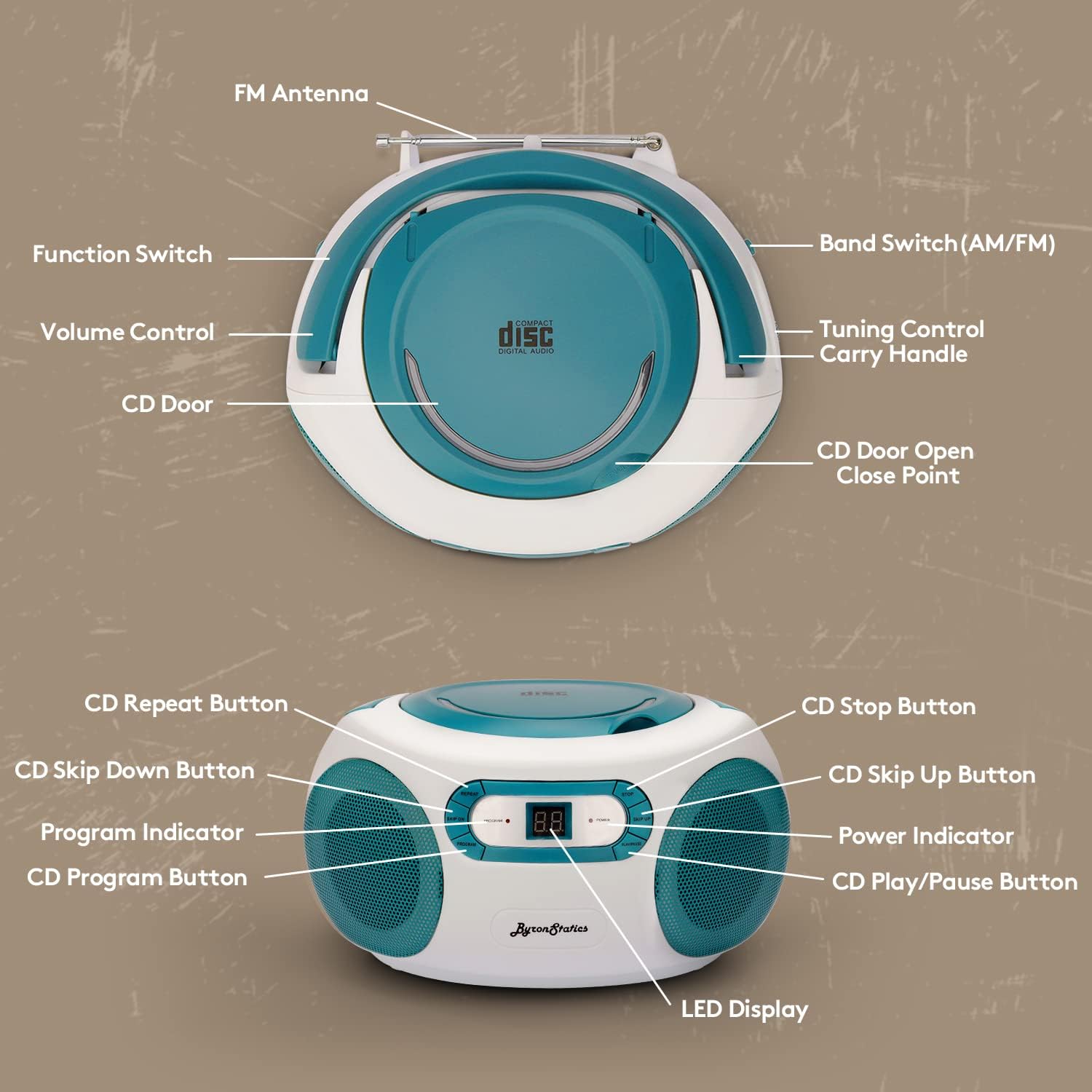
Mynd 1: Framan og efst View of the Boombox with Labeled Controls
- Geisladiskahurð: Access for loading/unloading CDs.
- Aðgerðarrofi: Selects between CD/AUX IN, OFF, and RADIO modes.
- Hljóðstyrkur: Stillir hljóðúttaksstigið.
- FM loftnet: Útdraganleg loftnet fyrir FM útvarpsmóttöku.
- Band Switch (AM/FM): Velur á milli AM og FM útvarpstíðna.
- Stillingarstýring: Fine-tunes radio frequencies.
- Handfang: Til að auðvelda flutning.
- Stjórnhnappar fyrir geisladiska: Repeat, Skip On/Down, Program, Stop, Play/Pause.
- LED skjár: Shows track number for CD or radio frequency.
- Rafmagnsvísir: Kveikir þegar kveikt er á tækinu.
- Aux-in Jack: Til að tengja utanaðkomandi hljóðtæki.
- Rafmagnsinntak: Til að tengja rafmagnssnúruna.
- Rafhlöðuhólf: Located on the bottom for 'C' size batteries.
Uppsetning
Kveikja á einingunni
Hægt er að knýja hljóðgjafann þinn annað hvort með riðstraumi eða rafhlöðum.
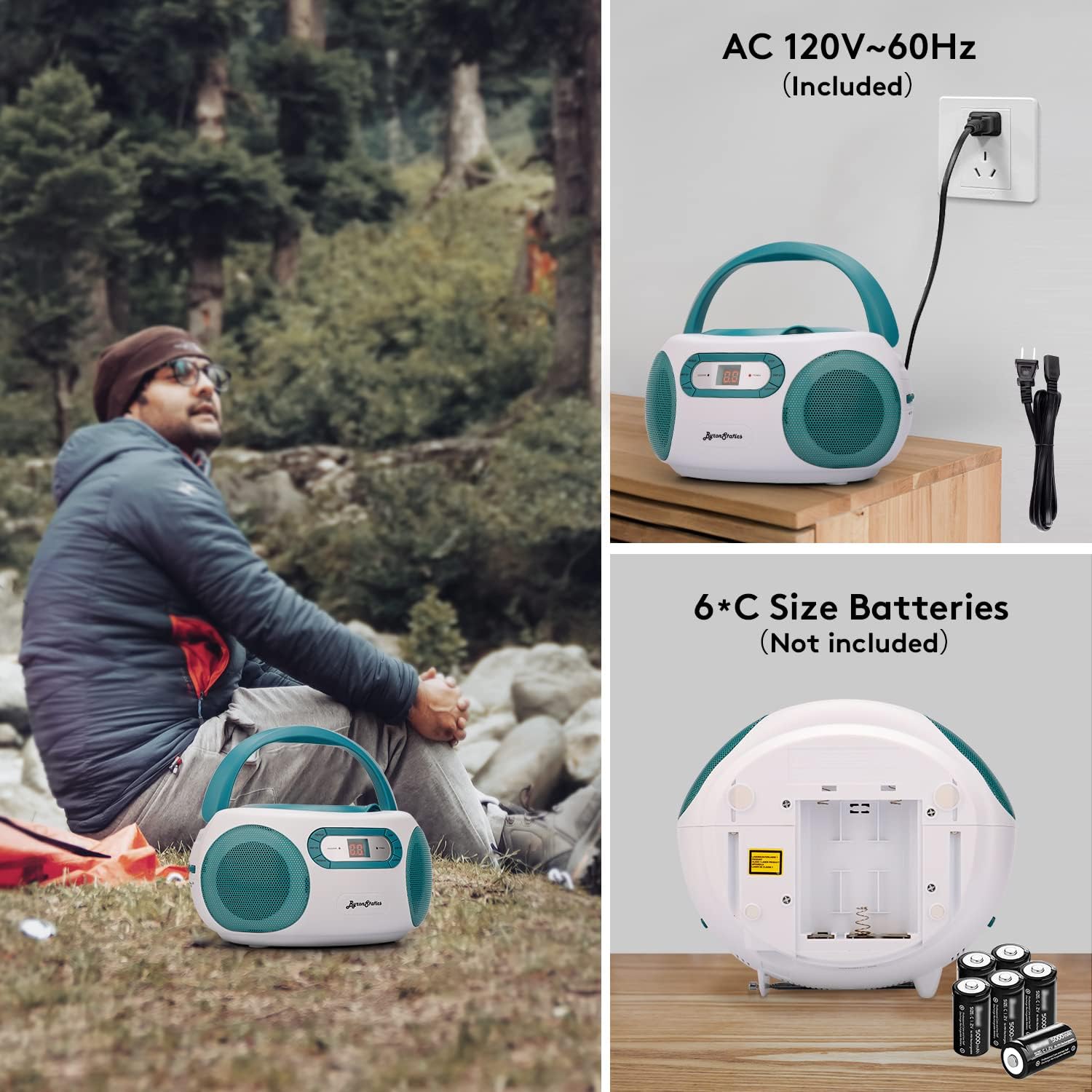
Mynd 2: AC Power Connection and Battery Installation
Rafstraumurekstur
- Ensure the Function Switch is in the "OFF" position.
- Connect the supplied AC power cord to the AC power input jack on the back of the unit.
- Plug the other end of the AC power cord into a standard AC 120V-60Hz wall outlet.
Rekstur rafhlöðu
- Ensure the Function Switch is in the "OFF" position.
- Opnaðu rafhlöðulokið sem staðsett er neðst á einingunni.
- Insert 6 x 1.5V 'C' size batteries (not included), observing the correct polarity (+/-) as indicated inside the compartment.
- Lokaðu rafhlöðuhólfinu tryggilega.
- Athugið: Aftengdu rafmagnssnúruna þegar þú notar rafhlöður.
Notkunarleiðbeiningar
Notkun geisladiskaspilara

Mynd 3: Loading a CD into the Top-Loading Compartment
- Set the Function Switch to the "CD/AUX IN" position.
- Open the CD door by gently lifting it.
- Settu geisladisk (CD, CD-R eða CD-RW) á miðjuna með merkimiðann upp.
- Close the CD door firmly until it clicks.
- The CD player will begin reading the disc, and the total number of tracks will appear on the LED display.
- Ýttu á SPILA/HÁT button to start playback. The track number will be displayed.
- Til að gera hlé á spilun, ýttu á SPILA/HÁT hnappinn. Ýttu aftur á hann til að halda áfram.
- Ýttu á til að fara í næsta lag SKIPPA UPP hnappinn.
- Til að fara aftur í upphaf núverandi lags eða í fyrra lag, ýttu á SLIPPA NIÐUR hnappinn.
- Ýttu á til að stöðva spilun HÆTTU hnappinn.
- Endurtaka aðgerð: Ýttu á ENDURTAKA button once to repeat the current track. Press it again to repeat the entire disc. Press a third time to cancel repeat mode.
- Forritsaðgerð: To program tracks for playback, press the PROGRAM button while the CD is stopped. The "PROGRAM" indicator will flash. Use the SKIPPA UPP/NIÐUR buttons to select your desired track, then press PROGRAM again to confirm. Repeat for up to 20 tracks. Press SPILA/HÁT til að hefja forritaða spilun.
AM/FM útvarpsaðgerð

Mynd 4: Using the AM/FM Radio with Extended Antenna
- Set the Function Switch to the "RADIO" position.
- Slide the Band Switch to select either "AM" or "FM".
- For FM reception, fully extend the telescopic FM antenna. For AM reception, the unit has a built-in antenna, so no external adjustment is needed.
- Snúðu STÖLLUN control knob to select your desired radio station. The frequency will be displayed on the LED screen.
- Stilltu RÁÐMÁL stjórna á þinn uppáhalds hlustunarstyrk.
Aux-in Operation
Mynd 5: Connecting an External Device via Aux-in
- Set the Function Switch to the "CD/AUX IN" position.
- Tengdu annan endann á 3.5 mm hljóðsnúru (fylgir ekki með) við Aux-in tengið á hljóðgjafanum.
- Connect the other end of the audio cable to the headphone jack or audio output of your external audio device (e.g., smartphone, tablet, MP3 player).
- Byrjaðu spilun á ytra tækinu þínu.
- Stilltu hljóðstyrkinn með því að nota RÁÐMÁL control on the boombox and/or your external device.
Viðhald
- Þrif á einingunni: Þurrkaðu ytra byrði einingarinnar með mjúku, damp klút. Ekki nota slípiefni eða leysiefni.
- Umhirða geisladiskalinsu: If the CD player experiences reading errors, clean the lens with a commercially available CD lens cleaner.
- Skipt um rafhlöðu: If using batteries, replace all six 'C' size batteries when the sound becomes distorted or the unit stops functioning. Do not mix old and new batteries.
- Geymsla: Þegar tækið er ekki í notkun í langan tíma skal fjarlægja rafhlöðurnar og geyma það á köldum, þurrum stað.
Úrræðaleit
| Vandamál | Möguleg orsök | Lausn |
|---|---|---|
| Enginn kraftur | Rafmagnssnúra ekki tengd; Rafhlöður tæmdar eða rangt settar í. | Athugið tengingu rafmagnssnúrunnar; skiptið um rafhlöður eða gætið þess að pólunin sé rétt. |
| Geisladiskur spilar ekki / sleppir | CD dirty or scratched; CD inserted incorrectly; CD door not closed; Function switch not in CD mode. | Clean or replace CD; Insert CD label-side up; Close CD door firmly; Set Function Switch to CD/AUX IN. |
| Léleg útvarpsmóttaka | FM antenna not extended; Weak signal; Interference. | Fully extend FM antenna; Reposition the unit; Try tuning to a stronger station. |
| Ekkert hljóð frá Aux-inngangi | Aux cable not connected; Volume too low; External device not playing. | Ensure Aux cable is fully inserted; Increase volume on boombox and external device; Start playback on external device. |
Tæknilýsing
- Gerð: KBB-250
- Aflgjafi: AC 120V-60Hz or 6 x 1.5V 'C' size batteries (not included)
- CD spilari: Top-loading, compatible with CD, CD-R, CD-RW
- Útvarpstíðni: AM 520-1710KHz; FM 76-108MHz
- Hátalarar: 1W RMS x 2 Stereo Speakers
- Tengingar: Aux-in Jack (3.5mm)
- Skjár: LCD skjár
- Vörumál: 8.3 x 7.68 x 4.73 tommur
- Þyngd hlutar: 3.47 pund
Ábyrgð og stuðningur
For customer service, warranty information, or technical support, please refer to the contact details provided with your product packaging or visit the official BYRONSTATICS webvefsíða. Þjónustuteymi okkar er til taks til að aðstoða þig við allar spurningar eða vandamál sem þú gætir lent í.