
iHip WLG-PP27
iHip 3ft PVC Micro USB High-Speed Data and Charging Cable
Model: WLG-PP27
Inngangur
This manual provides essential information for the proper use, setup, maintenance, and troubleshooting of your iHip 3ft PVC Micro USB High-Speed Data and Charging Cable. Please read this manual thoroughly before using the product.
The iHip Micro USB cable is designed for fast charging and high-speed data transfer, compatible with a wide range of devices including Android phones, tablets, gaming consoles, and other devices with a Micro USB interface. It features a durable rubber finish and a metal tip, engineered for longevity with a 10,000 bend test certification.
Innihald pakka
- 1 x iHip 3ft PVC Micro USB High-Speed Data and Charging Cable
Uppsetning
The iHip Micro USB cable is designed for plug-and-play functionality. Follow these steps to connect your device:
- Þekkja höfn: Locate the Micro USB port on your device (e.g., smartphone, tablet, game controller) and a standard USB-A port on your power adapter, computer, or other charging/data source.
- Tengjast tæki: Gently insert the Micro USB connector (the smaller, trapezoidal end) into the Micro USB port on your device. Ensure it is inserted horizontally and correctly to avoid damage.
- Connect to Power/Data Source: Insert the standard USB-A connector (the larger, rectangular end) into a compatible USB-A port on your power adapter, computer, or other charging/data source.
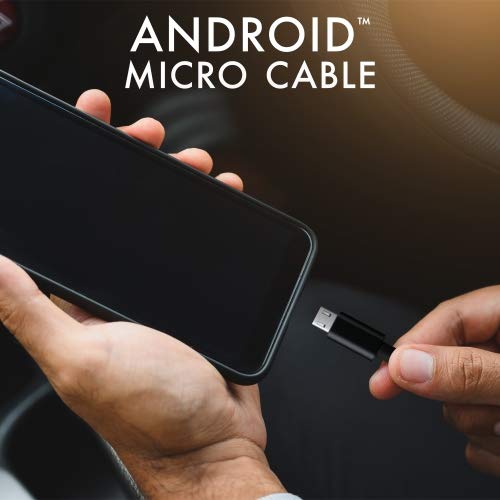
Image: Connecting the iHip Micro USB cable to a smartphone. The cable is designed for easy and secure connection.
Notkunarleiðbeiningar
Hleður tækið þitt
To charge your device using the iHip Micro USB cable:
- Tengdu snúruna eins og lýst er í hlutanum „Uppsetning“.
- Ensure your power adapter or USB port provides sufficient power. For fast charging, use a Quick Charge compatible power adapter (e.g., 9V/2A output) or a standard power adapter with 5V/2.4A output.
- The device's charging indicator should activate, confirming that charging has begun.
Gagnaflutningur
To transfer data between your device and a computer:
- Connect the Micro USB end to your device and the USB-A end to a USB port on your computer.
- Your computer should recognize the connected device. You may need to select "File Transfer" or "MTP" mode on your device's screen if prompted.
- You can now access your device's storage to transfer files at speeds up to 480Mb/s.
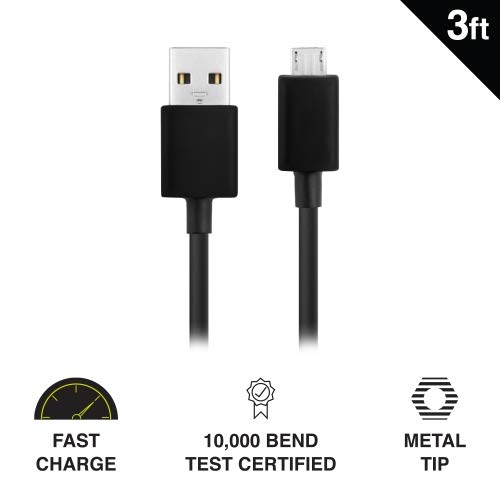
Image: Key features of the iHip Micro USB cable, highlighting its fast charge capability, durability, and robust metal tip.
Viðhald og umhirða
To ensure the longevity and optimal performance of your iHip Micro USB cable, follow these maintenance guidelines:
- Rétt meðhöndlun: Gríptu alltaf í tengihausinn þegar þú stingur snúrunni í samband eða tekur hana úr sambandi. Forðastu að toga beint í snúruna sjálfa því það getur skemmt innri vírana.
- Geymsla: Store the cable in a clean, dry place away from extreme temperatures and direct sunlight. Avoid tightly coiling or bending the cable at sharp angles.
- Þrif: If the connectors become dirty, gently wipe them with a dry, lint-free cloth. Do not use liquids or abrasive cleaners.
- Forðastu streitu: Do not place heavy objects on the cable or allow it to be pinched, which can lead to internal damage.
Úrræðaleit
If you encounter issues with your iHip Micro USB cable, try the following troubleshooting steps:
- Tæki hleðst ekki:
- Gakktu úr skugga um að báðir endar snúrunnar séu tryggilega tengdir.
- Prófaðu að nota annan straumbreyti eða USB tengi.
- Prófaðu snúruna með öðru samhæfu tæki til að útiloka vandamál með tækið.
- Check the Micro USB port on your device for any debris or damage.
- Hæg hleðsla:
- Ensure you are using a power adapter with adequate output (e.g., 5V/2.4A or Quick Charge compatible).
- Avoid charging from low-power USB ports (e.g., some laptop USB 2.0 ports).
- Gagnaflutningsvandamál:
- Staðfestu að tækið þitt sé stillt á "File „Flutningur“ eða „MTP“ stilling þegar tengt er við tölvu.
- Prófaðu annað USB tengi á tölvunni þinni.
- Endurræstu bæði tækið og tölvuna.
Tæknilýsing
| Eiginleiki | Smáatriði |
|---|---|
| Gerðarnúmer | WLG-PP27 |
| Lengd snúru | 3 fet (u.þ.b. 0.91 metrar) |
| Tegund tengis | USB-A to Micro USB |
| Efni | PVC with Rubber Finish, Metal Tip |
| Gagnaflutningshraði | Allt að 480 Mb/s |
| Ending | 10,000+ bend lifespan certified |
| Samhæfni | Android Cell Phones, Tablets, Windows Phones (Samsung Note/Galaxy, Nokia Lumia, LG, HTC), MP4, hard drives, PlayStation 4, Xbox One controller, and other Micro USB devices. |
| Vörumál | 6.5 x 3 x 1 tommur; 1.76 aura |

Image: The iHip 3ft PVC Micro USB cable, showcasing its compact and flexible design.
Ábyrgð og stuðningur
The iHip Micro USB cable comes with a lifetime guarantee. For detailed warranty information and support, please visit the official iHip websíða:
For any further assistance or inquiries, please refer to the contact information provided on the iHip websíða.
Ask a question about this manual
Ask about setup, troubleshooting, compatibility, parts, safety, or missing instructions. Manuals+ will review the question and use this page’s manual context to help answer it.