
AULCMEET AN-MR650A
User Manual: AN-MR650A Replacement Voice Remote Control
Vörumerki: AULCMEET | Gerð: AN-MR650A
1. Inngangur
This manual provides detailed instructions for the AULCMEET AN-MR650A Replacement Voice Remote Control. Designed for seamless compatibility with a wide range of LG Smart TV UHD 4K OLED TV models, this remote offers intuitive control and voice search functionality, enhancing your television viewupplifun.
Please read this manual thoroughly before using the remote control to ensure proper operation and to maximize its features.
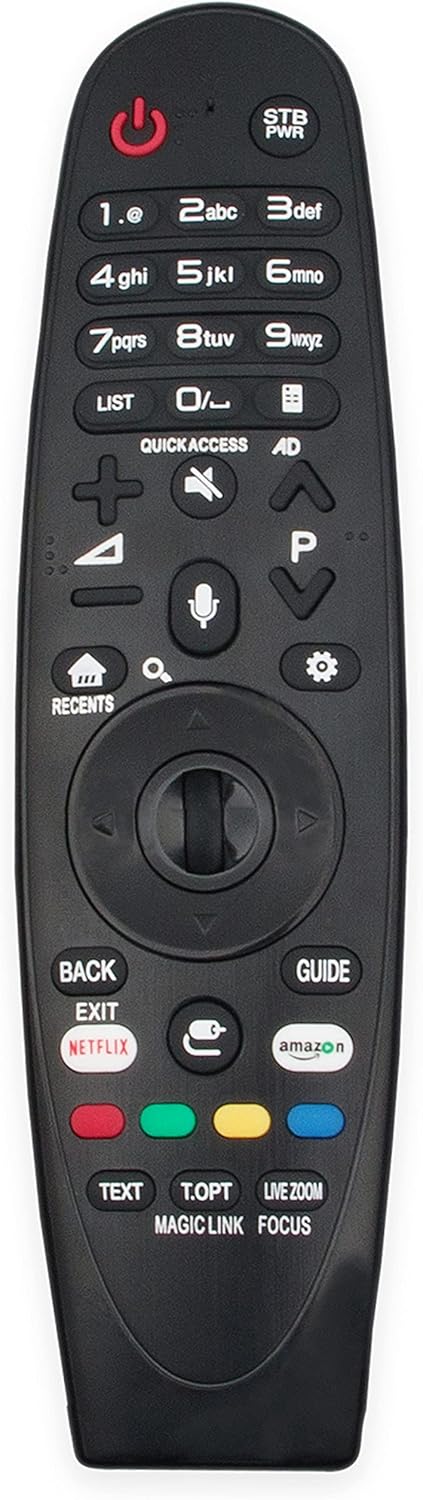
Mynd 1.1: Framan view of the AN-MR650A Replacement Voice Remote Control. This image displays the full layout of the remote, including the power button, number pad, navigation wheel, voice command button, and dedicated app buttons for Netflix and Amazon.
2. Uppsetning
2.1 Uppsetning rafhlöðu
The AN-MR650A remote control requires two (2) AAA 1.5V Alkaline batteries for operation.
- Finndu hlífina á rafhlöðuhólfinu aftan á fjarstýringunni.
- Rennið lokið niður eða ýtið á lásinn (ef hann er til staðar) til að opna hólfið.
- Insert two AAA 1.5V Alkaline batteries, ensuring the positive (+) and negative (-) terminals align correctly with the indicators inside the compartment.
- Lokaðu rafhlöðuhólfinu vel þar til það smellpassar.
2.2 Initial Pairing (If Required)
This remote control uses Bluetooth connectivity. While many replacement remotes are plug-and-play, some may require initial pairing with your LG Smart TV. If the remote does not respond after battery installation, follow these general pairing steps:
- Gakktu úr skugga um að sjónvarpið þitt sé kveikt.
- Beindu fjarstýringunni að sjónvarpinu.
- Ýttu á og haltu inni HEIM hnappinn og AFTUR button simultaneously for 5-10 seconds until a pairing message appears on your TV screen.
- Release the buttons once the pairing message is displayed. The remote should now be paired and ready for use.
Note: Specific pairing instructions may vary slightly depending on your LG TV model. Refer to your TV's user manual for detailed pairing procedures if the above steps are unsuccessful.
3. Notkun fjarstýringarinnar
The AN-MR650A remote control provides comprehensive functionality for navigating your LG Smart TV. Below are key features and button descriptions:
3.1 Key Button Functions
- Aflhnappur (⏻): Kveikir eða slekkur á sjónvarpinu.
- STB PWR: Power button for a Set-Top Box (if connected).
- Talnaborð (0-9): Directly input channel numbers or text.
- LISTI: Displays a list of channels or content.
- SNILLD AÐGANGUR: Provides quick access to frequently used apps or functions.
- AD: Audio Description button.
- Hljóðstyrkur upp/niður (⮝ / ⮟): Stillir hljóðstyrk sjónvarpsins.
- Þagga (🔇): Slökkvir á eða tekur hljóðið af sjónvarpinu.
- Rás upp/niður (P⮝ / P⮟): Skiptir um sjónvarpsrásir.
- Heima (⌂): Accesses the TV's Smart Home dashboard.
- Nýlegar: Displays recently used applications or content.
- Stillingar (⚙): Opnar stillingarvalmynd sjónvarpsins.
- Navigation Wheel/OK Button: Used for scrolling and selecting items on screen. Press the wheel to confirm selection.
- TIL BAKA / ÚTGANGUR: Returns to the previous screen or exits a menu/app.
- LEIÐBEININGAR: Opnar rafræna dagskrárleiðbeiningar.
- Netflix / Amazon: Dedicated buttons for direct access to Netflix and Amazon Prime Video.
- Litahnappar (rauður, grænn, gulur, blár): Context-sensitive buttons for various functions within menus or apps.
- TEXTI: Accesses Teletext (if available).
- T.OPT: Teletext Options.
- BEINNI AÐDREYNSLA: Zooms in on a specific area of the screen.
- GALDRATENGILL: Provides related content information.
- FOKUS: Focuses on a specific area for detailed viewing.
3.2 Voice Control Function
The AN-MR650A features a built-in microphone for voice commands. This allows you to search for content, change settings, or control your TV using your voice.
- Ýttu á og haltu inni Hnappur fyrir hljóðnema (🎤) located below the navigation wheel.
- Speak clearly into the microphone on the remote control.
- Release the Microphone Button when you have finished speaking. Your TV will process the command.
Tip: Ensure your TV's voice recognition settings are enabled for optimal performance.

Mynd 3.1: A user operating the AN-MR650A remote control while watching television. This image illustrates the remote being used in a typical home entertainment setting, highlighting its ergonomic design and ease of use.
4. Viðhald
4.1 Þrif á fjarstýringunni
Til að viðhalda útliti og virkni fjarstýringarinnar skal þrífa hana reglulega.
- Notið mjúkan, þurran klút til að þurrka yfirborð fjarstýringarinnar.
- Fyrir þrjósk óhreinindi, örlítið dýftampÞurrkið klútinn með vatni eða mildu, ekki slípandi hreinsiefni. Ekki úða hreinsiefni beint á fjarstýringuna.
- Avoid using harsh chemicals, solvents, or abrasive cleaning materials, as these can damage the remote's finish or internal components.
4.2 Skipt um rafhlöðu
Replace batteries when the remote's response becomes sluggish or it stops functioning. Always replace both batteries at the same time with new AAA 1.5V Alkaline batteries.
- Fylgdu skrefunum fyrir uppsetningu rafhlöðunnar sem lýst er í kafla 2.1.
- Fargið notuðum rafhlöðum á ábyrgan hátt í samræmi við staðbundnar reglur.
5. Bilanagreining
If you encounter issues with your AN-MR650A remote control, try the following troubleshooting steps:
- Fjarstýring svarar ekki:
- Athugaðu hvort rafhlöðurnar séu rétt settar í með réttri pólun.
- Replace the batteries with new AAA 1.5V Alkaline batteries.
- Gakktu úr skugga um að engar hindranir séu á milli fjarstýringarinnar og skynjara sjónvarpsins.
- Try re-pairing the remote with your TV (refer to Section 2.2).
- Raddstýring virkar ekki:
- Ensure the remote is properly paired with the TV.
- Check the TV's settings to ensure voice recognition is enabled.
- Speak clearly and hold the microphone button while speaking.
- Ensure there is no physical obstruction over the microphone on the remote.
- Sérstakir hnappar virka ekki:
- Clean the remote control, especially around the non-functioning buttons, to remove any dirt or debris.
- Ef aðeins ákveðnir hnappar svara ekki gæti það bent til vélbúnaðarvandamála.
Ef vandamálið er enn til staðar eftir að hafa prófað þessi skref, vinsamlegast hafðu samband við þjónustuver.
6. Tæknilýsing
| Eiginleiki | Lýsing |
|---|---|
| Vörumerki | AULCMEET |
| Fyrirmynd | AN-MR650A |
| Helstu eiginleikar | Raddleit |
| Hámarksfjöldi studdra tækja | 1 (Sjónvarp) |
| Tengitækni | Bluetooth |
| Gerð rafhlöðu áskilin | 2 x AAA 1.5V alkalískar rafhlöður |
| Samhæfar LG sjónvarpsgerðir | W7, G7, E7, C7, B7A SJ9570, SJ9500, SJ8570, SJ857A, SJ8500, SJ850A, SJ8000, UJ7700, UJ6570, UJ657A, UJ6540, UJ6500 Series, 65UJ7700, 65UJ7700-UA, 65UJ7750-UB, 70UJ6520-UA, 70UJ6570, 70UJ6570-UB, 70UJ657A-UC, 70UJ657T, 72SJ8570, 74UJ6450, 74UJ6450UD, 74UJ6450-UD, 75SJ8570, 75SJ8570UB, 75SJ8570-UB, 75SJ857A, 75SJ857AUC, 75SJ857A-UC, 75UJ6450UD, 75UJ6450-UD, 75UJ6470UC, 75UJ6470-UC, 75UJ6520-UA, 75UJ657A-UB, 86SJ9570, 86SJ9570UA, 86SJ9570-UA, OLED55B7A, OLED55B7AU, OLED55B7A-U, OLED55B7P, OLED55B7PU, OLED55B7P-U, OLED55C7C, OLED55C7P, OLED55C7PU, OLED55C7P-U, OLED55E7P, OLED55E7PU, OLED55E7P-U, OLED65B7, OLED65B7A, OLED65B7AUA, OLED65B7A-UA, OLED65B7AU, OLED65B7A-U, OLED65B7P, OLED65B7PU, OLED65B7P-U, OLED65C7P, OLED65C7PU, OLED65C7P-U, OLED65E7P, OLED65E7PU, OLED65E7P-U, 49SM8670PUA, 55SM8670PUA, 65SM8670PUA, 70UJ6570, 43UJ6500-UB, 49UJ6500-UB, 49UJ6560-UF, 49UJ7700, 49UJ7700-UA, 55SJ8000, 55SJ8000UA, 55SJ8000-UA, 55SJ800A, 55SJ8500, 55SJ8500UB, 55SJ8500-UB, 55UJ6520-UD, 55UJ6540-UB, 55UJ6580-UE, 55UJ7700, 55UJ7700-UA, 55UJ7750-UB, 60SJ8000, 60SJ8000UA, 60SJ8000-UA, 60SJ800A, 60SJ8500, 60SJ8500UB, 60SJ8500-UB, 60UJ6540-UB, 60UJ7700, 60UJ7700-UA, 65SJ8000, 65SJ8000UA, 65SJ8000-UA, 65SJ800A, 65SJ800AUB, 65SJ800A-UB, 65SJ850AUC, 65SJ850A-UC, 65SJ8500, 65SJ8500UB, 65SJ8500-UB, 65SJ850A, 65SJ9500, 65SJ9500UA, 65SJ9500-UA, 65UJ6520-UD, 65UJ6540-UB, 65UJ6580-UE. |
7. Ábyrgð og stuðningur
For any questions, concerns, or issues regarding your AULCMEET AN-MR650A Replacement Voice Remote Control, please contact the seller or manufacturer directly. Refer to your purchase documentation for specific warranty information and contact details.
The manufacturer is committed to providing quality products and support to ensure your satisfaction.