
Inngangur
This user manual provides detailed instructions for the installation, operation, maintenance, and troubleshooting of your Xprinter XP-K200L 80mm Thermal Receipt Printer. Please read this manual thoroughly before using the printer to ensure proper function and to extend the product's lifespan. Keep this manual for future reference.
Öryggisupplýsingar
- Always use the power adapter supplied with the printer.
- Ekki láta prentarann verða fyrir vatni eða raka.
- Forðist að setja prentarann í beinu sólarljósi eða nálægt hitagjöfum.
- Tryggðu rétta loftræstingu í kringum prentarann.
- Ekki reyna að taka prentarann í sundur eða gera við hann sjálfur. Hafðu samband við hæft þjónustufólk.
- Geymið þar sem börn ná ekki til.
Innihald pakka
Vinsamlegast athugið innihald pakkans við upppakkningu. Ef einhverjar vörur vantar eða eru skemmdar, hafið samband við söluaðila.
- Xprinter XP-K200L Thermal Receipt Printer
- Rafmagns millistykki
- Rafmagnssnúra
- USB snúru
- Thermal Paper Roll (starter roll)
- Snúra fyrir peningaskúffu
- Notendahandbók (þetta skjal)
Vara lokiðview
Familiarize yourself with the main components of your Xprinter XP-K200L thermal receipt printer.

Mynd 1: Hlið view of the Xprinter XP-K200L thermal receipt printer. On the right, the power switch is visible, and on the left, a button to open the paper cover is present.
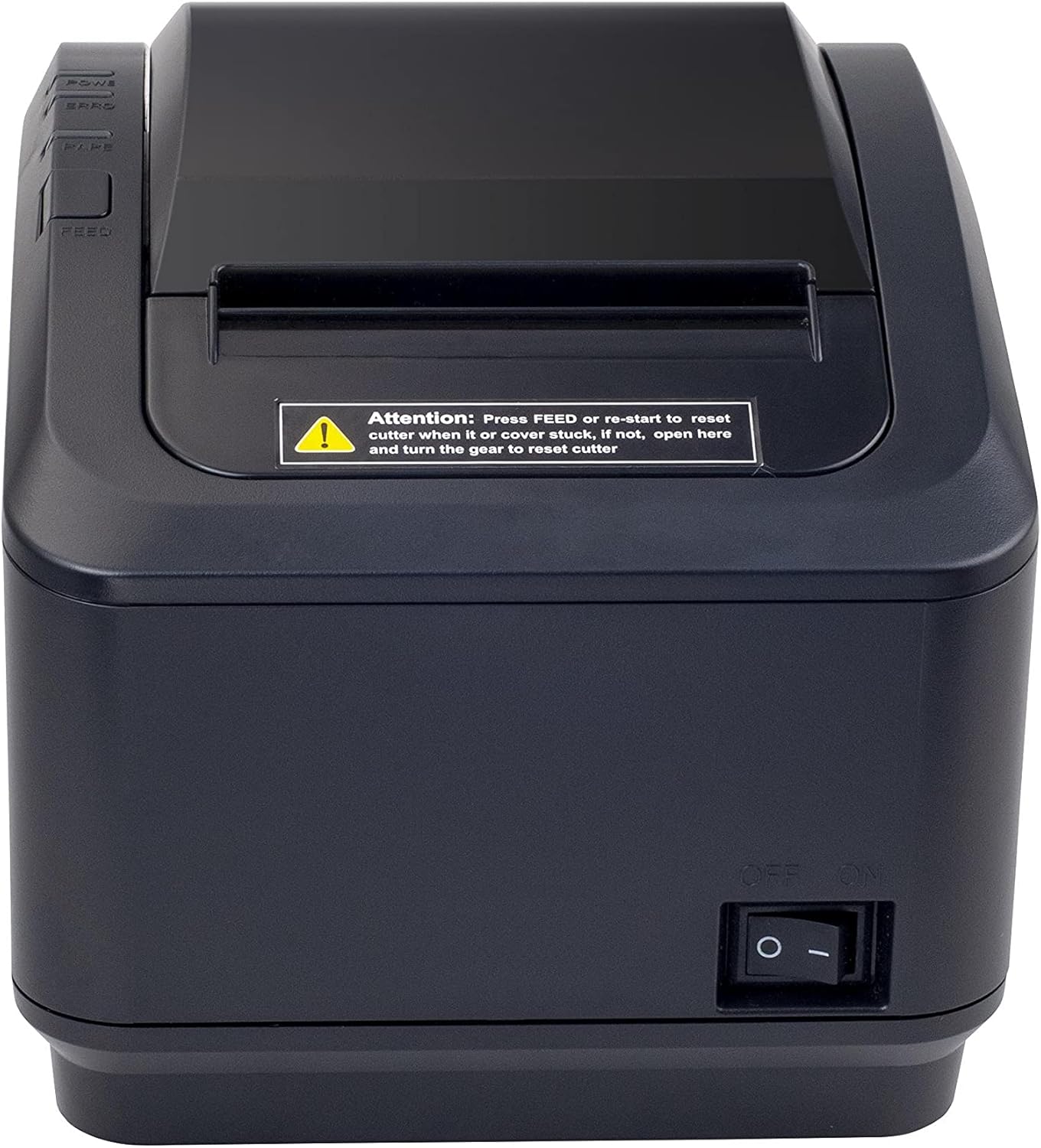
Mynd 2: Framhlið view of the Xprinter XP-K200L thermal receipt printer. The paper output slot is at the top, and below it are control buttons for functions like feed and error reset. A warning label is also visible.

Figure 3: This image displays the Xprinter XP-K200L thermal receipt printer with its top cover open, showing the internal compartment where the thermal paper roll is loaded. The print head mechanism is also visible.
Uppsetning
1. Tenging við rafmagn
- Ensure the printer's power switch is in the SLÖKKT stöðu.
- Tengdu rafmagnstengið við rafmagnstengið á prentaranum.
- Stingdu rafmagnssnúrunni í viðeigandi rafmagnsinnstungu.
2. Hleðsla á hitapappír
- Press the cover open button (refer to Figure 1) to open the top cover of the printer.
- Insert a new 80mm thermal paper roll into the compartment, ensuring the paper feeds from the bottom and the leading edge extends slightly out of the printer.
- Close the top cover firmly until it clicks into place. Ensure there is no slack in the paper roll.
3. Tenging við tölvu/netkerfi
The XP-K200L printer supports both USB and LAN (Ethernet) connectivity.
USB tenging:
- Tengdu annan endann á USB snúrunni við USB tengi prentarans.
- Tengdu hinn endann á USB snúrunni við tiltækt USB tengi á tölvunni þinni.
- Install the printer drivers. Drivers are typically provided on a CD or can be downloaded from the manufacturer's webFylgdu leiðbeiningunum á skjánum til að setja upp.
LAN (Ethernet) tenging:
- Connect one end of an Ethernet cable to the printer's LAN port.
- Tengdu hinn endann á Ethernet snúrunni við netbeini eða rofa.
- Configure the printer's network settings (e.g., IP address) if necessary. This usually involves printing a self-test page to get the current IP address and then accessing the printer's web interface or using a utility tool provided by the manufacturer.
- Install the printer drivers on your computer, selecting the network connection option during setup.
4. Connecting a Cash Drawer
- Connect the cash drawer cable to the dedicated cash drawer port on the printer.
- Ensure your POS software is configured to send commands to open the cash drawer via the printer.
Notkunarleiðbeiningar
Kveikt/slökkt
- To power on the printer, flip the power switch (refer to Figure 1) to the ON stöðu.
- To power off the printer, flip the power switch to the SLÖKKT stöðu.
Grunnprentun
Once the printer is connected and drivers are installed, you can print receipts from your POS software or any application that supports printing.
- Ensure the printer is powered on and has paper loaded.
- From your application, select the print option.
- Choose the "Xprinter XP-K200L" from the list of available printers.
- Confirm print settings and click "Print".
Self-Test Page
To print a self-test page, which provides information about the printer's settings and status:
- Ensure the printer is powered off and the paper roll is loaded.
- Ýttu á og haltu inni FEED hnappinn.
- Á meðan haldið er á FEED button, turn the power switch to ON.
- Slepptu FEED button after the printer starts printing.
Viðhald
Þrif á prentaranum
- Prenthaus: Notið bómullarþurrku léttampened with isopropyl alcohol to gently wipe the thermal print head. Allow it to dry completely before use. Clean regularly to ensure print quality.
- Skeri: If the cutter becomes jammed or dirty, carefully clean it with a soft brush or cloth.
- Að utan: Þurrkið ytra byrði prentarans með mjúkum, þurrum klút. Notið ekki slípiefni eða leysiefni.
Replacing Thermal Paper
When the paper roll is depleted or near its end, replace it following the steps in the "Loading Thermal Paper" section under Setup.
Úrræðaleit
| Vandamál | Möguleg orsök | Lausn |
|---|---|---|
| Prentarinn kviknar ekki á. | Power cord or adapter not connected properly; power outlet issue. | Athugaðu allar rafmagnstengingar. Prófaðu aðra rafmagnsinnstungu. |
| No printing. | No paper; paper loaded incorrectly; printer offline; driver issue; incorrect connection. | Load paper correctly. Check printer status. Reinstall drivers. Verify USB/LAN connection. |
| Léleg prentgæði. | Dirty print head; low quality thermal paper. | Clean the print head (see Maintenance). Use recommended thermal paper. |
| Paper jam or cutter error. | Paper loaded incorrectly; debris in cutter mechanism. | As per printer label: Ýttu á FEED or re-start to reset cutter. If the issue persists, open the top cover and carefully turn the gear to reset the cutter mechanism. Ensure paper is loaded correctly and remove any obstructions. |
| Sjóðskúffan opnast ekki. | Cable not connected; POS software not configured. | Check cash drawer cable connection. Verify POS software settings for cash drawer trigger. |
Tæknilýsing
| Eiginleiki | Smáatriði |
|---|---|
| Vörumerki | Xprinter |
| Nafn líkans | XP-K200L |
| Prentaratækni | Hitauppstreymi |
| Tengitækni | USB, LAN (Ethernet) |
| Sérstakir eiginleikar | Net tilbúið |
| Litur | Svartur |
| Printer Output | Einlita |
| Þyngd hlutar | 1.5 kg |
| Vörumál (DxBxH) | 19.5 cm x 14 cm x 13.8 cm |
| Compatible OS/Controller Type | Android (and typically Windows/Linux via drivers) |
| Prentmiðlar | Plain Thermal Paper |
| Prentlitur | Svartur |
| Upplausn | 576 x 512 dots per inch (or dots per line) |
| Max Print Resolution B/W | 576 dpi |
| Viðbótar prentaraaðgerðir | Prenta eingöngu |
| Eftirlitsaðferð | Fjarstýring |
| Hámarksstærð miðils | 80 mm |
| Pappírsstærð | 79.5 mm |
| Kraftur | 60 vött |
| Innifalið íhlutir | Power adapter, Cash drawer cable |
| Röð | XP-K |
| Sértæk notkun | Restaurants, bars, cinemas, garages, transportation, hospitals, clinics |
| Samtals USB tengi | 1 |
Ábyrgð og stuðningur
For warranty information and technical support, please refer to the documentation provided with your purchase or contact your vendor directly. Keep your proof of purchase for warranty claims.
For driver downloads and further support resources, visit the official Xprinter websíða.