
Inngangur
The Poly DA75 is a versatile USB-A/USB-C digital adapter designed to connect Poly Quick Disconnect (QD) headsets to computers. It ensures clear audio quality for call center environments, supporting both USB-A and USB-C connections for compatibility with various systems. This adapter is engineered to work seamlessly with platforms such as Avaya, Genesys, and Cisco, providing a reliable audio solution for professionals.
Helstu eiginleikar eru:
- Alhliða tenging: Equipped with both USB-A and USB-C connectors on the cable for broad compatibility with new and legacy equipment.
- Intelligent Headset Recognition: Automatically adjusts audio performance to the specific Poly Quick Disconnect headset for optimized call quality.
- Hljóðvörn: Incorporates features to manage safe volume levels, protecting user hearing.
- Samþætting kerfisins: Fully compatible with leading call center platforms including Avaya, Genesys, and Cisco.
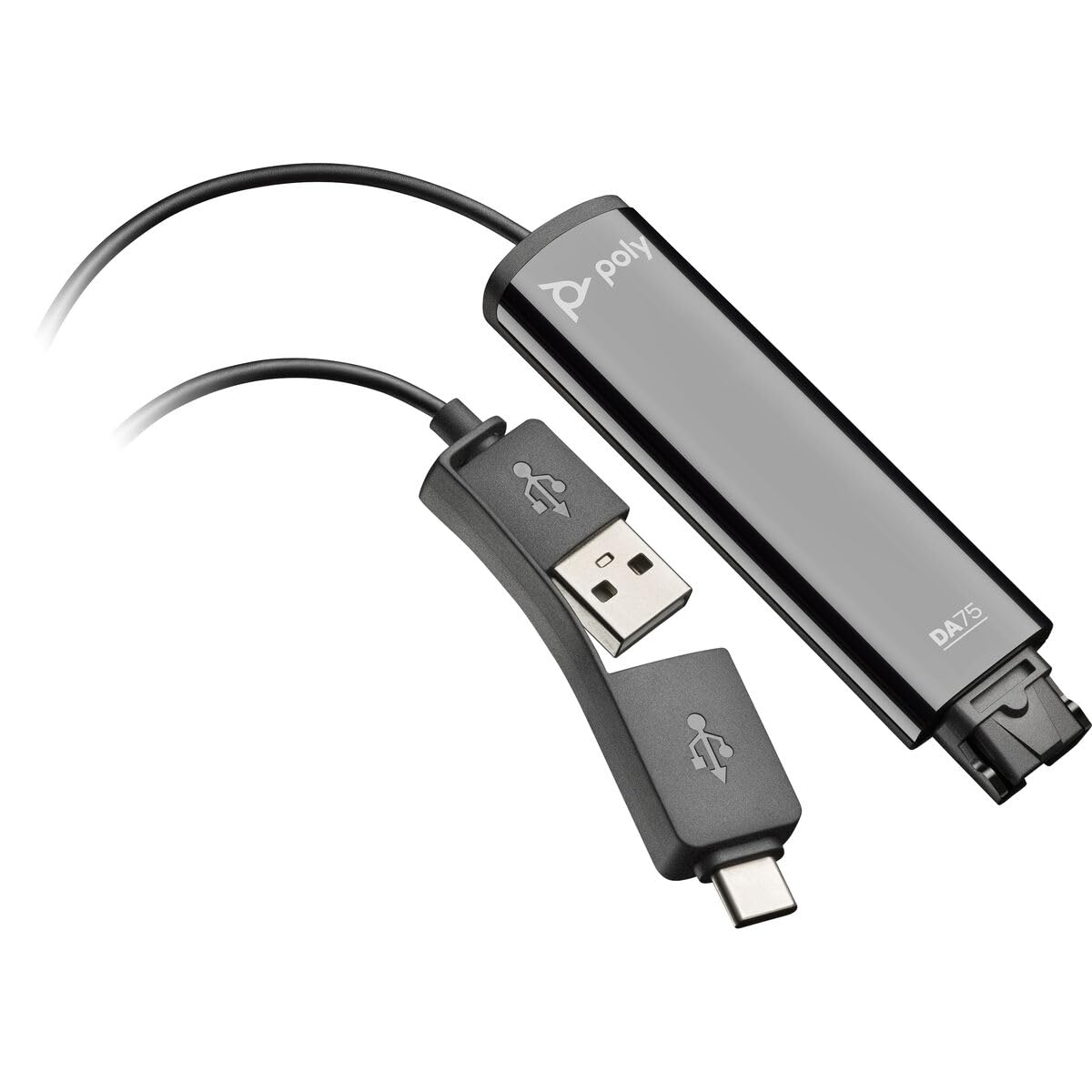
Image: The Poly DA75 USB-A/USB-C Digital Adapter, showing its dual USB-A and USB-C connectors and the Quick Disconnect port for headsets.
Hvað er í kassanum
The Poly DA75 package typically includes the following items:
- Poly DA75 USB-A/USB-C Digital Adapter
- Gögn (leiðbeiningar fyrir notendur, öryggisupplýsingar)
Note: Headsets are sold separately and are not included with the DA75 adapter.
Uppsetning
Follow these steps to set up your Poly DA75 Digital Adapter:
- Tengja heyrnartól: Connect your Poly Quick Disconnect (QD) headset to the QD port on the Poly DA75 adapter. Ensure the connection is secure.
- Tengjast tölvu:
- If your computer has a USB-A port, use the USB-A connector on the DA75 cable.
- If your computer has a USB-C port, use the USB-C connector on the DA75 cable.
Plug the appropriate USB connector into an available USB port on your computer.
- Uppsetning ökumanns: The DA75 is a plug-and-play device. Your operating system (Windows, macOS) should automatically detect the device and install the necessary drivers. This process may take a few moments.
- Staðfesta tækjagreiningu:
- Windows: Farðu til Stillingar > Kerfi > Hljóð or Stjórnborð > Hljóð. The Poly DA75 should appear as an audio input and output device.
- macOS: Farðu til System Settings > Sound. The Poly DA75 should appear as an input and output device.
Select the Poly DA75 as your default communication device for both playback and recording.
- Hugbúnaðarstilling: If you are using communication software (e.g., Avaya, Genesys, Cisco, Microsoft Teams, Zoom), ensure that the Poly DA75 is selected as the audio device within the application's settings.
Notkunarleiðbeiningar
The Poly DA75 adapter facilitates audio communication through your connected Poly QD headset. Its operation is primarily managed through your computer's operating system and communication software.
- Að hringja/taka við símtölum: Use your communication software to initiate or answer calls. The audio will be routed through your connected Poly QD headset via the DA75 adapter.
- Hljóðstyrkur: Adjust the listening volume using your computer's system volume controls or the volume controls within your communication application.
- Hljóðnemi: Mute and unmute your microphone using the controls provided by your communication software.
- Audio Optimization: The DA75 automatically optimizes audio for your specific Poly QD headset. No manual adjustments are typically required for audio profiles.
Viðhald
To ensure the longevity and optimal performance of your Poly DA75 Digital Adapter, follow these maintenance guidelines:
- Þrif: Gently wipe the adapter with a soft, dry, anti-static cloth. Do not use liquid cleaners or abrasive materials.
- Geymsla: Geymið millistykkið á köldum, þurrum stað fjarri beinu sólarljósi og miklum hita.
- Meðhöndlun: Forðist að beygja eða snúa snúrunni of mikið, sérstaklega nálægt tengjunum, til að koma í veg fyrir innri skemmdir.
- Tengingar: Ensure the Quick Disconnect (QD) connection and USB connections are clean and free of debris before connecting.
Úrræðaleit
If you encounter issues with your Poly DA75 Digital Adapter, refer to the following troubleshooting steps:
| Vandamál | Möguleg orsök | Lausn |
|---|---|---|
| Ekkert hljóð frá heyrnartólum |
|
|
| Hljóðnemi virkar ekki |
|
|
| Adapter not recognized by computer |
|
|
Tæknilýsing
| Eiginleiki | Smáatriði |
|---|---|
| Gerðarnúmer | 218266-01 |
| Vörumerki | POLY |
| Tegund tengis | USB-A, USB-C (dual connector) |
| Samhæf tæki | Poly Quick Disconnect (QD) Headsets |
| Sértæk notkun | PC, Call Center Platforms (Avaya, Genesys, Cisco) |
| Litur | Svartur |
| Stærðir hlutar (L x B x H) | 0.98 x 0.39 x 2.95 tommur |
| Þyngd hlutar | 30 grömm |
| Fjöldi hafna | 2 (USB-A/USB-C to QD) |
| UPC | 197029650054, 017229175112 |
Ábyrgð og stuðningur
Upplýsingar um ábyrgð: The Poly DA75 Digital Adapter comes with a 2 árs takmörkuð ábyrgð framleiðandaÞessi ábyrgð nær til galla í efni og framleiðslu við eðlilega notkun. Vinsamlegast geymið kaupkvittunina vegna ábyrgðarkröfu.
Tæknileg aðstoð: For technical assistance, product inquiries, or warranty service, please contact Poly customer support. Visit the official Poly website for the most up-to-date support contact information, FAQs, and additional resources.
Tilföng á netinu: Fjölstuðningur Websíða