
Inngangur
Thank you for choosing the Remax RB-T32 Wireless Bluetooth Earphone. This manual provides detailed instructions on how to set up, operate, and maintain your new earphone. Please read this manual carefully before use to ensure optimal performance and longevity of your device.
Innihald pakka
Vinsamlegast athugið hvort eftirfarandi atriði séu í pakkanum:
- Remax RB-T32 Wireless Bluetooth Earphone
- Hleðslusnúra
- Eyrnapúðar (ýmsar stærðir)
- Notendahandbók
Vara lokiðview
Familiarize yourself with the components of your Remax RB-T32 earphone.
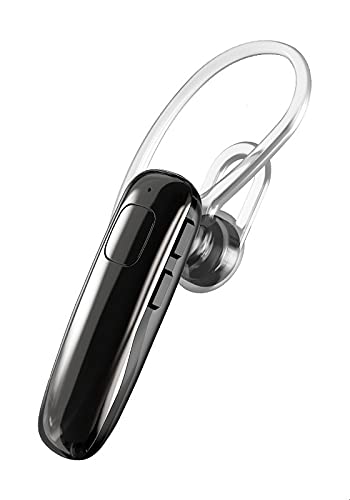
Image: The Remax RB-T32 Wireless Bluetooth Earphone, showcasing its compact design and in-ear form factor. This image provides a general view af vörunni.
The earphone features a compact in-ear design with integrated touch controls for easy operation. It includes a charging port, an LED indicator, and a built-in microphone for calls.
Uppsetning
1. Hleðsla heyrnartólsins
- Tengdu hleðslusnúruna við hleðslutengi heyrnartólsins.
- Tengdu hinn enda snúrunnar við USB aflgjafa (t.d. tölvu, veggmillistykki).
- The LED indicator will show the charging status. A full charge typically takes approximately 1-2 hours.
- Once fully charged, the LED indicator will change or turn off. Disconnect the earphone from the charger.
2. Pörun við Bluetooth tæki
- Ensure the earphone is charged and turned off.
- Press and hold the multi-function button (or touch area) on the earphone until the LED indicator flashes red and blue alternately, indicating pairing mode.
- Virkjaðu Bluetooth í tækinu þínu (snjallsíma, spjaldtölvu o.s.frv.) og leitaðu að tiltækum tækjum.
- Select "RB-T32" from the list of found devices.
- Once successfully paired, the LED indicator will flash blue slowly or turn off, and you will hear a confirmation tone.
- The earphone will automatically connect to the last paired device when turned on, if Bluetooth is enabled on the device.
Notkunarleiðbeiningar
Kveikt/slökkt
- Kveikt á: Press and hold the touch area for approximately 3 seconds until the LED indicator flashes blue and you hear a power-on prompt.
- Slökkva á: Press and hold the touch area for approximately 5 seconds until the LED indicator flashes red and you hear a power-off prompt.
Spilun tónlistar
- Spila / gera hlé: Ýttu einu sinni á snertisvæðið.
- Næsta lag: Ýttu tvisvar á snertisvæðið á hægra heyrnartólinu.
- Fyrra lag: Ýttu tvisvar á snertisvæðið á vinstra heyrnartólinu.
Hringistjórnun
- Svara/slíta símtali: Tap the touch area once during an incoming call or an active call.
- Hafna símtali: Haltu snertifletinum inni í 2 sekúndur meðan á símtali stendur.
Hljóðstyrkstýring
- Auka hljóðstyrk: Triple-tap the touch area on the right earphone.
- Minnka hljóðstyrk: Triple-tap the touch area on the left earphone.
Raddaðstoðarmaður
- Virkja raddaðstoðarmann: Press and hold the touch area for 2 seconds (when not on a call) to activate your device's voice assistant (e.g., Siri, Google Assistant).
Viðhald
- Þrif: Use a soft, dry cloth to clean the earphone. Do not use harsh chemicals or abrasive materials.
- Geymsla: Geymið heyrnartólið á köldum, þurrum stað fjarri beinu sólarljósi og miklum hita.
- Umhirða rafhlöðu: To preserve battery life, charge the earphone regularly, even if not in use for extended periods. Avoid fully discharging the battery frequently.
- Vatnsþol: Þessi heyrnartól eru ekki vatnsheld. Forðist að verða fyrir vatni eða miklum raka.
Úrræðaleit
| Vandamál | Lausn |
|---|---|
| Heyrnartólið kviknar ekki á. | Ensure the earphone is fully charged. |
| Ekki er hægt að para við tæki. |
|
| Ekkert hljóð eða lágt hljóðstyrkur. |
|
| Stöðug tenging. |
|
Tæknilýsing
| Eiginleiki | Smáatriði |
|---|---|
| Vörumerki | Remax |
| Nafn líkans | RB-T32 |
| Tengitækni | Þráðlaust (Bluetooth) |
| Heyrnartól Form Factor | In Ear |
| Gerð stjórna | Volume Control (Touch) |
| Samhæf tæki | Multi-device compatible |
| Innifalið íhlutir | Eyrnapúðar |
| Lýsing á aldursbili | Fullorðinn |
| Litur | Svartur |
Ábyrgð og stuðningur
The Remax RB-T32 Wireless Bluetooth Earphone comes with a standard manufacturer's warranty. Please refer to the warranty card included in your package for specific terms and conditions, including the warranty period and coverage details.
For technical support, troubleshooting assistance, or warranty claims, please contact your local Remax distributor or the retailer where you purchased the product. Keep your proof of purchase for warranty validation.