
1. Inngangur
This manual provides essential instructions for the installation, operation, and maintenance of your Hikvision 8MP AcuSense WDR Mini Bullet Network Camera, model DS-2CD2083G2-IU. Please read this manual thoroughly before using the product and retain it for future reference.
Vara lokiðview
The Hikvision DS-2CD2083G2-IU is a high-performance 8-megapixel (4K) network camera designed for advanced surveillance. It features AcuSense technology for accurate human and vehicle target classification, Wide Dynamic Range (WDR) for clear imaging against strong backlight, and a fixed 2.8mm lens for a wide field of view. Its IP67 rating ensures robust outdoor performance, and the integrated microphone allows for audio monitoring.
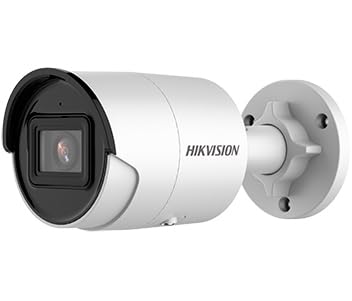
Figure 1: Hikvision 8MP AcuSense WDR Mini Bullet Network Camera (DS-2CD2083G2-IU)
This image displays the Hikvision 8MP AcuSense WDR Mini Bullet Network Camera, highlighting its compact bullet-style design suitable for various installation environments.
Helstu eiginleikar
- 8 Megapixel (4K) Resolution: Delivers high-quality, detailed video.
- AcuSense tækni: Reduces false alarms by accurately classifying human and vehicle targets.
- Wide Dynamic Range (WDR): Ensures clear images even in scenes with strong contrast.
- Fixed 2.8mm Lens: Veitir breitt viewing horn.
- Innrauð lýsing (IR): Night vision up to 40 meters.
- IP67 Veðurþolsmat: Suitable for outdoor use in various weather conditions.
- Innbyggður hljóðnemi: Enables audio monitoring.
- Innbyggður kortalesari: Supports local storage (microSD card not included).
2. Öryggisupplýsingar
Vinsamlegast fylgið eftirfarandi öryggisráðstöfunum til að koma í veg fyrir meiðsli eða skemmdir á vörunni:
- Ensure the power supply meets the camera's requirements (6.5 Watts).
- Ekki láta myndavélina verða fyrir miklum hita, raka eða tærandi umhverfi.
- Avoid pointing the lens directly at strong light sources, as this may damage the sensor.
- Uppsetning skal framkvæmd af hæfu starfsfólki í samræmi við gildandi rafmagnsreglugerðir.
- Notaðu aðeins fylgihluti sem framleiðandinn tilgreinir.
- Þrífið myndavélarlinsuna með mjúkum, þurrum klút. Forðist sterk efni.
3. Uppsetning og uppsetning
3.1 Upptaka
Carefully unpack the camera and check for any signs of damage. Ensure all components are present. (Typical components include: camera unit, mounting template, screws, waterproof connector, quick start guide).
3.2 Líkamleg uppsetning
The camera is designed for ceiling mounting. Select a suitable location that provides the desired field of view and is within reach of network and power cables. Due to its IP67 rating, it is suitable for outdoor environments.
- Use the provided mounting template to mark drill holes on the ceiling.
- Drill the necessary holes and insert wall plugs if required.
- Secure the camera base to the mounting surface using the supplied screws.
- Stilltu myndavélarhornið til að ná sem bestum þekju.
3.3 Nettenging og rafmagnstenging
This is an IP network camera. It requires a network connection and power. Power over Ethernet (PoE) is typically supported, simplifying installation by delivering both power and data over a single Ethernet cable. If PoE is not used, a separate 12V DC power adapter (not included) will be required.
- Connect an Ethernet cable from your network switch/router to the camera's RJ45 port. Use the waterproof connector for outdoor installations.
- Ef þú notar ekki PoE skaltu tengja 12V DC straumbreyti við aflgjafainntak myndavélarinnar.
- Once connected, the camera will power on. Allow a few minutes for it to boot up.
3.4 Upphafleg stilling
Aðgangur að myndavélinni web viðmót í gegnum a web browser using its default IP address (refer to the quick start guide or use Hikvision's SADP tool to discover the IP address). You will be prompted to set a strong password for security. Follow the on-screen instructions to configure network settings, date/time, and other basic parameters.
4. Notkunarleiðbeiningar
4.1 Í beinni View og Upptaka
Eftir upphaflega uppsetningu geturðu view the live feed from the camera through its web interface, a Network Video Recorder (NVR), or Hikvision's client software (e.g., iVMS-4200) or mobile app (Hik-Connect). Configure recording schedules and methods (continuous, motion-triggered) via the camera's settings or NVR.
4.2 AcuSense Smart Features
The AcuSense technology allows the camera to distinguish between humans, vehicles, and other moving objects, significantly reducing false alarms caused by animals, rain, or falling leaves. Configure these detection rules in the camera's event settings to receive more accurate alerts.
- Hreyfiskynjun 2.0: Set up detection zones and sensitivity for human and vehicle events.
- Uppgötvun uppgötvun: Define virtual boundaries, and the camera will trigger an alarm if a human or vehicle crosses them.
- Greining á línuþverun: Similar to intrusion, but for a specific line.
4.3 Breitt kraftmikið svið (WDR)
WDR compensates for extreme lighting conditions, such as strong backlight, to ensure that both bright and dark areas of the image are clearly visible. This feature is typically enabled by default but can be adjusted in the image settings.
4.4 Infrared (IR) Night Vision
The camera automatically switches to IR mode in low-light conditions, providing clear black-and-white video up to 40 meters. Ensure no obstructions block the IR LEDs for optimal night vision performance.
4.5 Hljóðeftirlit
With its built-in microphone, the camera can capture audio from the surveillance area. Audio settings, including gain control, can be configured in the camera's web interface. Ensure local regulations regarding audio recording are followed.
5. Viðhald
- Þrif: Hreinsið myndavélarlinsuna og húsið reglulega með mjúkum, þurrum klút.amp klút. Ekki nota slípiefni.
- Uppfærsla vélbúnaðar: Athugaðu reglulega hjá Hikvision embættismanni website for firmware updates. Keeping the firmware updated ensures optimal performance, new features, and security enhancements.
- Snúruskoðun: For outdoor installations, periodically inspect cables and connections for wear or damage, especially the waterproof connectors.
- Lykilorðsstjórnun: Regularly change your camera's password to maintain security.
6. Bilanagreining
| Vandamál | Möguleg orsök | Lausn |
|---|---|---|
| No image/camera offline | No power, network cable disconnected, incorrect IP address. | Check power supply and network cable. Verify IP address using SADP tool. Restart camera. |
| Léleg myndgæði | Dirty lens, incorrect focus (if adjustable), poor lighting, network bandwidth issues. | Clean the lens. Ensure adequate lighting. Check network connection speed. Adjust image settings (WDR, exposure). |
| Falskar viðvaranir frá hreyfiskynjun | Sensitivity too high, environmental factors (trees, animals), AcuSense not configured. | Adjust motion detection sensitivity. Configure AcuSense human/vehicle detection. Adjust detection zones. |
| Get ekki fengið aðgang web viðmót | Rangt IP-tala, vandamál með nettengingu, samhæfni við vafra. | Verify IP address. Ensure camera and PC are on the same network segment. Try a different browser. |
If the problem persists after attempting these solutions, please contact Hikvision technical support.
7. Tæknilýsing
| Eiginleiki | Smáatriði |
|---|---|
| Gerðarnúmer | DS-2CD2083G2-ae |
| Myndskynjari | CMOS |
| Hámark Upplausn | 8 megapixla (4K) |
| Linsa | 2.8mm fast linsa |
| IR svið | Allt að 40 metrar |
| WDR | Stuðningur |
| AcuSense | Human and Vehicle Target Classification |
| Hljóð | Innbyggður hljóðnemi |
| Staðbundin geymsla | Integrated Card Reader (MicroSD slot) |
| Veðurheldur einkunn | IP67 |
| Orkunotkun | 6.5 Watt |
| Mál (L x B x H) | 15 x 15 x 8 cm (u.þ.b.) |
| Gerð uppsetningar | Loftfesting |
| Viðvörunargerð | Motion Only (configurable for human/vehicle) |
8. Ábyrgð og stuðningur
Hikvision products typically come with a limited manufacturer's warranty. Please refer to the warranty card included with your product or visit the official Hikvision webvefsíðu fyrir ítarlegar ábyrgðarskilmála sem eiga við um þitt svæði.
For technical support, firmware downloads, or further assistance, please visit the official Hikvision support portal or contact their customer service department. Ensure you have your product model number (DS-2CD2083G2-IU) and serial number ready when contacting support.
Official Hikvision Websíða: www.hikvision.com