
1. Inngangur
This instruction manual provides detailed information on the setup, operation, maintenance, and troubleshooting for your Aibecy withzoom 1080P 3X Optical Zoom Webcam. Please read this manual thoroughly before using the product to ensure proper functionality and to prevent damage.
2. Vöru lokiðview
2.1 Helstu eiginleikar
- 1080P Full HD Video Resolution
- 3X optísk aðdráttarlinsa
- 355° Horizontal Rotation and 90° Vertical Rotation
- Rekstur fjarstýringar
- USB tengimöguleikar
- Compatible with Windows, Mac, Linux, and Chromebook operating systems
- Infrared (IR) support
2.2 Innihald pakka
Gakktu úr skugga um að allir hlutir séu til staðar í pakkanum:
- Aibecy withzoom Webkambur
- Fjarstýring
- Rafmagns millistykki
- USB snúru
- Festingar Bracket
- Skrúfur til uppsetningar

Mynd 1: Innihald pakka
2.3 Vörumynd

Mynd 2: Framan View og íhlutir
- HD linsa: Tekur upp háskerpu myndband.
- 355° Rotating Gimbal: Allows for wide-angle coverage and precise positioning.
- IR Infrared Receiver: Tekur við merkjum frá fjarstýringunni.
- Rafmagnsvísir: Sýnir stöðu rafmagnstækisins.
- Fjarstýringarvísir: Lights up when a remote control signal is received.
3. Uppsetningarleiðbeiningar
3.1 Uppsetningaraðferðir
The Aibecy withzoom webmyndavél býður upp á sveigjanlega uppsetningarmöguleika:
- Staðsetning borðs: Place the camera on a flat surface such as a desk or conference table.
- Loftfesting: Use the included mounting bracket and screws to attach the camera to the ceiling. Ensure the image flip function is enabled if mounting upside down.
- Festing fyrir festingu: Attach the camera to a tripod or other compatible bracket using the screw hole at the bottom.

Mynd 3: Uppsetningarvalkostir
3.2 Myndavélin tengd
Follow these steps to connect your webkambur:
- Rafmagnstenging: Connect the AC power adapter to the camera's 12V power input port and plug it into a power outlet.
- USB tenging: Connect the USB cable from the camera's USB port to an available USB port on your computer (Windows, Mac, Linux, or Chromebook). The camera is plug-and-play and does not require driver software.
- Optional RS232/RS422 Connection: If advanced control via RS232 or RS422 is required, connect the appropriate cable from the camera to your control device.

Mynd 4: Tengimynd
Once connected, open your video conferencing software (e.g., Zoom, Skype, Microsoft Teams) and select the Aibecy withzoom camera as your video input device.
4. Notkunarleiðbeiningar
4.1 Grunnaðgerð
- Kveikt á: After connecting the power adapter, the camera will automatically power on. The Power Indicator light will illuminate.
- Slökkva á: Disconnect the power adapter from the camera.
4.2 Notkun fjarstýringarinnar
The included remote control allows for easy adjustment of camera functions.

Mynd 5: Webcam and Remote Control
- Camera Selection Buttons: If multiple cameras are connected, use these buttons to select the camera you wish to control.
- Rotation Speed Control: Adjust the pan/tilt speed for smoother movements.
- Stýringar fyrir hreyfanleika/halla/aðdrátt (PTZ): Use the directional arrows to pan (left/right) and tilt (up/down) the camera. Use the zoom in/out buttons to adjust the optical zoom.
- Preset Function Area: Save and recall specific camera positions and zoom levels using the preset buttons.
4.3 Camera Movement and Zoom
The camera supports wide-range movement for comprehensive coverage:
- Láréttur snúningur: The camera head can rotate 355 degrees horizontally.
- Lóðréttur snúningur: The camera head can tilt 90 degrees vertically.
- Optískur aðdráttur: Utilize the 3X optical zoom to focus on specific areas without loss of image quality.
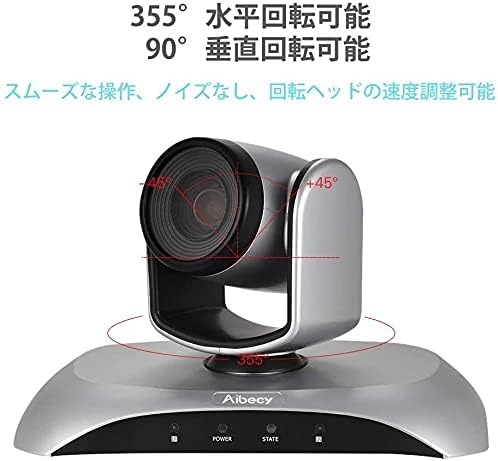
Figure 6: Camera Rotation Capabilities
4.4 Image Flip Function
If the camera is mounted upside down (e.g., on a ceiling), you can use the image flip function to correct the video orientation.

Figure 7: Image Flip Function in Use
Refer to the remote control instructions for the specific button to activate or deactivate the image flip function.
5. Viðhald
Rétt viðhald tryggir langlífi og bestu mögulegu afköst bílsins þíns. webkambur.
- Þrif: Notið mjúkan, þurran klút til að þrífa myndavélarhúsið. Notið sérstakan klút og lausn til að þrífa linsuna. Forðist slípandi hreinsiefni eða leysiefni.
- Geymsla: Þegar myndavélin er ekki í notkun í langan tíma skal geyma hana á köldum, þurrum stað fjarri beinu sólarljósi og miklum hita.
- Meðhöndlun: Forðist að láta myndavélina detta eða verða fyrir hörðum höggum.
6. Bilanagreining
If you encounter issues with your Aibecy withzoom webcam, refer to the table below for common problems and solutions.
| Vandamál | Möguleg orsök | Lausn |
|---|---|---|
| No image or video output | Power not connected; USB cable loose; Incorrect camera selected in software. | Ensure power adapter is securely connected. Check USB cable connection. Select the Aibecy withzoom camera in your video conferencing software settings. |
| Fjarstýring virkar ekki | Batteries low/dead; Obstruction between remote and camera; Remote not pointed at IR receiver. | Replace remote control batteries. Ensure a clear line of sight to the camera's IR receiver. Point the remote directly at the camera. |
| Myndin er á hvolfi | Camera mounted upside down and image flip not activated. | Activate the image flip function using the remote control. |
| Léleg myndgæði | Insufficient lighting; Dirty lens; Network bandwidth issues. | Ensure adequate lighting in the room. Clean the camera lens. Check your internet connection speed. |
7. Tæknilýsingar
| Eiginleiki | Forskrift |
|---|---|
| Vörumerki | Aibecy |
| Gerðarnúmer | withzoom |
| Myndbandsupplausn | 1080p |
| Optískur aðdráttur | 3X |
| Lárétt snúningur | 355° |
| Lóðrétt snúningur | 90° |
| Tengitækni | USB |
| Samhæf tæki | Windows, Mac, Linux, Chromebook |
| Sérstakir eiginleikar | Remote Control, Infrared |
| Myndstöðugleiki | Nei |
| Stærðir pakka | 29.7 x 22.4 x 19.9 cm |
| Þyngd hlutar | 1.51 kg |
8. Upplýsingar um stuðning
For further assistance or inquiries not covered in this manual, please refer to the official Aibecy support channels or contact your retailer. Keep your purchase receipt for warranty purposes.