
1. Vöru lokiðview
The ARPHA D01 Smart Lock offers advanced security and convenient access to your home. It integrates multiple unlocking methods and smart features for enhanced control and peace of mind.
Helstu eiginleikar:
- Margar opnunaraðferðir: Fingerprint, Pin Password, App Control (Bluetooth), and Mechanical Key.
- Quick Fingerprint Identification: Identifies fingerprints in 0.3 seconds with 360° recognition, storing up to 50 fingerprints.
- Sjálfvirk læsing: Automatically locks the door based on door position when closed, preventing accidental lockouts.
- Aðgerðarskrá: View unlocking history via the mobile application.
- Advanced Secure Password: Features anti-peep password entry and stores up to 50 pin codes.
- Neyðarafl: USB port for temporary power in case of battery depletion.
- Viðvörun um lága rafhlöðu: Provides alerts when batteries are low.
- Viðvörun gegn hnýðingu: Activates an alarm if incorrect passwords are entered multiple times.
- Veðurþol: Designed to withstand temperatures from -13°F to 131°F with IP65 rating.

Figure 1: Multiple ways to unlock the ARPHA D01 Smart Lock.

Figure 2: The ARPHA D01 Smart Lock, designed to be smart, secure, and reliable.
2. Hvað er innifalið
Gakktu úr skugga um að allir íhlutir séu til staðar áður en uppsetning hefst:
- ARPHA D01 Smart Lock (Front and Rear Assemblies)
- Deadbolt Lach
- Festingarplata
- Strike Plate og Box
- Vélrænir lyklar (2)
- Uppsetningarskrúfur og vélbúnaður
- Notendahandbók
- Uppsetningarsniðmát
3. Uppsetningarhandbók
Follow these steps carefully to install your ARPHA D01 Smart Lock. For a visual guide, please refer to the installation video below.
Video 1: ARPHA D01 Smart Lock Installation Guide. This video provides a step-by-step visual walkthrough of the installation process.
Skref 1: Undirbúðu hurðina
- Fjarlægðu núverandi láslokann.
- Use the provided template to mark and drill any necessary holes.
Skref 2: Settu Deadbolt upp
- Adjust the deadbolt length if necessary (60mm or 70mm backset).
- Insert the deadbolt into the door hole with the word "TOP" facing up.
- Secure the deadbolt with the provided screws.
Step 3: Install the Lock Assemblies
- Install the connection columns onto the rear assembly.
- Adjust the paddle on the rear assembly to the horizontal direction.
- Guide the connection wire from the front assembly through the deadbolt opening.
- Align the front assembly with the door and the deadbolt.
- Install the iron plate (mounting plate) by aligning it with the connection columns and fixing the screws.
Step 4: Connect Wires and Install Batteries
- Connect the wire from the front assembly to the rear assembly.
- Insert 4 AA batteries into the battery compartment of the rear assembly.
Step 5: Lock Calibration
- Long press the RESET button until you hear a "Di" voice.
- Switch the knob from vertical to horizontal direction.
- A "successful" voice prompt indicates calibration is complete.
Step 6: Set Administrator Password
- Ýttu á RESET hnappinn.
- Set your desired administrator password, followed by the '#' key.
- Re-enter the password to confirm.
4. Notkunarleiðbeiningar
Aflæsingaraðferðir:
4.1 Opnun með fingrafara
- Settu skráða fingurinn þinn á fingrafaralesarann.
- The lock will unlock if the fingerprint is recognized.

Figure 3: Quick fingerprint identification for unlocking.
4.2 Opnun með aðgangskóða
- Enter your registered 6-8 digit passcode on the touchscreen keypad.
- Press '#' to confirm. The lock will unlock.
- The anti-peep function allows you to enter random digits before or after your actual passcode to prevent others from guessing it.
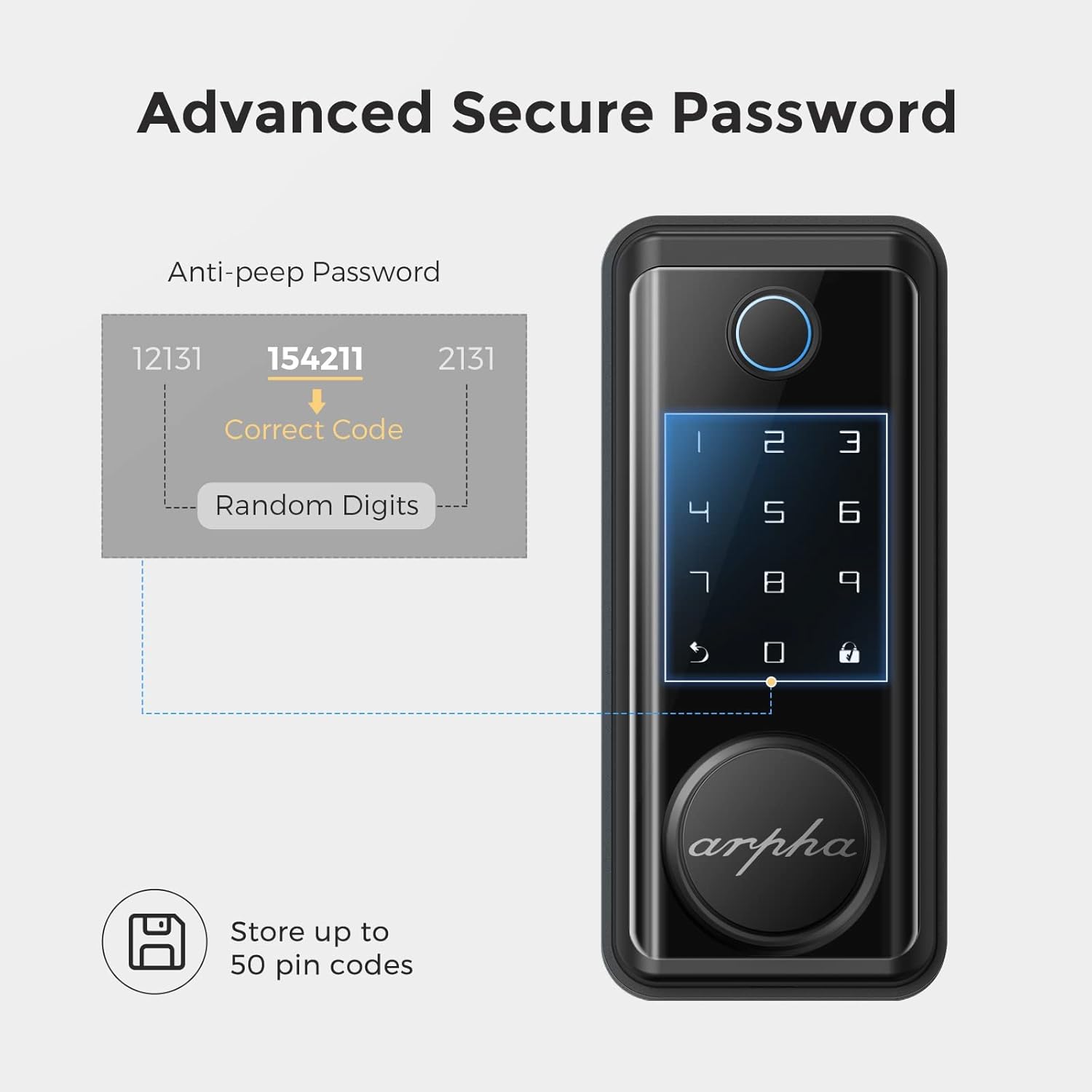
Figure 4: Advanced secure password entry with anti-peep function.
4.3 Opnun með vélrænum lykli
- Remove the magnetic cover at the bottom of the front assembly to reveal the keyhole.
- Settu vélræna lykilinn í og snúðu honum til að opna hurðina.
4.4 Opnun forrita (Bluetooth)
- Ensure Bluetooth is enabled on your smartphone and you are within range of the lock.
- Open the Tuya Smart app and select your ARPHA D01 Smart Lock.
- Tap and hold the unlock icon in the app to unlock the door.
4.5 Sjálfvirk læsing
- The lock is equipped with a sensor that detects when the door is closed.
- It will automatically engage the deadbolt after a set period (configurable in the app) once the door is closed.

Figure 5: The auto-lock feature based on door position.
4.6 Neyðarafl
- In case the batteries are completely drained, connect a power bank to the micro-USB port located at the bottom of the front assembly.
- This will temporarily power the lock, allowing you to use the keypad or fingerprint sensor to gain entry.

Figure 6: USB port for emergency power supply.
5. App eiginleikar
The Tuya Smart app provides comprehensive control and monitoring capabilities for your ARPHA D01 Smart Lock:
- Vöktun rafhlöðustigs: View núverandi hlutfall rafhlöðunnartage of your lock.
- Að opna skrár: Access a detailed log of all unlocking events, including method and time.
- Félagsstjórn: Add or remove family members and assign specific access methods (fingerprint, passcode).
- Tímabundin lykilorð: Generate one-time or periodic passwords for guests or service providers.
- Snjalltenging: Integrate your smart lock with other smart home devices for automated scenarios.
- Stillingar: Customize various lock parameters, including language, navigation volume, and auto-lock duration.

Mynd 7: View unlocking records and manage access via the app.

Figure 8: Easily share temporary passwords with guests.
6. Viðhald
- Skipt um rafhlöðu: Replace all 4 AA batteries when the low battery alert is triggered. Use high-quality alkaline batteries for optimal performance.
- Þrif: Wipe the touchscreen and fingerprint sensor with a soft, dry cloth. Avoid abrasive cleaners or solvents.
- Skrúfuprófun: Periodically check all mounting screws to ensure they are tight.

Figure 9: Low battery alert on the smart lock.
7. Bilanagreining
- Lás svarar ekki: Check battery levels. Use emergency USB power if batteries are dead.
- Fingrafar ekki greint: Gakktu úr skugga um að fingurinn sé hreinn og þurr. Skráðu fingrafarið aftur ef vandamálin halda áfram.
- Aðgangskóðinn virkar ekki: Verify the correct passcode is entered. Ensure the anti-peep function is not causing issues.
- Vandamál með tengingu við forrit: Ensure Bluetooth is enabled and you are within range. Restart the app and try again.
- Sjálfvirk læsing virkar ekki: Check door sensor alignment. Verify auto-lock settings in the app.
8. Tæknilýsing
| Eiginleiki | Smáatriði |
|---|---|
| Vörumerki | ARPHA |
| Gerðarnúmer | D01 |
| Tegund læsa | Líffræðilegt tölfræði, lyklaborð |
| Efni | Sink |
| Stíll | Nútímalegt |
| Sérstakir eiginleikar | Fingerprint, Touchscreen, Smart Lock, Wifi (via gateway, not direct) |
| Tengireglur | Bluetooth |
| Eftirlitsaðferð | App, snerta |
| Þyngd hlutar | 3.65 pund |
| Stærðir pakka | 9.02 x 7.13 x 3.7 tommur |
| Rekstrarhitastig | -13°F til 131°F |
| Vatnsheld einkunn | IP65 |

Figure 10: ARPHA D01 Smart Lock dimensions.

Figure 11: Weather resistance features of the smart lock.
9. Ábyrgð og stuðningur
ARPHA products come with a standard manufacturer's warranty. For detailed warranty information, technical support, or service inquiries, please refer to the contact information provided in your product packaging or visit the official ARPHA websíða.