
1. Mikilvægar öryggisleiðbeiningar
Please read these instructions carefully before using the product and retain them for future reference. Failure to follow these instructions may result in electric shock, fire, or other hazards.
- Ekki útsetja þetta tæki fyrir rigningu eða raka.
- Ekki loka neinum loftræstiopum. Setjið upp í samræmi við leiðbeiningar framleiðanda.
- Ekki setja upp nálægt neinum hitagjöfum eins og ofnum, hitatöflum, ofnum eða öðrum tækjum (þ. amplyftara) sem framleiða hita.
- Verndaðu rafmagnssnúruna frá því að ganga á hana eða klípa hana, sérstaklega við innstungur, snyrtivörur og þar sem hún fer úr tækinu.
- Notaðu aðeins viðhengi/aukahluti sem framleiðandi tilgreinir.
- Taktu þetta tæki úr sambandi í eldingarstormum eða þegar það er ónotað í langan tíma.
- Látið alla þjónustu til hæfs þjónustufólks. Þjónusta er nauðsynleg þegar tækið hefur skemmst á einhvern hátt, svo sem að rafmagnssnúra eða kló er skemmd, vökvi hefur hellst niður eða hlutir hafa fallið inn í tækið, tækið hefur orðið fyrir rigningu eða raka, virkar ekki eðlilega , eða hefur verið fellt niður.
- The stylus is delicate; handle with care to avoid damage.
2. Vöru lokiðview
The Udreamer UD001 is a belt-driven vinyl record player featuring built-in speakers, Bluetooth connectivity, USB playback, AUX-IN, and RCA line-out. It supports 3 speeds for various record types.

Mynd: Framan view of the Udreamer UD001 Vinyl Record Player with a record on the platter and the dust cover open.
2.1 Íhlutir og stjórntæki
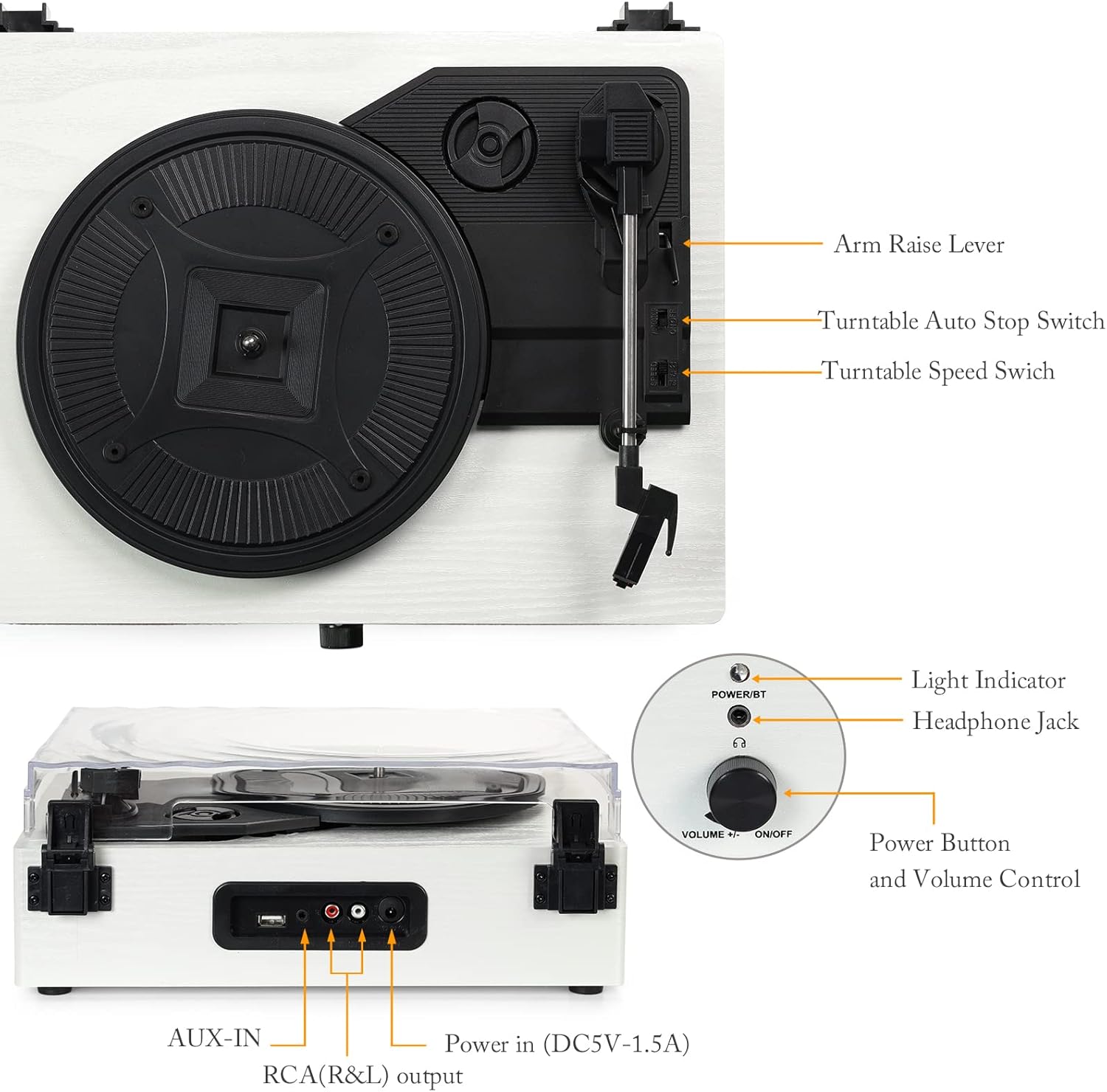
Mynd: Ítarleg view of the turntable with labels pointing to key components including the arm raise lever, auto stop switch, speed switch, light indicator, headphone jack, power button, volume control, AUX-IN, RCA(R&L) output, and power input.
- Diskur: Supports the record during playback.
- Rykhlíf: Verndar plötuspilarann fyrir ryki.
- Tonhandleggur: Holds the stylus and cartridge.
- Stíll: Nálin sem les raufar plötunnar.
- Arm Raise Lever: Lifts and lowers the tonearm.
- Turntable Auto Stop Switch: Virkjar eða afvirkjar sjálfvirka stöðvun plötunnar í lok færslu.
- Turntable Speed Switch: Selects playback speed (33, 45, or 78 RPM).
- Power Button/Volume Control: Kveikir/slökkvir á tækinu og stillir hljóðstyrkinn.
- Ljósvísir: Sýnir stöðu rafmagns og Bluetooth.
- Heyrnartól tjakkur: Fyrir einka hlustun.
- USB tengi: Til að spila hljóð af USB-lykil.
- AUX-IN: Til að tengja utanaðkomandi hljóðtæki.
- RCA (R&L) úttak: Til að tengjast við ytri amplifers eða máttur hátalarar.
- Rafmagnsinntak (DC5V-1.5A): Tengist við straumbreytinn.

Mynd: Nærmynd views illustrating the stylus, the belt-driven platter mechanism, and the three supported record speeds (33, 45, 78 RPM) for 7-inch, 10-inch, and 12-inch records.
3. Uppsetning
3.1 Upptaka
Carefully remove the turntable from its packaging. Ensure all components are present and undamaged. The package should include the UD001 turntable unit and an operation manual.

Image: The Udreamer UD001 turntable, its packaging box, power adapter, and instruction manual.
3.2 Rafmagnstenging
- Connect the power adapter to the 'Power In (DC5V-1.5A)' port on the rear of the turntable.
- Stingdu rafmagnsmillistykkinu í viðeigandi innstungu.
3.3 Initial Platter and Belt Setup
The turntable platter and drive belt may require minor setup. Ensure the drive belt is correctly positioned around the motor pulley and the inner rim of the platter. Refer to the diagram in the 'Product Overview' section for visual guidance.
4. Notkunarleiðbeiningar
4.1 Að spila vínylplötu
- Settu plötu á plötudiskinn.
- Select the appropriate speed (33, 45, or 78 RPM) using the Turntable Speed Switch, matching the record's speed.
- If playing a 45 RPM single, place the included 45 RPM adapter on the center spindle.
- Snúðu rofanum/hljóðstyrksstýringunni réttsælis til að kveikja á tækinu. Ljósvísirinn mun lýsast upp.
- Lift the tonearm using the Arm Raise Lever.
- Færðu tónarminn varlega yfir þá upphafsrauf sem þú vilt á plötunni.
- Gently lower the tonearm onto the record using the Arm Raise Lever. The record will begin to play.
- Adjust the volume using the Power Button/Volume Control knob.
- To stop playback, lift the tonearm using the Arm Raise Lever and return it to its rest. Turn the Power Button/Volume Control knob counter-clockwise to power off.

Image: Close-up of the Turntable Auto Stop Switch and Turntable Speed Switch, located near the tonearm base.
Sjálfvirk stöðvunaraðgerð: The Turntable Auto Stop Switch controls whether the platter stops automatically at the end of a record. Set to 'ON' for automatic stop, 'OFF' for continuous rotation.
4.2 Bluetooth pörun
The UD001 can connect wirelessly to Bluetooth-enabled devices for audio playback through its built-in speakers.
- Turn on the turntable by rotating the Power Button/Volume Control knob clockwise. The light indicator will flash blue, indicating Bluetooth pairing mode.
- Virkjaðu Bluetooth á ytra tækinu þínu (t.d. snjallsíma, spjaldtölvu).
- Leitaðu að 'Turntable' in your device's Bluetooth settings and select it to pair.
- Once paired, the light indicator will turn solid blue. You can now play audio from your device through the turntable's speakers.
- Adjust volume using the turntable's volume knob or your external device.

Image: A smartphone displaying a Bluetooth pairing menu with 'Turntable' selected, next to the Udreamer UD001 turntable, indicating a successful wireless connection.
4.3 USB spilun
The USB port allows playback of digital audio files frá USB-drifi.
- Insert a USB flash drive into the USB port on the rear of the turntable.
- The unit will automatically switch to USB mode and begin playing compatible audio files.
- Use the turntable's volume control to adjust the audio output.

Image: Close-up of the rear panel connections, clearly labeling the USB port, AUX-IN port, RCA (R&L) output ports, and DC power input.
4.4 AUX-IN tenging
Connect external audio sources (e.g., MP3 players, CD players) using the AUX-IN port.
- Connect a 3.5mm audio cable (not included) from your external audio device's headphone or line-out jack to the AUX-IN port on the rear of the turntable.
- The turntable will automatically switch to AUX-IN mode.
- Play audio from your external device. Adjust volume using both the external device and the turntable's volume control.
4.5 RCA Line Out
For enhanced audio, connect the turntable to external powered speakers or an amplifier using the RCA output ports.
- Connect an RCA cable (not included) from the RCA (R&L) output ports on the rear of the turntable to the corresponding input jacks on your external amphátalara eða hátalara.
- Gakktu úr skugga um að ytra hljóðkerfið sé kveikt og stillt á rétt inntak.
- Audio will now play through your external system. Adjust volume using the external system's controls.
4.6 Notkun heyrnartóla
For private listening, connect headphones to the headphone jack on the front panel.
- Plug your headphones into the 3.5mm Headphone Jack on the front of the turntable.
- Audio will automatically be routed to the headphones, muting the built-in speakers.
- Adjust volume using the turntable's volume control.

Image: A woman wearing red headphones, holding a vinyl record, and listening to music, illustrating the use of the headphone jack for private listening.
5. Viðhald
5.1 Þrif á einingunni
- Þurrkið ytra byrði snúningsdisksins með mjúkum, þurrum klút. Notið ekki slípiefni eða leysiefni.
- Haldið rykhlífinni lokaðri þegar hún er ekki í notkun til að koma í veg fyrir að ryk safnist fyrir.
5.2 Umhirða stílls
- Gently clean the stylus periodically using a soft brush, brushing from back to front.
- Forðastu að snerta stíllinn með fingrunum.
- Replace the stylus when sound quality deteriorates or if the stylus is visibly damaged. Consult the manufacturer for compatible replacement styli.
6. Bilanagreining
- Enginn kraftur:
- Ensure the power adapter is securely connected to the turntable and a working power outlet.
- Confirm the Power Button/Volume Control knob is turned clockwise to the 'ON' position.
- Ekkert hljóð:
- Adjust the volume control on the turntable and any connected external devices.
- Ef þú notar heyrnartól skaltu ganga úr skugga um að þau séu alveg tengd.
- If using RCA output, verify the external amplifier/speakers are on and set to the correct input.
- Check that the stylus is properly seated and not damaged.
- Record Skipping:
- Gakktu úr skugga um að skráin sé hrein og laus við ryk eða rusl.
- Place the turntable on a stable, level surface to minimize vibrations.
- Check the stylus for damage or excessive wear.
- Vandamál með Bluetooth-tengingu:
- Ensure the turntable is in Bluetooth pairing mode (flashing blue light).
- Make sure your external device's Bluetooth is enabled and within range.
- Reyndu að aftengja tækið og para það aftur.
7. Tæknilýsing
| Eiginleiki | Smáatriði |
|---|---|
| Gerðarnúmer | UD001 |
| Vörumál | 12.8 x 9.8 x 4.7 tommur |
| Þyngd hlutar | 5.02 pund |
| Spilunarhraði | 33 1/3, 45, 78 snúninga á mínútu |
| Tegund drifs | Beltisdrifið |
| Tengingar | Bluetooth, USB, AUX-IN, RCA Line Out, Headphone Jack |
| Innbyggðir hátalarar | Já |
| Aflgjafi | Rafmagn með snúru |
| Voltage | 2.4E+2 volt (240V) |
| Samhæf tæki | Heyrnartól, hátalari |
8. Ábyrgð og stuðningur
For warranty information or technical support, please refer to the contact details provided with your purchase documentation or visit the official Udreamer webGeymið kaupkvittunina vegna ábyrgðarkröfu.