
1. Inngangur
This manual provides detailed instructions for the installation, operation, and maintenance of your ESLYYDS Double Din Car Stereo. This advanced multimedia system offers a wide range of features including Apple CarPlay, Android Auto, Bluetooth connectivity, a high-definition touchscreen, and support for a backup camera, enhancing your in-car entertainment and navigation experience.

Figure 1.1: ESLYYDS Double Din Car Stereo Overview
2. Innihald pakka
Vinsamlegast staðfestu að allir hlutir sem taldir eru upp hér að neðan séu innifaldir í pakkanum þínum:
- ESLYYDS Double Din Car Stereo Unit
- Festingarfestingarsett
- Camera Wire A
- Camera Wire B
- Steering Wheel Control Unit
- Vírbelti A
- Vírbelti B
- Aftur-view Myndavél
- Fjarstýring
- Notendahandbók (þetta skjal)

Figure 2.1: Stereo Dimensions and Included Accessories
3. Vörueiginleikar
The ESLYYDS Double Din Car Stereo is equipped with a variety of features designed for convenience and enhanced driving experience:
- Samhæfni við Apple CarPlay og Android Auto: Seamlessly integrate your smartphone for navigation, music, calls, and messages using voice control.
- 7 tommu HD rafrýmd snertiskjár: A responsive and accurate display supporting 1080P video playback.
- Bluetooth 5.2: For stable and clear hands-free calling and audio streaming.
- Tengill á símaspegil: Display your smartphone's screen directly on the stereo.
- Tvöfalt USB tengi: One port for media playback and another with 2.1A fast charging capability.
- Aftan View Inntak myndavélar: Supports the included 12 HD LED light, night vision, 170° viewing angle waterproof backup camera for safer reversing.
- Stýrisstýring (SWC): Samhæft við núverandi stýrisstýringar fyrir þægilega notkun.
- AM/FM Audio Receiver: Access to radio stations with user-friendly digital control.
- AUX IN Connectivity: Fyrir utanaðkomandi hljóðtæki.
- 7 Color LED Buttons: Sérsniðin lýsing á hnöppum.
3.1 Apple CarPlay og Android Auto
Connect your smartphone via USB to access navigation, phone contacts, email, notifications, and music directly on the stereo display. This feature utilizes voice control technology for safe operation while driving.
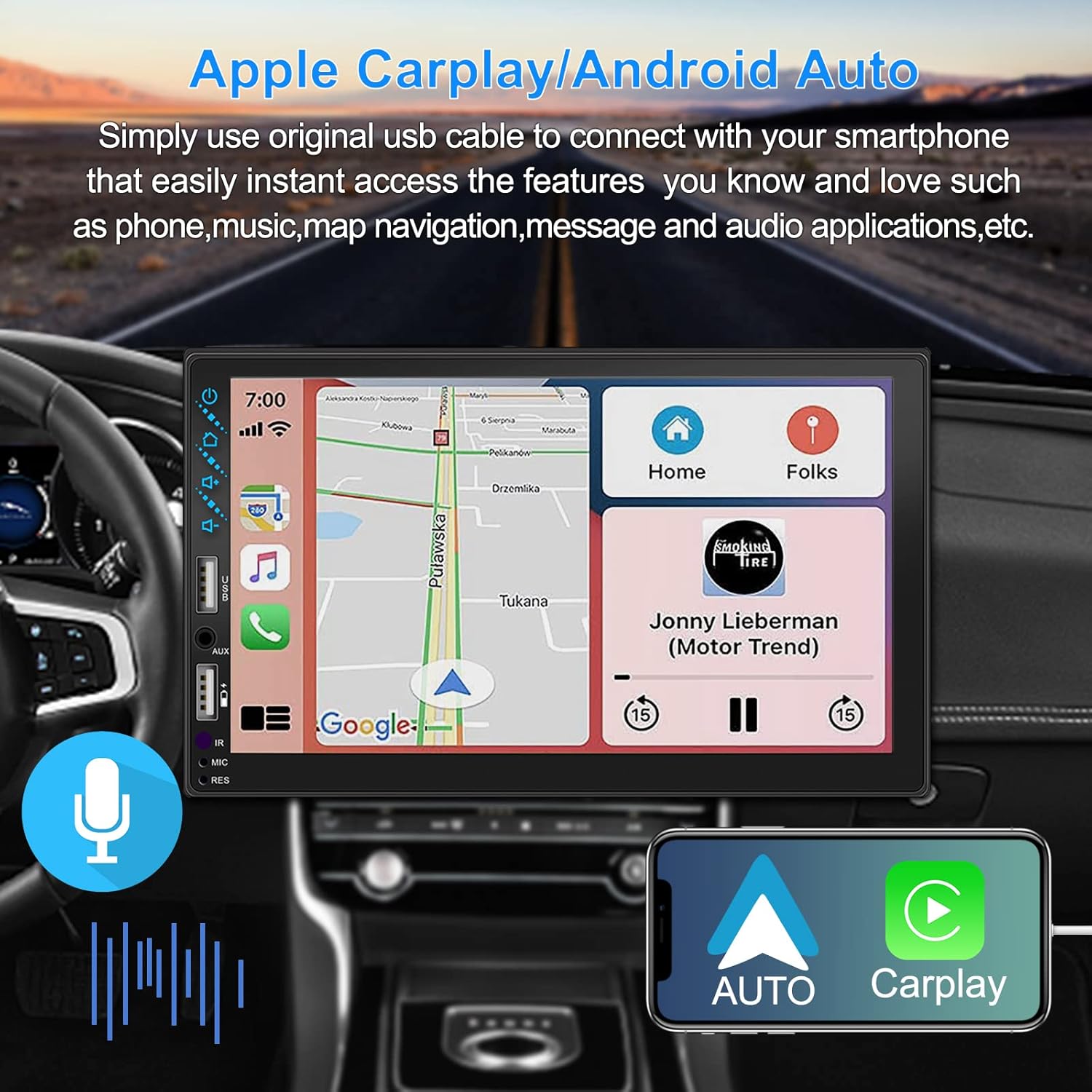
Figure 3.1: Apple CarPlay and Android Auto Interface
3.2 Raddstýring
Utilize voice commands to control various functions such as making calls, playing music, and navigating, allowing you to keep your hands on the wheel and eyes on the road.

Mynd 3.2: Raddstýringarvirkni
3.3 Símaspegiltenging
The Mirror Link function allows you to display your smartphone's screen directly onto the stereo's touchscreen. This supports Android devices (version 10.1 and below) and iPhone devices (version 14.5 and below, including iPhone 12, 11, XR, and 8 series and below) with resolutions up to 1920x1080 pixels.
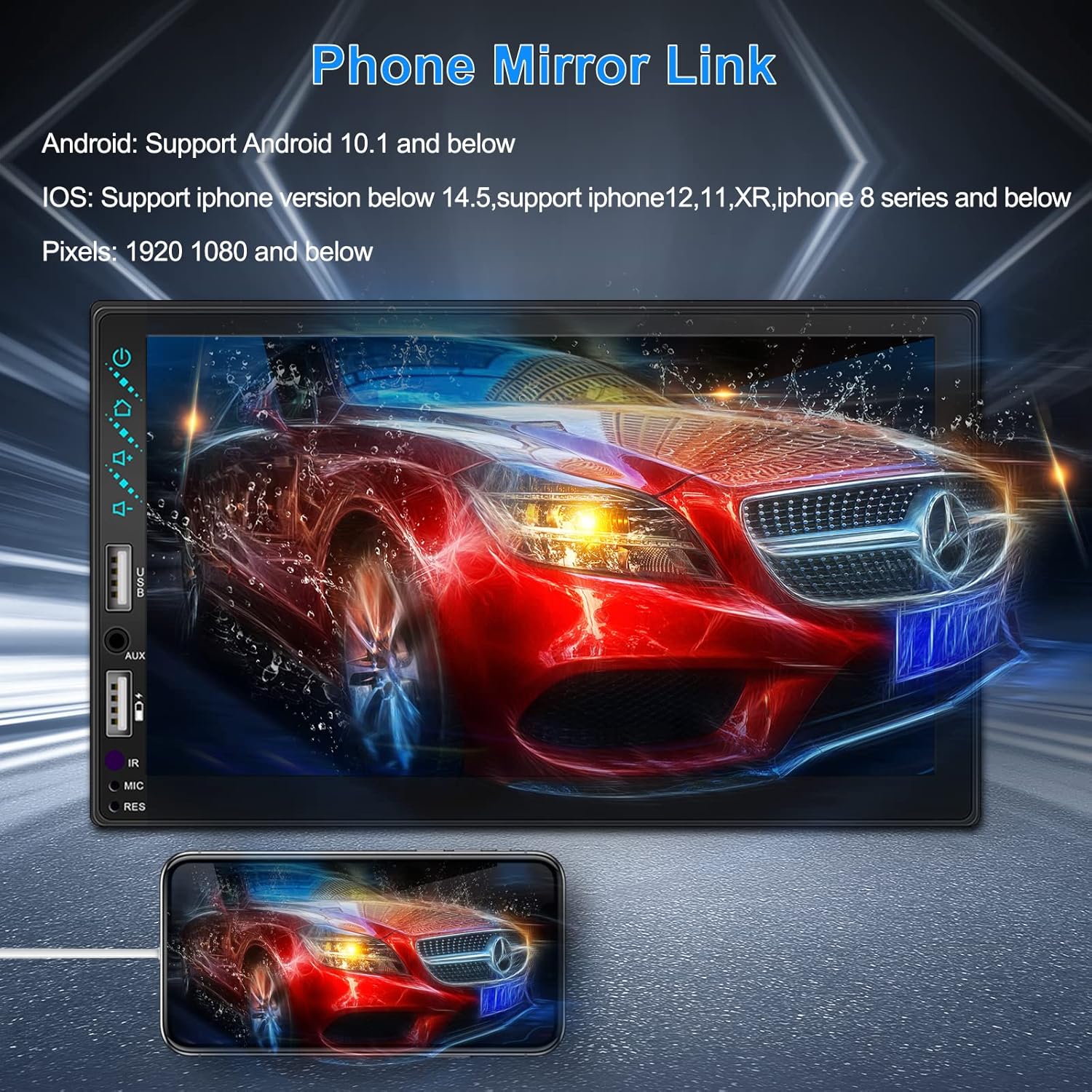
Figure 3.3: Phone Mirror Link
3.4 Aftan View Myndavél
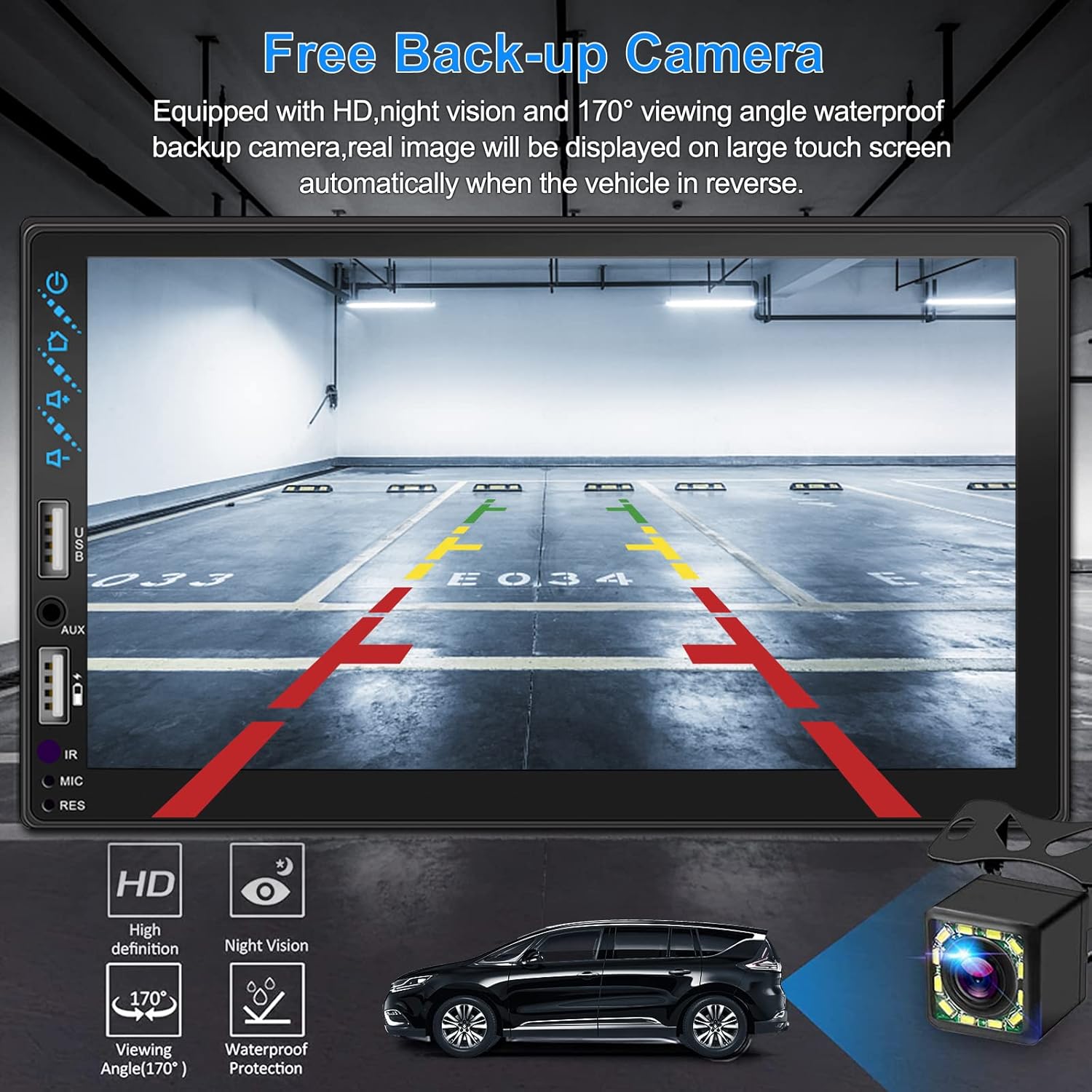
The included waterproof backup camera features 12 HD LED lights for night vision and a 170° viewing angle. When you shift into reverse, the system automatically displays the camera feed on the screen, providing optimal visibility in various weather conditions.
Mynd 3.4: Aftan View Myndavélarskjár
4. Uppsetningarhandbók
Proper installation is crucial for optimal performance. It is recommended to have the unit installed by a professional if you are unfamiliar with car audio wiring.
4.1 Mál
The stereo unit has a standard double din size. Refer to Figure 2.1 for detailed dimensions.
- Breidd: 178mm (7 tommur)
- Hæð: 102 mm (4 tommur)
- Dýpt: 60 mm (2.6 tommur)
4.2 Raflagnamynd
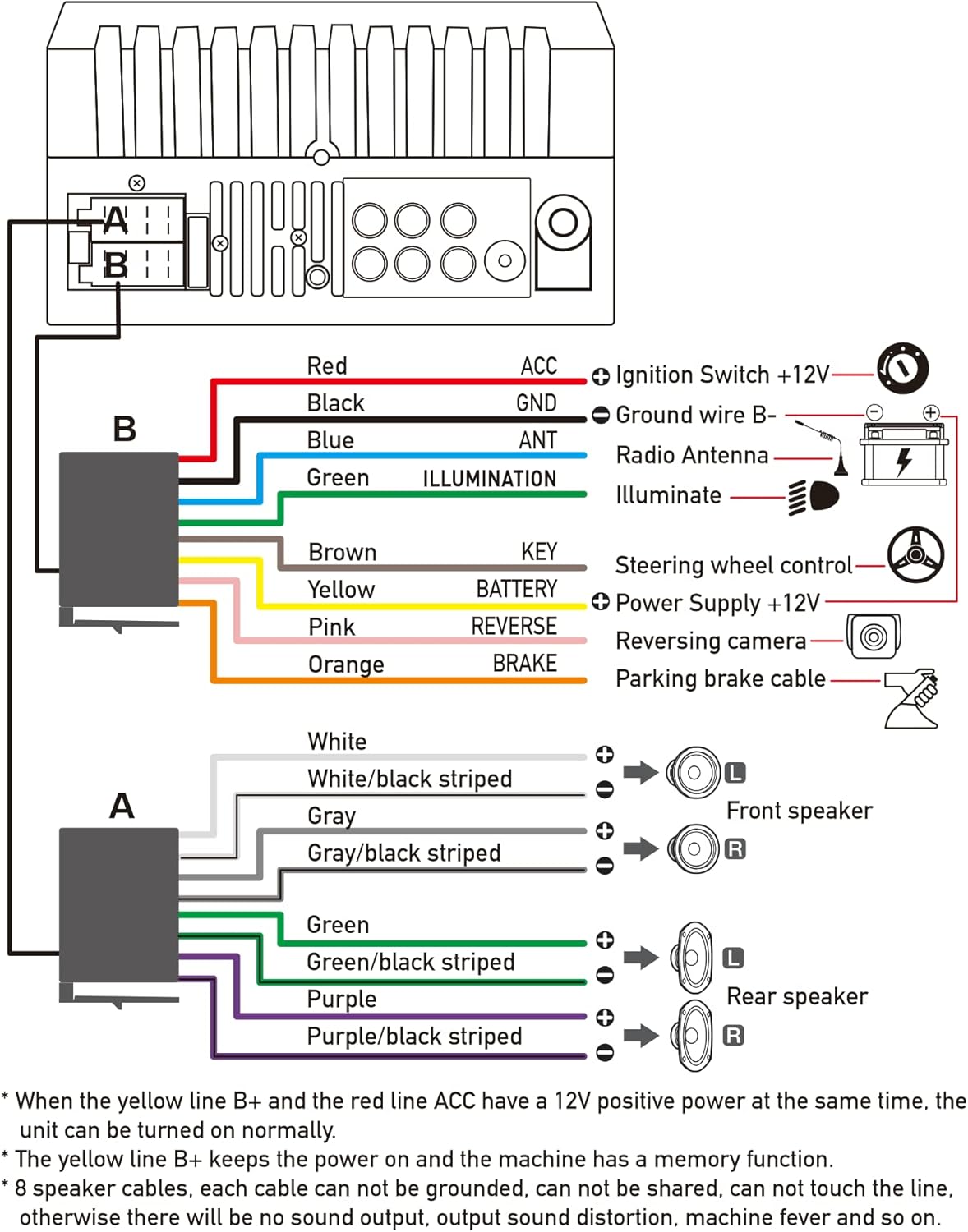
Carefully follow the wiring diagram below to connect the stereo to your vehicle's electrical system. Ensure all connections are secure to prevent malfunctions.
Mynd 4.1: Aðalrafmagnsskýringarmynd
- Rauður (ACC): Tengist við kveikjulás +12V.
- Svartur (GND): Connect to Ground wire B-.
- Blár (MAUR): Tengist við útvarpsloftnet (ef við á).
- Green (ILLUMINATION): Connect to Illuminate wire.
- Brown (KEY): Connect to Steering wheel control.
- Gult (rafhlaða): Connect to Power Supply +12V.
- Bleikur (Á BAKHLIÐINNI): Connect to Reversing camera input.
- Orange (BRAKE): Connect to Parking brake cable.
Speaker Connections (8 speakers supported):
- White / White/black striped: Fremri vinstri hátalari
- Gray / Gray/black striped: Fremri Hægri hátalari
- Green / Green/black striped: Aftari vinstri hátalari
- Purple / Purple/black striped: Hægri hátalari
Mikilvægar athugasemdir:
- The unit requires both the Yellow (BATTERY) and Red (ACC) wires to have a 12V positive power supply simultaneously for normal operation.
- The Yellow (BATTERY) wire keeps the power on and maintains memory functions.
- For speaker connections, each cable must not be grounded or shared with other cables. Incorrect wiring can lead to no sound output, sound distortion, or damage to the machine.
5. Notkunarleiðbeiningar
5.1 Grunnaðgerðir
- Kveikt/slökkt: Ýttu á rofann á framhliðinni eða fjarstýringunni.
- Hljóðstyrkur: Use the volume buttons on the front panel, steering wheel controls, or remote control.
- Upprunaval: Tap the 'Source' or 'Mode' icon on the touchscreen to switch between Radio, Bluetooth, USB, AUX, CarPlay, and Android Auto.
5.2 Apple CarPlay / Android Auto Usage
- Connect your compatible iPhone or Android smartphone to the stereo's USB port using a certified USB cable.
- The stereo will automatically detect the connection and prompt you to launch CarPlay or Android Auto.
- Fylgdu leiðbeiningunum á skjánum til að ljúka uppsetningunni.
- Once connected, you can access supported apps like Maps, Phone, Messages, and Music directly from the stereo's touchscreen or via voice commands.
5.3 Bluetooth pörun
- Kveiktu á Bluetooth á snjallsímanum þínum.
- On the stereo, navigate to the Bluetooth menu.
- Leitaðu að available devices on your smartphone. The stereo's Bluetooth name will typically be 'ESLYYDS' or similar.
- Select the stereo from your smartphone's list and confirm the pairing code if prompted.
- Þegar þú hefur parað tækið geturðu hringt/svarað símtölum og streymt hljóði þráðlaust.
5.4 Phone Mirror Link Usage
- Connect your smartphone to the stereo's USB port.
- Select the 'Mirror Link' option on the stereo's screen.
- Follow the specific instructions displayed on the stereo for your phone's operating system (Android or iOS) to enable screen mirroring. This may involve enabling USB debugging for Android or trusting the device for iOS.
5.5 Útvarpsrekstur
- Select the 'Radio' source.
- Use the 'Scan' function to automatically search and save stations, or manually tune using the frequency controls.
- Vistaðu uppáhaldsstöðvarnar þínar með forstilltum hnöppum til að fá fljótlegan aðgang.
5.6 USB spilun
- Insert a USB drive containing audio or video files into the designated USB playback port.
- The stereo will automatically switch to USB mode or prompt you to select it.
- Skoðaðu og spilaðu margmiðlunarefni files using the touchscreen controls.
6. Viðhald
Til að tryggja endingu og bestu mögulegu virkni bílhljóðkerfisins skaltu fylgja þessum viðhaldsleiðbeiningum:
- Þrif: Use a soft, dry cloth to clean the screen and exterior. For stubborn smudges on the screen, use a screen cleaner specifically designed for electronic displays. Avoid abrasive cleaners or solvents.
- Hitastig: Forðist að láta tækið verða fyrir miklum hita, bæði heitu og köldu, í langan tíma.
- Raki: Haldið tækinu þurru. Ekki láta það verða fyrir vatni eða miklum raka.
- Uppfærsla vélbúnaðar: Athugaðu framleiðanda webSæktu reglulega vefsíðuna til að sjá hvort tiltækar uppfærslur á vélbúnaði séu til að bæta afköst og bæta við nýjum eiginleikum.
7. Bilanagreining
If you encounter issues with your ESLYYDS car stereo, please refer to the following common problems and solutions. If the problem persists, contact customer support.
| Vandamál | Möguleg orsök | Lausn |
|---|---|---|
| Enginn kraftur | Röng raflögn; Sprungið öryggi; Vandamál með rafgeymi ökutækis. | Check power (Yellow and Red) and ground (Black) wire connections. Inspect vehicle fuses. Ensure vehicle battery is charged. |
| Ekkert hljóð | Hátalaravírar rangt tengdir; Hljóðstyrkur of lágur; Hljóðlausn virk. | Verify all speaker wire connections (ensure no shorts or grounds). Increase volume. Check if mute is enabled. |
| Bluetooth tengist ekki | Bluetooth not enabled on phone/stereo; Incorrect pairing process. | Ensure Bluetooth is active on both devices. Delete previous pairings and re-attempt pairing process. |
| CarPlay/Android Auto ræsist ekki | Bilaður USB snúra; Síminn er ekki samhæfur; Hugbúnaðarvandamál. | Use a high-quality, certified USB cable. Ensure your phone's OS version is compatible. Restart both phone and stereo. |
| Afturmyndavélin sýnir ekki | Camera wire disconnected; Reverse trigger wire not connected. | Check the camera's video input and power connections. Ensure the Pink (REVERSE) wire is correctly connected to the vehicle's reverse light trigger. |
| USB not reading media | Óstudd file format; Corrupted USB drive; USB port issue. | Tryggja fjölmiðla files are in supported formats (e.g., MP3, MP4, MKV). Try a different USB drive. |
8. Tæknilýsing
| Eiginleiki | Forskrift |
|---|---|
| Vörumál | 7 x 2.6 x 3.94 tommur |
| Þyngd hlutar | 2.33 pund |
| Gerðarnúmer | L3 |
| Skjárstærð | 7 tommur (18 cm) |
| Skjár Tegund | HD rafrýmd snertiskjár |
| Tengitækni | Carplay, Android Auto, Mirror-Link, Bluetooth 5.2, USB, AUX |
| Gerð stjórnanda | Google Assistant, iOS, Android |
| Sérstakir eiginleikar | Touchscreen, RDS, Steering Wheel Control (SWC), Fast Charging USB (2.1A) |
| Samhæf tæki | Snjallsími |
| Tegund tengis | USB |
| Hljóðútgangsstilling | Umhverfi |
| Surround Sound Channel Stilling | 5.1 |
| Stuðningur við myndkóðun | MKV |
| Litur | Svartur |
| Dagsetning fyrst í boði | 25. september 2021 |
9. Ábyrgð og stuðningur
ESLYYDS is committed to providing excellent customer service and technical support. For any inquiries or assistance, please contact our professional technical team.
- Peningar-til baka ábyrgð: 30-day period from purchase.
- Skiptiábyrgð: 12-month period for product replacement.
- Tæknileg aðstoð: Life-time technical support is provided.
Please refer to your purchase documentation for specific contact details or visit the official ESLYYDS websíða fyrir upplýsingar um stuðning.