
Pipishell PILFK1
Leiðbeiningarhandbók fyrir Pipshell Full Motion sjónvarpsveggfestingu
Model: PILFK1 | Brand: Pipishell
Inngangur
Thank you for choosing the Pipishell Full Motion TV Wall Mount. This manual provides detailed instructions for safe installation, operation, and maintenance of your TV mount. Designed for most 37-75 inch TVs weighing up to 132lbs, this mount offers full motion adjustment for optimal viewing.
Mikilvægar öryggisupplýsingar
Please read all instructions carefully before installation. Failure to do so may result in personal injury or property damage. Keep this manual for future reference.
- Þyngdargeta: Ekki má fara yfir hámarksþyngdargetu sem er 60 kg (132 lbs).
- Samhæfni sjónvarpsstærðar: Suitable for TVs between 37 and 75 inches.
- VESA eindrægni: Compatible with VESA mounting patterns from 200x100mm to 600x400mm. Verify your TV's VESA pattern before installation.
- Tegund veggjar: This mount is designed for installation on 12" or 16" wood studs, solid concrete, or brick walls. EKKI setja í gipsvegg einn.
- Gakktu úr skugga um að allar skrúfur séu vel hertar en ekki ofhertar.
- Notið alltaf naglaleitara til að finna viðarnagla nákvæmlega.
Hvað er í kassanum
Pakkinn inniheldur eftirfarandi hluti:
- Sjónvarpsveggfesting
- Uppsetningar sniðmát
- Leiðbeiningarhandbók
- Standard Mounting Hardware (various TV bolts, lag screws, washers, spacers, wall anchors)
- Lítið stig
- Kapalbönd
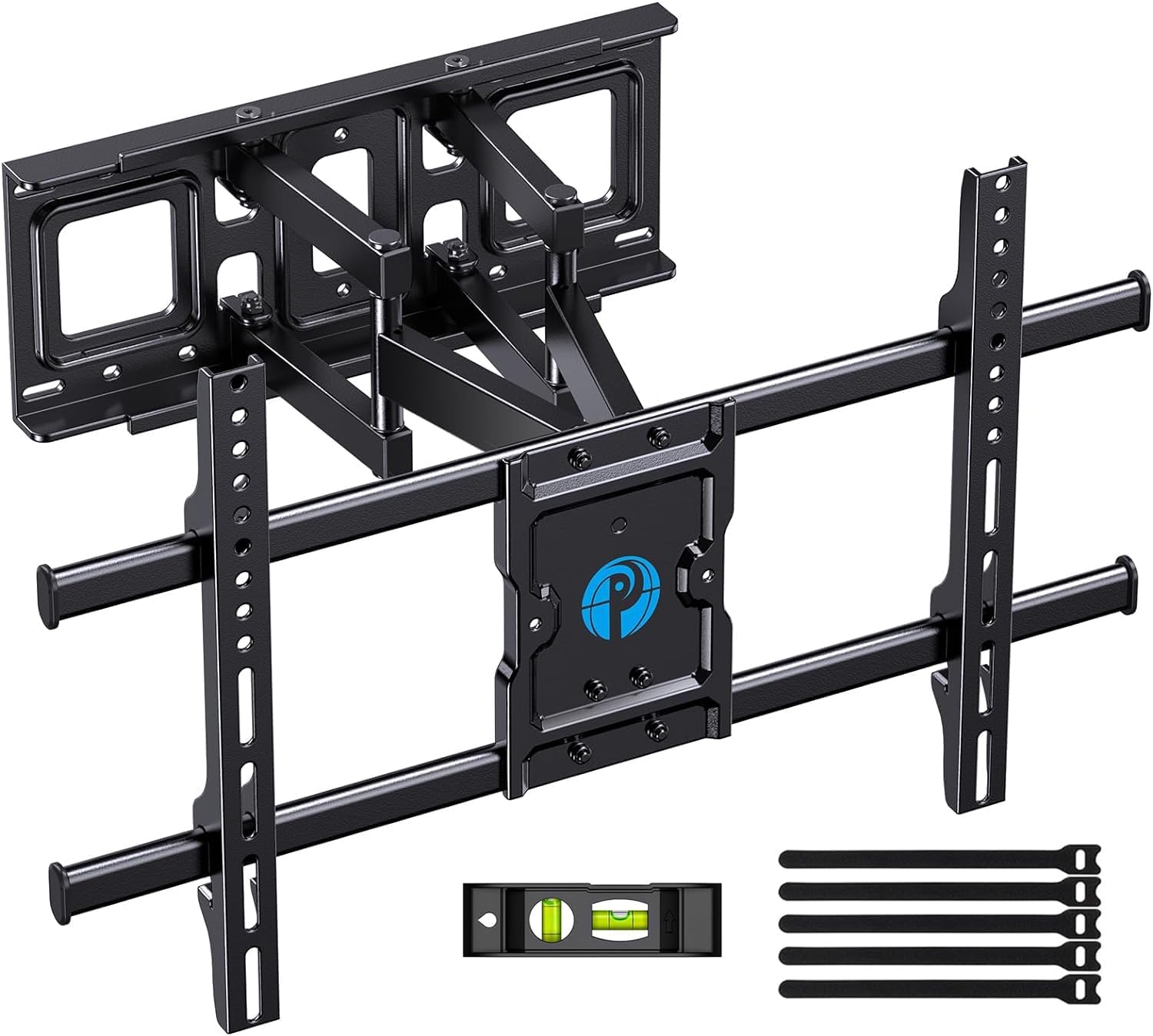
Image: All components included in the Pipishell TV Wall Mount package.
Tæknilýsing
| Forskrift | Gildi |
|---|---|
| Vörumál | 23.62 x 0.79 x 15.75 tommur |
| Þyngd hlutar | 10.56 pund |
| Hámarks samhæf stærð | 75 tommur |
| Lágmarks samhæfð stærð | 37 tommur |
| Hámarks burðargeta | 132 lbs (60 kg) |
| VESA samhæfni | 200x100mm til 600x400mm |
| Tegund hreyfingar | Swivel, Tilt, Extension |
| Efni | Álblendi |
| Litur | Svartur |
| Gerðarnúmer | PILFK1 |
Uppsetning og uppsetning
The installation process is designed to be straightforward. Always ensure you have the necessary tools and verify your wall construction before drilling.
1. Verify TV Compatibility
Before starting, ensure your TV's size, weight, and VESA pattern are compatible with the mount. The mount supports VESA patterns from 200x100mm to 600x400mm.

Image: How to measure your TV's VESA pattern.
2. Choose Wall Type and Location
Identify your wall type (wood studs, concrete, or brick). Use a stud finder for wood studs. The mount fits 12" and 16" wood studs. Do not install into drywall alone.

Image: Compatible wall types for installation.
3. Attach TV Brackets to TV
Select the appropriate TV bolts and spacers from the provided hardware kit based on your TV's specifications. Secure the vertical brackets to the back of your TV.

Image: TV mount attached to a TV, highlighting its 132 lbs max load capacity.
4. Secure Wall Plate to Wall
Use the provided drilling template to mark the pilot holes on your wall. Drill the holes and secure the wall plate using the appropriate lag screws and wall anchors for your wall type. Use the included level to ensure the mount is perfectly horizontal.

Image: Using the drilling template to mark the right location on the wall.
5. Hang TV on Wall Plate
Carefully lift the TV with the attached brackets and hook them onto the wall plate. Ensure the TV is securely seated on the mount. Tighten any safety screws to prevent accidental dislodgement.
Rekstrar- og stillingar
The Pipishell Full Motion TV Wall Mount offers versatile adjustments to achieve your ideal viewing horn.
- Stilla halla: Tilt your TV +5°/-15° to reduce glare and optimize viewúr mismunandi hæðum.
- Snúningsstilling: Swivel the TV +/-45° (maximum swivel angle depends on TV size) to direct the screen towards your seating area.
- Framlenging/Afturdráttur: Extend the TV up to 14.84 inches from the wall for flexible viewing or collapse it to 3 inches to save space.
- Stigstilling: Fine-tune the TV's level by +/-3° after installation for a perfectly straight display.

Image: Demonstrating the mount's extension (up to 14.84 inches) and tilt range (+5°/-15°).

Image: The mount allows for a +/-45° swivel for optimum viewing from anywhere in the room.
Viðhald
To ensure the longevity and safe operation of your TV mount, follow these maintenance tips:
- Reglulegar athuganir: Athugið reglulega allar skrúfur og tengingar til að tryggja að þær séu vel festar og öruggar.
- Þrif: Þurrkið festinguna með mjúkum, þurrum klút til að fjarlægja ryk. Forðist að nota slípiefni eða leysiefni.
- Smurning: If the articulating arms become stiff, apply a small amount of silicone-based lubricant to the moving joints.
Úrræðaleit
If you encounter any issues with your Pipishell TV Wall Mount, try the following solutions:
- Sjónvarpið er ekki í láréttu lagi: Use the level adjustment feature (+/-3°) to correct the TV's horizontal alignment.
- Fjallið finnst laust: Re-check all lag screws and TV bolts to ensure they are securely tightened into the wall studs/anchors and the TV.
- Erfiðleikar við aðlögun: Ensure no cables are snagged or obstructing movement. Apply lubricant to joints if stiffness persists.
- Sjónvarpstengi lokuð: If the mount blocks TV ports, use the provided spacers or adjust the TV's position on the vertical brackets if possible.
Ábyrgð og stuðningur
Pipishell guarantees the quality of this TV mount to be free of defects in materials and workmanship. For any questions, assistance, or warranty claims, please contact our US-based product support team.
Þú getur einnig vísað til opinberra Notendahandbók (PDF) fyrir frekari upplýsingar.