
1. Inngangur
This manual provides detailed instructions for the BoxWave SlimKeys Bluetooth Keyboard with Trackpad, designed for use with the Apple iPhone 13 mini. Please read this manual thoroughly before using the product to ensure proper operation and to maximize its lifespan.
The SlimKeys Bluetooth Keyboard integrates responsive chiclet-style keys and a full-functioning trackpad, transforming your iPhone 13 mini into a portable workstation. Its ultra-thin and lightweight design makes it an ideal travel companion.
2. Innihald pakka
- BoxWave SlimKeys Bluetooth Keyboard with Trackpad
- USB hleðslusnúra
- Notendahandbók
3. Vörueiginleikar
- Integrated Keyboard and Trackpad: Combines a full QWERTY keyboard with a responsive trackpad for enhanced navigation.
- Þunn og létt hönnun: At approximately 3/16 inch thick, it is highly portable without compromising key size for comfortable typing.
- Bluetooth útgáfa 3.0: Ensures fast pairing and seamless wireless communication with your device.
- Rafhlöðuvernd: Features an on/off switch to extend battery life when not in use.
- Færanlegt: Designed for easy transport in bags or luggage.

Mynd 3.1: Ofan frá og niður view of the SlimKeys Bluetooth Keyboard, showing the full keyboard layout and integrated trackpad.
4. Uppsetning
4.1 Hleðsla lyklaborðsins
- Locate the charging port on the side of the keyboard.
- Connect the small end of the provided USB charging cable to the keyboard's charging port.
- Tengdu stærri enda USB-snúrunnar við USB-aflgjafa (t.d. USB-tengi tölvu, USB-veggmillistykki).
- The charging indicator light will illuminate. Once fully charged, the light will typically change color or turn off.
4.2 Kveikt/slökkt
- To power on the keyboard, slide the 'ON/OFF' switch, usually located on the side or back, to the 'ON' position. A power indicator light will briefly illuminate.
- To power off the keyboard, slide the 'ON/OFF' switch to the 'OFF' position. This conserves battery life when the keyboard is not in use.
4.3 Bluetooth pörun
Follow these steps to pair your BoxWave SlimKeys Bluetooth Keyboard with your Apple iPhone 13 mini:
- Ensure the keyboard is fully charged and powered on.
- On your iPhone 13 mini, go to Stillingar > Bluetooth.
- Turn on Bluetooth. Your iPhone will begin searching for nearby Bluetooth devices.
- On the keyboard, press the Bluetooth pairing button (often labeled 'Connect' or with a Bluetooth symbol). The Bluetooth indicator light on the keyboard will start blinking, indicating it is in pairing mode.
- On your iPhone, locate 'BoxWave Keyboard' or a similar name in the list of 'Other Devices' and tap on it.
- If prompted, enter the pairing code displayed on your iPhone screen using the keyboard, then press Enter.
- Once paired, the Bluetooth indicator light on the keyboard will stop blinking and remain solid or turn off, and your iPhone will show the keyboard as 'Connected'.

Figure 4.1: Keyboard with highlighted power switch and Bluetooth pairing button locations.
5. Notkunarleiðbeiningar
5.1 Notkun lyklaborðs
Once paired, the keyboard functions like a standard computer keyboard. Simply open any application on your iPhone that requires text input (e.g., Messages, Notes, Safari) and begin typing. The on-screen keyboard will automatically disappear, allowing you to use the physical keyboard.
5.2 Notkun rekjaflatar
The integrated trackpad allows for precise cursor control and navigation on your iPhone 13 mini. Basic gestures include:
- Bankaðu með einum fingri: Functions as a left-click to select items or activate buttons.
- Tveggja fingra skrun: Drag two fingers up or down on the trackpad to scroll through content.
- Bendill hreyfing: Move a single finger across the trackpad to move the cursor on your iPhone screen.
5.3 Sérstakir virknihnappar
The keyboard may include function keys (F1-F12) or dedicated media control keys. These keys often require pressing the 'Fn' key simultaneously with the desired function key to activate their secondary functions (e.g., volume control, play/pause, screen lock).
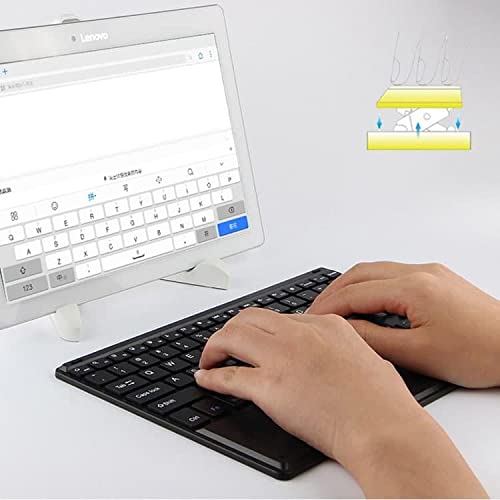
Figure 5.1: User demonstrating typing on the SlimKeys Bluetooth Keyboard.
6. Viðhald
6.1 Þrif
- Gakktu úr skugga um að lyklaborðið sé slökkt áður en það er þrifið.
- Notaðu mjúkan, lólausan klút örlítið dampened with water or a mild electronics cleaner to wipe the surface.
- Forðist að nota sterk efni, slípiefni eða mikinn raka, þar sem þau geta skemmt lyklaborðið.
- For dust or debris between keys, use compressed air.
6.2 Umhirða rafhlöðu
- To prolong battery life, power off the keyboard when not in use.
- Forðastu að tæma rafhlöðuna alveg oft. Endurhlaðið hana þegar vísirinn fyrir lága rafhlöðu birtist.
- Geymið lyklaborðið á köldum og þurrum stað ef það er ekki notað í langan tíma.
7. Bilanagreining
If you encounter issues with your BoxWave SlimKeys Bluetooth Keyboard, refer to the following common solutions:
- Lyklaborðið kveikir ekki á sér: Gakktu úr skugga um að rafhlaðan sé hlaðin. Tengdu hleðslusnúruna og láttu hana hlaða í að minnsta kosti 30 mínútur áður en þú reynir að kveikja aftur.
- Lyklaborðið parast ekki:
- Ensure the keyboard is in pairing mode (Bluetooth indicator blinking).
- Make sure Bluetooth is enabled on your iPhone 13 mini.
- Move the keyboard closer to your iPhone.
- Forget the device from your iPhone's Bluetooth settings and attempt to pair again.
- Restart both the keyboard and your iPhone.
- Lyklar svara ekki:
- Check if the keyboard is still connected via Bluetooth.
- Gakktu úr skugga um að rafhlaðan sé ekki mjög lág.
- Try reconnecting the keyboard by turning it off and on, or by re-pairing.
- Rekstrarflöturinn virkar ekki:
- Gakktu úr skugga um að lyklaborðið sé tengt.
- Check for any settings on your iPhone that might disable external trackpads.
- Hreinsið yfirborð snertifletisins til að fjarlægja allt rusl.
8. Tæknilýsing
| Eiginleiki | Forskrift |
|---|---|
| Vörumerki | BoxWave |
| Gerðarnúmer | bw-1977-29861-11782 |
| Vélbúnaðarviðmót | Bluetooth |
| Bluetooth útgáfa | 3.0 |
| Samhæf tæki | Apple iPhone 13 mini, Smartphones, Laptops |
| Lýsing á lyklaborði | Þráðlaust |
| Sérstakir eiginleikar | Portable, Integrated Trackpad |
| Aflgjafi | Rafhlöðuknúið |
| Stærðir (u.þ.b.) | 257mm x 172mm x 5mm |

Figure 8.1: Dimensions and operating system compatibility of the SlimKeys Bluetooth Keyboard.
9. Ábyrgð og stuðningur
9.1 Upplýsingar um ábyrgð
For specific warranty details, please refer to the warranty card included with your product or visit the official BoxWave webGeymið kaupkvittunina ef þið viljið gera kröfur um ábyrgð.
9.2 Þjónustuver
If you require further assistance or have questions not covered in this manual, please contact BoxWave customer support through their official webvefsíðu eða tengiliðaupplýsingar sem fylgja kaupskjölunum þínum.