
HATUSOKU Digital Thermometer Hygrometer
Gerð: LX8112
Inngangur
Þakka þér fyrir kaupinasing the HATUSOKU Digital Thermometer Hygrometer. This device is designed to accurately measure and display indoor temperature and humidity, helping you maintain a comfortable and healthy living environment. Its compact size, large digital display, and comfort level indicator make it an essential tool for any home.
Important Note: Beware of inferior imitations. When purchasing, please ensure the brand name is ≪HATUSOKU≫.
Innihald pakka
- HATUSOKU Digital Thermometer Hygrometer Unit
- 1 x AAA rafhlaða
- Instruction Manual (Japanese, for reference)
Vara lokiðview
The HATUSOKU Digital Thermometer Hygrometer features a clear LCD display and intuitive controls. Understanding its components will help you operate it effectively.
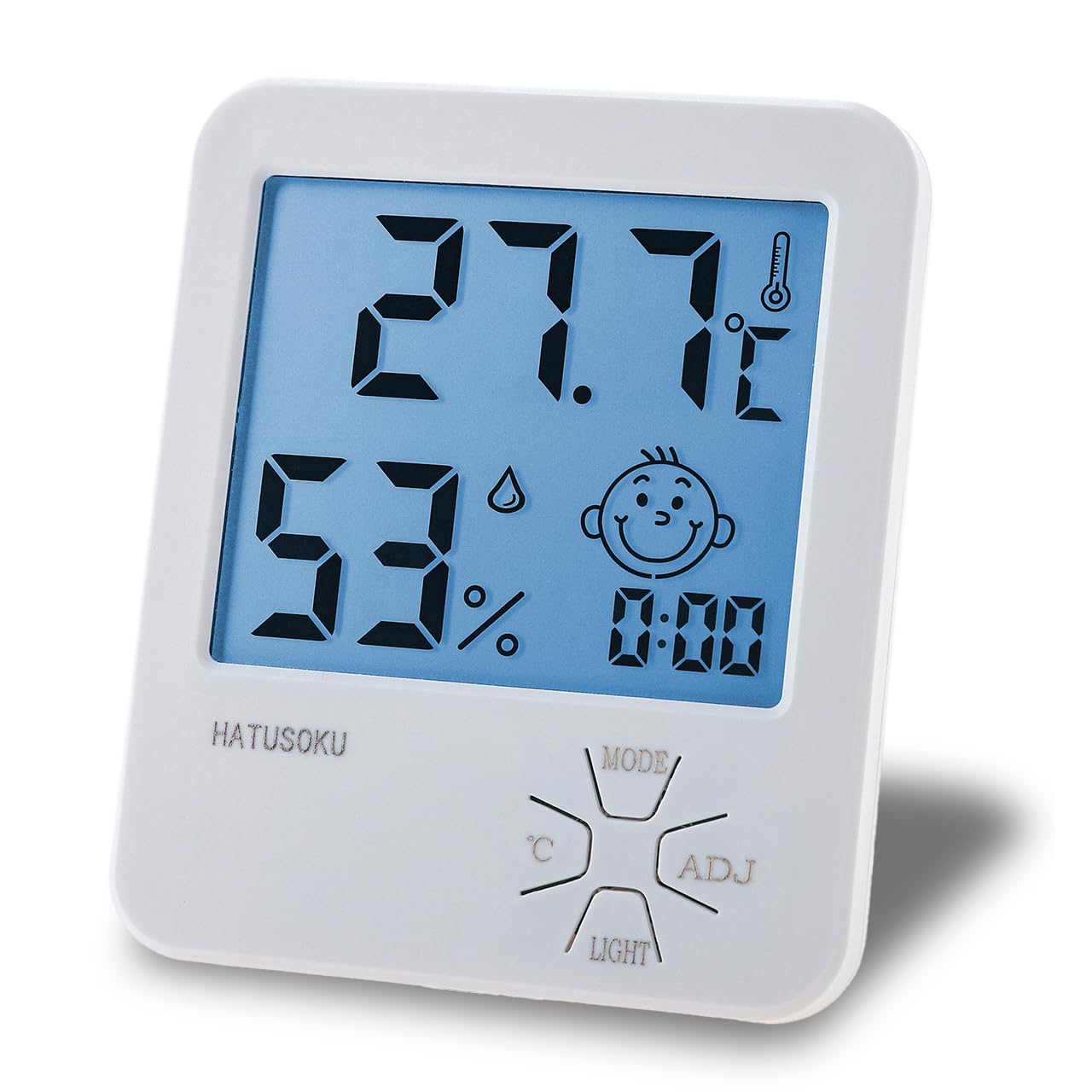
Mynd 1: Framan view of the HATUSOKU Digital Thermometer Hygrometer.

Figure 2: Front panel features including temperature, humidity, comfort indicator, time, and control buttons.

Figure 3: Back panel features including the kickstand, wall-mount hook, and battery compartment.
Helstu eiginleikar:
- Stór stafrænn skjár: Easy-to-read temperature and humidity values.
- Þægindastigsvísir: A face icon changes to indicate comfort levels based on humidity.
- Hámarks-/lágmarksskrá: Records the highest and lowest temperature and humidity readings.
- Baklýsingaaðgerð: Illuminates the display for easy reading in low light conditions.
- Two-Way Installation: Can be placed on a desktop using the integrated kickstand or mounted on a wall using the hook hole.
Uppsetning
1. Uppsetning rafhlöðu
- Locate the battery compartment on the back of the unit (refer to Figure 3).
- Renndu lokið á rafhlöðuhólfinu.
- Insert the included 1 AAA battery, ensuring the correct polarity (+/-) as indicated inside the compartment.
- Lokaðu rafhlöðuhólfinu tryggilega.
2. Staðsetning
The device offers two convenient placement options:
- Staðsetning skjáborðs: Extend the kickstand on the back of the unit to stand it upright on any flat surface.
- Veggfesting: Use the hook hole on the back of the unit to hang it on a nail or screw on the wall.
Initial Readings: Please allow 2 to 3 hours for the temperature and humidity values to stabilize and accurately reflect the environment of the placement location.
Notkunarleiðbeiningar
Birta upplýsingar
Aðalskjárinn sýnir eftirfarandi upplýsingar:
- Hitastig: Displayed in Celsius (°C).
- Raki: Birtist sem prósentatage (%).
- Tími: Núverandi tími.
- Þægindastigsvísir: A face icon that changes based on humidity levels.

Figure 4: Comfort Level Indicator Explanation.
- Smiling Face: Humidity between 40% and 70% (comfortable).
- Sorglegt andlit: Humidity below 40% (dry) or above 70% (humid).
Hnappar aðgerðir
The device has four control buttons on the front panel:
- MODE hnappur: Used to switch between display modes (e.g., time setting, viewing Max/Min records).
- ADJ hnappur: Used to adjust values during setting modes (e.g., time adjustment).
- °C hnappur: (If applicable, though the product description states Celsius only) Used to switch between Celsius and Fahrenheit. Note: This model is designed to display only in Celsius (°C) in accordance with regulations. Fahrenheit (°F) switching is not available.
- LIGHT hnappur: Activates the backlight for a few seconds.
Viewing Max/Min Temperature and Humidity
The device automatically records the highest and lowest temperature and humidity values since the last reset or battery installation.
- Ýttu á MODE button once to display the maximum recorded temperature and humidity.
- Ýttu á MODE button again to display the minimum recorded temperature and humidity.
- To reset the Max/Min records, press and hold the MODE button while the Max/Min values are displayed.
Stilla tímann
- From the normal display mode, press and hold the MODE hnappinn þar til tímaskjárinn byrjar að blikka.
- Notaðu ADJ hnappinn til að stilla klukkustundina.
- Ýttu á MODE hnappinn til að fara í mínútustillinguna.
- Notaðu ADJ hnappinn til að stilla mínútur.
- Ýttu á MODE hnappinn aftur til að staðfesta og hætta að stilla tíma.
Viðhald
- Þrif: Þurrkið tækið með mjúkum, þurrum klút. Notið ekki slípiefni eða dýfið tækinu í vatn.
- Skipt um rafhlöðu: When the display becomes dim or stops functioning, replace the AAA battery. Follow the battery installation steps in the Setup section.
- Geymsla: If storing the device for an extended period, remove the battery to prevent leakage.
Úrræðaleit
| Vandamál | Möguleg orsök | Lausn |
|---|---|---|
| Enginn eða dimmur skjár | Rafhlaðan er dauð eða rangt sett í. | Replace the battery with a new AAA battery, ensuring correct polarity. |
| Ónákvæm lesning | Device has not stabilized to the environment; placed near heat/cold source. | Allow 2-3 hours for stabilization. Relocate the device away from direct sunlight, vents, or extreme temperature sources. |
| Comfort face icon is always sad | Humidity is consistently outside the 40-70% range. | Consider using a humidifier or dehumidifier to adjust room humidity. |
Tæknilýsing
| Forskrift | Smáatriði |
|---|---|
| Framleiðandi | HATUSOKU |
| Gerðarnúmer | LX8112 |
| Þyngd hlutar | 78.5 g |
| Vörumál | 10 x 8.3 x 2.2 cm |
| Litur | Hvítur |
| Stíll | Með baklýsingu |
| Gerð aflgjafa | Rafhlöðuknúið |
| Mælingarnákvæmni (hitastig) | ±1°C |
| Sýna stíl | LCD |
| Gerð uppsetningar | Frístandandi, veggfesting |
| Eiginleikar | Backlight, Comfort Level Display, Max/Min Record |
| Rafhlöður fylgja | Yes (1 x AAA) |
| Tegund rafhlöðuklefa | Basískt |
Ábyrgð og stuðningur
For product support, warranty information, or any inquiries, please contact the seller directly through your Amazon order history. HATUSOKU is committed to providing quality products and customer satisfaction.
You can also visit the official HATUSOKU brand store on Amazon for more information and products: HATUSOKU Brand Store