
Sades TWS01-PRO
SADES Wings 100 Pro Wireless Gaming Earbuds User Manual
Model: TWS01-PRO
1. Inngangur
This manual provides instructions for the proper use and maintenance of your SADES Wings 100 Pro Wireless Gaming Earbuds. Please read this manual thoroughly before using the product to ensure optimal performance and longevity.

Image 1.1: SADES Wings 100 Pro Wireless Gaming Earbuds and Charging Case. The image displays the black earbuds with blue LED accents and their matching black charging case, also featuring blue LED lighting.
2. Innihald pakka
Gakktu úr skugga um að allir hlutir séu til staðar í pakkanum:
- SADES Wings 100 Pro Wireless Gaming Earbuds (Left and Right)
- Hleðslutaska
- USB Type-C hleðslusnúra
- Additional Ear Tips (Small, Medium, Large)
- Notendahandbók (þetta skjal)

Image 2.1: Package contents including the SADES Wings 100 Pro earbuds, charging case, USB-C cable, and various ear tip sizes. The image also highlights the immersive 3D sound experience with dynamic bass and crystal-clear highs.
3. Uppsetning og fyrsta notkun
3.1 Hleðsla eyrnatólanna og hulstrsins
Áður en eyrnatólin eru notuð í fyrstu umferð skal hlaða þau að fullu og hleðsluhulstrið.
- Settu báðar heyrnartólin í hleðslutöskuna.
- Connect the USB Type-C charging cable to the charging port on the case and the other end to a USB power source (e.g., computer, wall adapter).
- The LED indicators on the case and earbuds will illuminate to show charging status.
- A full charge for the earbuds takes approximately 1 hour, and the charging case takes approximately 2 hours.

Image 3.1: The charging case with earbuds inside, highlighting the USB Type-C charging port. The image indicates a 400mAh battery capacity for the case and fast charging capabilities.
The charging case features futuristic blue LED indicators that show the battery level. Observe the flash intervals to determine the charging status of both the earbuds and the case.
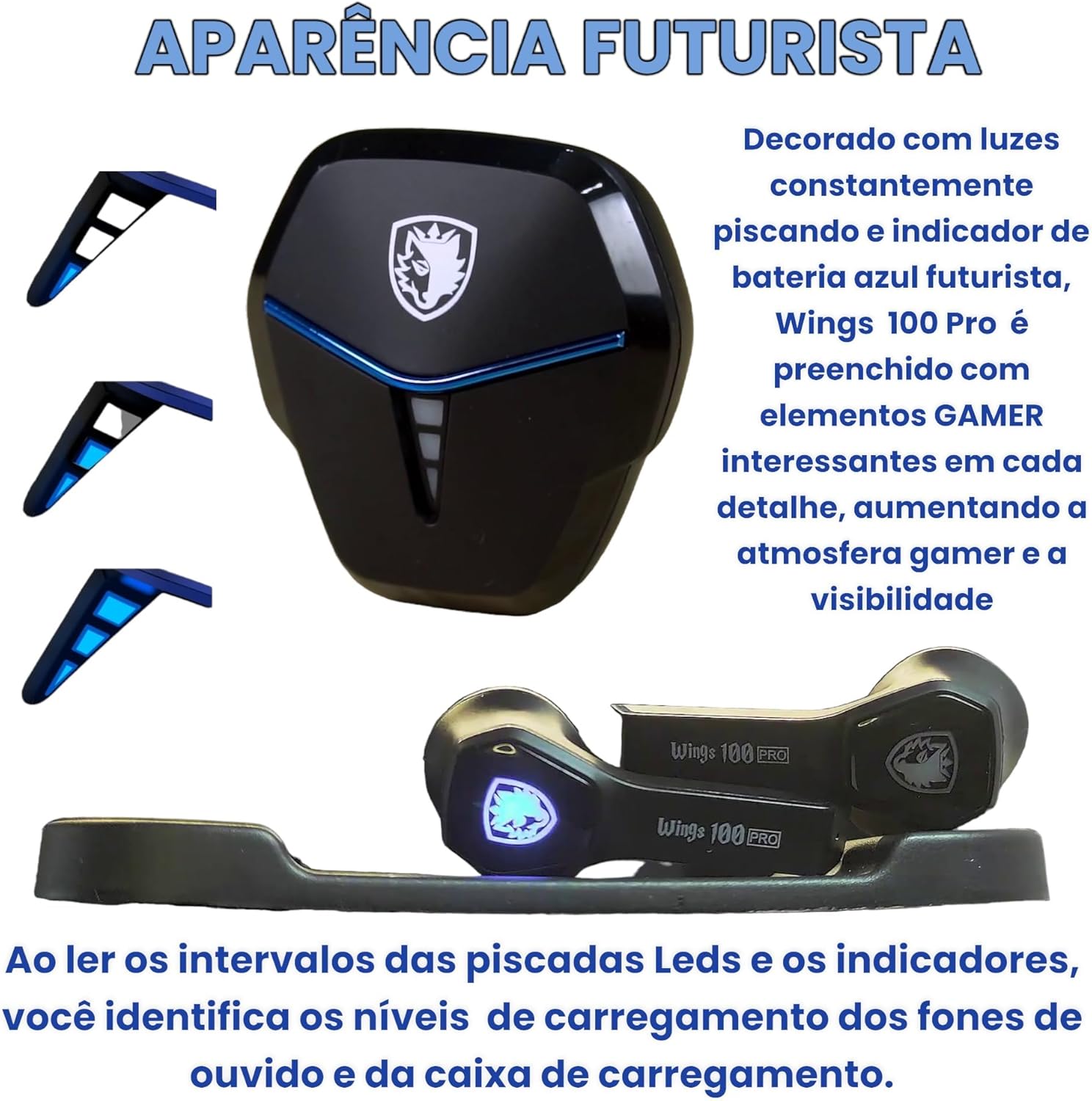
Image 3.2: Close-up of the SADES Wings 100 Pro charging case and earbuds, showcasing the blue LED lights that indicate charging status and battery levels.
3.2 Pörun við tæki
For initial pairing, or if you are connecting to a new device:
- Opnaðu hleðsluhulstrið. Eyrnatólin fara sjálfkrafa í pörunarstillingu.
- Virkjaðu Bluetooth í tækinu þínu (snjallsíma, spjaldtölvu, tölvu).
- Leitaðu að "Wings 100 Pro" in the list of available Bluetooth devices.
- Select "Wings 100 Pro" to connect. Once connected, you will hear an audible confirmation.
- The earbuds will automatically connect to the last paired device when the case is opened.

Image 3.3: Demonstrates opening the charging case to automatically connect the earbuds to a previously paired device, and closing the case to initiate charging.

Image 3.4: Illustrates the Bluetooth 5.0 pairing process on a smartphone, showing "Wings 100 Pro" as an available device for connection.
3.3 Adjusting Fit and Comfort
For optimal sound quality and comfort, choose the ear tips that best fit your ears. The package includes small, medium, and large sizes.
- Togið varlega af fyrirfram uppsettu eyrnatappa.
- Select a new pair of ear tips and push them onto the earbud nozzles until securely attached.
- Test different sizes to find the most comfortable and secure fit.
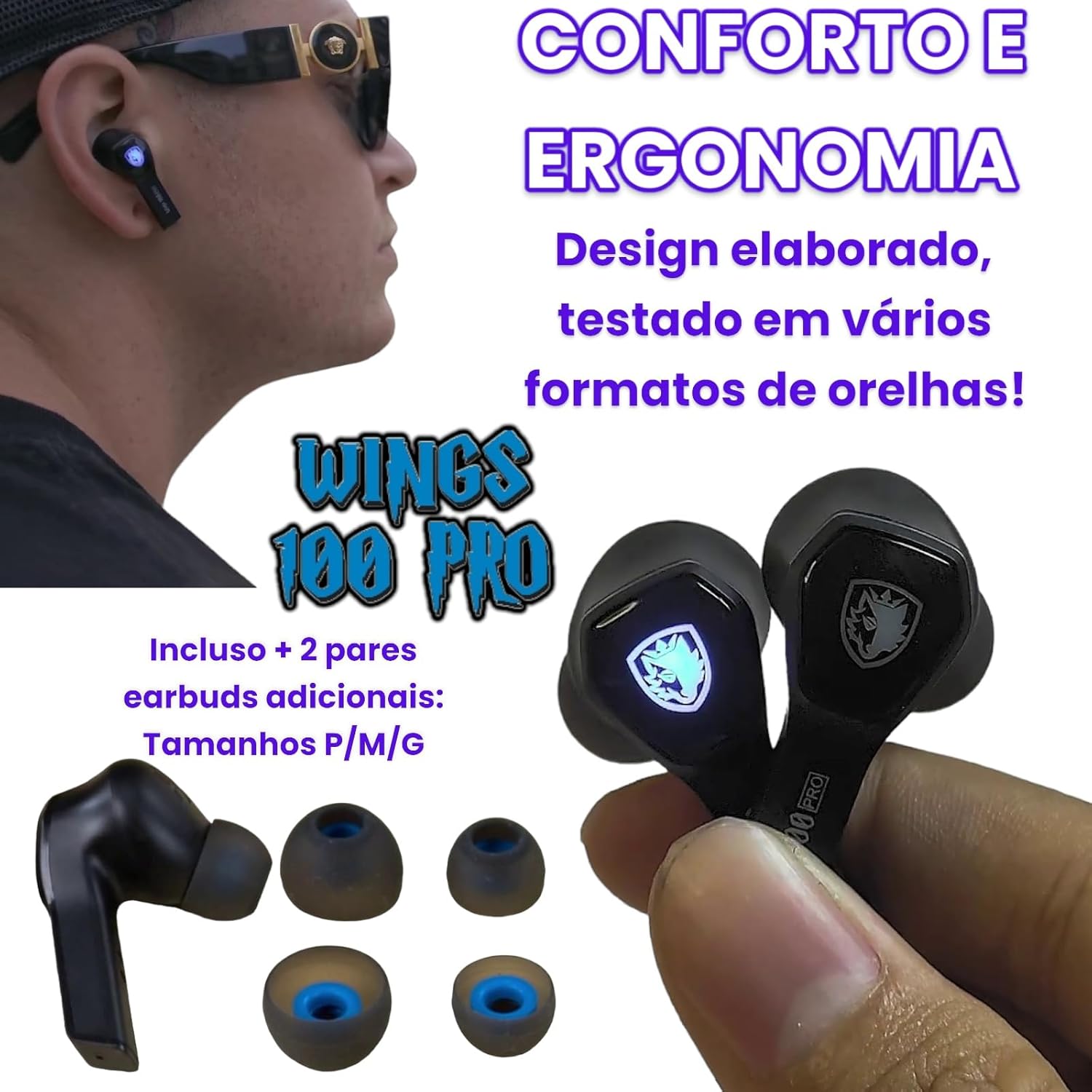
Image 3.5: Shows the SADES Wings 100 Pro earbuds and the included additional ear tip sizes (S, M, L) for personalized comfort and ergonomic fit.
4. Notkunarleiðbeiningar
4.1 Snjall snertistýring
The SADES Wings 100 Pro earbuds feature touch-sensitive controls on each earbud for managing audio playback, calls, and game mode.
| Aðgerð | Vinstri heyrnartól (L) | Hægri heyrnartól (R) |
|---|---|---|
| Tónlistarspilun: | ||
| Spila / gera hlé | Einn smellur | Einn smellur |
| Fyrra lag | Tap and Hold (2 seconds) | N/A |
| Næsta lag | N/A | Tap and Hold (2 seconds) |
| Hljóðstyrkur niður | Bankaðu tvisvar | N/A |
| Hljóðstyrkur upp | N/A | Bankaðu tvisvar |
| Símtöl: | ||
| Svara / leggja á símtal | Einn smellur | Einn smellur |
| Hafna símtali | Tap and Hold (2 seconds) | Tap and Hold (2 seconds) |
| Leikjastilling: | ||
| Virkja/slökkva á leikjastillingu | Bankaðu tvisvar | Bankaðu tvisvar |
Image 4.1: Diagram illustrating the smart touch control functions for music, phone calls, and game mode on the SADES Wings 100 Pro earbuds.
4.2 Game Mode and Low Latency
The SADES Wings 100 Pro earbuds are designed for an immersive gaming experience with a dedicated Game Mode that offers low latency.
- Virkja leikham: Double-tap the touch control on either the left or right earbud.
- Kostir: In Game Mode, you will experience authentic 3D audio with surround sound. Shot and footstep effects are amplified for enhanced precision.
- Lítil seinkun: Game Mode provides a low latency of approximately 40ms, ensuring perfect synchronization between video and audio for an immersive 3D experience.

Image 4.2: Depicts a user playing a mobile game with the SADES Wings 100 Pro earbuds, illustrating the activation of Game Mode via double-tap for high-performance audio.

Image 4.3: A user enjoying a game on a mobile device while connected to a laptop, demonstrating the low latency feature (40ms) of the SADES Wings 100 Pro for synchronized audio and video.
5. Viðhald
- Þrif: Þrífið eyrnatólin og hleðsluhulstrið reglulega með mjúkum, þurrum og lólausum klút. Notið ekki sterk efni eða slípiefni.
- Eyrnabendingar: Remove and clean the ear tips periodically with water and mild soap. Ensure they are completely dry before reattaching.
- Hleðsluport: Keep the USB Type-C charging port free of dust and debris.
- Geymsla: Þegar eyrnatólin eru ekki í notkun skal geyma þau í hleðsluhulstrinu til að vernda þau og halda þeim hlaðnum.
- Vatnsþol: Eyrnatólin eru ekki vatnsheldurForðist að vera í snertingu við vatn, rigningu eða mikinn raka.
6. Bilanagreining
- Eyrnatól hlaðast ekki:
- Gakktu úr skugga um að hleðslusnúran sé vel tengd bæði við hulstrið og aflgjafann.
- Gakktu úr skugga um að eyrnatólin séu rétt sett í hleðsluhulstrið.
- Verify that the charging case has sufficient battery power.
- Eyrnatól parast ekki:
- Gakktu úr skugga um að kveikt sé á Bluetooth í tækinu þínu.
- Ensure the earbuds are out of the charging case and in pairing mode (LEDs flashing).
- Prófaðu að slökkva og kveikja aftur á Bluetooth í tækinu þínu.
- Ef tækið hefur verið parað áður skaltu prófa að „gleyma“ því í Bluetooth-stillingunum og para það aftur.
- Ekkert hljóð eða lágt hljóðstyrkur:
- Athugaðu hljóðstyrkinn bæði í tækinu þínu og eyrnatólunum.
- Gakktu úr skugga um að eyrnatólin séu rétt tengd við tækið þitt.
- Try resetting the earbuds by placing them back in the case and closing the lid, then reopening.
- Stöðug tenging:
- Gakktu úr skugga um að engar hindranir séu á milli eyrnatappa og tækisins.
- Forðist að nota eyrnatólin í umhverfi með sterkum rafsegultruflunum.
- Keep your device within the effective Bluetooth range.
7. Tæknilýsing
| Almennar upplýsingar | |
|---|---|
| Gerðarnúmer | TWS01-PRO |
| Vörumerki | SADES |
| Þyngd | 50 grömm (samtals) |
| Form Factor | In-Ear |
| Vatnsþol | Ekki vatnsheldur |
| Sérstakir eiginleikar | With microphone, wireless, low latency Game Mode |
| Noise Cancellation | Active Noise Suppression (as per product spec, specific ANC features not detailed) |
| Hljóðupplýsingar | |
|---|---|
| Stærð bílstjóra | 10 mm dynamic with neodymium magnets |
| Næmi | 106 ± 3 dB / 1 kHz |
| Tíðni svörun | 50 ~ 3000 Hz |
| Viðnám | 32 Ω ± 15 % / 1 kHz |
| Hljóðnema Tæknilýsingar | |
|---|---|
| Stefna | Alhliða |
| Næmi | -41 ± 1 dB / 1 kHz |
| Tíðnisvið | 100 Hz ~ 8 kHz |
| Viðnám | 400 Ω / 1 kHz |
| Rafhlaða & Hleðsla | |
|---|---|
| Heyrnartól rafhlaða | DC 5 V 30 mAh |
| Hleðsluhylki Rafhlaða | DC 5 V 400 mAh |
| Bluetooth útgáfa | 5.0 |
| Bluetooth samskiptareglur | HFP V1.7, A2DP V1.3, AVRCP V1.6, HID V1.0 |
| Hleðslutími eyrnatóla | 1 klst |
| Case Charge Time | 2 klst |
| Hleðsluport | USB Type-C |
| Battery Life (50% volume, single earbud) | 18 klukkustundir (33 klukkustundir með hleðsluhylki) |
| Battery Life (50% volume, stereo earbuds) | 12 klukkustundir (20 klukkustundir með hleðsluhylki) |
| Biðtími | > 200 klst |
8. Ábyrgð og stuðningur
For warranty information and technical support, please refer to the warranty card included in your product package or visit the official SADES websíða.
Vinsamlegast geymið kaupkvittunina vegna hugsanlegra ábyrgðarkrafna.