
1. Inngangur
Thank you for choosing the Awei TC-7 Wired Earphones. These in-ear earphones are designed for clear audio and convenient communication, featuring a Type-C connector for modern devices and an inline microphone with control buttons. Please read this manual carefully to ensure proper use and maintenance of your earphones.
2. Innihald pakka
- Awei TC-7 Wired Earphones
- Multiple sizes of Ear Cushions (Small, Medium, Large)

Mynd 2.1: The Awei TC-7 earphones include ear caps in various sizes to ensure a comfortable and secure fit for different users.
3. Vöru lokiðview
The Awei TC-7 earphones feature a durable design with a Type-C plug for direct connection to compatible devices. The inline remote control allows for easy management of audio playback and calls.

Mynd 3.1: A close view of the Awei TC-7 earphones, showcasing their in-ear design for optimal sound delivery.

Mynd 3.2: The inline remote control features multi-function buttons for managing audio and calls.

Mynd 3.3: The integrated HD microphone is designed to pick up clear audio, even in noisy environments.
4. Uppsetning
- Veldu eyrnapúða: Choose the ear cushion size (Small, Medium, or Large) that provides the most comfortable and secure fit for your ears. A proper fit enhances sound quality and noise isolation.
- Tengjast tæki: Insert the USB-C plug of the earphones into the Type-C port of your smartphone, tablet, laptop, or other compatible device.
- Hljóðúttak: Ensure your device's audio output is set to the connected earphones. This is usually automatic upon connection.
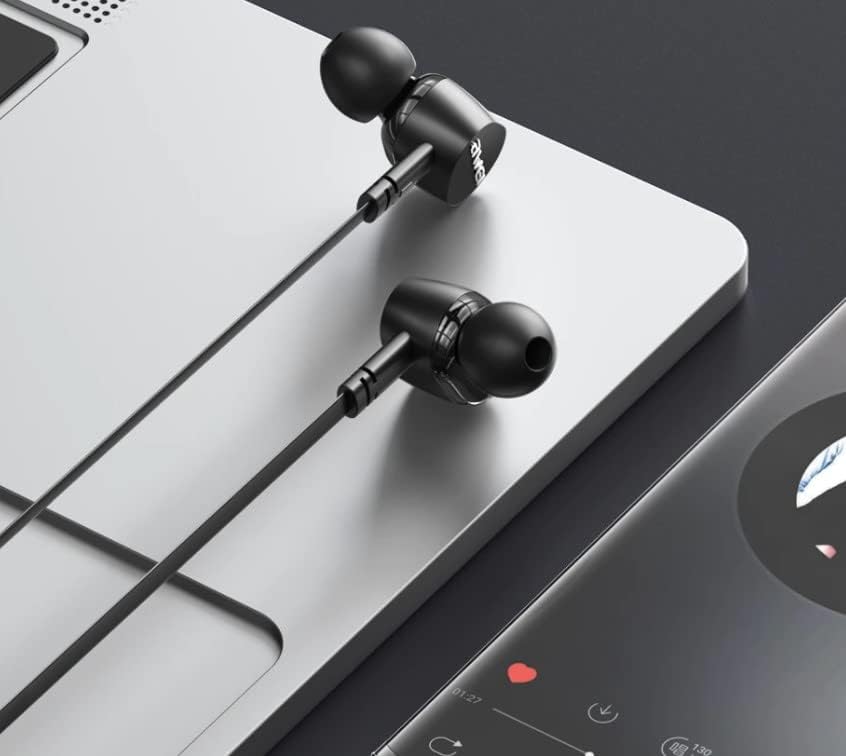
Mynd 4.1: The earphones are compatible with various devices featuring a USB-C port, such as laptops and smartphones.
5. Notkunarleiðbeiningar
The Awei TC-7 earphones feature an inline remote with buttons for convenient control of your audio and calls.
5.1. Stjórnun tónlistarspilunar
- Spila / gera hlé: Ýttu einu sinni á miðjuhnappinn.
- Næsta lag: Ýttu hratt á miðjuhnappinn tvisvar.
- Fyrra lag: Ýttu hratt á miðjuhnappinn þrisvar sinnum.
- Hækka: Ýttu á '+' hnappinn.
- Hljóðstyrkur niður: Ýttu á '-' hnappinn.
5.2. Símtalsstjórnun
- Svara/slíta símtali: Ýttu einu sinni á miðjuhnappinn meðan á innhringingu stendur eða símtali er í gangi.
- Hafna símtali: Ýttu á miðjuhnappinn og haltu honum inni í um það bil 2 sekúndur meðan á símtali stendur.
6. Viðhald
Proper care will extend the lifespan of your Awei TC-7 earphones.
- Þrif á eyrnapúðum: Regularly remove the ear cushions and clean them with a soft, damp klút. Gakktu úr skugga um að þeir séu alveg þurrir áður en þeir eru settir aftur á.
- Kapalumhirða: The cable is designed to be tangle-free. Avoid excessive pulling or sharp bending to prevent internal damage.
- Geymsla: Þegar heyrnartólin eru ekki í notkun skal geyma þau á hreinum, þurrum stað, fjarri miklum hita.
- Vatnsþol: The earphones are rated as waterproof. However, avoid prolonged submersion and ensure the USB-C port is dry before connecting to a device after exposure to water.
7. Bilanagreining
If you encounter issues with your Awei TC-7 earphones, please refer to the following common solutions:
| Vandamál | Möguleg orsök | Lausn |
|---|---|---|
| Ekkert hljóð frá heyrnartólum | Earphones not properly connected; device volume too low; incorrect audio output setting on device. | Ensure the USB-C plug is fully inserted. Increase device volume. Check device audio settings to confirm output is set to earphones. |
| Hljóðnemi virkar ekki | Microphone port blocked; incorrect input setting on device; application permissions. | Ensure the microphone area is clear. Check device sound settings for microphone input. Verify application permissions for microphone access. |
| Hnappar svara ekki | Loose connection; device incompatibility; software glitch. | Reconnect the earphones. Test with another compatible device if possible. Restart your device. |
8. Tæknilýsing
| Eiginleiki | Smáatriði |
|---|---|
| Nafn líkans | TC-7 |
| Tengitækni | Þráðlaust |
| Heyrnartólstengi | USB-C |
| Staðsetning eyrna | In Ear |
| Tíðnisvið | 20Hz - 20kHz |
| Viðbótar eiginleikar | Microphone Included, Inline Control |
| Efni | Plast |
| Vatnsþolsstig | Vatnsheldur |
| Eiginleikar kapal | Flækjalaust |
| Samhæf tæki | Smartphones, Laptops, Tablets, Desktops with USB-C |
9. Ábyrgð og stuðningur
Til að fá upplýsingar um ábyrgð og þjónustu við viðskiptavini, vinsamlegast skoðið skjöl sem fylgja með við kaup eða hafið samband við söluaðila. Geymið kaupkvittunina vegna hugsanlegra ábyrgðarkröfu.