
1. Inngangur
This manual provides essential information for the safe and efficient operation of your Vamvo Mini Projector. Designed for portability and versatility, this projector supports native 1080P resolution with 4K compatibility, features WiFi 6 and Bluetooth 5.4 connectivity, and includes a 180° adjustable stand for flexible projection. Please read this manual thoroughly before use and retain it for future reference.

Figure 1: Vamvo Mini Projector highlighting key features.
2. Hvað er í kassanum
Gakktu úr skugga um að allir eftirfarandi hlutir séu innifaldir í pakkanum þínum:
- Vamvo Mini Projector
- Fjarstýring
- HDMI snúru
- Rafmagns millistykki
- Notendahandbók
- Ábyrgðarkort
3. Vöru lokiðview
The Vamvo Mini Projector is designed for ease of use and high-quality projection. Its compact form factor includes an integrated 180° adjustable stand, allowing for versatile placement and projection angles.
3.1 Helstu eiginleikar
- Innbyggð 1080P upplausn með 4K stuðningi: Delivers crisp and clear visuals.
- Mikil birta og andstæða: Features 15,000 lumens brightness and a 10,000:1 contrast ratio for vivid colors and sharp details.
- 180° Adjustable Stand: Provides flexible positioning for projection on walls, ceilings, or other surfaces.
- WiFi 6 og Bluetooth 5.4: Ensures fast and stable wireless connectivity for streaming and audio.
- Innbyggðir hátalarar: Innbyggðir hátalarar bjóða upp á hljóðútgang.
- Auto Keystone & Motorized Focus: Simplifies setup by automatically correcting image distortion and allowing precise focus adjustments via remote.

Figure 2: Projector's visual performance metrics.
3.2 Tengingar og tengi
The projector offers various ports for connecting external devices:
- HDMI: For connecting TV sticks, laptops, gaming consoles (PS5, Xbox), etc.
- USB: For connecting USB drives or other USB-compatible devices.
- Tegund-C: For one-touch wireless mirroring with iOS/Android devices (adapters and cables not included).
- 3.5 mm AUX: Til að tengja við ytri hátalara eða heyrnartól.
- DC inn: Rafmagnsinntak.
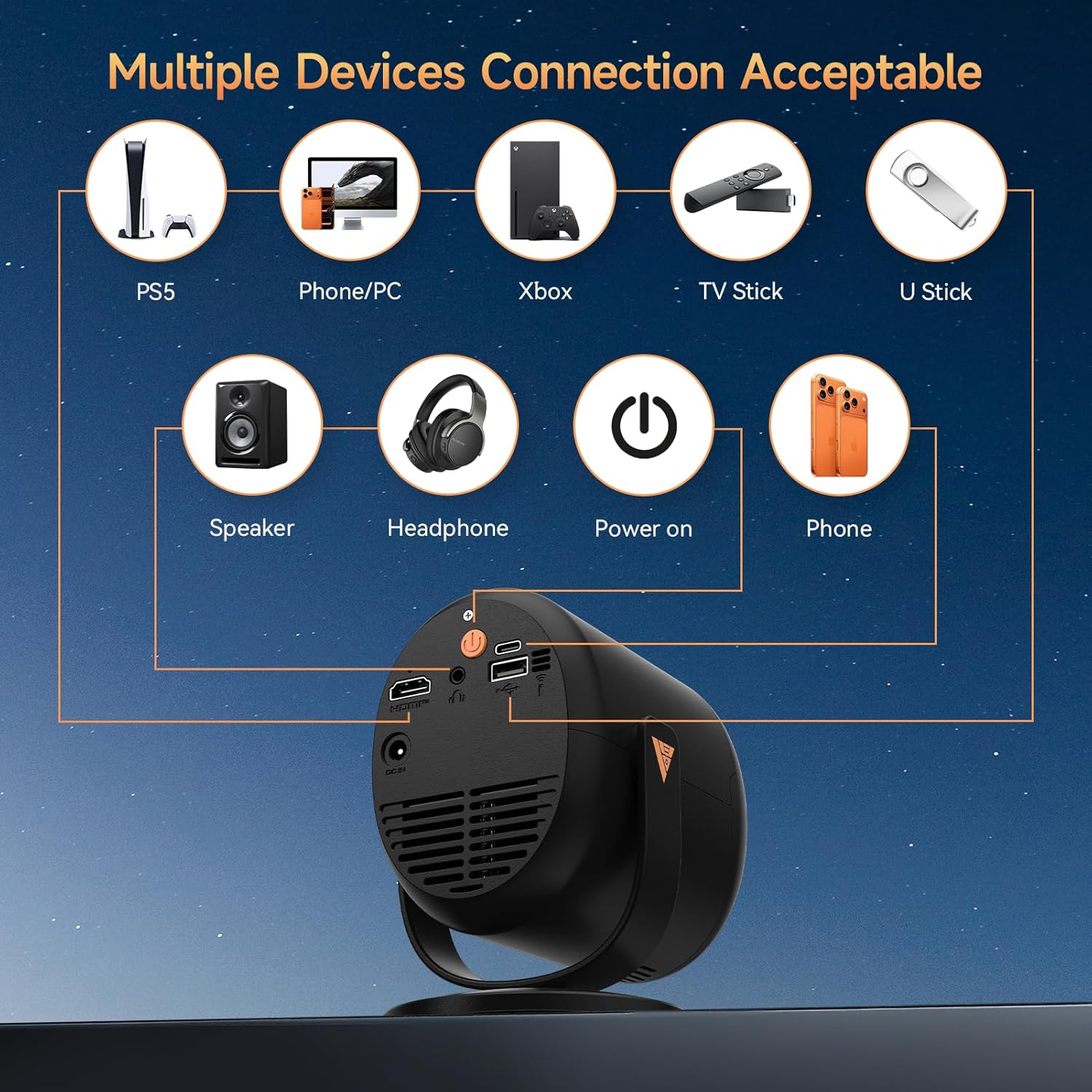
Figure 3: Available ports and compatible devices.
4. Uppsetning
4.1 Upphafsvirkjun
- Connect the provided power adapter to the projector's DC In port and then to a power outlet.
- Ýttu á rofann á skjávarpanum eða fjarstýringunni til að kveikja á honum.
4.2 Staðsetning og vörpun
Utilize the 180° adjustable stand to position the projector for optimal viewing. The projector can project images up to 180 inches. For the best projection experience, select a distance between 5ft to 10ft from the projection surface.

Figure 4: Flexible 180° projection angles.

Mynd 5: Dæmiample of a large 180-inch display.
4.3 Fókus og leiðrétting á lykilþráðum
The projector features automatic vertical keystone correction and motorized focus. Use the remote control to fine-tune the focus (F+ / F- buttons) for a clear image. The auto keystone feature will adjust the image shape to be rectangular.

Figure 6: Motorized focus and keystone adjustment via remote.
5. Notkunarleiðbeiningar
5.1 Navigation and Streaming
Use the provided remote control to navigate the projector's interface. The projector comes with pre-installed streaming platforms like Netflix, Prime Video, and YouTube. You can also access the App Store to download additional applications.
5.2 Skjáspeglun
The projector supports screen mirroring from iOS and Android devices:
- Þráðlaus speglun: Connect your smartphone or tablet via WiFi 6 for a smooth audio and video experience.
- Wired Mirroring: Use a Type-C cable (not included) for one-touch mirroring with compatible devices.
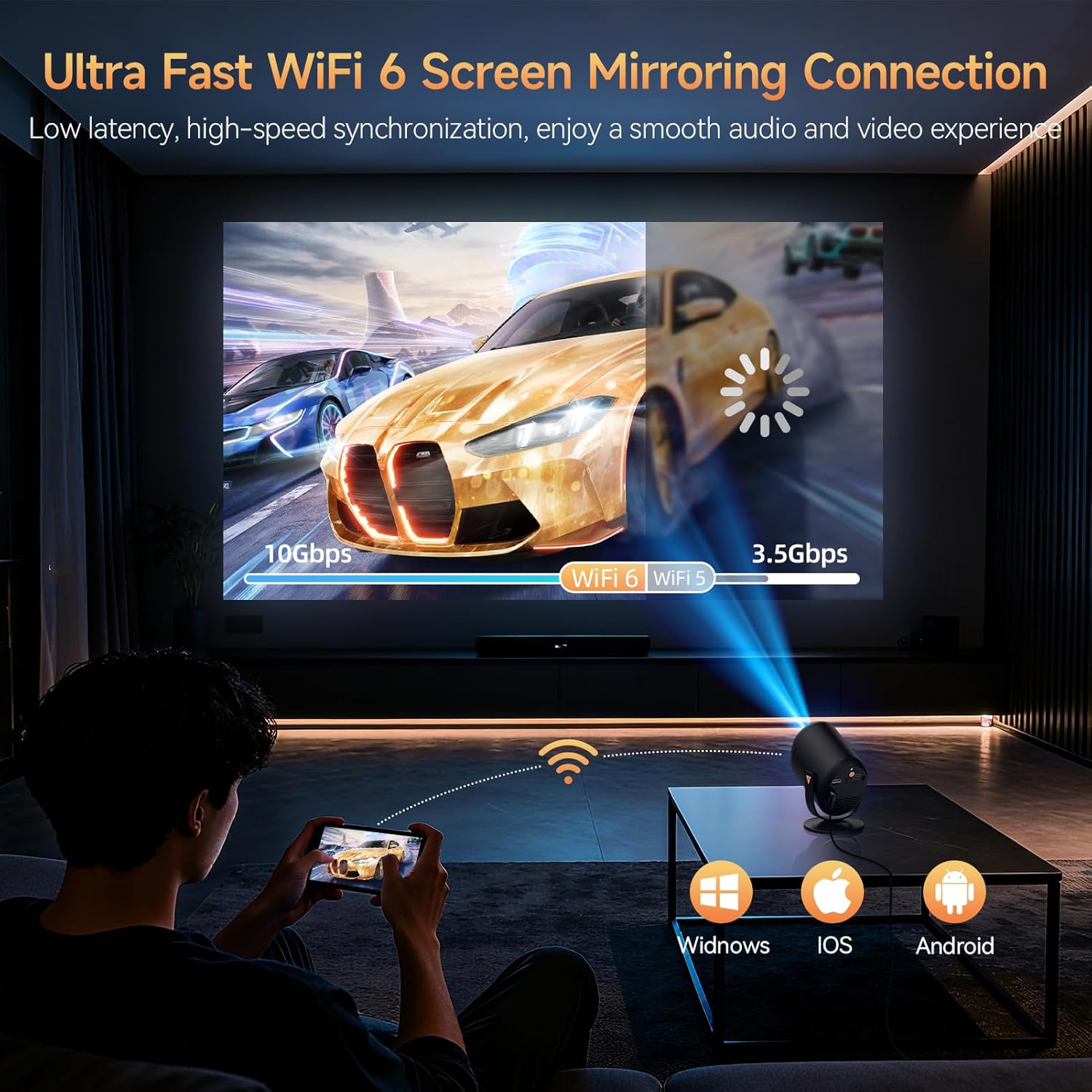
Figure 7: Ultra-fast WiFi 6 screen mirroring.
5.3 Tenging við utanaðkomandi tæki
You can connect various devices to the projector:
- HDMI: For TV sticks (Fire TV Stick, Roku, Chromecast), laptops, and gaming consoles.
- USB: For U-sticks or other USB storage devices.
- Bluetooth 5.4: Til að tengja við ytri hátalara eða heyrnartól.
- 3.5 mm AUX: For wired audio output to speakers or headphones.
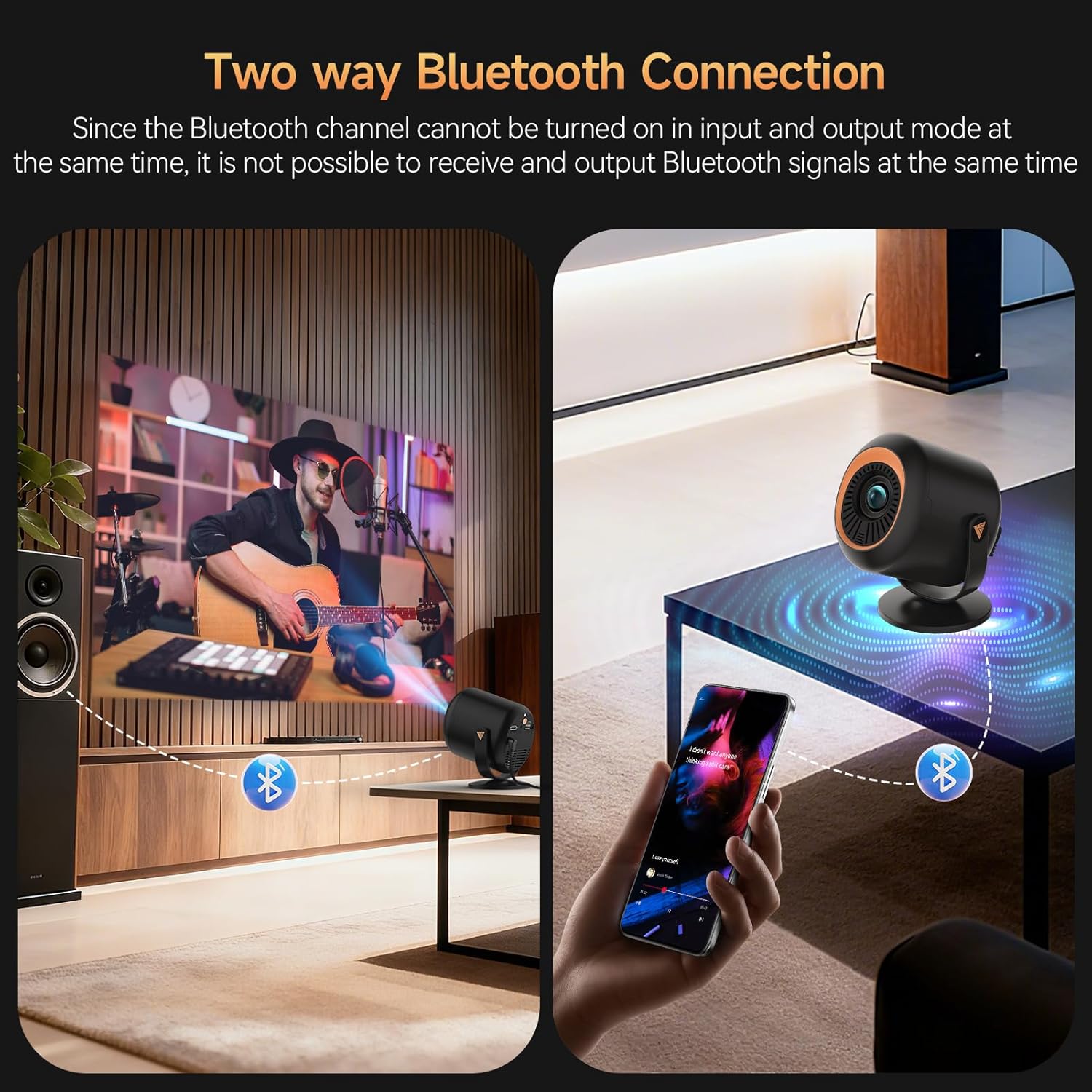
Figure 8: Two-way Bluetooth connection for audio.
Mikilvæg athugasemd:
Due to content protection agreements (HDCP), screen mirroring may not display video or audio for certain apps like Amazon Prime Video, Hulu, or Netflix. For these apps, connect your streaming device (e.g., Fire TV Stick, Roku, Chromecast) directly to the projector via HDMI, or use an HDMI cable from your laptop/computer.
6. Stillingar
The projector offers a comprehensive settings menu to customize your viewing og hljóðupplifun.
6.1 Myndastillingar
Adjust visual parameters to your preference:
- Myndastilling: Standard, Softness, Dynamic, Energy Saving, Vivid, User (customizable).
- Birtustig: Stilltu heildarbirtu myndarinnar.
- Andstæða: Control the difference between light and dark areas.
- Mettun: Adjust the intensity of colors.
- Skerpa: Enhance edge definition.
- Litatónn: Modify the color balance.
- Litahitastig: Stilltu hlýju eða kulda litanna.
- Augnverndarstilling: Minnkar blátt ljós fyrir þægilega notkun viewing.
6.2 Hljóðstillingar
Sérsníða hljóðúttak:
- Hljóðstilling: Standard, Music, Movie, News, Game, User (customizable).
- Staða: Adjust audio balance between left and right channels.
- Audio Output Devices: Select between auto (speaker) or other connected devices.
6.3 Netstillingar
Manage your projector's connectivity:
- Wi-Fi: Connect to available Wi-Fi networks.
- Bluetooth: Leitaðu að and connect to Bluetooth devices.
6.4 Lens Settings
Control projection display and adjustments:
- Sýningarstefna: Framan, aftan, loftið að framan, loftið að aftan.
- Sjálfvirkur fókusstillingar: Enable/disable automatic refocus when moved or power-on autofocus.
- Keystone leiðrétting: Auto Keystone Correction, 4-corner correction, Obstacle Recognition, Screen Recognition.
- Stafrænn aðdráttur: Stilltu stærð varpaðrar myndar.
6.5 Tækjastillingar
General device management:
- Tungumál: Veldu tungumálið sem þú vilt.
- Dagsetning og tími: Stilltu núverandi dagsetningu og tíma.
- Lyklaborð: Configure keyboard settings.
- Skjáhvíla: Adjust screen saver options.
- Svefntími: Stilltu tímamæli fyrir sjálfvirka lokun.
- Verksmiðjustillingar: Reset the projector to its original factory settings.
- Reset Projector/Restart Projector: Perform a soft or hard reset.
7. Viðhald
To ensure the longevity and optimal performance of your Vamvo Mini Projector, follow these maintenance guidelines:
- Linsuhreinsun: Þurrkið varlega linsuna á skjávarpanum með mjúkum, lólausum klút. Forðist slípiefni eða sterk efni.
- Loftræsting: Ensure the projector's ventilation openings are clear and unobstructed to prevent overheating. Regularly clean dust from the vents using a soft brush or compressed air.
- Geymsla: Þegar skjávarpinn er ekki í notkun skal geyma hann á köldum, þurrum stað, fjarri beinu sólarljósi og miklum hita.
8. Bilanagreining
Ef þú lendir í vandræðum með skjávarpann þinn skaltu skoða eftirfarandi algeng vandamál og lausnir:
- Ekkert samband:
- Gakktu úr skugga um að HDMI-snúran sé vel tengd bæði við skjávarpann og upprunatækið.
- Gakktu úr skugga um að rétt inntaksgjafi (HDMI, USB, o.s.frv.) sé valinn á skjávarpanum.
- Check if the source device (laptop, TV stick) is powered on and outputting a signal.
- Fuzzy or Unclear Image:
- Adjust the focus using the F+ / F- buttons on the remote control.
- Ensure the projector lens is clean and free from dust or smudges.
- Check the projection distance and adjust if necessary to match the desired screen size.
- Ekkert hljóð eða lágt hljóðstyrkur:
- Hækkið hljóðstyrkinn bæði á skjávarpanum og upprunatækinu.
- Athugaðu hvort skjávarpinn sé hljóðlaus.
- Ef þú notar ytri hátalara skaltu ganga úr skugga um að þeir séu rétt tengdir og kveikt á.
- Screen Mirroring Issues (No Video/Audio):
- Some streaming apps (Netflix, Hulu, Prime Video) have HDCP content protection that prevents screen mirroring. Connect a streaming device directly via HDMI for these apps.
- Ensure your device and projector are connected to the same Wi-Fi network for wireless mirroring.
9. Tæknilýsing
| Eiginleiki | Smáatriði |
|---|---|
| Vörumerki | Vamvo |
| Þyngd hlutar | 2.61 pund |
| Stærðir pakka | 11.57 x 7.91 x 5.08 tommur |
| Litur Nafn | Blek |
| Sérstakir eiginleikar | Innbyggður hátalari |
| Ráðlagður notkun fyrir vöru | Leikir, Heimabíó |
| Tengitækni | HDMI |
| Skjáupplausn | 1920 x 1080 |
10. Ábyrgð og stuðningur
Your Vamvo Mini Projector comes with a warranty. Please refer to the included Warranty Card for detailed information regarding warranty coverage, terms, and conditions. For technical support or further assistance, please consult the contact information provided on your Warranty Card or visit the official Vamvo websíða.