
Inngangur
This manual provides detailed instructions for the safe installation, operation, and maintenance of your bimar Wi-Fi Ceiling Fan, Model 1 (Ø 132). Please read this manual thoroughly before using the product and retain it for future reference.
Fyrirhuguð notkun: This high-performance ceiling fan is designed for ventilation in indoor domestic environments. Any other use is considered improper and potentially hazardous. The manufacturer cannot be held responsible for any damages resulting from improper use or repairs performed by unqualified personnel.
Mikilvægar öryggisleiðbeiningar
Til að draga úr hættu á eldi, raflosti eða meiðslum á fólki skal fylgjast með eftirfarandi:
- Lesið allar leiðbeiningar áður en viftan er sett upp.
- Uppsetning verður að vera framkvæmd af löggiltum rafvirkja í samræmi við allar gildandi rafmagnsreglur á hverjum stað og á landsvísu.
- Ensure the installation site can support the fan's weight (approximately 6.2 kg).
- Aftengdu alltaf rafmagnið við aðalrofa fyrir uppsetningu eða viðhald.
- Ekki nota viftuna ef rafmagnssnúra eða kló er skemmd.
- Keep hands, hair, and clothing away from moving blades.
- Do not insert any objects into the fan blades while it is operating.
- Þetta tæki er ekki ætlað til notkunar af einstaklingum (þar á meðal börnum) með skerta líkamlega, skynræna eða andlega getu, eða skort á reynslu og þekkingu, nema þeir hafi fengið eftirlit eða leiðbeiningar um notkun tækisins af einstaklingi sem ber ábyrgð á öryggi þeirra.
- Hafa skal eftirlit með börnum til að tryggja að þau leiki sér ekki með heimilistækið.
Hvað er í kassanum
Your bimar Wi-Fi Ceiling Fan package includes the following components:
- bimar Wi-Fi Ceiling Fan unit (with 3 blades)
- Fjarstýring
- Mounting hardware (screws, brackets, etc.)
- Leiðbeiningar (þetta skjal)

Image: The bimar Wi-Fi Ceiling Fan, featuring three light-colored wooden blades and a brushed metal motor housing and downrod.
Uppsetning og uppsetning
1. Uppsetning viftu
Fagleg uppsetning af viðurkenndum rafvirkja er eindregið ráðlögð. Ensure the ceiling structure can safely support the fan's weight and that all wiring complies with local electrical codes.
- Undirbúðu uppsetningarstaðinn: Slökkvið á rafmagninu við rofann. Festið festingarfestinguna örugglega við loftbjálka eða innstungukassa með viftu.
- Setjið saman stöngina og mótorinn: Festið niðurstöngina við viftumótorhúsið.
- Hangðu viftuna: Lyftu viftubúnaðinum varlega upp og hengdu hann upp á festingarfestinguna.
- Víra viftuna: Connect the electrical wires (live, neutral, ground) from the ceiling to the fan's wiring, following the wiring diagram provided in the separate installation guide (if applicable).
- Festu blöðin: Securely fasten the three blades to the motor housing.
- Tryggðu tjaldhiminn: Raise the canopy to cover the wiring and mounting bracket, securing it in place.

Mynd: Hlið view of the bimar ceiling fan, illustrating the angle of the light wood blades and the connection to the downrod.
2. Wi-Fi og tenging við forrit
The bimar Wi-Fi Ceiling Fan is compatible with the Bimar Live Smart app for advanced control and scheduling.
- Sækja appið: Leitaðu að "Bimar Live Smart" in your smartphone's app store (iOS or Android) and install it.
- Búðu til reikning: Opnaðu appið og fylgdu leiðbeiningunum á skjánum til að búa til nýjan notandareikning eða skrá þig inn ef þú ert þegar með einn.
- Bæta við tæki: Power on the ceiling fan. In the Bimar Live Smart app, tap "Add Device" or the "+" icon. Select "Ceiling Fan" or the appropriate device type.
- Tengjast Wi-Fi: Follow the app's instructions to put the fan into pairing mode (usually by pressing a button on the fan or remote for a few seconds). Connect the fan to your home 2.4GHz Wi-Fi network.
- Name the Device: Once connected, you can name your fan for easy identification within the app.

Image: A modern living room featuring the bimar ceiling fan installed, with a smartphone displaying the Bimar Live Smart app interface, indicating Wi-Fi and voice control capabilities.
Notkunarleiðbeiningar
Your bimar Wi-Fi Ceiling Fan offers multiple control options for convenience.
1. Fjarstýring
The included remote control allows direct access to all fan functions.
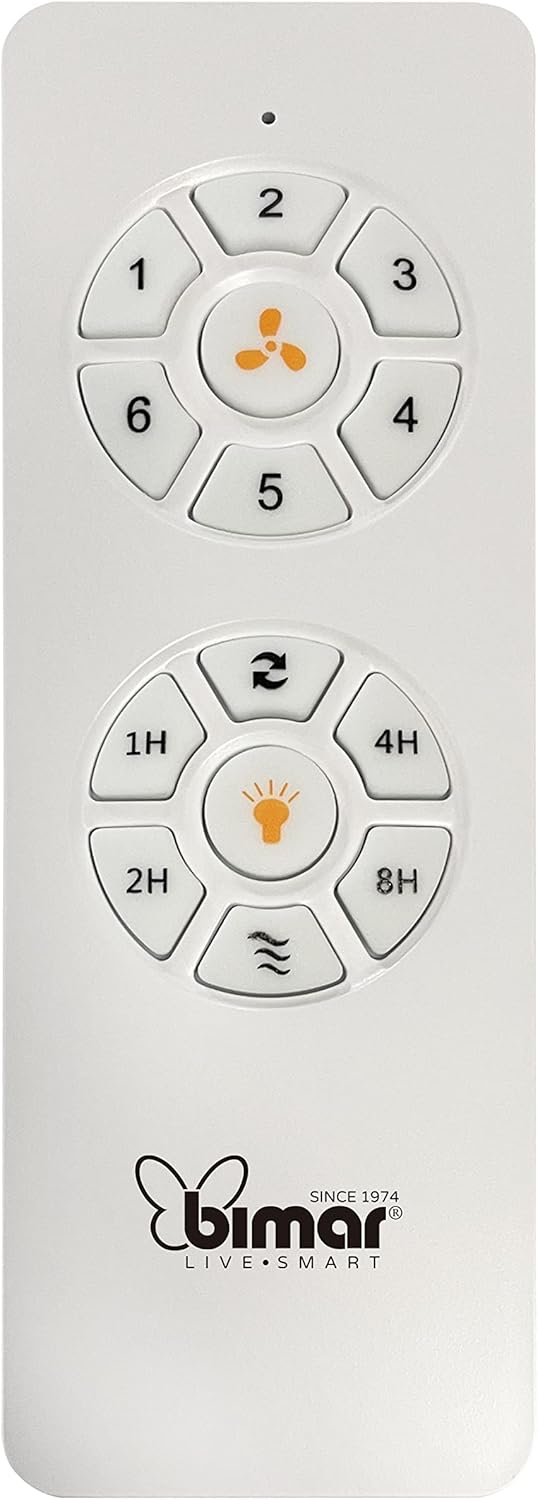
Image: The white remote control for the bimar ceiling fan, showing buttons for fan speed (1-6), fan on/off, timer (1H, 2H, 4H, 8H), mode selection, and reverse function.
- Kveikt/slökkt: Ýttu á viftutáknið til að kveikja eða slökkva á viftunni.
- Hraðaleiðrétting: Use buttons 1-6 to select one of the six available fan speeds.
- Tímamælir aðgerð: Press 1H, 2H, 4H, or 8H to set the fan to automatically turn off after the selected duration.
- Stillingarval: Use the mode button (often represented by waves or arrows) to cycle through Normal, Natural, Sleep, and Breeze modes.
- Sumar/vetrarstilling: The reverse button (often two arrows forming a circle) changes the blade rotation direction.
2. App Control (Bimar Live Smart)
Once connected to the Bimar Live Smart app, you can access enhanced features:
- Fjarstýring: Control all fan functions from anywhere with an internet connection.
- Áætlun: Program daily and weekly on/off times for automated operation.
- Tímamælir: Adjust the timer from 1 to 8 hours.
- Mode and Speed Selection: Easily switch between the 6 speeds and 4 operating modes.
3. Raddstýring
The bimar Wi-Fi Ceiling Fan is compatible with popular voice assistants like Amazon Alexa and Google Assistant. After connecting the fan to the Bimar Live Smart app, link your Bimar account to your voice assistant app (e.g., Alexa app or Google Home app).
Example raddskipanir:
- "Alexa, turn on the ceiling fan."
- "Hey Google, set ceiling fan speed to 3."
- "Alexa, turn off the ceiling fan in 1 hour."
4. Operating Modes and Speeds
- 6 Ventilation Speeds: Adjust the airflow intensity to your preference.
- Venjulegur háttur: Consistent airflow at the selected speed.
- Natural Mode: Simulates natural breezes by varying fan speed.
- Svefnhamur: Virkar á lægri og rólegri hraða fyrir ótruflaða hvíld.
- Breeze Mode: Provides a gentle, intermittent airflow.
5. Sumar-/vetrarvirkni
The reversible blade function allows for year-round use:
- Sumarstilling (snúningur rangsælis): Býr til niðurstreymi í lofti og myndar kælandi gola.
- Vetrarstilling (réttsælis): Creates an upward airflow, circulating warm air trapped near the ceiling, improving heating efficiency.

Image: A diagram illustrating the airflow patterns for summer (indirect ventilation, pushing air upwards) and winter (direct ventilation, pulling air downwards) modes of a ceiling fan.
Viðhald
Reglulegt viðhald tryggir bestu mögulegu afköst og endingu loftviftunnar.
- Þrif: Before cleaning, ensure the fan is turned off and power is disconnected at the circuit breaker. Use a soft, damp cloth to wipe down the blades and motor housing. Do not use abrasive cleaners or solvents.
- Skoðun blaðs: Periodically check the blades for any signs of damage or warping. Ensure all blade screws are tight.
- Smurning mótor: The fan's DC motor is designed for maintenance-free operation and does not require lubrication.
- Herðið festingar: Over time, some fasteners may become loose. Check and tighten all screws and connections annually.

Mynd: Nærmynd view of the bimar ceiling fan's brushed metal motor housing and the attachment points for the light wood blades, highlighting areas for cleaning and inspection.
Úrræðaleit
| Vandamál | Möguleg orsök | Lausn |
|---|---|---|
| Vifta fer ekki í gang | Engin straumgjafi; Lítil rafhlöðugeta í fjarstýringu; Röng raflögn. | Check circuit breaker and wall switch. Replace remote batteries. Verify wiring connections (consult electrician). |
| Aðdáandi vaggar | Laus blöð eða festingarbúnaður; Ójafnvægi blöð. | Ensure all blade screws and mounting screws are tight. Use a balancing kit (not included) if necessary. |
| Fjarstýring virkar ekki | Low battery; Obstruction between remote and receiver; Remote not paired. | Replace remote batteries. Ensure clear line of sight. Refer to pairing instructions in the full manual. |
| Vandamál með Wi-Fi tengingu | Incorrect Wi-Fi password; Router too far; 5GHz network selected. | Verify Wi-Fi password. Move router closer or use a Wi-Fi extender. Ensure you are connecting to a 2.4GHz network. Reset fan and re-attempt pairing. |
| Vifta er hávær | Loose screws; Blades hitting an obstruction; Motor issue. | Check and tighten all screws. Ensure nothing is obstructing the blades. If noise persists, contact customer support. |
Tæknilýsing
| Eiginleiki | Smáatriði |
|---|---|
| Vörumerki | bimar |
| Gerðarnúmer | 1 |
| Vörumál | 132 x 132 x 27.5 cm (þvermál x þvermál x hæð) |
| Þyngd | 6.2 kg |
| Fjöldi blaða | 3 |
| Efni | Viður |
| Litur | Black (Note: Blades are light wood finish as shown in images) |
| Tegund mótor | DC (Brushless, energy-saving) |
| Orkunotkun | 35W |
| Eftirlitsaðferðir | Remote Control, Bimar Live Smart App, Voice Control (Amazon Alexa, Google Assistant) |
| Viftuhraði | 6 |
| Rekstrarstillingar | Normal, Natural, Sleep, Breeze |
| Tímamælir | 1 til 8 klst |
| Viðbótar eiginleikar | Silent operation, Summer/Winter mode (reversible blades) |
| Aflgjafi | Rafmagns |
| Gerð uppsetningar | Loftfesting |

Image: The three light wood fan blades, detached and laid flat, showcasinhönnun þeirra og áferð.


Mynd: Tvær views of the bimar ceiling fan, illustrating different downrod lengths: one with a 25 cm downrod and another with a 13 cm downrod, affecting the overall height of the fan.
Ábyrgð og stuðningur
For warranty information, technical support, or service inquiries, please refer to the warranty card included with your product or visit the official bimar webGeymið kaupkvittunina vegna ábyrgðarkröfu.
Framleiðandi: Bimar S.r.l.
Tengiliður: Vinsamlegast heimsóttu the bimar store on Amazon or the official bimar webvefsíðu fyrir upplýsingar um tengiliði.