
1. Inngangur
Welcome to the Bmax I10 Pro Tablet user manual. This guide provides essential information for setting up, operating, maintaining, and troubleshooting your new tablet. Please read this manual thoroughly to ensure proper use and to maximize your device's performance.
The Bmax I10 Pro is a 10.1-inch tablet featuring a UNISOC Tiger T310 SoC, 4GB RAM, 64GB ROM (expandable via MicroSD), and runs on Android 11. It supports 4G LTE, dual-band Wi-Fi, and Bluetooth 5.0, making it suitable for various tasks from work to entertainment.

This banner image introduces the Bmax MaxPad I10 Pro, an ultralight entertainment tablet supporting 4G network standards. It highlights features like an In-Cell Display, a high AnTuTu benchmark score, A75 and A55 CPU cores, and its slim 8.9mm, 400g design.
2. Upphafsuppsetning
2.1 Innihald pakka
Gakktu úr skugga um að allir hlutir séu til staðar í pakkanum:
- Bmax I10 Pro Tablet
- USB Type-C kapall
- Rafmagns millistykki
- Notendahandbók (þetta skjal)
2.2 Skipulag tækis

Þessi skýringarmynd gefur skýra yfirsýnview of the Bmax I10 Pro Tablet's external components, labeling the front camera, rear camera, 3.5mm audio jack, power key, reset hole, volume keys, Micro SD card reader, Type-C port, microphone, and speakers for easy identification.
2.3 Hleðsla spjaldtölvunnar
Before first use, fully charge the tablet. Connect the USB Type-C cable to the tablet's Type-C port and the other end to the power adapter. Plug the adapter into a wall outlet. The battery indicator on the screen will show charging status.
2.4 Kveikt/slökkt
- Til að kveikja á: Press and hold the Power key until the Bmax logo appears.
- Til að slökkva á: Press and hold the Power key until the power options appear. Select "Power off" and confirm.
- Til að endurræsa: Press and hold the Power key until the power options appear. Select "Restart" and confirm.
2.5 Upphafleg stilling
Upon first power-on, follow the on-screen prompts to set up your tablet:
- Veldu tungumálið sem þú vilt.
- Tengstu við Wi-Fi net.
- Skráðu þig inn með Google reikningnum þínum eða stofnaðu nýjan.
- Settu upp skjálás (PIN-númer, mynstur, lykilorð eða andlitsopnun).
- Review og samþykkja skilmála.
2.6 Að setja inn SIM- og microSD-kort
The tablet supports dual 4G SIM cards and a MicroSD card for expandable storage.
- Finndu SIM-/MicroSD-kortsskúffuna á hlið spjaldtölvunnar.
- Notaðu meðfylgjandi SIM-kortsútkastarverkfæri til að opna skúffuna.
- Carefully place the SIM card(s) and/or MicroSD card into the designated slots. Ensure correct orientation.
- Ýttu bakkanum varlega aftur inn í spjaldtölvuna þar til hann smellpassar.

This image demonstrates the Bmax I10 Pro Tablet's communication capabilities, showing a video call in progress. It details support for multiple 4G network standards (GSM, WCDMA, FDD-TLE, TD-TLE), dual SIM card slots (SIM 1 + SIM 2 & Dual Standby), a Micro SD card slot, and VoLTE high-definition voice calls.
3. Notkunarleiðbeiningar
3.1 Grunnleiðsögn
The Bmax I10 Pro uses a touch-sensitive screen for navigation:
- Bankaðu á: Snertu skjáinn einu sinni til að velja hlut eða opna forrit.
- Bankaðu og haltu: Touch and hold an item to access contextual menus or move icons.
- Strjúktu: Dragðu fingurinn yfir skjáinn til að fletta í gegnum síður eða lista.
- Klípa: Notaðu tvo fingur til að stækka eða minnka myndir og web síður.
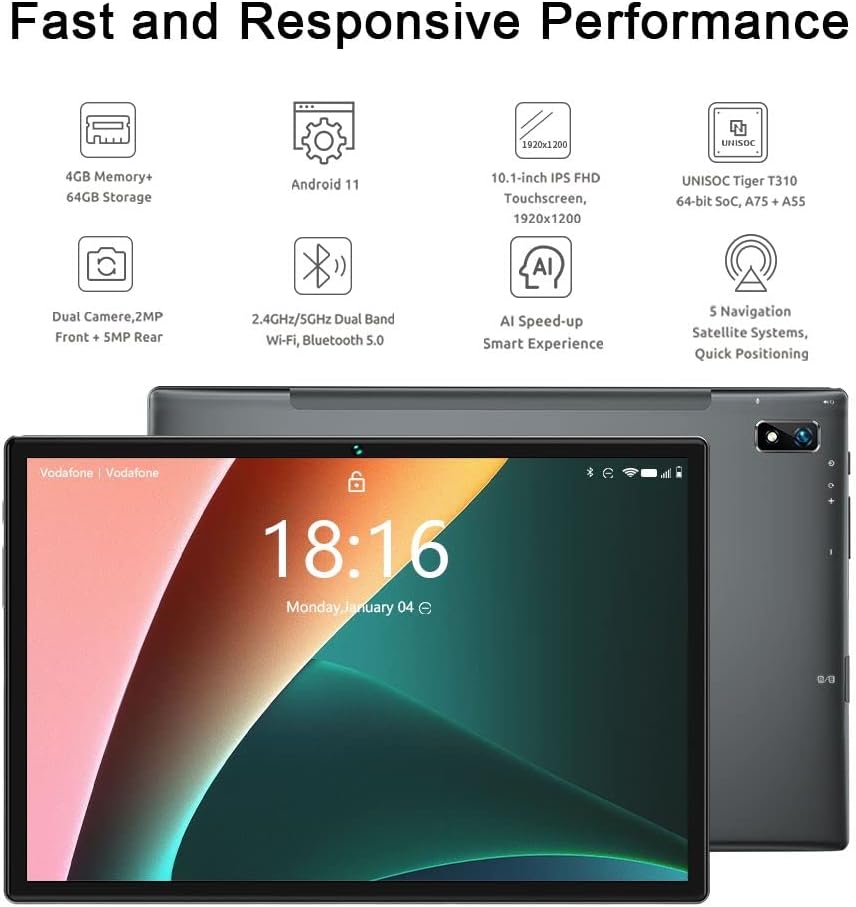
This image displays the Bmax I10 Pro tablet from both the front and rear. The front shows the Android home screen with the current time, while the rear highlights the camera module and sleek design.
3.2 Wi-Fi og Bluetooth tenging
Til að tengjast Wi-Fi eða Bluetooth tækjum:
- Farðu til Stillingar > Net og internet for Wi-Fi, or Tengd tæki fyrir Bluetooth.
- Skipta á milli Wi-Fi eða Bluetooth On.
- For Wi-Fi, select your desired network and enter the password if prompted.
- For Bluetooth, select a device from the list to pair.
3.3 Using 4G LTE and VoLTE
If you have inserted a 4G SIM card, your tablet can connect to mobile data networks and make calls via VoLTE (Voice over LTE).
- Gakktu úr skugga um að farsímagögn séu virk í Stillingar > Net og internet > Farsímakerfi.
- VoLTE will automatically activate if supported by your carrier and SIM card.
- Use the pre-installed Phone app to make and receive calls.
3.4 Notkun myndavélar
Spjaldtölvan er með 2MP myndavél að framan og 5MP myndavél að aftan.
- Opnaðu Myndavél app.
- Ýttu á myndavélarrofatáknið til að skipta á milli fram- og aftari myndavélar.
- Ýttu á lokarahnappinn til að taka mynd eða hefja/stöðva myndbandsupptöku.

The image shows the Bmax I10 Pro Tablet with a vibrant image of a snowboarder on its screen, emphasizing its dual camera system: a 5-megapixel rear camera and a 2-megapixel front camera.
3.5 GPS-virkni
The Bmax I10 Pro supports multiple navigation satellite systems (GPS, Beidou, GLONASS, Galileo, A-GPS) for accurate positioning.
- Ensure Location services are enabled in Stillingar > Staðsetning.
- Use pre-installed or downloaded navigation apps for directions and location-based services.

The image shows the Bmax I10 Pro Tablet securely mounted in a car, displaying a navigation map. This illustrates the tablet's advanced GPS features, including support for GPS, Beidou, GLONASS, Galileo, and A-GPS for accurate positioning.
3.6 Face Recognition Unlock
To set up face recognition for unlocking your tablet:
- Farðu til Stillingar > Öryggi > Andlitsopnun.
- Fylgdu leiðbeiningunum á skjánum til að skrá andlitið þitt. Gakktu úr skugga um að þú sért á vel upplýstum stað.
- Once registered, you can unlock your tablet by looking at the front camera.
4. Viðhald
4.1 Þrif á spjaldtölvunni
To keep your tablet clean:
- Notið mjúkan, lólausan klút til að þurrka skjáinn og hlífina.
- Fyrir þrjósk óhreinindi, örlítið dýftampÞurrkið klútinn með vatni eða skjáhreinsiefni sem er hannað fyrir rafeindatæki.
- Forðist að nota sterk efni, slípiefni eða mikinn raka.
4.2 Umhirða rafhlöðu
The Bmax I10 Pro has a 6600mAh battery. To prolong its lifespan:
- Forðastu mikinn hita.
- Ekki láta rafhlöðuna tæmast alveg oft.
- Unplug the charger once the tablet is fully charged.

This graphic highlights the Bmax I10 Pro Tablet's 6600mAh Li-polymer battery, indicating support for fast charging and suggesting 4 to 6 hours of usage for gaming and movie watching.
4.3 Hugbúnaðaruppfærslur
Athugaðu reglulega hvort hugbúnaðaruppfærslur séu tiltækar og settu upp þær til að tryggja bestu mögulegu afköst, öryggi og aðgang að nýjum eiginleikum.
- Farðu til Stillingar > Kerfi > Kerfisuppfærsla.
- Fylgdu leiðbeiningunum á skjánum til að hlaða niður og setja upp allar tiltækar uppfærslur.
4.4 Geymslustjórnun
To manage the 64GB internal storage and any MicroSD card storage:
- Farðu til Stillingar > Geymsla til view geymslunotkun.
- Eyða óþarfa files, apps, or move them to the MicroSD card to free up space.
5. Bilanagreining
If you encounter issues with your Bmax I10 Pro Tablet, refer to the following common solutions:
| Vandamál | Lausn |
|---|---|
| Spjaldtölvan kveikir ekki á sér | Ensure the tablet is charged. Connect to the charger for at least 30 minutes. If still unresponsive, press and hold the Power key for 10-15 seconds to force a restart. |
| Wi-Fi / Bluetooth connectivity issues | Toggle Wi-Fi/Bluetooth off and on. Restart the tablet. Forget the network/device and reconnect. Ensure you are within range of the network/device. |
| Hæg afköst / Forrit hrynja | Close unused apps. Clear app caches (Settings > Apps > [App Name] > Storage > Clear cache). Free up storage space. Restart the tablet. |
| Skjár svarar ekki | Restart the tablet by holding the Power key. If unresponsive, use the reset hole (refer to Device Layout) with a thin pin. |
| Cannot make/receive calls (4G LTE) | Ensure SIM card is correctly inserted and activated. Check mobile network settings. Verify VoLTE is enabled and supported by your carrier. |
5.1 Factory Reset
If problems persist, you may consider a factory reset. Viðvörun: Þetta mun eyða öllum gögnum á spjaldtölvunni þinni. Taktu öryggisafrit af mikilvægum gögnum áður en þú heldur áfram.
- Farðu til Stillingar > Kerfi > Endurstilla valkosti.
- Veldu Eyða öllum gögnum (endurstilla verksmiðju).
- Staðfestu ákvörðun þína og sláðu inn PIN-númerið/lykilorðið þitt ef beðið er um það.
6. Tæknilýsing
Detailed technical specifications for the Bmax I10 Pro Tablet:

Þessi mynd sýnir ítarlega yfirsýnview of the Bmax I10 Pro Tablet's key features, such as its 10.1-inch FHD display, 4GB RAM, 64GB ROM, dual speakers, UNISOC Tiger T310 processor, dual-band Wi-Fi, 5-mode GPS, 6600mAh battery, USB Type-C port, Android 11 operating system, and face recognition capability.
| Eiginleiki | Smáatriði |
|---|---|
| Fyrirmynd | Bmax I10 Pro |
| Stýrikerfi | Android 11 |
| Örgjörvi | UNISOC Tiger T310 SoC (ARM Cortex A75@2.0GHz + A55@1.8GHz) |
| GPU | Imagination PowerVR GE8300 |
| vinnsluminni | 4 GB |
| Innri geymsla | 64 GB |
| Stækkanlegt geymsla | MicroSD card slot (up to 2TB) |
| Skjástærð | 10.1 tommur |
| Skjáupplausn | 1920 x 1200 pixels (IPS Display Panel, 16:10 Aspect Ratio, 10-point Touch Control) |
| Myndavél að aftan | 5 MP |
| Myndavél að framan | 2 MP |
| Rafhlaða | 6600 mAh Li-fjölliða |
| Tengingar | 2.4GHz + 5GHz Wi-Fi, Bluetooth 5.0, 4G LTE (Dual SIM), GPS (GPS, Beidou, GLONASS, Galileo, A-GPS) |
| Hafnir | USB Type-C, 3.5 mm hljóðtengi |
| Mál | 8.9 mm þunn |
| Þyngd | 400g |

This image provides a close-up of the UNISOC Tiger T310 processor, emphasizing its DynamIQ architecture, which includes A75 cores clocked at 2.0GHz and A55 cores at 1.8GHz, manufactured using a 12nm process. It also mentions the Imagination PowerVR GE8300 GPU.

This image presents two comparison charts. The first shows the upgraded CPU architecture of the T310 compared to SC9863A, indicating better performance. The second chart illustrates the upgraded manufacturing process (TSMC 12nm vs 28nm HPC+), leading to lower power consumption. An AnTuTu 8.0.5 benchmark result shows the T310 SoC improving the score by 44% over SC9863A.

The image features the Bmax I10 Pro Tablet displaying a vivid image of the aurora borealis, illustrating its high-quality display. Key display specifications highlighted are the IPS Display Panel, 1920 x 1200 resolution, 16:10 aspect ratio, and responsive 10-point touch control.
7. Ábyrgð og stuðningur
7.1 Vöruábyrgð
Your Bmax I10 Pro Tablet is covered by a standard manufacturer's warranty. Please refer to the warranty card included in your product packaging or visit the official Bmax webvefsíðu fyrir ítarlegar ábyrgðarskilmála.
7.2 Þjónustuver
For technical assistance, troubleshooting beyond this manual, or warranty claims, please contact Bmax customer support through their official webvefsíðu eða tengiliðaupplýsingar sem gefnar eru upp í vörugögnum þínum.