
1. Inngangur
Thank you for choosing the Karlsson LED Mirror Alarm Clock. This digital alarm clock features a modern design with a clear LED display integrated into a silver mirror surface, showing time and temperature. This manual provides essential information for the safe and efficient use of your device.
Hvað er í kassanum:
- Karlsson LED Mirror Alarm Clock
- USB aflstrengur

Mynd 1: Framan view of the Karlsson LED Mirror Alarm Clock, showing the time (15:08) and temperature (19°C) on its reflective display.
2. Öryggisupplýsingar
- Ekki láta tækið verða fyrir vatni eða miklum raka.
- Forðist mikinn hita, beint sólarljós eða rykugt umhverfi.
- Geymið þar sem börn ná ekki til.
- Use only the provided USB cable or a compatible power adapter.
- When inserting batteries, ensure correct polarity (+/-).
- Ekki blanda saman gömlum og nýjum rafhlöðum, eða mismunandi gerðum af rafhlöðum.
- Fjarlægðu rafhlöður ef tækið verður ekki notað í langan tíma.
3. Vöru lokiðview
Kynntu þér íhluti og stjórntæki vekjaraklukkunnar þinnar.
Framhlið skjár:
- Tímaskjár: Sýnir núverandi tíma í 12 tíma eða 24 tíma sniði.
- Hitaskjár: Shows ambient temperature in Celsius or Fahrenheit.
Stýringar aftan:
- SET hnappur: Notað til að fara inn í stillingarhami (tími, vekjaraklukka).
- UPP hnappur: Notað til að auka gildi eða fletta í gegnum valmyndir.
- NIÐUR hnappur: Notað til að lækka gildi eða fletta í gegnum valmyndir.
- MODE/V Button: Used to switch display modes or activate voice control (if available).
- RESET hnappur: Endurstillir tækið í verksmiðjustillingar.
- DC 5V inntak: Til að tengja USB rafmagnssnúruna.
- Rafhlöðuhólf: Holds 3 x AAA batteries for backup power.
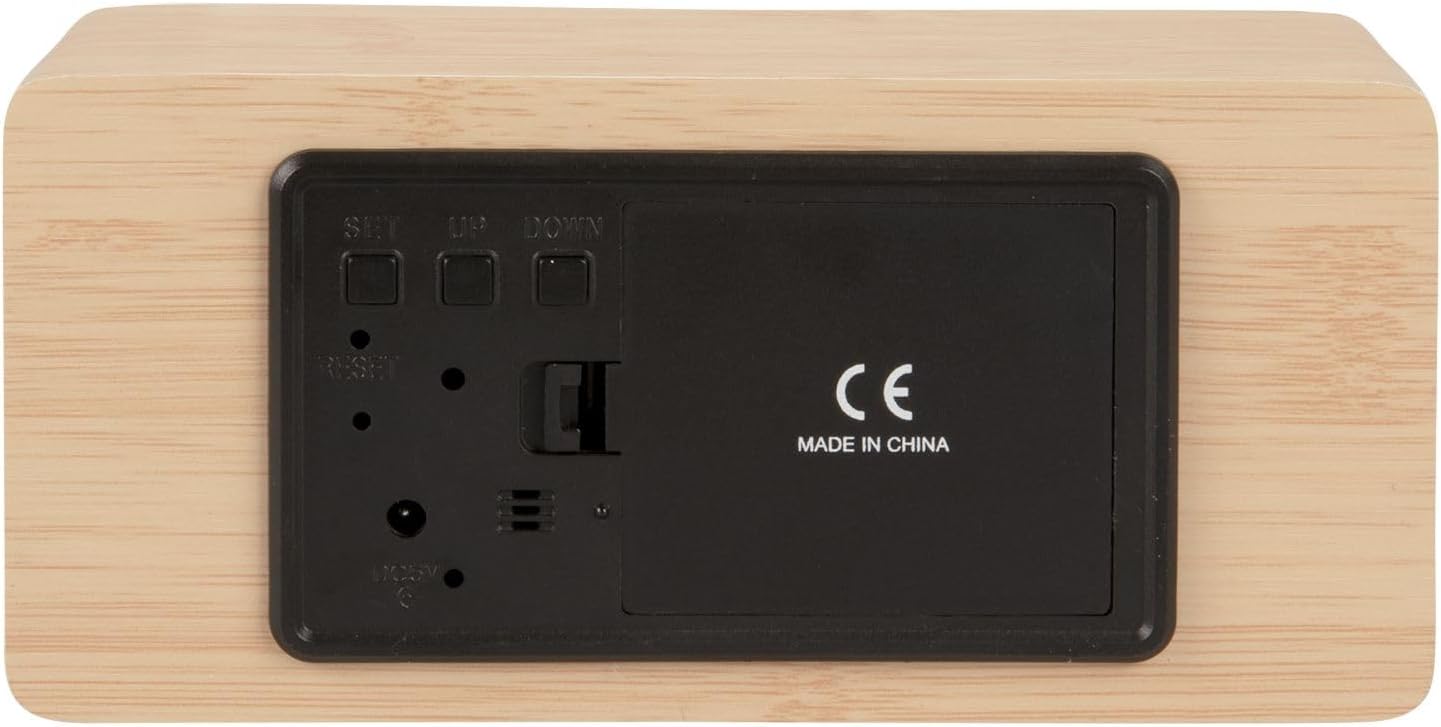
Mynd 2: Aftan view of the alarm clock, highlighting the SET, UP, DOWN buttons, power input, and battery compartment.
4. Uppsetning
Kveikt á tækinu:
The alarm clock can be powered via the included USB cable or by 3 x AAA batteries (not included) for backup.
- USB Power: Connect the small end of the USB cable to the DC 5V input port on the back of the alarm clock. Connect the other end to a USB power adapter (not included) or a powered USB port.
- Afritun rafhlöðu: Open the battery compartment cover on the back of the clock. Insert 3 x AAA batteries, ensuring correct polarity. Close the cover securely. Batteries are primarily for backup and may not power the display continuously.

Mynd 3: The USB power cable provided for connecting the alarm clock to a power source.
5. Notkunarleiðbeiningar
Stilla tímann:
- Ýttu á og haltu inni SETJA hnappinn þar til klukkustundartölurnar byrja að blikka.
- Notaðu UP or NIÐUR hnappa til að stilla klukkustundina.
- Ýttu á SETJA aftur til að staðfesta klukkustundina og fara yfir í mínútustillingu.
- Notaðu UP or NIÐUR hnappa til að stilla mínúturnar.
- Ýttu á SETJA to confirm the minutes and exit time setting mode.
Stilla vekjaraklukkuna:
- Ýttu á SETJA button once (do not hold) to cycle through display modes until 'AL' or an alarm icon appears.
- Ýttu á og haltu inni SETJA button again until the alarm hour digits flash.
- Notaðu UP or NIÐUR hnappana til að stilla vekjaraklukkutíma sem óskað er eftir.
- Ýttu á SETJA to confirm the alarm hour and move to alarm minute setting.
- Notaðu UP or NIÐUR hnappana til að stilla óskaðar vekjaraklukkumínútur.
- Ýttu á SETJA til að staðfesta og hætta við stillingu viðvörunar.
- Til að virkja/slökkva á vekjaraklukkunni, ýttu á UP button while in normal time display mode. An alarm icon will appear/disappear on the display.
Switching Display Modes (12/24 Hour, Temperature Unit):
- Í venjulegri tímaskjásstillingu, ýttu á UP button to switch between 12-hour and 24-hour formats.
- Ýttu á NIÐUR hnappinn til að skipta á milli hitaeininga í Celsíus (°C) og Fahrenheit (°F).
6. Viðhald
- Clean the alarm clock with a soft, dry cloth.
- Do not use abrasive cleaners, solvents, or harsh chemicals, as these may damage the mirror surface or casing.
- Gakktu úr skugga um að tækið sé aftengt og rafhlöður fjarlægðar áður en það er þrifið.
7. Bilanagreining
- Skjárinn er auður: Check if the USB cable is securely connected to a power source. If using batteries, ensure they are inserted correctly and are not depleted.
- Viðvörunin hljómar ekki: Verify that the alarm is set and activated (alarm icon visible on display). Check the alarm volume if adjustable (this model may not have adjustable volume).
- Incorrect time/settings: Ýttu á ENDURSTILLA button on the back of the unit using a thin object (e.g., a paperclip) to restore factory settings, then re-set the time and alarm.
- Hitamæling virðist ónákvæm: Ensure the clock is placed in a location away from direct heat sources or drafts that could affect ambient temperature readings.
8. Tæknilýsing
| Gerðarnúmer | PTG-KA5879WD |
| Efni | Viðarspónn |
| Mál (L x B x H) | 15 cm x 7 cm x 4.5 cm (u.þ.b. 5.9 x 2.76 x 1.77 tommur) |
| Þyngd | 245 g (u.þ.b. 0.54 pund) |
| Litur | Light wood casing, silver mirror display |
| Skjár Tegund | Stafræn LED |
| Sérstakur eiginleiki | Viðvörun |
| Aflgjafi | USB powered (cable included), 3 x AAA batteries (not included) for backup |
9. Ábyrgð og stuðningur
This product is manufactured by Karlsson. For any support inquiries, warranty information, or service requests, please refer to the retailer where the product was purchased or visit the official Karlsson webvefsíðu fyrir upplýsingar um tengiliði. Vinsamlegast geymið kaupkvittunina vegna ábyrgðarkröfu.