
BN-LINK W6-6FXT-LOFJ
BN-LINK Smart Digital Outlet Timer
Leiðbeiningarhandbók
Inngangur
Þakka þér fyrir kaupinasing the BN-LINK Smart Digital Outlet Timer. This device is designed to automate the power control of your electrical appliances, helping you save energy and enhance convenience in your daily life. With its user-friendly interface and robust programming capabilities, you can easily manage when your devices turn on and off.
Key features include a large, clear display, simple button operation, up to 20 programmable ON/OFF settings per day, and a repeat function for recurring schedules. It also incorporates important safety features to ensure reliable operation.
Öryggisráðstafanir
Vinsamlegast lesið og skiljið allar öryggisleiðbeiningar áður en þessi vara er notuð til að koma í veg fyrir meiðsli eða skemmdir.
- Do not exceed the electrical rating: Metið Voltage: AC100V, Input Current: 15A, 50/60Hz, 1500W. Overloading can cause overheating and fire.
- This timer is constructed with PC flame-retardant material to effectively prevent electrical fires.
- The plug is equipped with an insulation cap to help prevent fires caused by tracking phenomena.
- Ekki setja tímamælinn í vatn eða láta hann verða fyrir miklum raka.
- Ekki taka tímastillinn í sundur eða breyta honum. Látið hæft starfsfólk sjá um alla þjónustu.
- Geymið þar sem börn ná ekki til.
Applicable Electrical Appliances (Maximum Power Consumption)
- Heater appliances: 1500W or less (e.g., electric kettles, electric carpets, heated toilet seats)
- Transformer appliances: 750W or less (e.g., TVs, stereos, AV equipment)
- Motorized appliances: 400W or less (e.g., fans, ventilation fans, circulation pumps)
- Lighting fixtures: 750W or less (e.g., incandescent illuminations, fluorescent lamps)
- LED lighting fixtures: 250W or less (e.g., LED illuminations, LED fluorescent lamps)
Athugið: Simultaneous ON/OFF of two electrical appliances is possible by connecting an extension cord to the timer output and then connecting two electrical appliances to the extension cord. However, please ensure the total current does not exceed 15A, and pay attention to connections.
Vara lokiðview
The BN-LINK Smart Digital Outlet Timer features a compact design with a large, clear LCD display and intuitive buttons for easy programming.

Mynd 1: Framan view of the timer, showing the large digital display and the arrangement of control buttons for day, hour, minute, clear, clock, program, and mode.

Mynd 2: Product dimensions. The timer measures approximately 70mm in height and 68mm in width, with a weight of 114.2 grams.

Mynd 3: Safety and programming features. The timer is made from PC flame-retardant material, features an insulation cap on the plug to prevent tracking fires, and supports up to 20 programmable settings.
Uppsetning
- Upphafsgjald: Before first use, plug the timer into an outlet for at least 30 minutes to charge the internal battery. This battery backs up your settings during power outages.
- Hreinsa allar stillingar: Press the 'Clear' button to reset any previous settings.
- Stilla núverandi tíma:
- Ýttu á hnappinn „Klukka“.
- Use the 'Day', 'Hour', and 'Minute' buttons to set the current day and time.
- Press 'Clock' again to confirm and exit time setting mode.
Notkunarleiðbeiningar
Forritun ON / OFF sinnum
You can set up to 20 ON/OFF programs per day. Each program consists of an ON time and an OFF time.
- Press the 'Program' button to enter programming mode. The display will show '1 ON'.
- Use the 'Day', 'Hour', and 'Minute' buttons to set the desired ON time for Program 1.
- Press 'Program' again. The display will show '1 OFF'.
- Use the 'Day', 'Hour', and 'Minute' buttons to set the desired OFF time for Program 1.
- Repeat steps 1-4 for additional programs (up to 20). Press 'Program' to cycle through '2 ON', '2 OFF', and so on.
- After setting all desired programs, press the 'Clock' button to exit programming mode and return to the current time display.
Activating Programs
To activate your set programs, ensure the timer is in 'AUTO' mode. Press the 'Mode' button repeatedly to cycle through 'ON', 'OFF', and 'AUTO'. Select 'AUTO' for the timer to follow your programmed schedule.
Handvirk hnekking
While in 'AUTO' mode, you can temporarily override the current program by pressing the 'Mode' button. This will switch the output to 'ON' or 'OFF' manually. To return to programmed operation, press 'Mode' until 'AUTO' is displayed again.
Screen Blanking Feature
After 3 minutes of inactivity, the screen automatically goes blank to save energy. Press any button to reactivate the display.
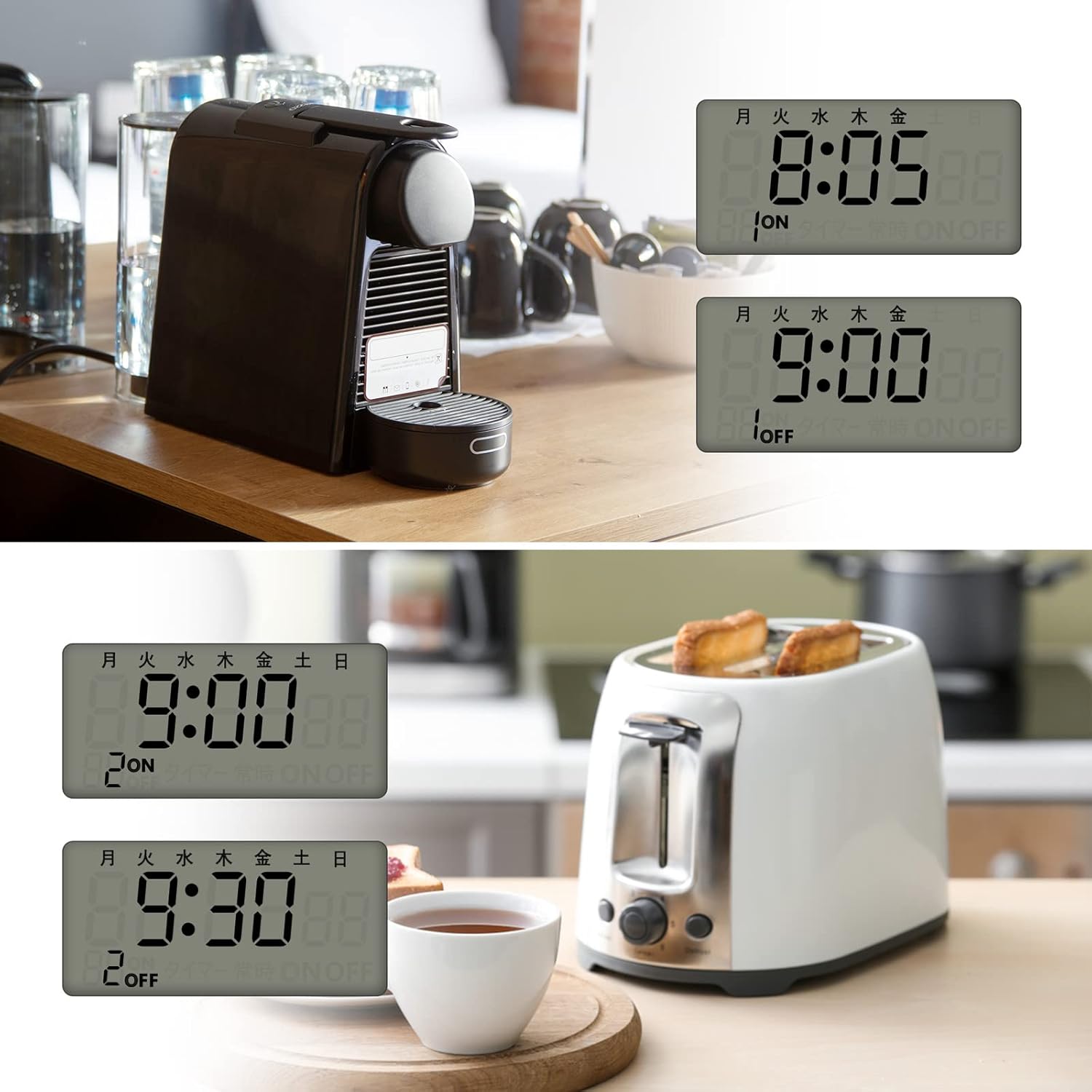
Mynd 4: Notkun tdamples. The timer can automate daily routines, such as turning on a coffee maker in the morning or a toaster at a specific time.

Mynd 5: Various applications. The timer is suitable for controlling humidifiers, lamps, Wi-Fi routers, and decorative lighting.

Mynd 6: Anti-theft lighting. The timer can be used to simulate occupancy by turning lights on and off at set times, enhancing home security.
Viðhald
The BN-LINK Smart Digital Outlet Timer requires minimal maintenance.
- Þurrkið ytra byrðina með mjúkum, þurrum klút. Notið ekki slípiefni eða leysiefni.
- Gakktu úr skugga um að tímastillirinn sé aftengdur áður en þrif eru gerð.
- Geymið á köldum, þurrum stað þegar það er ekki í notkun í langan tíma.
Úrræðaleit
| Vandamál | Möguleg orsök | Lausn |
|---|---|---|
| Timer display is blank or unresponsive. | Internal battery is low or depleted; screen blanking feature is active. | Plug the timer into an active outlet for at least 30 minutes to charge the battery. Press any button to reactivate the display. |
| Forritin virkjast ekki. | Timer is not in 'AUTO' mode; programs are incorrectly set. | Press the 'Mode' button until 'AUTO' is displayed. Review and re-enter your programs carefully, ensuring ON and OFF times are correct. |
| Appliance connected to timer does not turn on/off. | Appliance is not properly plugged into the timer; appliance is faulty; timer is overloaded. | Ensure the appliance is securely plugged into the timer. Test the appliance by plugging it directly into a wall outlet. Verify the appliance's power consumption does not exceed 1500W. |
| Timer is making unusual noises or smells. | Internal malfunction; electrical short. | Immediately unplug the timer from the wall outlet. Do not attempt to use it again. Contact customer support. |
Tæknilýsing
| Framleiðandi | BN-LINK |
| Gerðarnúmer | W6-6FXT-LOFJ |
| Stærðir pakka | 11.5 x 9 x 8.2 cm |
| Efni | Plast |
| Litur | Hvítur |
| Tegund rafhlöðu | Nickel-metal hydride (NiMH) |
| Þyngd pakka | 0.29 kíló |
| Rafhlöður nauðsynlegar | Já |
| Rafhlöður fylgja | Já |
| Vöruþyngd | 114.2 grömm |
| Vörumál | 3.3D x 6.8B x 7H cm |
Ábyrgð og stuðningur
Þessi vara kemur með a 1 árs ábyrgð framleiðanda frá kaupdegi.
For technical support, troubleshooting assistance, or warranty claims, please contact BN-LINK customer service. Refer to the product packaging or the retailer's websíðu fyrir nákvæmar tengiliðaupplýsingar.
Please have your model number (W6-6FXT-LOFJ) and proof of purchase ready when contacting support.
Ask a question about this manual
Ask about setup, troubleshooting, compatibility, parts, safety, or missing instructions. Manuals+ will review the question and use this page’s manual context to help answer it.