
1. Inngangur
This manual provides instructions for the installation, operation, and maintenance of your NETGEAR GS305P 5-Port PoE Gigabit Ethernet Unmanaged Switch. This device is designed to expand your network connectivity with both standard Gigabit Ethernet and Power over Ethernet (PoE+) capabilities, ideal for small office or home network environments.
2. Innihald pakka
Staðfestu að pakkinn þinn inniheldur eftirfarandi hluti:
- NETGEAR GS305P 5-Port PoE Gigabit Ethernet Unmanaged Switch (GS305Pv3)
- Rafmagns millistykki
- Veggfestingarsett
- Fljótleg uppsetningarleiðbeiningar

Image: The NETGEAR GS305P switch, power adapter, and power cord as typically found in the package.
3. Vöru lokiðview
The NETGEAR GS305P is an unmanaged switch featuring 5 Gigabit Ethernet ports, with 4 of these ports supporting PoE+ (Power over Ethernet Plus). It provides a total power budget of 63W for connected PoE devices. The switch is designed for plug-and-play operation, requiring no software installation or configuration.
Myndband: Yfirview of the NETGEAR 5-Port PoE Switch, demonstrating its features and ease of use.
Framhlið

Image: Front panel of the GS305P switch, highlighting the 5 Gigabit Ethernet ports and LED indicators for power, PoE Max, link/activity, and PoE fault.
- Power LED: Gefur til kynna orkustöðu.
- PoE Max LED: Illuminates when PoE power consumption is near maximum capacity.
- Link/Activity LEDs (Ports 1-5): Green for 1000Mbps link, Yellow for 10/100Mbps link. Blinks to indicate activity.
- PoE stöðuljós (tengi 1-4): Green for PoE powered, Yellow for PoE fault.
- Ethernet tengi (1-5): RJ-45 ports for network connections. Ports 1-4 support PoE+.
4. Uppsetning og uppsetning
The NETGEAR GS305P switch is designed for simple plug-and-play installation. No software configuration is required.
4.1 Tenging rofans
- Connect the power adapter to the switch's power input and then plug the power adapter into an electrical outlet. The Power LED on the switch will illuminate.
- Connect your router or modem to any of the 5 Gigabit Ethernet ports on the switch using an Ethernet cable.
- Connect your network devices (computers, printers, network storage) to the remaining Gigabit Ethernet ports. For PoE-powered devices (e.g., IP cameras, wireless access points), connect them to ports 1-4.

Image: A diagram illustrating the plug-and-play nature of the unmanaged switch, connecting various devices like WiFi Access Points, IP Cameras, Computers, and NAS.
4.2 Uppsetningarvalkostir
The GS305P switch can be placed on a desktop or mounted on a wall. A wallmount kit is included for secure installation.
- Staðsetning skjáborðs: Ensure the switch is placed on a flat, stable surface with adequate ventilation.
- Veggfesting: Use the provided wallmount kit to secure the switch to a wall. Refer to the quick installation guide for detailed steps on wall mounting.
5. Notkun rofans
Once connected, the switch operates automatically. The LEDs provide visual feedback on the network status.
- Kveikt á: The Power LED will be green when the switch is receiving power.
- Network Activity: The Link/Activity LEDs will light up when a device is connected and blink to indicate data transmission.
- PoE Power: For PoE-powered devices, the PoE Status LED will be green when power is being supplied. If a PoE fault occurs, the LED will turn yellow.
- Hljóðlaus aðgerð: The fanless design ensures quiet operation, making it suitable for noise-sensitive environments.
6. Viðhald
To ensure optimal performance and longevity of your switch, follow these maintenance guidelines:
- Þrif: Notið mjúkan, þurran klút til að þrífa ytra byrði rofans. Notið ekki fljótandi hreinsiefni eða úðabrúsa.
- Loftræsting: Gakktu úr skugga um að loftræstiopin séu ekki stífluð til að koma í veg fyrir ofhitnun.
- Umhverfi: Operate the switch within its specified temperature and humidity ranges. Avoid direct sunlight or extreme temperatures.
- Kapalstjórnun: Keep network cables organized to prevent strain on ports and improve airflow.
7. Bilanagreining
If you encounter issues with your NETGEAR GS305P switch, refer to the following common troubleshooting steps:
- Enginn kraftur: Ensure the power adapter is securely connected to the switch and a working electrical outlet. Check the Power LED.
- Enginn tengill/virkni: Verify that Ethernet cables are properly connected to both the switch and the connected device. Try a different cable or port. Check the Link/Activity LED.
- PoE tækið kveikir ekki á sér: Ensure the device is PoE-compatible and connected to one of the PoE+ ports (1-4). Check the PoE Status LED for the port; a yellow light indicates a fault. Verify the total power budget (63W) is not exceeded by all connected PoE devices.
- Hægur nethraði: Ensure all connected devices and cables support Gigabit Ethernet for optimal performance. Check for excessive network traffic.
8. Tæknilýsing
Key technical specifications for the NETGEAR GS305P switch:
| Eiginleiki | Lýsing |
|---|---|
| Fyrirmynd | GS305P (GS305Pv3) |
| Fjöldi hafna | 5 Gigabit Ethernet tengi |
| PoE+ tengi | 4 (Tengi 1-4) |
| Heildar PoE Power Budget | 63W |
| Gagnaflutningshraði | 1000 Mbps (gígabit) |
| Skiptategund | Óstýrt |
| Málsefni | Málmur |
| Mál (L x B x H) | 9.5" x 6.7" x 3.4" (approximate, from product data) |
| Voltage | 240 Volts (Power adapter input) |
| Rekstrarumhverfi | Designed for indoor use in U.S. & CA. |
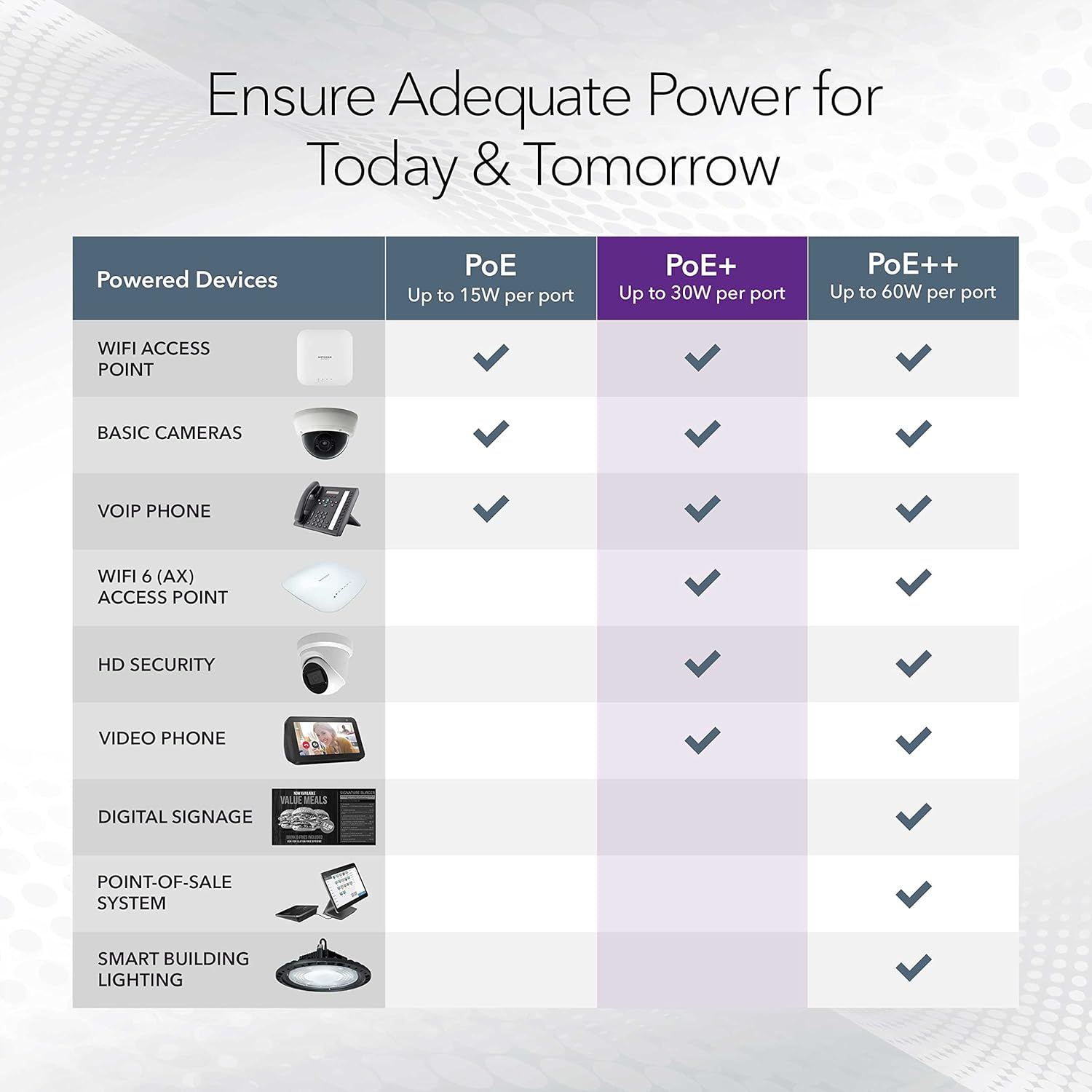
Image: A table illustrating the power capabilities of PoE, PoE+, and PoE++ for different powered devices.
9. Ábyrgð og stuðningur
9.1 Upplýsingar um ábyrgð
The NETGEAR GS305P switch comes with an industry-leading 3 ára takmörkuð vélbúnaðarábyrgð. Please retain your proof of purchase for warranty claims. For full warranty terms and conditions, refer to the official NETGEAR webvefsíðunni eða skjölunum sem fylgja vörunni þinni.
9.2 Tæknileg aðstoð
For technical assistance, product registration, or to access additional resources, visit the official NETGEAR support website. You can find FAQs, firmware updates, and community forums there.
NETGEAR stuðningur Websíða: www.netgear.com/support