
1. Inngangur
This manual provides detailed instructions for the installation, operation, and maintenance of your TP-Link Deco X50-Outdoor AX3000 Whole Home Mesh WiFi 6 Unit. The Deco X50-Outdoor is designed to extend your mesh WiFi network to outdoor and indoor spaces, providing robust and stable wireless connectivity. Please read this manual thoroughly before using the device to ensure proper setup and optimal performance.
2. Öryggisupplýsingar
Fylgið alltaf þessum grunnöryggisráðstöfunum til að draga úr hættu á eldsvoða, raflosti og meiðslum:
- Ekki setja þetta tæki fyrir vatn eða raka.
- Ekki reyna að taka í sundur, gera við eða breyta tækinu.
- Notaðu aðeins straumbreytinn sem fylgir tækinu.
- Ensure the device is installed in a stable location to prevent it from falling.
- Haltu tækinu frá hitagjöfum og beinu sólarljósi.
- For outdoor installation, ensure all cable connections are properly sealed to prevent water ingress.
3. Innihald pakka
Staðfestu að pakkinn þinn inniheldur eftirfarandi hluti:
- 1 x TP-Link Deco X50-Outdoor Unit
- 1 x straumbreytir
- 1 x Ethernet snúru
- Mounting Kit (includes mounting bracket, screws, and wall plugs)
- Fljótleg uppsetningarleiðbeiningar

Image: The retail packaging for the TP-Link Deco X50-Outdoor unit, showing the device and its key features.
4. Vöru lokiðview
The Deco X50-Outdoor is a cylindrical, white unit designed for both outdoor and indoor use. It features an IP65 rating for waterproof and dustproof protection, making it suitable for various weather conditions.
4.1 Skipulag tækis

Mynd: Framan view of the TP-Link Deco X50-Outdoor unit, showcasing its sleek, cylindrical design and 'deco outdoor' branding.

Image: The bottom of the Deco X50-Outdoor unit, revealing the port cover and the attachment point for the mounting bracket.
4.2 Tengi og hnappar
Under the protective cover at the bottom of the unit, you will find the following:
- PoE höfn: Used for Power over Ethernet (PoE) connection, providing both power and data through a single Ethernet cable.
- LAN Ports (2): For connecting wired devices or for backhaul connection to other Deco units.
- Aflhöfn: For connecting the included power adapter when not using PoE.
- Endurstilla hnappur: A small button to reset the device to factory settings.

Mynd: Nærmynd view of the PoE and AC power supply ports located at the base of the Deco X50-Outdoor unit, with labels indicating their functions.
5. Uppsetning
Follow these steps to set up your Deco X50-Outdoor unit. It is recommended to use the TP-Link Deco app for a guided setup process.
5.1 Download the Deco App
- Scan the QR code in the Quick Installation Guide or search for "TP-Link Deco" in the App Store or Google Play.
- Sæktu og settu upp Deco appið á snjallsímanum þínum eða spjaldtölvu.
5.2 Líkamleg uppsetning
The Deco X50-Outdoor can be mounted on a pole, wall, or placed on a tabletop.
- Veldu staðsetningu: Select a location that provides optimal WiFi coverage and is within range of your existing Deco network (if extending). For outdoor use, ensure it's protected from direct impact and accessible for power/Ethernet.
- Uppsetning:
- Stöngfesting: Use the provided straps to secure the mounting bracket to a pole.
- Veggfesting: Drill holes, insert wall plugs, and screw the mounting bracket to the wall.
- Borðplata: Simply place the unit on a flat, stable surface.
- Tengdu rafmagn:
- Notkun rafmagns millistykkis: Connect the provided power adapter to the power port and plug it into an electrical outlet.
- Notkun PoE: Connect an Ethernet cable from a PoE-enabled switch or injector to the PoE port on the Deco unit.
- Connect to Existing Network (Optional): If you are using the Deco X50-Outdoor as a satellite unit, it will connect wirelessly to your main Deco unit. For a wired backhaul, connect an Ethernet cable from one of the LAN ports to your main Deco unit or network switch.

Image: The Deco X50-Outdoor unit securely mounted on an outdoor pole, demonstrating a typical installation scenario.
5.3 App-Guided Setup
- Opnaðu Deco appið og skráðu þig inn með TP-Link auðkenninu þínu. Ef þú ert ekki með eitt skaltu stofna reikning.
- Tap the "+" icon in the top right corner to add a new Deco unit.
- Select your Deco model (X50-Outdoor) and follow the on-screen instructions to complete the setup. The app will guide you through connecting the unit and integrating it into your existing Deco mesh network.
6. Rekstur
Once set up, your Deco X50-Outdoor unit will automatically integrate into your mesh network, providing seamless WiFi coverage. You can manage your network using the TP-Link Deco app.
6.1 Deco App Features
The Deco app allows you to:
- View tengd tæki og stöðu þeirra.
- Settu upp gestanet.
- Stjórna foreldraeftirliti.
- Prioritize devices for optimal performance (QoS).
- Access HomeShield Security features.
- Uppfærðu vélbúnaðar.
- Monitor network health and usage.
6.2 Staða LED vísir
The LED on your Deco unit indicates its status:
- Gegnstætt grænt: Deco is working properly.
- Pikkandi grænn: Deco er að byrja.
- Rauður fastur: Deco á við vandamál að stríða (t.d. engin nettenging).
- Birtandi rauður: Deco er aftengt frá aðal Deco-einingunni.
- Gult blátt: Deco er tilbúið til uppsetningar.
- Birtandi blár: Deco is pairing via Bluetooth.
7. Viðhald
Regular maintenance ensures the longevity and optimal performance of your Deco X50-Outdoor unit.
7.1 vélbúnaðaruppfærslur
Keep your Deco's firmware updated to benefit from the latest features, security enhancements, and bug fixes. You can check for and install updates via the Deco app.
7.2 Þrif
Wipe the device with a soft, dry cloth. Do not use liquid cleaners or chemical sprays.
7.3 Umhverfissjónarmið
Despite its outdoor rating, avoid placing the unit in locations where it is constantly submerged in water or exposed to extreme physical impact.
8. Bilanagreining
If you encounter issues with your Deco X50-Outdoor, try the following solutions:
8.1 Engin nettenging
- Check the LED status. If solid red, ensure your main Deco unit has an internet connection.
- Verify that the Ethernet cable (if used) is securely connected.
- Restart your modem, main Deco unit, and then the X50-Outdoor unit.
8.2 Deco X50-Outdoor Disconnected
- Ensure the unit is within range of your main Deco or another satellite Deco.
- Athugaðu rafmagnstenginguna.
- Try relocating the unit to a closer position to the main Deco.
8.3 Slow WiFi Speed
- Ensure the unit is placed in an open area, free from obstructions.
- Athugaðu hvort vélbúnaðaruppfærslur séu uppfærðar.
- Use the Deco app to run a network optimization test.
8.4 Factory Reset
If issues persist, you may need to perform a factory reset. With the Deco unit powered on, use a pin to press and hold the Reset button until the LED turns solid red (approximately 1 second), then release. The unit will restart with factory default settings.
9. Tæknilýsing
Technical details for the TP-Link Deco X50-Outdoor unit:
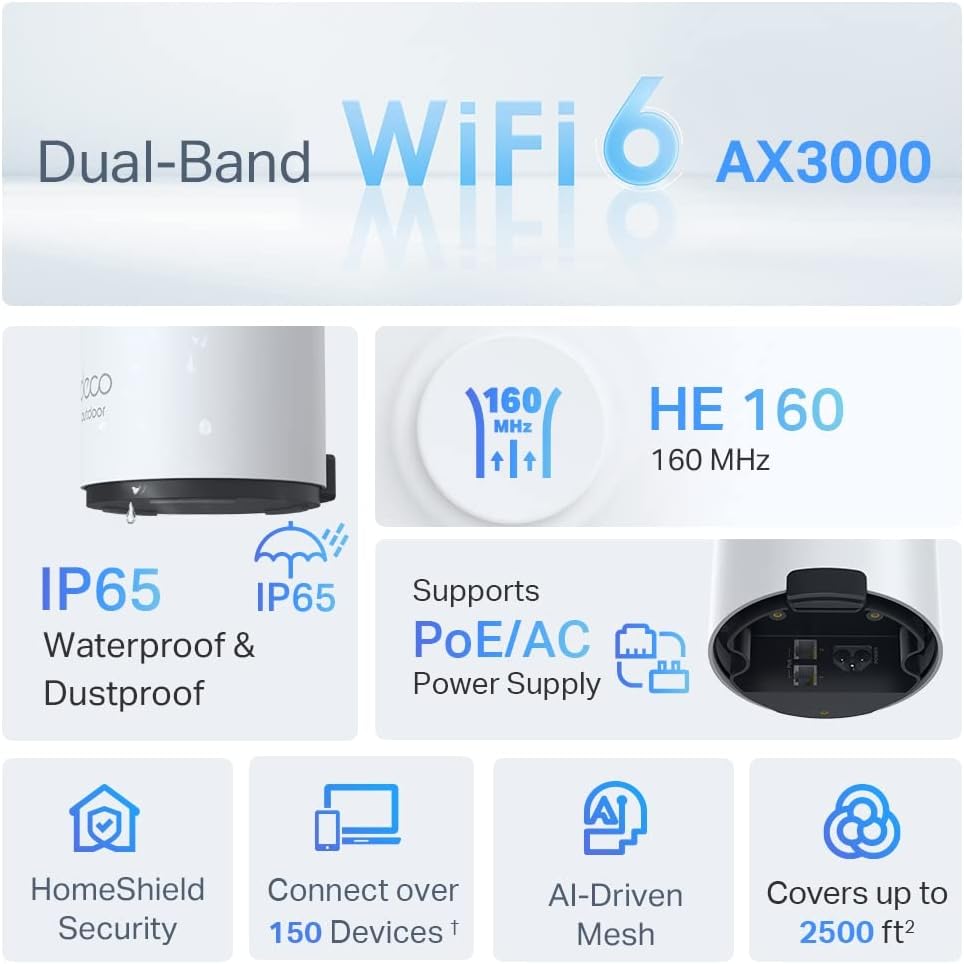
Image: An infographic highlighting key features of the Deco X50-Outdoor, including Dual-Band WiFi 6, AX3000 speeds, IP65 rating, PoE/AC power support, HomeShield Security, support for over 150 devices, AI-Driven Mesh, and up to 2500 sq ft coverage.
| Eiginleiki | Smáatriði |
|---|---|
| Nafn líkans | AX3000 Outdoor Whole Home Mesh WiFi 6 Unit |
| Þráðlaus staðalbúnaður | Wi-Fi 6 (802.11ax) |
| Frequency Band Class | Dual-band |
| Gagnaflutningshraði | Allt að 2402 Mbps (5 GHz) + 574 Mbps (2.4 GHz) |
| Tengisvið | Up to 2000 Square Feet (per unit) |
| Hafnir | 2 x Gigabit Ethernet Ports (Auto-sensing WAN/LAN) |
| Aflgjafi | PoE (802.3at) or AC Power Adapter (240V AC) |
| Veðurþol | IP65 (vatns- og rykheldur) |
| Öryggisbókun | WPA, WPA2, WPA3 |
| Eftirlitsaðferð | TP-Link Deco App |
| Þyngd hlutar | 0.9 kíló |
10. Ábyrgð og stuðningur
Fyrir upplýsingar um ábyrgð og tæknilega aðstoð, vinsamlegast skoðið opinberu vefsíðu TP-Link. websíðuna eða hafðu samband við þjónustuver þeirra.
- TP-Link opinbert Websíða: www.tp-link.com
- Tæknileg aðstoð: Heimsæktu þjónustudeildina á TP-Link websíða fyrir algengar spurningar, leiðbeiningar um bilanaleit og tengiliðaupplýsingar.