
1. Inngangur
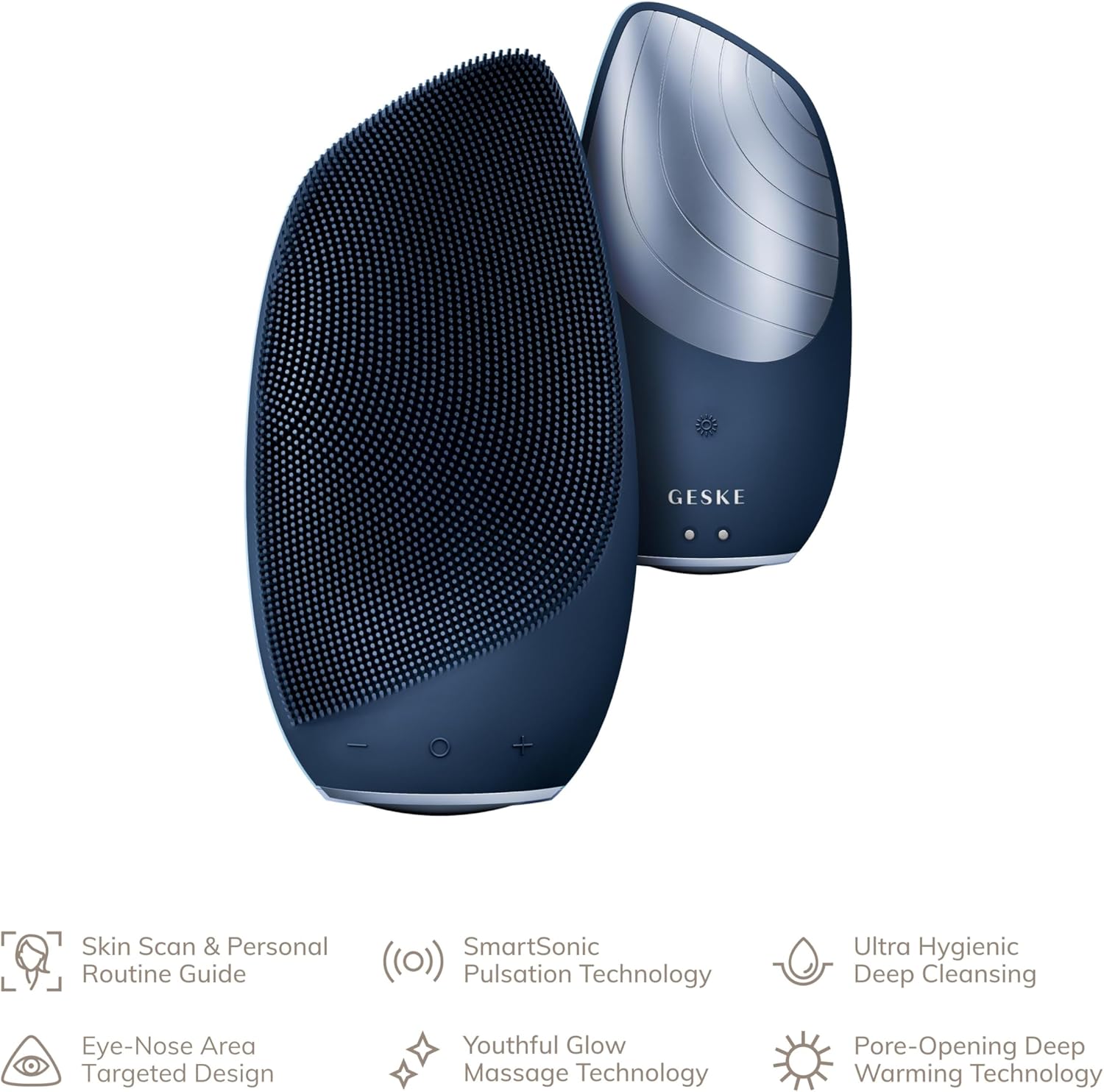
The GESKE SmartAppGuided Sonic Thermo Facial Brush is a versatile 6-in-1 device designed for comprehensive skincare. It combines ultra-hygienic deep cleansing, pore-opening deep warming technology, and youthful glow massage technology to revitalize your skin. This device helps remove dirt, oil, and makeup, leaving your skin feeling fresh and healthy.
Helstu eiginleikar eru:
- Instant results for smooth, clean skin.
- Functions as a facial cleanser, pore cleanser, skin scrubber, and massager.
- Innovative features for thorough cleansing and exfoliation.
- Rechargeable design for regular skincare routines.
- Smart App integration with AI Technology for personalized routines.
2. Vöru lokiðview & Stýringar
Familiarize yourself with the components and controls of your GESKE SmartAppGuided Sonic Thermo Facial Brush.

Mynd: Diagram illustrating the ergonomic design, super soft silicone bristles, heated aluminum area, 18 cleansing modes, and magnetic charging cable of the facial brush.
Stýringar:
- Aflhnappur: Press and hold for 1-2 seconds to turn the device on/off.
- SmartSonic Pulsations: Use the '+' and '-' buttons to adjust between 18 intensity levels.
- Djúphitunartækni sem opnar svitaholur: Press the sun icon to activate the warming function.
Myndband: This video demonstrates how to turn on the device, adjust SmartSonic Pulsation intensity, and activate the Pore-Opening Deep Warming Technology. It also includes important safety warnings regarding the warming function.
Safety Information for Warming Function:
- Avoid the warming function if you have hypersensitivity to hot temperatures (e.g., with urticaria).
- Always test the temperature on the inside of your forearm before using the device on your face.
- Do not use on sensitive or irritated skin, open wounds, cuts, or rashes.
- Allow skin to heal completely before use if you have any skin conditions or infections.
3. Notkunarleiðbeiningar
3.1. Pre-Cleanse Relaxing Warming Massage
Prepare your skin for a deep cleanse by using the warming massage function.
- Ensure your face is clean and free of makeup.
- Activate the Pore-Opening Deep Warming Technology by pressing the sun icon.
- Gently rub the device on your face in small circular motions for 90 seconds, covering all areas of the face. This helps increase blood flow and triggers natural renewal processes.
Mynd: A woman demonstrating the use of the GESKE facial brush on her cheek, illustrating the gentle circular motions for massage.
3.2. Sonic Deep Facial Cleanse
Achieve a deep and thorough cleanse using the SmartSonic Pulsations.
- Bleyttu andlitið með vatni.
- Apply your preferred cleanser to your face or directly onto the silicone bristles of the brush.
- Turn on the SmartSonic Pulsation Technology by holding the power button for 1-2 seconds. Adjust intensity using the '+' and '-' buttons.
- Move the brush in small circular motions across your face. A haptic signal will appear every 15 seconds, indicating when to move to the next area of your face.
- Rinse your face with clean water and pat it dry with a towel.
3.3. Stimulating Thermal Facial Massage
Enhance the absorption of your skincare products with a stimulating thermal massage.
- Gakktu úr skugga um að andlit þitt sé hreint og þurrt.
- Activate the Pore-Opening Deep Warming Technology by pressing the sun icon.
- Apply your serum or moisturizer to the back (warming plate) of the brush.
- Massage the serum into your skin by rubbing the brush in gentle small circular motions all over your face. Continue until the serum is fully absorbed, making several passes if necessary.
3.4. Full Facial Comfort Massage
Enjoy a rejuvenating massage for a revitalized glow.
- Ensure your face is clean and free of makeup.
- Turn on the SmartSonic Pulsation Technology.
- Around the Eyes: Place the device on the outer corner of the brow bone and glide in a circular motion towards the nose, under the eye, and back to the temple. Repeat this motion four more times.
- Ennið: Place the device on the outer corner of the brow bone and glide in an upward motion, making your way across the forehead. Repeat this motion four more times.
- Musteri: Place the device near the temple and lightly massage in circular motions. Repeat on the other side of your face.
- Chin & Mouth Area: Place the device on the chin. Glide it around the mouth to under the nose, then reverse this motion back to the chin. Repeat this motion four more times.
- Jawline & Neck: Place the device on the chin and glide it along the jawbone to the bottom of the ear. Repeat this motion four more times. Then, place the device at the bottom center of the neck and move it in an upward motion to the chin, along the jawbone, and then down to the shoulder. Repeat this motion four more times.
4. Viðhald
Proper cleaning ensures the longevity and hygiene of your device.
- Slökktu á tækinu með því að halda rofanum inni í 2 sekúndur.
- Rinse the device thoroughly with water to remove any cleanser residue.
- Spray an organic device cleanser all over the device after each use for thorough cleaning.
- Ensure the device is left to dry in a well-ventilated area to prevent bacterial growth.
5. Bilanagreining
No specific troubleshooting information is provided in the product details. If you encounter any issues, please refer to the support section or contact customer service.
6. Tæknilýsing
| Tegundarnúmer vöru | GK000086MN02 |
| Efni | Kísill |
| Vörumerki | GESKE |
| Litur | Miðnætti |
| Nafn líkans | Sonic Thermo andlitsbursti |
| Aflgjafi | Endurhlaðanleg rafhlaða |
| Framleiðandi | GESKE Fegurðartækni ehf. |
| Stærðir pakka | 7.2 x 4.8 x 2.64 tommur; 9.52 aura |
7. Ábyrgð og stuðningur
The GESKE SmartAppGuided Sonic Thermo Facial Brush comes with a 15-year product protection, sem tryggir langtíma áreiðanleika og hugarró.
For further support, product registration, or to explore more GESKE products, please visit the Official GESKE Store.
You can also find more information and download the SmartAppGuided App at www.geske.com/app.