
Inngangur
Thank you for choosing the JUMMICO 140 x 70 cm Electric Height Adjustable Standing Desk. This manual provides essential information for the safe and efficient assembly, operation, and maintenance of your new desk. Please read these instructions carefully before use and retain them for future reference.
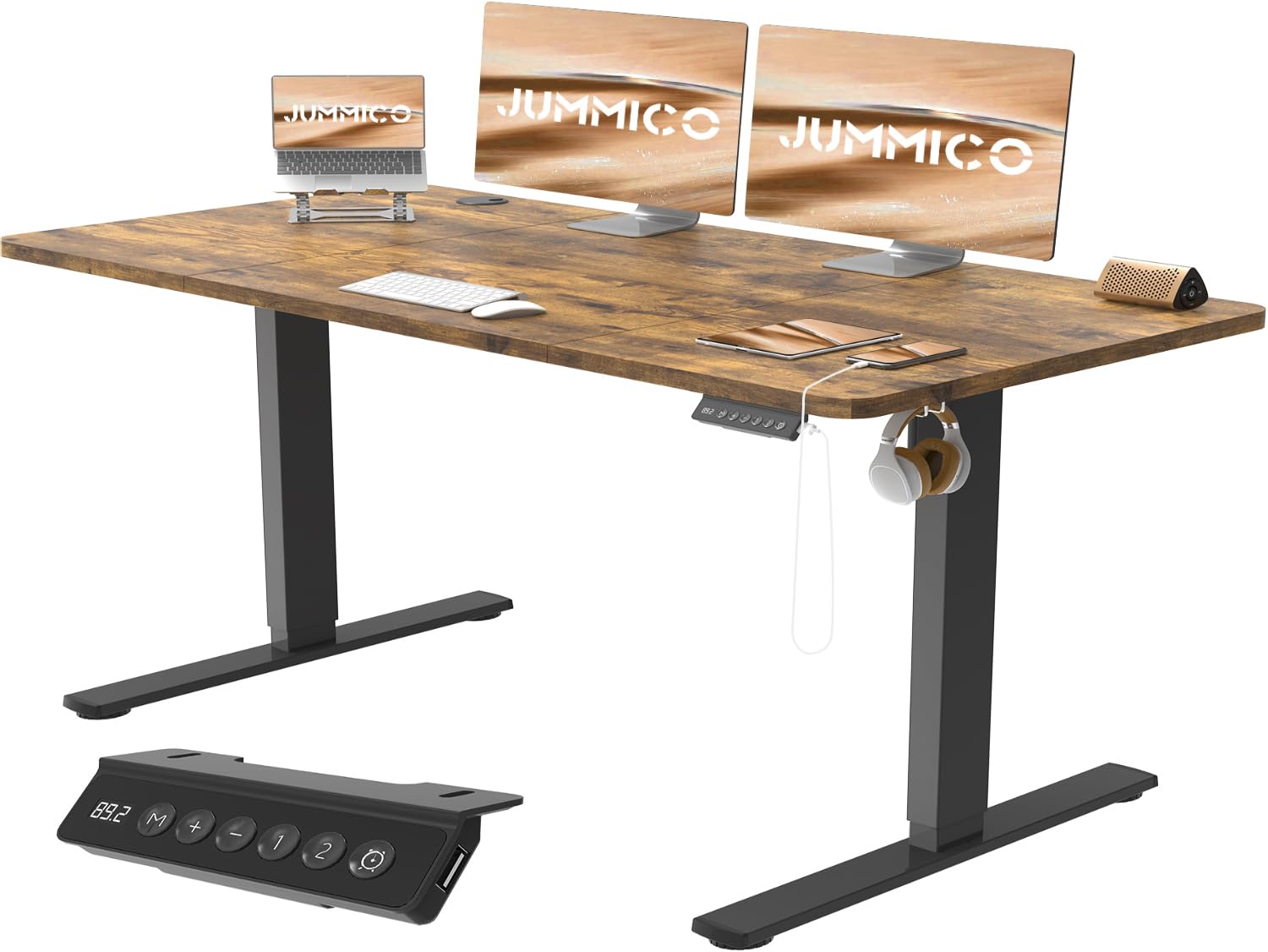
Image: The JUMMICO Electric Height Adjustable Standing Desk in a modern office environment, showcasing its spacious desktop and integrated features.
Öryggisupplýsingar
Til að tryggja örugga notkun og koma í veg fyrir skemmdir skal fylgja eftirfarandi öryggisleiðbeiningum:
- Always ensure the desk is placed on a stable, level surface.
- Ekki fara yfir hámarksþyngdargetu 70 kg (154 lbs)Ofhleðsla getur valdið óstöðugleika og skemmdum.
- Exercise caution when using the integrated USB socket. Avoid overloading it with high-power devices.
- Follow all assembly instructions precisely to ensure the desk is properly constructed and stable.
- Haldið börnum og gæludýrum frá borðinu á meðan hæðarstilling stendur yfir til að koma í veg fyrir meiðsli.
- Ensure no obstacles are in the path of the desk's movement during height adjustments.
- Ekki sitja eða standa á skrifborðinu.
- Aftengdu rafmagnið áður en þú þrífur eða framkvæmir viðhald.
Innihald pakka
Please verify that all components are present before beginning assembly. Refer to the detailed parts list provided in your packaging for specific quantities.
- Desktop sections (Note: Desktop is assembled from multiple parts)
- Electric lifting columns and motor
- Desk frame components (T-shaped legs, beams)
- Control panel with LED display and USB ports
- Skúffueining
- Kapalbakki
- Headphone hooks (2 included)
- Casters (4 included)
- Samsetningarbúnaður (skrúfur, verkfæri)
- Leiðbeiningarhandbók
Uppsetning og samsetning
The JUMMICO standing desk is designed for easy assembly, typically taking around 30 minutes. Follow the clear, illustrated instructions provided in the package.
- Taka upp íhluti: Takið alla hluta varlega úr umbúðunum og leggið þá á hreint, mjúkt yfirborð til að koma í veg fyrir rispur.
- Setja saman skrifborðsramma: Attach the T-shaped legs to the lifting columns, then connect the crossbeams. Ensure all screws are tightened securely but do not overtighten.
- Tengja skjáborð: Place the desktop sections onto the assembled frame. The desktop is composed of multiple parts that fit together seamlessly. Align the pre-drilled holes and secure the desktop to the frame using the provided hardware.
- Install Control Panel and Accessories: Attach the control panel, drawer unit, cable tray, and headphone hooks to their designated positions.
- Tengja raflögn: Connect the motor and control panel wiring according to the manual. Ensure all connections are firm.
- Festið hjól: Screw the four casters into the bottom of the desk legs for easy mobility.
- Upphafsvirkjun: Plug the desk into a power outlet. The desk may require an initial reset or calibration as per the detailed instructions.

Image: An exploded diagram illustrating the main components of the JUMMICO standing desk and the ease of assembly, highlighting clear instructions and an estimated 30-minute setup time.

Image: Diagram illustrating the robust construction of the JUMMICO standing desk frame, highlighting features like hooks, cable clips, reinforced beam structure, pre-drilled holes, and non-slip feet. Note: While the image indicates a 60kg load capacity, the product specifications state 70kg.
Notkunarleiðbeiningar
Your JUMMICO standing desk features an intelligent control panel for easy height adjustment and personalized settings.

Mynd: Ítarleg view of the multi-function intelligent keypad, showing the LED display, Up/Down buttons, memory presets (1, 2), sedentary reminders, and integrated USB ports.
Hæðarstilling
- Notaðu Upp (+) og Down (−) buttons on the control panel to smoothly adjust the desk height. The LED display will show the current height in centimeters.
- The desk offers a continuous height adjustment range between 72 cm og 116 cm.

Image: Illustration of the wide height range of the JUMMICO desk, showing a user comfortably sitting and another user comfortably standing, demonstrating the ergonomic benefits.
Forstillingar á minni
- Skrifborðið er með two memory buttons (1 and 2) to save your preferred sitting and standing heights.
- Til að vista hæð: Stilltu skrifborðið í þá hæð sem þú vilt. Ýttu á M hnappinn og ýttu síðan á annað hvort "1" or "2" within 3 seconds. The LED display will confirm the save.
- Til að muna hæð: Simply press the saved memory button ("1" or "2"). The desk will automatically move to the stored height.
Kyrrsetuáminningar
- The control panel includes a sedentary reminder function to encourage movement.
- Ýttu á Timer button (clock icon) to cycle through reminder intervals: 0.5 hours, 1 hour, or 2 hours.
- When the set time elapses, the desk will emit a gentle reminder to switch your posture.
USB hleðslutengi
- The integrated USB socket allows convenient charging of various devices directly from your desk.
- Ensure devices are compatible with the USB output specifications to prevent damage.
Viðhald
Proper maintenance ensures the longevity and optimal performance of your JUMMICO standing desk.
- Þrif: The desk surface is easy to clean. Use a soft, damp cloth to wipe down the desktop and frame. Avoid abrasive cleaners or harsh chemicals that could damage the laminate finish.
- Kapalstjórnun: Regularly check the cable tray and ensure all cables are neatly organized to prevent tangling and damage.
- Skoðanir: Athugið reglulega allar skrúfur og tengingar til að tryggja að þær séu þéttar. Herðið ef þörf krefur.
- Þyngdardreifing: Distribute weight evenly across the desktop to maintain stability and prevent strain on the lifting mechanism.

Mynd: Ítarleg view of the desk's humanized design, highlighting features like the protective edge, seamless desktop splicing, integrated cable pass-through, and the easy-to-clean laminated surface.
Úrræðaleit
If you encounter issues with your JUMMICO standing desk, refer to the following common troubleshooting steps:
| Vandamál | Möguleg orsök | Lausn |
|---|---|---|
| Skrifborðið hreyfist ekki. | Power cable disconnected, motor cable loose, overload, or system error. |
|
| Skrifborðið hreyfist ójafnt eða gefur frá sér óvenjuleg hljóð. | Uneven weight distribution, loose connections, or obstruction. |
|
| Forstillingar minnis virka ekki. | Presets not saved correctly or system error. |
|
If these steps do not resolve the issue, please contact JUMMICO customer support for further assistance.
Tæknilýsing
| Eiginleiki | Smáatriði |
|---|---|
| Vörumerki | JUMMICO |
| Gerðarnúmer | 0183 |
| Skrifborðshönnun | Rafmagns standandi skrifborð |
| Mál (L x B) | 140 cm x 70 cm (55.12 x 23.62 tommur) |
| Hæðarstillingarsvið | 72 cm til 116 cm (28.3 til 45.7 tommur) |
| Hámarksþyngdargeta | 70 kg (154 lbs) |
| Tegund efnis | Engineered Wood (Top), Alloy Steel (Frame) |
| Gerð klára | Laminated (Vintage Brown) |
| Sérstakir eiginleikar | Electric Height Adjustment, USB Socket, Cable Tray, Drawer, Memory Presets (2), Sedentary Reminders, Headphone Hooks, Casters |
| Lyftingarhraði | 22 mm/s |
| Hávaðastig | Undir 50 dB |
| Þyngd hlutar | 29 kíló |
| UPC | 788418915856 |

Image: An image demonstrating the smooth and quiet operation of the JUMMICO standing desk, featuring a cat sleeping peacefully on the desktop, with an infographic indicating a noise level below 50 dB and a lifting speed of 22mm/s.
Ábyrgð og stuðningur
JUMMICO provides a worry-free guarantee for this product. Each desk comes with illustrated instructions for easy assembly.
If you have any questions, require assistance with assembly, or encounter any issues with your desk, please do not hesitate to contact JUMMICO customer support. We are committed to providing a solution within 24 hours.
Please note that the desktop is assembled from multiple individual parts, which is a design feature and not a defect.