
Inngangur
Thank you for choosing the MENEEA Cooling Stand & Charging Station for Xbox Series S. This multi-functional accessory is designed to enhance your gaming experience by providing efficient cooling for your console, convenient charging for your controllers, customizable RGB lighting, and organized storage for your accessories. Please read this manual carefully to ensure proper setup and operation.
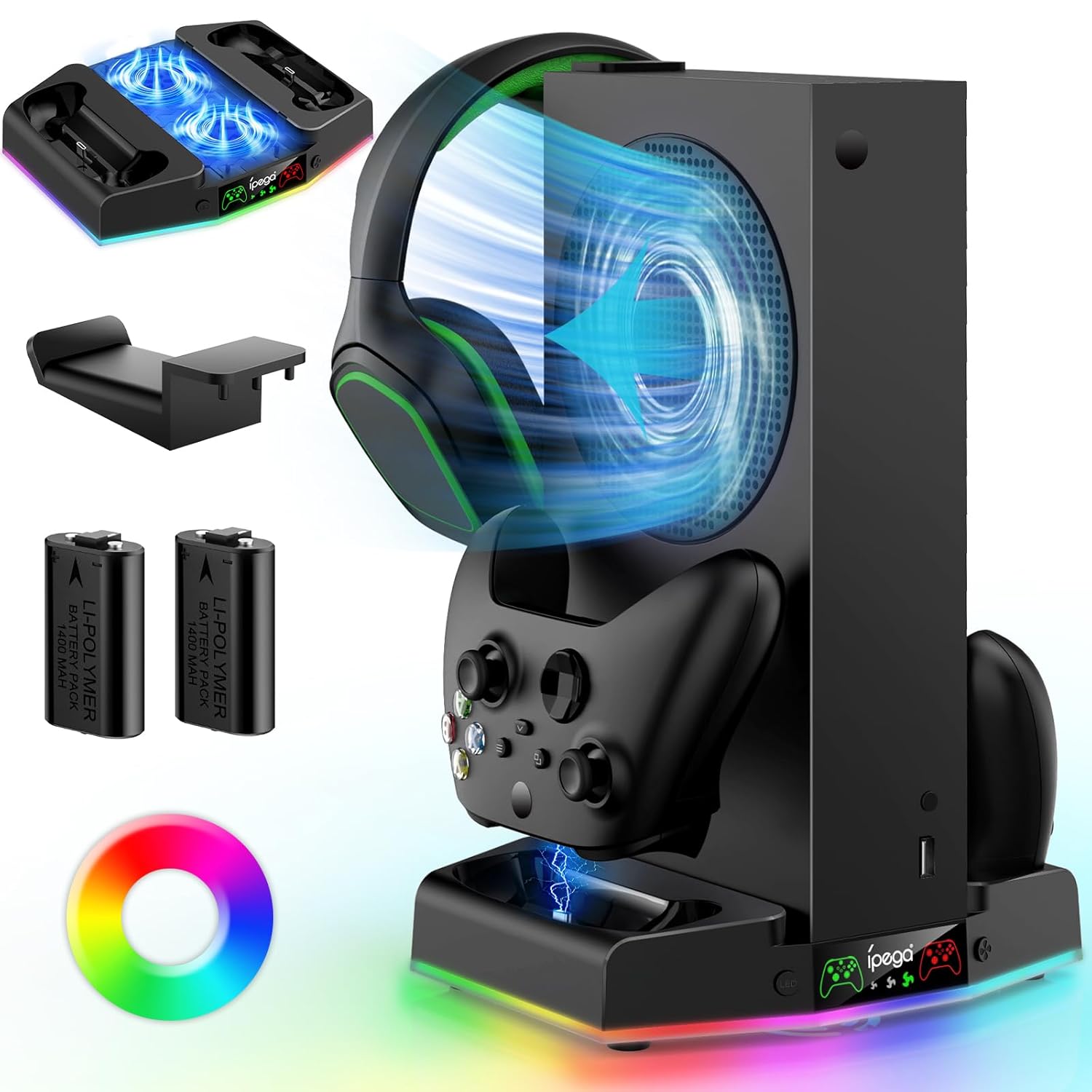
Image: The MENEEA Cooling Stand and Charging Station, showcasing its features including the console slot, controller charging docks, RGB lighting, and included accessories like batteries and a headphone hook.
Innihald pakka
Vinsamlegast staðfestu að allir hlutir sem taldir eru upp hér að neðan séu innifaldir í pakkanum þínum:
- 1 x MENEEA Cooling Stand & Charging Station
- 2 x 1400mAh endurhlaðanlegar rafhlöður
- 1 x heyrnartólskrókur
- 1 x USB Power Cable (not explicitly listed but implied for operation)
- 1 x Notendahandbók (þetta skjal)
Samhæfni
This cooling stand and charging station is specifically designed for the Xbox Series S console and its official controllers. It is not compatible with Xbox One S or Xbox One X consoles and their respective controllers.

Image: A visual guide illustrating the compatibility of the stand with Xbox Series S consoles and controllers, and its incompatibility with Xbox One X and Xbox One S models.
Eiginleikar vöru
- Skilvirkt kælikerfi: Features dual cooling fans with three adjustable speeds (1400RPM, 2200RPM, 3000RPM) to dissipate heat from the Xbox Series S console, extending its lifespan.
- Dual Controller Charging: Equipped with two charging docks for Xbox Series S/X controllers, capable of fully charging controllers in 2-3 hours. Includes over current/voltage/heat protection.
- Endurhlaðanlegar rafhlöður: Comes with two 1400mAh rechargeable batteries, offering up to 40 hours of use per charge and rechargeable up to 1500 times.
- Dynamísk RGB lýsing: Features an RGB ambient light strip with 15 modes, including 8 dynamic and 7 monochrome options, controlled by an independent switch.
- Innbyggður heyrnartólakrókur: A detachable hook provides convenient storage for your gaming headset, keeping your setup tidy.
- Viðbótar USB tengi: Includes two USB ports; one for fast data transfer (USB 2.0) and another for fast charging external devices.
Uppsetningarleiðbeiningar
Follow these steps to set up your MENEEA Cooling Stand & Charging Station:
- Settu standinn: Position the cooling stand on a stable, flat surface near your Xbox Series S console and power outlet.
- Tengdu rafmagn: Connect the provided USB power cable to the stand and then to a suitable USB power source (e.g., console USB port, USB wall adapter).
- Settu rafhlöður upp: Open the battery compartment of your Xbox Series S controllers. Insert the included 1400mAh rechargeable batteries, ensuring the text on the battery faces upwards. Close the battery compartment.
- Charge Controllers: Place your controllers onto the designated charging docks on the stand. The indicator light will turn red while charging and green when fully charged or in standby.
- Position Console: Carefully place your Xbox Series S console vertically into the central slot of the cooling stand. Ensure it is securely seated.
- Festa heyrnartólakrókinn: If desired, attach the headphone hook to the designated slot on the stand for convenient headset storage.

Image: The Xbox Series S console securely placed on the cooling stand, with controllers docked for charging and a headset hanging on the integrated hook, demonstrating a compact and organized setup.
Video: An official product video demonstrating the setup and features of the MENEEA RGB Cooling Fan Charging Stand for Xbox Series S, including its cooling function, charging capabilities, and RGB lighting.
Notkunarleiðbeiningar
Virkni kæliviftu
The cooling stand features dual fans with adjustable speeds to optimize heat dissipation for your Xbox Series S console.
- Locate the fan speed adjustment button on the front of the stand.
- Press the button to cycle through three fan speed gears: Low (1400RPM), Middle (2200RPM), and Fast (3000RPM).
- Select the desired speed based on your console's temperature and ambient conditions. The Fast gear provides maximum cooling but may produce a slight noise.

Mynd: Ítarleg view of the cooling stand's three-speed adjustable fan settings (Slow, Middle, Fast) and a graph illustrating the temperature reduction achieved with the cooling stand compared to a console without cooling.
RGB LED Light Modes
Customize the aesthetic of your gaming setup with 15 different RGB lighting modes.
- Locate the independent RGB switch button on the front of the stand.
- Short press the button to cycle through 8 dynamic modes and 7 monochrome modes (red, green, blue, yellow, cyan, purple, white).
- Press and hold the button for 3 seconds to save the current light mode and turn off the lighting.
- The RGB lighting can operate independently of the cooling fan.

Image: A visual representation of the 15 RGB lighting modes, highlighting both dynamic color effects and individual static color options, along with the control button.
Stjórnandi hleður
The charging docks provide a convenient way to keep your Xbox Series S/X controllers powered.
- Ensure the rechargeable batteries are correctly installed in your controllers (text facing upwards).
- Place the controllers firmly into the charging slots.
- A red indicator light signifies that the controller is currently charging.
- A green indicator light signifies that the controller is fully charged or in standby mode.
- Hleðsla tekur venjulega 2-3 klukkustundir fyrir fulla hleðslu.

Image: The charging station with controllers, displaying the red light for charging and green light for fully charged/standby, alongside a graphic indicating compatibility with original rechargeable and included batteries.
USB tengi
The stand includes two additional USB ports for expanded connectivity.
- One USB 2.0 port is available for data transfer, allowing you to connect external storage or other peripherals.
- Another USB port is dedicated for fast charging, suitable for charging smartphones or other USB-powered devices.

Mynd: Nærmynd view of the integrated headphone hook and the two additional USB ports on the stand, with labels indicating one for fast file transfer (USB 2.0) and the other for fast charging.
Viðhald
To ensure the longevity and optimal performance of your cooling stand, follow these maintenance guidelines:
- Þrif: Use a soft, dry cloth to wipe down the surface of the stand. Avoid using abrasive cleaners or solvents that could damage the finish.
- Rykhreinsun: Periodically use compressed air to clear any dust accumulation from the fan vents and charging ports to maintain efficient airflow and connectivity.
- Geymsla: When not in use for extended periods, store the stand in a cool, dry place away from direct sunlight and extreme temperatures.
- Umhirða rafhlöðu: For optimal battery life, avoid fully discharging the rechargeable batteries frequently. Charge them regularly.
Úrræðaleit
If you encounter any issues with your MENEEA Cooling Stand & Charging Station, please refer to the following table for common problems and solutions:
| Vandamál | Möguleg orsök | Lausn |
|---|---|---|
| Cooling fan is not operating. | No power, fan switch off, or cable issue. | Ensure the stand is connected to a power source. Check if the fan speed adjustment button has been pressed to activate the fan. Verify the USB power cable is securely connected. |
| Controllers are not charging. | Batteries incorrectly installed, incompatible batteries, or poor contact. | Ensure the rechargeable batteries are installed with the text facing upwards. Confirm you are using the included 1400mAh batteries or official Xbox Series S/X rechargeable batteries. Re-seat the controllers firmly in the charging docks. |
| RGB lights are not turning on or changing modes. | No power or RGB switch not activated. | Ensure the stand is powered. Short press the RGB switch button to cycle through modes. If held for 3 seconds, the lights turn off; short press again to reactivate. |
| USB tengi virka ekki. | No power or device incompatibility. | Verify the stand is receiving power. Ensure the connected device is compatible with standard USB 2.0 data transfer or charging specifications. |
Tæknilýsing
- Gerðarnúmer: PG-XBS011C
- Samhæfni: Xbox Series S Console, Xbox Series S/X Controllers
- Cooling Fan Speeds: 3 adjustable gears (1400RPM, 2200RPM, 3000RPM)
- RGB ljósastillingar: 15 (8 dynamic, 7 monochrome)
- Hleðslutími stjórnanda: 2-3 tímar
- Rafhlaða rúmtak: 2 x 1400mAh Li-Polymer rechargeable batteries
- USB tengi: 1 x USB 2.0 (data transfer), 1 x USB (charging)
- Stærðir: Um það bil 9.53 x 6.3 x 1.81 tommur
- Þyngd: Um það bil 1.15 pund
- Framleiðandi: MENEEA/Shenzhen IPM Biotechnology Co., Ltd.
Ábyrgð og stuðningur
MENEEA offers a warranty for this product. If you encounter any problems or require assistance, please feel free to contact us at any time through your purchase platform. Our customer service team is available to provide support and resolve any issues you may have.
For further assistance, please refer to the contact information provided with your purchase or visit the official MENEEA store page.