
1. Inngangur og öryggisupplýsingar
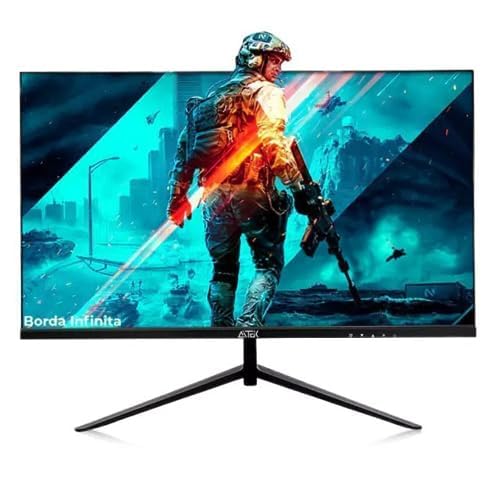
Thank you for choosing the AITEK DELTA-M2410 23.8-inch Full HD Gaming Monitor. This manual provides essential information for setting up, operating, and maintaining your monitor. Please read it carefully before use and retain it for future reference.
Mikilvægar öryggisleiðbeiningar:
- Aftengdu alltaf rafmagnssnúruna úr innstungunni áður en þú þrífur skjáinn.
- Ekki láta skjáinn verða fyrir rigningu eða raka til að forðast hættu á eldsvoða eða rafstuði.
- Ekki opna skjáinn casing. Engir hlutar eru inni í tækinu sem notandinn getur gert við. Látið hæft þjónustufólk alla þjónustu sjá um.
- Setjið skjáinn á stöðugt, slétt yfirborð til að koma í veg fyrir að hann detti.
- Tryggið góða loftræstingu í kringum skjáinn. Ekki loka fyrir loftræstiop.
- Notið aðeins straumbreytinn sem fylgir skjánum.
2. Innihald pakka
Vinsamlegast athugið hvort eftirfarandi atriði séu í pakkanum:
- AITEK DELTA-M2410 23.8" Full HD Gaming Monitor
- Skjástandur (grunnur og háls)
- Rafmagns millistykki
- HDMI snúru
- Notendahandbók (þetta skjal)
3. Uppsetning
3.1 Samsetning standsins
- Takið skjáinn varlega úr umbúðunum og haldið skjánum varið.
- Festið hálsinn á standinum við skjáinn með því að samræma flipana og ýta fast þar til hann smellpassar.
- Attach the stand base to the stand neck. Secure it with the provided screw, usually located at the bottom of the base.
- Place the assembled monitor on a stable, level desk or table.
3.2 Skjárinn tengdur
- Rafmagnstenging: Connect the power adapter to the monitor's power input port, then plug the other end into a suitable electrical outlet (110/220V compatible).
- Vídeótenging:
- For optimal Full HD quality, connect one end of the provided HDMI cable to the monitor's HDMI port and the other end to the HDMI output port on your computer or gaming console.
- Alternatively, you can use a VGA cable to connect to the monitor's VGA port and your computer's VGA output.
Mynd 1: Aftan view of the AITEK DELTA-M2410 monitor showing power and video connections.
4. Notkunarleiðbeiningar
4.1 Kveikt/slökkt
- Press the power button, usually located on the bottom right or rear of the monitor, to turn it on or off.
- The power indicator light will illuminate when the monitor is on.
4.2 Skjávalmynd (OSD)
The OSD menu allows you to adjust various monitor settings. Use the control buttons (joystick or individual buttons) on the monitor to navigate and select options.
- Inntaksval: Choose between HDMI and VGA inputs.
- Myndastillingar: Stilltu birtustig, andstæðu, skerpu og litahitastig.
- Litastillingar: Fine-tune RGB levels or select preset color modes.
- Hljóð: Adjust volume if external speakers are connected to the monitor's audio output (if available).
- Leikjaeiginleikar: Access specific gaming modes or settings (e.g., response time, crosshair overlay if supported).
4.3 Að stilla skjáinn
The monitor stand allows for tilt adjustment to find a comfortable viewing angle. Gently tilt the monitor panel forward or backward to your preferred position.
5. Viðhald
5.1 Þrif á skjánum
- Taktu alltaf skjáinn úr sambandi áður en þú þrífur.
- Notaðu létt mjúkan, lólausan klút dampÞvoið með vatni eða mildum, ekki slípandi skjáhreinsiefni.
- Ekki úða hreinsiefni beint á skjáinn.
- Forðist að nota bensen, þynni, ammoníak-bundin hreinsiefni eða slípiefni.
5.2 Geymsla
When storing the monitor for an extended period, ensure it is powered off, unplugged, and stored in a cool, dry place away from direct sunlight and extreme temperatures. Use the original packaging if available for best protection.
6. Bilanagreining
| Vandamál | Möguleg lausn |
|---|---|
| Engin mynd á skjánum |
|
| Myndin er óskýr eða bjöguð |
|
| Litir eru rangir |
|
7. Tæknilýsing
| Eiginleiki | Smáatriði |
|---|---|
| Fyrirmynd | DELTA-M2410 |
| Vörumerki | AITEK |
| Skjástærð | 23.8 tommur |
| Upplausn | 1920 x 1080 (Full HD 1080p) |
| Hlutfall | 16:9 |
| Tengingar | 1x HDMI, 1x VGA |
| Power Input | 110/220V |
| Þyngd | 3.69 kíló |
| Litur | Svartur |
| Yfirborð pallborðs | Glansandi |
8. Ábyrgð og stuðningur
AITEK provides a limited warranty for this product. Please refer to the warranty card included in your package for detailed terms and conditions, including coverage period and service procedures. Keep your purchase receipt as proof of purchase.
For technical support or service inquiries, please contact AITEK customer service through the contact information provided on the warranty card or the official AITEK websíða.
9. Samþætting fjölmiðla
Vörumyndbönd
No official product videos from the seller for the AITEK DELTA-M2410 monitor were found in the provided data. If available, relevant videos would be embedded here to demonstrate features or setup processes.