
BERIBES WH305B
BERIBES WH305B Hybrid Active Noise Cancelling Headphones User Manual
Model: WH305B
1. Inngangur
Thank you for choosing the BERIBES WH305B Hybrid Active Noise Cancelling Headphones. These headphones are designed to provide a superior audio experience with advanced noise cancellation, transparent mode, and comfortable wear. This manual will guide you through the setup, operation, and maintenance of your new headphones to ensure optimal performance.

Framan view of the BERIBES WH305B headphones in black.
2. Innihald pakka
Vinsamlegast athugið innihald pakkans til að ganga úr skugga um að allir hlutir séu til staðar:
- BERIBES WH305B Wireless Bluetooth Headphones
- 3.5 mm hljóðsnúra
- USB Type-C hleðslusnúra
- Notendahandbók

This image displays all items included in the product package: the BERIBES WH305B wireless Bluetooth headphones, a 3.5mm audio cable, a USB charging cable, and the user manual.
3. Vöru lokiðview
3.1 Stýringar og tengi
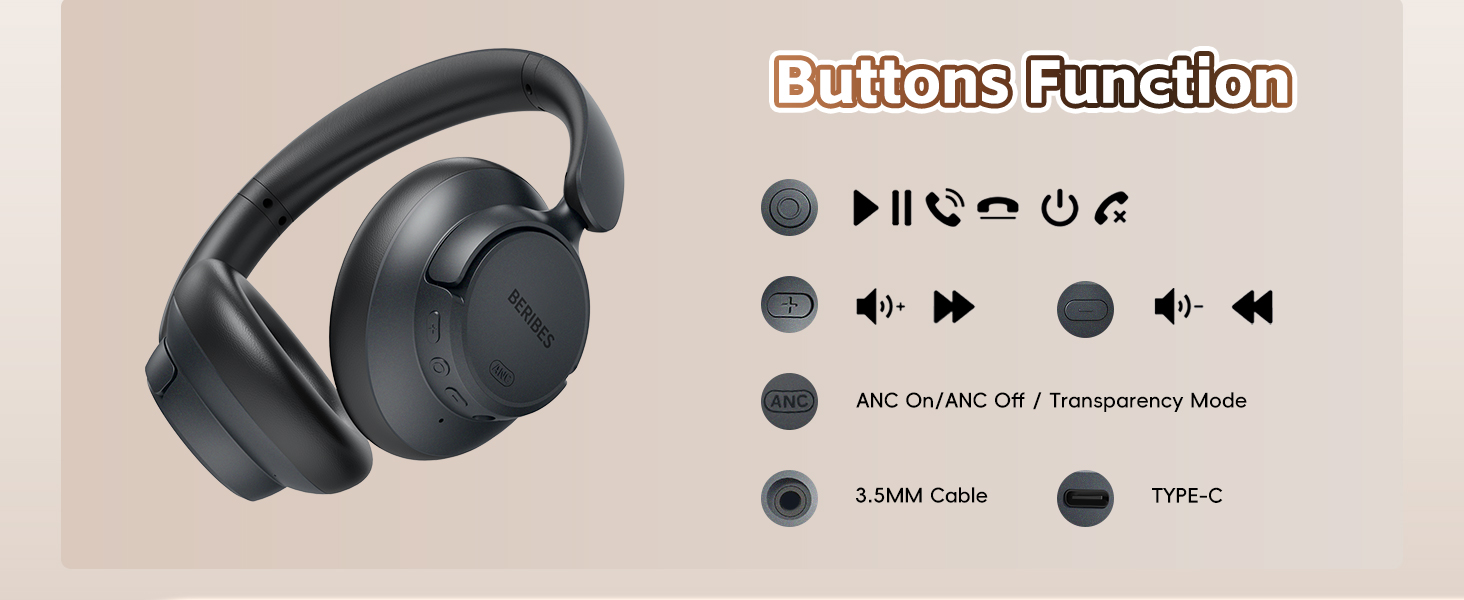
Familiarize yourself with the headphone controls and ports:
An illustration detailing the various buttons and ports on the headphones, including controls for power, volume adjustment, track navigation, ANC/Transparency mode switching, the 3.5mm audio jack, and the Type-C charging port.
- Fjölnota hnappur: Power On/Off, Play/Pause, Answer/End Call, Reject Call, Voice Assistant.
- Hnappur til að hækka hljóðstyrk/næsta lag: Stutt ýting til að hækka hljóðstyrk, langt ýting fyrir næsta lag.
- Hnappur til að lækka hljóðstyrk/fyrra lag: Stutt ýting til að lækka hljóðstyrk, lengi ýting til að velja fyrra lag.
- ANC hnappur: Toggle Active Noise Cancellation (ANC) On/Off or Transparent Mode.
- 3.5 mm hljóðtengi: Fyrir snúrutengingu.
- USB Type-C hleðslutengi: Til að hlaða heyrnartólin.
3.2 Ergonomísk hönnun
The BERIBES WH305B headphones are designed for comfort and portability:
- 90° Swiveling Earcups: Allows for flat storage and comfortable fit.
- Foldable hönnun: Þétt fyrir auðvelda geymslu og ferðalög.
- Stillanlegt höfuðband: Tryggir örugga og þægilega passun fyrir mismunandi höfuðstærðir.
- Mjúkir eyrnapúðar: Professional-grade protein ear-pads for extended comfort.

This image illustrates the ergonomic design of the headphones, highlighting the 90-degree swiveling earcups, foldable structure for portability, and the adjustable headband for a comfortable fit.
4. Uppsetning
4.1 Hleðsla heyrnartólanna
- Tengdu USB Type-C hleðslusnúruna við hleðslutengið á heyrnartólunum.
- Tengdu hinn endann á snúrunni við USB-straumbreyti (fylgir ekki með) eða USB-tengi tölvu.
- LED-ljósið sýnir hleðslustöðu. Full hleðsla tekur um það bil 2.5 klukkustundir.
- Once fully charged, the headphones provide up to 70 hours of playtime in standard mode or 45 hours with ANC enabled. A 5-minute quick charge provides approximately 4 hours of listening.

The headphones are shown connected to a power source via a Type-C cable, demonstrating the charging process. An overlay indicates a 2.5-hour charging time provides up to 70 hours of playback.
4.2 Kveikt/slökkt
- Kveikt á: Press and hold the Multi-function Button for 3 seconds until the LED indicator flashes blue.
- Slökkva á: Press and hold the Multi-function Button for 3 seconds until the LED indicator turns off.
4.3 Bluetooth pörun
- Gakktu úr skugga um að slökkt sé á heyrnartólunum.
- Press and hold the Multi-function Button for 5 seconds until the LED indicator flashes red and blue alternately, indicating pairing mode.
- Virkjaðu Bluetooth í tækinu þínu (snjallsíma, spjaldtölvu, fartölvu) og leitaðu að tiltækum tækjum.
- Select "WH305B" from the list of devices.
- Þegar það er tengt blikkar LED vísirinn blátt hægt.

The image shows the headphones successfully paired with a smartphone via Bluetooth, with the device name 'WH305B' visible on the screen.
4.4 snúrutenging (3.5 mm hljóðsnúra)
Til að nota heyrnartólin með snúrutengingu:
- Tengdu annan endann á 3.5 mm hljóðsnúrunni við hljóðtengið á heyrnartólunum.
- Tengdu hinn endann við 3.5 mm hljóðútganginn á tækinu þínu.
- In wired mode, the headphones function passively, and ANC features may not be available or require power.
The headphones are shown connected to a device using the included 3.5mm audio cable, illustrating the wired listening option.
5. Notkunarleiðbeiningar
5.1 Active Noise Cancellation (ANC) and Transparent Mode
The headphones feature Hybrid Active Noise Cancellation and a Transparent Mode:
- ANC á: Press the ANC button once to activate Active Noise Cancellation. This mode reduces ambient noise by up to 95%.
- Gegnsætt stilling: Press the ANC button again to switch to Transparent Mode. This mode allows you to hear your surroundings without removing the headphones.
- ANC slökkt: Press the ANC button a third time to turn off both ANC and Transparent Mode.

This graphic explains how the Hybrid Active Noise Cancellation technology works, depicting the reduction of external noise by up to 95% to enhance audio clarity.

Users are depicted wearing the headphones in different scenarios, such as on a bus, in a library, and during lawn mowing, illustrating the effectiveness of noise reduction in various environments.
5.2 Tónlist spilun
- Spila / gera hlé: Ýttu stuttlega á fjölvirka hnappinn.
- Hækka: Ýttu stutt á hljóðstyrkshnappinn.
- Hljóðstyrkur niður: Ýttu stutt á hljóðstyrkstakkann.
- Næsta lag: Ýttu lengi á hljóðstyrkshnappinn.
- Fyrra lag: Ýttu lengi á hljóðstyrkstakkann.
5.3 Símtalsstjórnun
- Svara/slíta símtali: Ýttu stuttlega á fjölvirka hnappinn.
- Hafna símtali: Long press the Multi-function Button for 2 seconds.
- Virkja raddaðstoðarmann: Ýttu tvisvar á fjölvirka hnappinn.
5.4 Smart One Connect Two
The headphones support simultaneous connection to two Bluetooth devices:
- Pair the headphones with the first device (e.g., smartphone) as described in Section 4.3.
- Slökktu á Bluetooth á fyrsta tækinu. Heyrnartólin fara aftur í pörunarstillingu.
- Pair the headphones with the second device (e.g., tablet).
- Virkjaðu Bluetooth aftur á fyrsta tækinu. Heyrnartólin ættu að tengjast sjálfkrafa báðum tækjunum.
- You can now switch between audio sources by pausing playback on one device and starting it on the other.
The 'Smart One Connect Two' feature is demonstrated, showing the headphones wirelessly connected to two devices (a smartphone and a tablet) at the same time, allowing for easy switching between audio sources.
6. Viðhald
- Þrif: Notið mjúkan, þurran klút til að þrífa heyrnartólin. Notið ekki sterk efni eða slípiefni.
- Geymsla: Þegar heyrnartólin eru ekki í notkun skal geyma þau á köldum, þurrum stað, fjarri beinu sólarljósi og miklum hita. Nýtið samanbrjótanlega hönnunina fyrir þétta geymslu.
- Umhirða rafhlöðu: Til að lengja endingu rafhlöðunnar skaltu forðast að tæma heyrnartólin alveg oft. Hladdu þau reglulega, jafnvel þótt þau séu ekki í stöðugri notkun.
- Vatnsútsetning: Þessi heyrnartól eru ekki vatnsheld. Forðist að verða fyrir vatni eða miklum raka.
7. Bilanagreining
| Vandamál | Lausn |
|---|---|
| Heyrnartólin kveikjast ekki. | Gakktu úr skugga um að heyrnartólin séu hlaðin. Tengdu þau við aflgjafa með USB Type-C snúrunni. |
| Ekki er hægt að para við Bluetooth tæki. |
|
| Ekkert hljóð eða lágt hljóðstyrkur. |
|
| ANC is not working effectively. |
|
8. Tæknilýsing
| Eiginleiki | Smáatriði |
|---|---|
| Nafn líkans | WH305B |
| Hávaðastýring | Blendingur hávaðadeyfingar |
| Tengitækni | Þráðlaust (Bluetooth), Hlerað (3.5 mm tengi) |
| Þráðlaus samskiptatækni | Bluetooth 5.3 |
| Bluetooth svið | 10 metrar |
| Rafhlöðuending | Up to 70 Hours (Standard Mode) |
| Hleðslutími | Um það bil 2.5 klst |
| Gerð hljóðbílstjóra | Dynamískur hátalari (40 mm) |
| Tíðnisvið | 20 Hz - 20,000 Hz |
| Viðnám | 32 Ohm |
| Staðsetning eyrna | Yfir Eyra |
| Þyngd hlutar | 0.73 pund (u.þ.b. 331g) |
| Efni | Plastic, Protein Leather (ear-pads) |
9. Ábyrgð og stuðningur
BERIBES products are designed and manufactured to the highest quality standards. For detailed warranty information and customer support, please refer to the warranty card included in your package or visit the official BERIBES website. If you encounter any issues or have questions regarding your headphones, please contact BERIBES customer service for assistance.
Ask a question about this manual
Ask about setup, troubleshooting, compatibility, parts, safety, or missing instructions. Manuals+ will review the question and use this page’s manual context to help answer it.