
1. Inngangur
Þakka þér fyrir kaupinasing the MEBERRY Tablet M8. This 12-inch Android 13 tablet is designed to provide a versatile and powerful computing experience, whether for work, learning, or entertainment. Featuring a vibrant 2K display, robust Octa-Core processor, and ample memory, the M8 is built for efficiency and enjoyment.
Þessi handbók veitir nauðsynlegar upplýsingar um uppsetningu, notkun, viðhald og bilanaleit tækisins til að tryggja bestu mögulegu afköst og endingu.
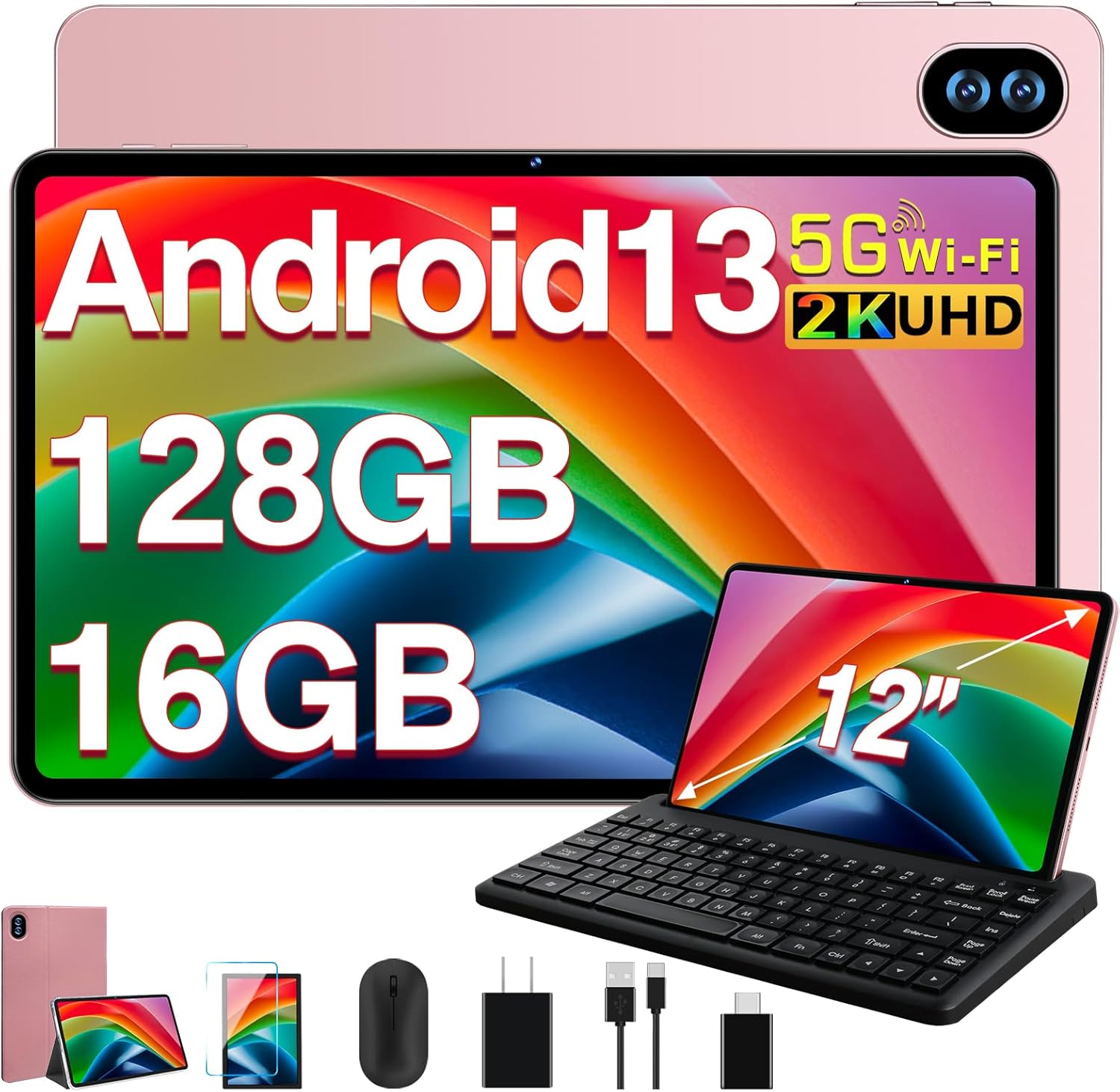
Figure 1.1: MEBERRY Tablet M8 and its accompanying accessories.
2. Hvað er í kassanum
Upon opening your MEBERRY Tablet M8 package, please verify that all the following items are included:
- MEBERRY Tablet M8 (12-inch, Gold)
- Bluetooth lyklaborð
- Þráðlaus mús
- Rafmagns millistykki
- USB-C hleðslusnúra
- USB-A til USB-C millistykki
- Hlífðarmál
- Skjávörn (fyrirfram sett á eða fylgir sér)
- Notendahandbók (þetta skjal)
3. Uppsetningarleiðbeiningar
3.1 Upphafshleðsla
Before first use, it is recommended to fully charge your MEBERRY Tablet M8. Connect the provided USB-C charging cable to the tablet's USB-C port and the power adapter, then plug the adapter into a wall outlet. The charging indicator will illuminate.
3.2 Kveikt/slökkt
- Til að kveikja á: Press and hold the Power button (located on the side of the tablet) for a few seconds until the MEBERRY logo appears on the screen.
- Til að slökkva á: Haltu inni aflrofanum þar til valmyndin fyrir aflgjafavalkosti birtist. Veldu „Slökkva“ og staðfestu.
- Til að endurræsa: From the power options menu, select "Restart."
3.3 Uppsetningarhjálp
Þegar þú kveikir á tækinu í fyrsta skipti mun uppsetningarhjálpin fyrir Android 13 leiða þig í gegnum nauðsynlegar stillingar:
- Veldu tungumálið sem þú vilt.
- Tengstu við Wi-Fi net.
- Samþykkja skilmála og skilyrði.
- Skráðu þig inn með Google reikningnum þínum eða stofnaðu nýjan.
- Settu upp skjálás (PIN-númer, mynstur eða lykilorð).
- Review and adjust privacy settings.
3.4 Tenging við fylgihluti
Your MEBERRY Tablet M8 comes with a Bluetooth keyboard and a wireless mouse for enhanced productivity.
3.4.1 Bluetooth lyklaborð
- Gakktu úr skugga um að lyklaborðið sé hlaðið og kveikt á.
- Á spjaldtölvunni þinni skaltu fara á Stillingar > Tengd tæki > Bluetooth.
- Kveiktu á Bluetooth.
- Put the keyboard into pairing mode (refer to the keyboard's specific instructions, usually by pressing a dedicated pairing button or key combination).
- Select the keyboard from the list of available devices on your tablet and follow any on-screen prompts to complete pairing.
3.4.2 Þráðlaus mús
The wireless mouse typically connects via a USB dongle. Use the provided USB-A to USB-C adapter to connect the mouse dongle to the tablet's USB-C port.

Figure 3.1: The MEBERRY Tablet M8 can be used as a 2-in-1 device with keyboard and mouse.
3.5 Micro SD kort sett í
The tablet supports storage expansion up to 1TB via a Micro SD card. Locate the SIM/SD card tray on the side of the tablet. Use the provided SIM ejector tool (if included) or a small paperclip to open the tray. Carefully place the Micro SD card into the designated slot and reinsert the tray.
4. Notkun spjaldtölvunnar
4.1 Sýning og myndefni
The MEBERRY Tablet M8 features a 12-inch 2K HD display with a resolution of 2000*1200 pixels, offering clear and vibrant visuals. The screen incorporates new touch technology for improved viewing angles and touch sensitivity.
- Augnverndarstilling: Reduces blue light emission to minimize eye strain, especially during prolonged use. This can typically be found in Display settings.
- Dark Mode: Changes the system's color scheme to a darker palette, which can be more comfortable in low-light environments and save battery on some display types.
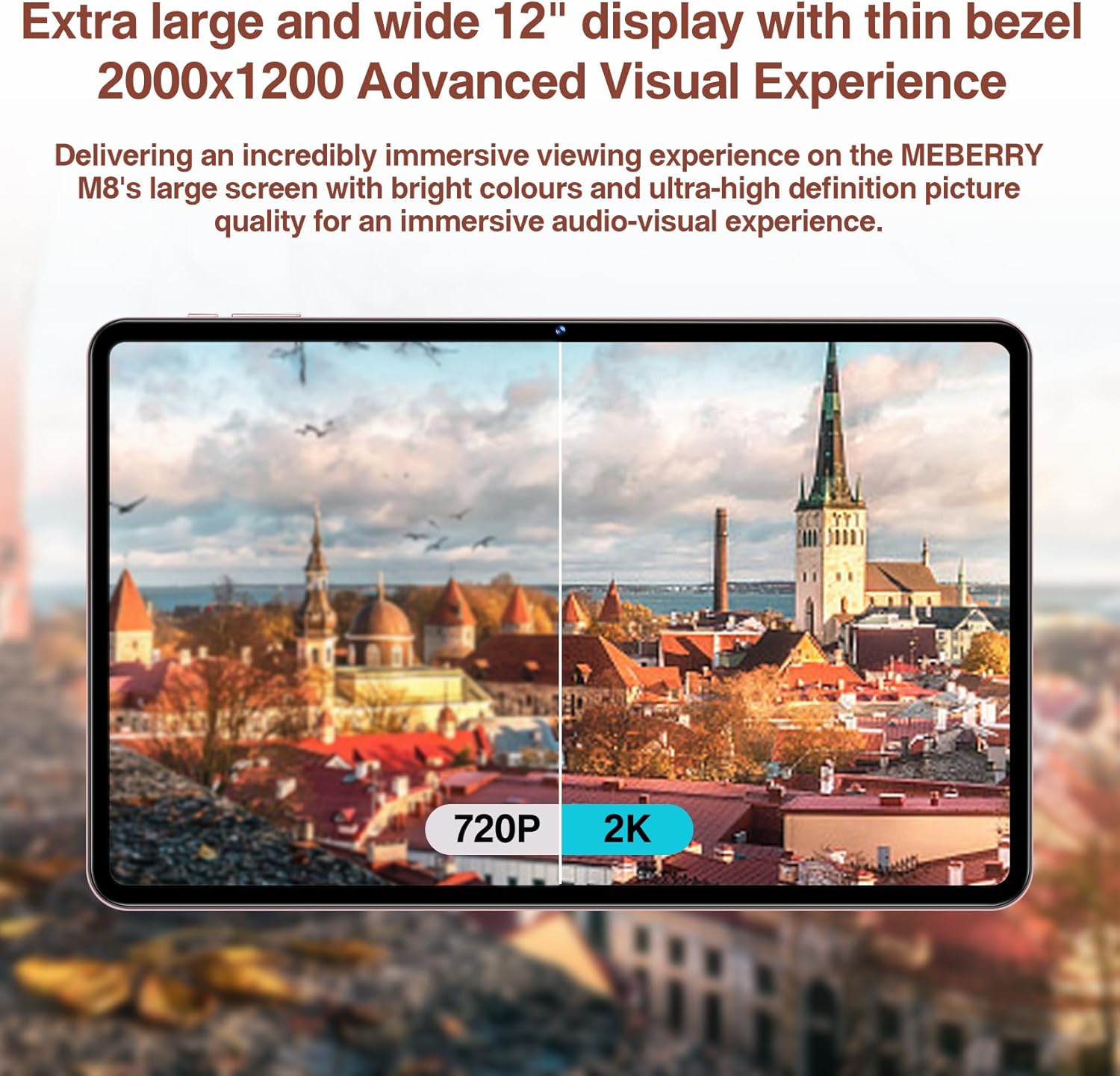
Figure 4.1: The 2K display offers significantly enhanced visual clarity.
4.2 Afköst og geymsla
The tablet runs on the latest Android 13 operating system, providing enhanced privacy, security, and overall system speed. It is powered by a stable Octa-Core processor (MT8183) with a clock speed of up to 2.0 GHz, ensuring fast application launches and efficient multitasking.

Figure 4.2: The MT8183 Octa-Core processor powers the MEBERRY M8.
The M8 comes with 16GB of RAM (10GB physical + 6GB virtual) and 128GB of internal storage (ROM). This ample memory ensures smooth operation and sufficient space for applications and files. Storage can be expanded by up to 1TB using a Micro SD card.

Figure 4.3: Memory and storage capabilities of the MEBERRY M8.
4.3 Rafhlöðustjórnun
Equipped with an 8000mAh battery and intelligent power management, the tablet is designed for extended use. Expected battery life includes:
- Up to 14 hours of game play
- Up to 16 hours of video watching
- Up to 72 hours of standby time

Mynd 4.4: Afköst rafhlöðunnar yfirview.
4.4 Notkun myndavélar
The MEBERRY M8 features a 13MP rear camera and a 5MP front camera, suitable for capturing photos, recording videos, and engaging in video calls.
- Að taka myndir/myndbönd: Open the Camera application from the home screen or app drawer. Select photo or video mode and tap the shutter button.
- Myndsímtöl: Use popular communication apps (e.g., Google Meet, Zoom, Skype) that utilize the front camera for video conferencing.
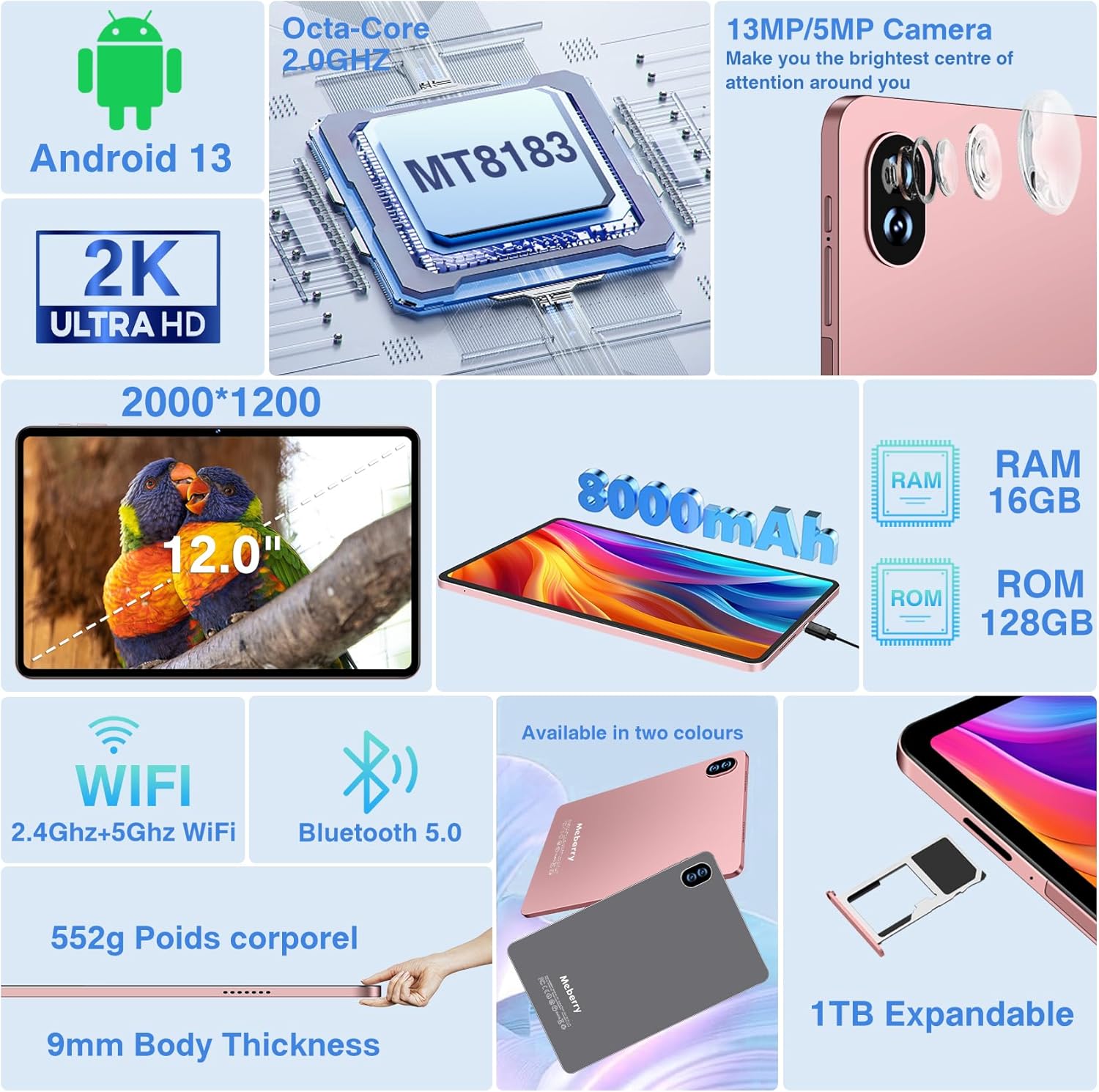
Figure 4.5: Camera specifications are part of the overall product features.
4.5 Tengingar
The tablet supports both 2.4Ghz and 5.0Ghz Wi-Fi networks (802.11a/b/g/n/ac) and Bluetooth 5.0, ensuring stable and fast wireless connections.
- Wi-Fi: To connect to Wi-Fi, go to Stillingar > Net og internet > Internet. Select your desired network and enter the password if required.
- Bluetooth: Til að tengja Bluetooth tæki skaltu fara á Stillingar > Tengd tæki > Bluetooth. Turn on Bluetooth and pair with your device.
- Hljóð: The tablet is equipped with four speakers for high-quality audio output.
5. Viðhald
5.1 Þrif á spjaldtölvunni
Til að þrífa skjáinn og spjaldtölvuna skaltu nota mjúkan, lólausan klút. Fyrir þrjósk bletti skaltu þurrka örlítið.ampÞurrkið klútinn með vatni eða sérstöku hreinsiefni fyrir skjái. Forðist að nota sterk efni eða slípiefni.
5.2 Umhirða rafhlöðu
- Forðist að láta spjaldtölvuna verða fyrir miklum hita (heitu eða köldu).
- Do not let the battery completely drain frequently. Charge it before it reaches 0%.
- Notið aðeins meðfylgjandi hleðslutæki eða vottað samhæft hleðslutæki.
5.3 Hugbúnaðaruppfærslur
Regularly check for and install system updates to ensure your tablet has the latest features, security patches, and performance improvements. Go to Stillingar > Kerfi > Kerfisuppfærsla.
5.4 Geymslustjórnun
To maintain optimal performance, periodically manage your tablet's storage. Delete unnecessary files, fjarlægja ónotuð forrit og hreinsa skyndiminnið. Þú getur athugað geymslurýmisnotkun í Stillingar > Geymsla.
6. Bilanagreining
This section addresses common issues you might encounter with your MEBERRY Tablet M8.
| Vandamál | Möguleg orsök | Lausn |
|---|---|---|
| Spjaldtölvan kveikir ekki á sér | Lítil rafhlaða; Kerfisbilun | Charge the tablet for at least 30 minutes. Press and hold the Power button for 10-15 seconds to force a restart. |
| Vandamál með Wi-Fi tengingu | Rangt lykilorð; Vandamál með leiðara; Vandamál með Wi-Fi einingu spjaldtölvunnar | Verify Wi-Fi password. Restart your router. Toggle Wi-Fi off/on on the tablet. Forget the network and reconnect. |
| Bluetooth accessories not connecting | Accessory not in pairing mode; Bluetooth off on tablet | Ensure accessory is in pairing mode. Check tablet's Bluetooth settings. Restart both devices. |
| Spjaldtölvan er hægfara eða frýs | Too many apps open; Low storage; Software bug | Close background apps. Clear app caches. Free up storage space. Restart the tablet. |
| Skjár svarar ekki | Tímabundinn hugbúnaðargalli | Þvingaðu endurræsingu spjaldtölvunnar með því að halda inni aflrofanum. |
6.1 Factory Reset
Ef vandamálin halda áfram getur endurstilling á verksmiðjustillingum leyst mörg hugbúnaðartengd vandamál. Warning: This will erase all data on your tablet. Back up important files áður en haldið er áfram.
- Farðu til Stillingar > Kerfi > Endurstilla valkosti.
- Veldu Eyða öllum gögnum (endurstilla verksmiðju).
- Staðfestu ákvörðun þína og sláðu inn PIN-númer/mynstur/lykilorð ef beðið er um það.
- The tablet will restart and begin the reset process.
7. Tæknilýsing
Detailed technical specifications for the MEBERRY Tablet M8:
| Eiginleiki | Forskrift |
|---|---|
| Nafn líkans | M8 |
| Stýrikerfi | Android 13 |
| Skjástærð | 12 tommur |
| Skjáupplausn | 2000*1200 Pixels (2K HD) |
| Örgjörvi | Octa-Core (MT8183), 2.0 GHz |
| vinnsluminni | 16GB (10GB líkamlegt + 6GB sýndar) |
| Innri geymsla (ROM) | 128GB |
| Stækkanlegt geymsla | Allt að 1 TB með Micro SD korti |
| Myndavél að aftan | 13 MP |
| Myndavél að framan | 5 MP |
| Rafhlöðugeta | 8000mAh |
| Þráðlaus tenging | 802.11a/b/g/n/ac (2.4Ghz & 5.0Ghz WiFi) |
| Bluetooth | Bluetooth 5.0 |
| Hljóð | Tveir hátalarar |
| Mál (LxBxH) | 10.9 x 6.85 x 0.35 tommur |
| Þyngd hlutar | 4.62 pund |
| Litur | M8 Gold |
8. Ábyrgð og stuðningur
MEBERRY is committed to providing quality products and customer experience. For any product-related inquiries, technical support, or warranty claims, please refer to the contact information provided with your purchase documentation or visit the official MEBERRY support websíða.
Vinsamlegast geymið kaupkvittunina vegna ábyrgðar.