
1. Inngangur
Thank you for choosing the PayLessHere Ergonomic Mesh Office Chair. This chair is designed to provide comfort and support during extended periods of sitting. Featuring a breathable mesh back, adjustable height, lumbar support, and 360-degree swivel wheels, it is suitable for various office and home environments. Please read this manual carefully before assembly and use to ensure proper function and longevity of your chair.
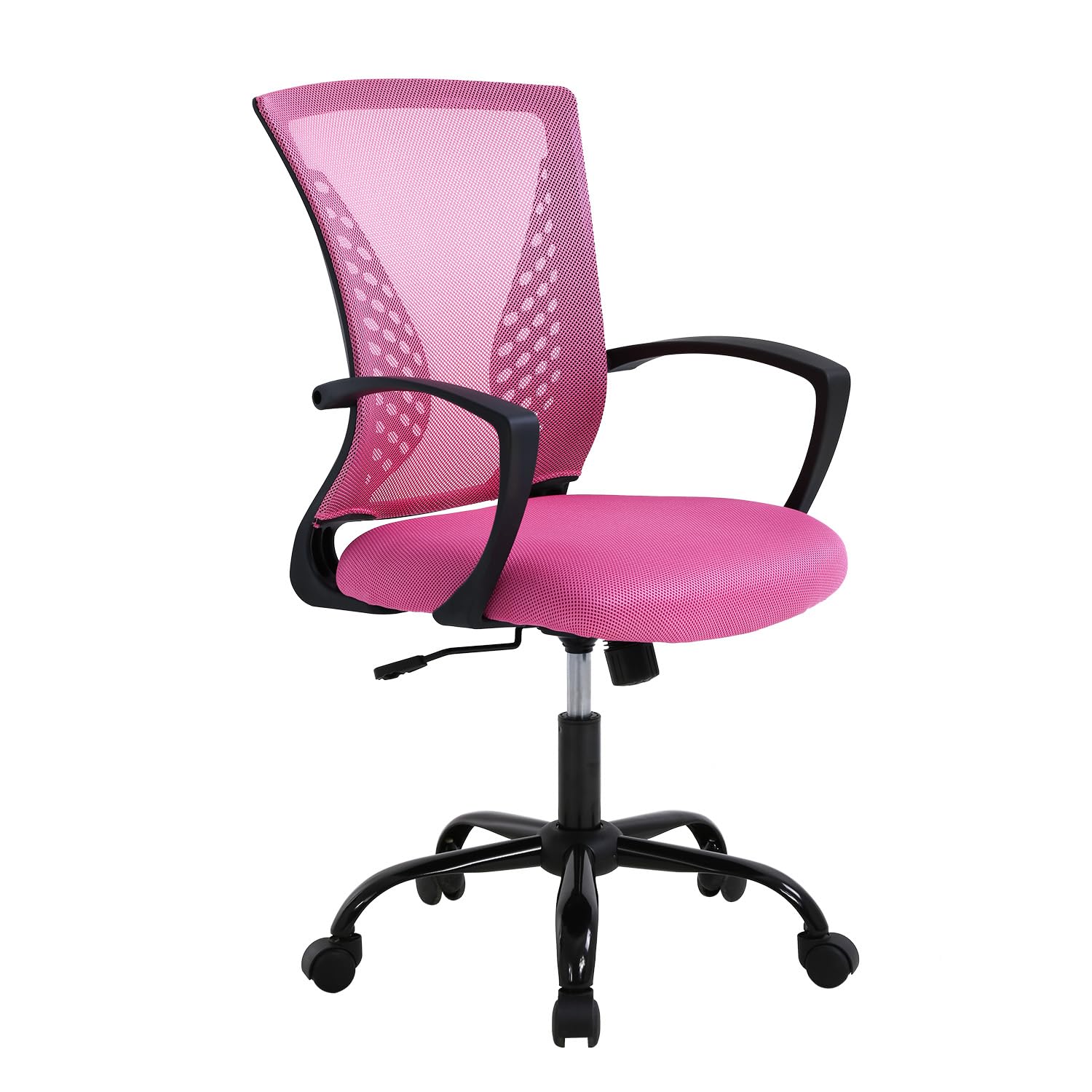
Image 1.1: The PayLessHere Ergonomic Mesh Office Chair in Pink.
2. Innihald pakka
Áður en samsetning hefst skal ganga úr skugga um að allir íhlutir séu til staðar og óskemmdir. Ef einhverjir hlutar vantar eða eru skemmdir skal hafa samband við þjónustuver.
- Stólabakstoð
- Sætispúði
- Armpúðar (2)
- Gas lyftihylki
- Base with Wheels (5-star base)
- Festingarbúnaður (skrúfur, þvottavélar, insexlykill)
Image 2.1: All components included in the package for assembly.
3. Uppsetning og samsetning
The PayLessHere Office Chair is designed for easy assembly. Follow these steps carefully to ensure correct setup.
- Festa hjól við botninn: Insert each of the five wheels into the openings at the end of the chair base. Push firmly until they click into place.
- Setjið inn gaslyftu: Setjið gaslyftistútinn í miðjugatið á samsetta stólgrunninum.
- Festa armpúða við sætið: Festið armleggina við neðri hluta sætispúðans með meðfylgjandi skrúfum og sexkantlykli. Gangið úr skugga um að þeir séu rétt snúnir.
- Festa bakstuðninginn við sætið: Align the backrest with the seat cushion and secure it using the remaining screws. Do not overtighten.
- Tengdu sætissamstæðuna við gaslyftuna: Setjið sætið og bakstuðninginn varlega á gaslyftistútinn og gætið þess að miðbúnaðurinn sé í takt við efri hluta gaslyftunnar. Ýtið fast niður til að festa.
Your chair is now assembled and ready for use. Verify all connections are secure before sitting.
4. Notkunarleiðbeiningar
Familiarize yourself with the chair's adjustable features to optimize your comfort and support.
4.1. Hæðarstilling
To adjust the chair's height, locate the lever on the right side, beneath the seat. While seated, pull the lever up to lower the chair. To raise the chair, stand up and pull the lever up. Release the lever at your desired height.

Image 4.1: The height adjustment lever and regulating interval (37.4-40.4 inches).
4.2. Rocking Mode and Tilt Control
The chair features a rocking mode for relaxation. To activate, pull the same lever (used for height adjustment) outwards. To lock the chair in an upright position, push the lever inwards. The tension of the rocking motion can be adjusted by turning the round knob located under the seat, towards the front. Turn clockwise to increase tension, counter-clockwise to decrease.

Image 4.2: Instructions for engaging rocking mode (115° tilt) and adjusting tension control.
4.3. 360-Degree Swivel and Mobility
The chair is equipped with 360-degree swivel wheels, allowing for easy movement and rotation within your workspace. The wheels are designed for smooth, quiet operation on hard floors.

Image 4.3: The chair's rotation wheels provide 360-degree movement and stable support.
4.4. Lumbar Support and Ergonomics
The chair features a biomimetic backrest design with integrated lumbar support to promote healthy posture and reduce back strain. The mesh material conforms to your back for optimal comfort.

Image 4.4: The biomimetic backrest design provides scientific radians to effectively support your waist.
5. Viðhald
Rétt viðhald lengir líftíma og útlit skrifstofustólsins.
- Þrif: Þurrkaðu af með auglýsinguamp cloth. Avoid harsh chemicals or abrasive cleaners, which can damage the mesh fabric or frame.
- Skoðun: Athugið reglulega allar skrúfur og tengingar til að tryggja að þær séu vel hertar. Herðið ef þörf krefur.
- Flutningur: When moving the chair, lift it rather than dragging it to prevent damage to the wheels or floor.
- Þyngdartakmörk: Ekki fara yfir ráðlagða hámarksþyngd sem er 250 pund.
6. Bilanagreining
If you encounter any issues with your PayLessHere Office Chair, refer to the following common problems and solutions:
- Stóllinn sekkur eða mun ekki standa uppi: This usually indicates an issue with the gas lift cylinder. Ensure the height adjustment lever is fully engaged. If the problem persists, the gas lift may need replacement.
- Stólavaggar: Check all assembly screws to ensure they are securely tightened. A loose connection can cause instability.
- Hjól rúlla ekki vel: Inspect the wheels for any debris (hair, lint) that might be obstructing their movement. Clean as necessary. Ensure the chair is used on an appropriate surface (hard floor recommended).
- Pískandi hljóð: Apply a small amount of silicone-based lubricant to moving parts, such as the gas lift or tilt mechanism, if squeaking occurs.
If these solutions do not resolve the issue, please contact PayLessHere customer support for further assistance.
7. Tæknilýsing
| Eiginleiki | Smáatriði |
|---|---|
| Vörumerki | Borgaðu minna hér |
| Nafn líkans | Skrifborðsstóll |
| Litur | Bleikur |
| Efni | Mesh (back), Fabric (seat), Metal (frame) |
| Vörumál (D x B x H) | 17" D x 19" B x 40" H |
| Þyngd hlutar | 21 pund |
| Ráðlegging um hámarksþyngd | 250 pund |
| Stillanlegir eiginleikar | Height, Tilt/Rocking Mode, Lumbar Support |
| Hreyfing | 360-Degree Swivel Wheels |
| Samsetning krafist | Já |
| Leiðbeiningar um umhirðu vöru | Þurrkaðu hreint |
| Mælt er með notkun | Office, Study, Bedroom, Meeting Room |
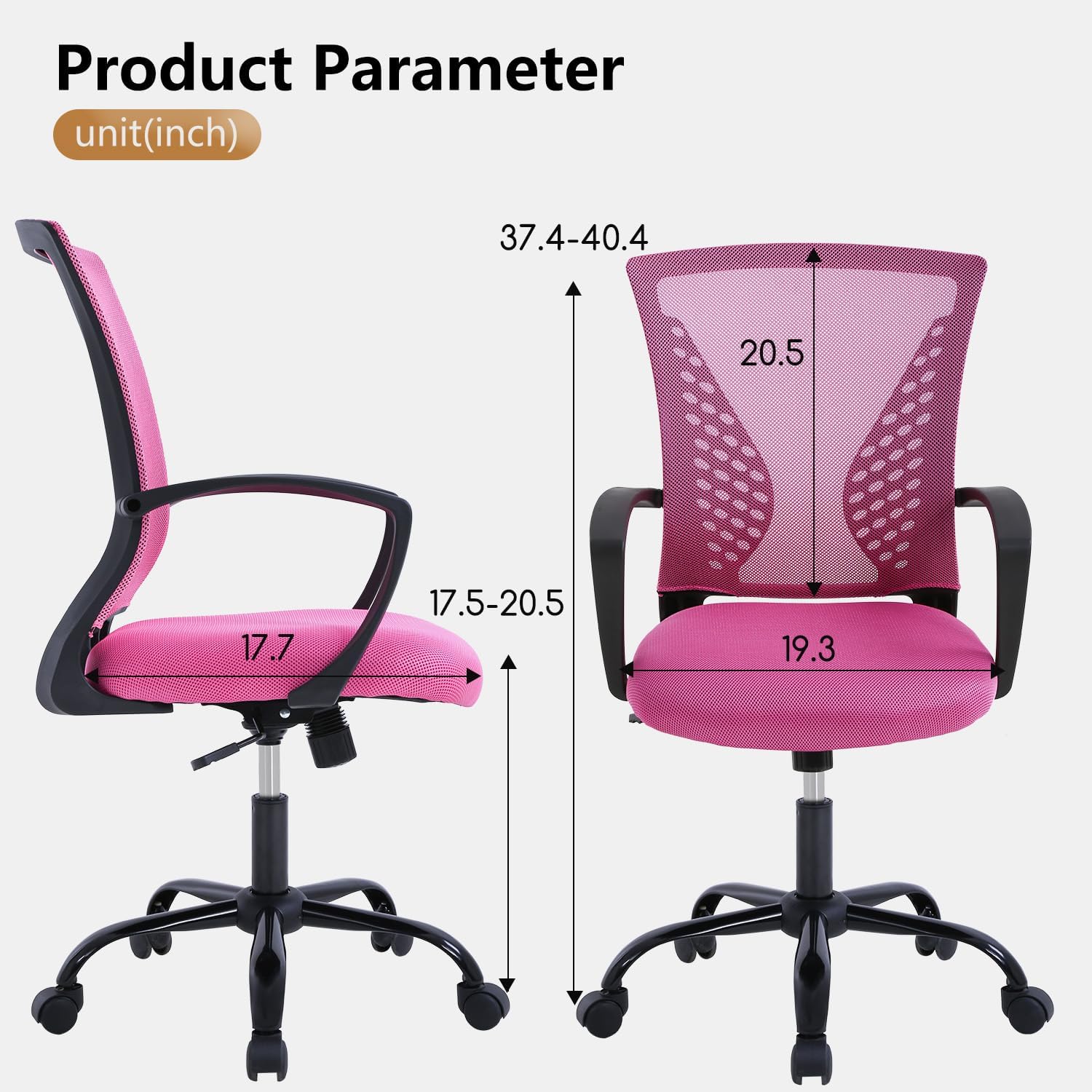
Image 7.1: Detailed product parameters and dimensions in inches.
8. Ábyrgð og stuðningur
For warranty information, product support, or to purchase replacement parts, please contact PayLessHere customer service. Refer to your purchase documentation for specific contact details or visit the official PayLessHere websíða.
Við leggjum áherslu á að veita hágæða vörur og framúrskarandi þjónustu við viðskiptavini. Ánægja þín er okkar forgangsverkefni.